
OpenClaw とは

OpenClaw はオープンソースのセルフホスト型 AI エージェントゲートウェイで、自分のマシン上に個人用 AI アシスタントをデプロイし、WhatsApp、Telegram、Discord、iMessage、Feishu/Lark、Slack、Signal など、あらゆるチャットプラットフォーム経由でやり取りできます。
クラウド専用の AI ツールとは異なり、OpenClaw はローカルで動作し、データをプライベートに保ち、AI アシスタントにファイル・ツール・ワークフローへの恒常的なアクセスを与えます。
主な機能:
- ローカルファースト —— データは自分のマシンに留まり、サーバー側に保存されない
- マルチプラットフォーム —— 1つのエージェント、多数のチャットアプリ、デバイス間をシームレスに切替
- マルチモデル —— 設定変更だけで Anthropic、OpenAI、Google Gemini、DeepSeek、Ollama、30以上のプロバイダを切替可能
- 拡張可能 —— ClawHub 経由で 5,400以上のコミュニティスキル、数分で自作も
- 常駐 —— バックグラウンドデーモンとして実行、Cron、Heartbeat、Task Flow、Webhooks で能動的に動作
- マルチエージェント —— 異なる人格、モデル、ツールセットを持つ複数の隔離されたエージェントを並行実行
OpenClaw の仕組み
OpenClaw はゲートウェイアーキテクチャを採用 —— 中央プロセスが統一メッセージバスを介してチャットプラットフォームを AI エージェントに接続します。
┌─────────────────────────────────────────────────────────┐
│                   Application Layer                      │
│   WebChat  ·  macOS App  ·  CLI  ·  Control UI (Admin)  │
├─────────────────────────────────────────────────────────┤
│                   Gateway Layer                          │
│   WebSocket Server  ·  Message Routing  ·  Sessions     │
├─────────────────────────────────────────────────────────┤
│                   Channel Layer                          │
│   WhatsApp · Telegram · Discord · Slack · Feishu · ...  │
├─────────────────────────────────────────────────────────┤
│                   Agent Layer                            │
│   System Prompt  ·  Tool Execution  ·  Memory Retrieval  │
├─────────────────────────────────────────────────────────┤
│                   Model Layer                            │
│   Claude · GPT · Gemini · DeepSeek · Ollama · ...       │
└─────────────────────────────────────────────────────────┘
メッセージフロー:
- ユーザーがいずれかのチャットプラットフォームでメッセージを送信
- チャネルアダプタがそれを OpenClaw の内部形式に変換
- ゲートウェイがバインディングルールに基づき正しいエージェントセッションにルーティング
- エージェントがコンテキスト(システムプロンプト + メモリ + ツール)を組み立て、LLM を呼び出す
- 応答はゲートウェイ経由で発信元チャネルに戻る
コア設計原則
| 原則 | 説明 |
|---|---|
| セルフホスト | 自分のマシンで実行 —— ノートPC、VPS、Docker、クラウド VM。データは自分のもの。 |
| プラットフォーム非依存 | 同一エージェントをあらゆるチャットアプリで。エージェントロジックに触れずにチャネルを追加・削除可能。 |
| モデルフレキシブル | ベンダーロックインなし。エージェント単位・タスク単位でモデル切替、自動フォールバックチェーンも設定可。 |
| スキル拡張可能 | スキルは Markdown ベースの指示ファイル。ClawHub からインストールするか自作。 |
| エージェント隔離 | 各エージェントは独自のワークスペース、セッション、メモリ、認証、スキルセットを持つ。 |
| 能動的 | 単なる受動応答でなく —— Cron、Heartbeat、Task Flow、Webhooks でエージェントが自律行動。 |
システムアーキテクチャの深掘り
OpenClaw は拡張性と隔離のために設計された5層アーキテクチャを採用:
ゲートウェイ(コア):
- 全クライアント接続を扱う WebSocket サーバー
- 受信メッセージをエージェントセッションにマッピングするメッセージルーティングエンジン
- エージェントごとの状態隔離を持つセッション管理
- 並行ツール呼び出しを管理するツール実行コーディネータ
チャネルアダプタ:
- 各プラットフォーム(WhatsApp、Telegram 等)に専用アダプタ
- アダプタはプラットフォーム固有の認証、メッセージフォーマット、メディアを処理
- ゲートウェイを変更せずにプラグインで新チャネルを追加可能
エージェントランタイム:
- ワークスペースファイル(SOUL.md、USER.md、IDENTITY.md)からのシステムプロンプト組み立て
- ツール登録と実行サンドボックス
- メモリ検索パイプライン(Active Memory、Memory Wiki)
- トークンバジェット付き会話コンテキスト管理
モデル抽象化:
- 35以上の LLM プロバイダにまたがる統一インターフェース
- 自動フォールバックチェーン(主 → 副 → ローカル)
- エージェントごとのモデル設定
- 低レイテンシストリーミングのための WebSocket トランスポート
ゲートウェイ内部
ゲートウェイは OpenClaw の心臓部です。全クライアント —— CLI、WebChat、チャットプラットフォーム —— は WebSocket 経由でここに接続します。
接続ライフサイクル:
Client                          Gateway
  │                                │
  ├── req:connect (identity) ────▶ │
  │                                ├── authenticate
  │ ◀── res (ok) + hello-ok ──────┤
  │                                │
  │ ◀── event:presence ───────────┤  (online status)
  │ ◀── event:tick ───────────────┤  (heartbeat)
  │                                │
  ├── req:agent (message) ───────▶ │
  │                                ├── route to agent session
  │                                ├── execute tools
  │                                ├── call LLM
  │ ◀── event:agent (stream) ─────┤  (partial response)
  │ ◀── res:agent (final) ────────┤  (complete response)
主要設定:
{
  "gateway": {
    "port": 18789,
    "host": "127.0.0.1",
    "auth": {
      "mode": "token",
      "token": "your-secret-token"
    }
  }
}
マルチエージェントアーキテクチャ
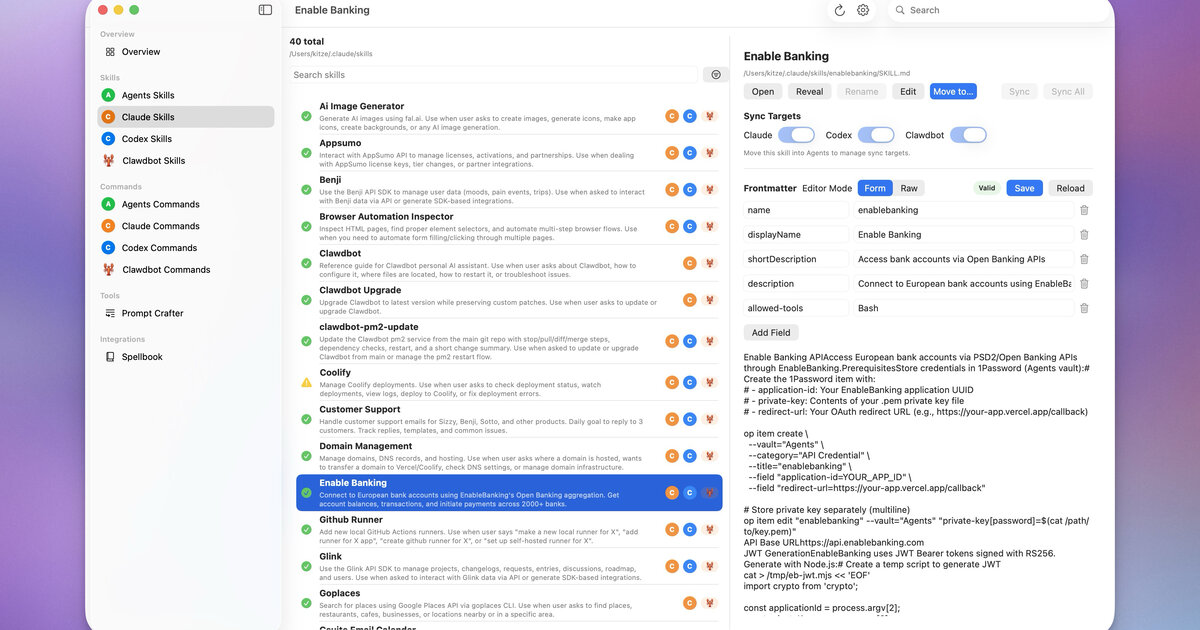 Control UI で並行実行される複数エージェント — openclaw/openclaw より
OpenClaw は複数エージェントの並行実行をサポート、各々は完全に隔離:
| 隔離の次元 | 説明 |
|---|---|
| ワークスペース | 各エージェントは SOUL.md、USER.md 等を含む独自ディレクトリを持つ |
| セッション | 独立した会話履歴 |
| 認証 | 個別の API キーとモデル設定 |
| メモリ | 独立したメモリストア |
| スキル | エージェントごとに異なるスキルセットをロード可能 |
トポロジ例:
Gateway
├── WhatsApp ──▶ "alex" agent (personal assistant)
├── Telegram ──▶ "work" agent (coding helper)
├── Discord  ──▶ "coding" agent (pair programmer)
└── Feishu   ──▶ "team" agent (team coordinator)
各エージェントのワークスペースは ~/.openclaw/agents/<agentId>/agent/ にあります。
OpenClaw vs ChatGPT vs Claude Code
| 機能 | ChatGPT | Claude Code | OpenClaw |
|---|---|---|---|
| 実行場所 | クラウド | ローカル端末 | ローカル(任意 OS) |
| データプライバシー | サーバー側保存 | ローカル | ローカル |
| チャットアプリ連携 | なし | なし | WhatsApp / Telegram / Discord / iMessage / Feishu / Slack |
| ローカルファイルアクセス | 不可 | 可 | 可 |
| カスタムスキル | GPTs(制限あり) | なし | ClawHub 経由 5,400以上 |
| 常駐 | ブラウザ必要 | 端末必要 | バックグラウンドデーモン |
| マルチエージェント | なし | なし | 複数の隔離ペルソナ |
| 能動的 | なし | なし | Cron / Heartbeat / Task Flow / Webhooks |
| 主な用途 | 一般チャット | コーディングアシスタント | 個人用 AI アシスタント |
OpenClaw を使うべきケース:
- スマホからいつでもアクセス可能な AI アシスタントが欲しい
- ローカルファイルへのアクセス、コマンド実行、タスク自動化が必要
- 完全なデータプライバシーとローカル実行が欲しい
- 単一エージェントから複数プラットフォームへのアクセスが必要
- コミュニティスキルで機能を拡張したい
エコシステムとコミュニティ
OpenClaw のエコシステムはコアゲートウェイをはるかに超えて拡張:
| コンポーネント | 説明 |
|---|---|
| ClawHub | 5,400以上のコミュニティスキルを持つ公開スキルレジストリ |
| Control UI | ゲートウェイ管理用 Web 管理ダッシュボード |
| OpenClaw Manager | マルチゲートウェイ管理用 React + Tailwind Web UI |
| ClawX | 自律エージェントタスク用デスクトップアプリ |
| ClawPanel | Tauri v2 管理パネル |
| Composio | 1,000以上の外部サービスのマネージド OAuth 連携 |
| MyClaw | ワンクリックのクラウドホスト型 OpenClaw インスタンス |
コミュニティリソース:
- GitHub: github.com/openclaw/openclaw
- Discord: discord.com/invite/clawd
- ClawHub: clawhub.com
- スキルカタログ: github.com/VoltAgent/awesome-openclaw-skills(50k以上のスター)
インストール方法
環境に合ったインストール方法を選択:
| 方法 | 難易度 | コスト | 適している人 |
|---|---|---|---|
| npm(公式) | 中 | 無料 | 完全な制御を求める開発者 |
| curl インストーラ | 易 | 無料 | macOS / Linux ユーザー |
| Docker | 中 | 無料 | サーバーデプロイ |
| EasyClaw | 易 | 無料 | 初心者、ゼロ設定 |
| クラウド VPS | 易 | 有料 | 24/7 稼働、リモートアクセス |
| マネージド(MyClaw) | 最も易 | 有料 | サーバー管理不要 |
npm インストール(推奨)
# Requires Node.js 22+
node -v  # verify

# Install globally
npm install -g openclaw@latest

# Run onboarding wizard
openclaw onboard
curl インストーラ
# macOS / Linux
curl -fsSL https://openclaw.ai/install.sh | bash

# Windows (PowerShell)
iwr -useb https://openclaw.ai/install.ps1 | iex
Docker
# Clone the docker-compose template
git clone https://github.com/openclaw/openclaw.git
cd openclaw/docker

# Configure environment
cp .env.example .env
# Edit .env with your API keys

# Start
docker compose up -d
クラウドデプロイオプション
| プロバイダ | 起点価格 | 備考 |
|---|---|---|
| Tencent Cloud Lighthouse | ~$3/月 | プレビルド済 OpenClaw イメージ |
| Alibaba Cloud Wuying | 従量課金 | OpenClaw 付きクラウドデスクトップ |
| Volcengine | ~$1.5/月 | コスト重視 VPS |
| Cloudflare Workers | $5/月 | グローバル CDN、R2 設定が必要 |
| MyClaw | マネージド | ワンクリック、24/7 稼働 |
システム要件
| 要件 | 最小 | 推奨 |
|---|---|---|
| Node.js | 22.x | 24.x |
| メモリ | 512 MB | 2 GB以上 |
| ディスク | 200 MB | 1 GB以上(スキル、メモリ用) |
| OS | macOS 12+、Ubuntu 20.04+、Windows 10+(WSL2) | macOS、Linux |
| ネットワーク | インターネット(API 呼出用) | 安定したブロードバンド |
プラットフォームメモ:
- macOS —— 最良の体験。ネイティブの launchd デーモンサポート。
- Linux —— 完全サポート。systemd サービスが利用可能。
- Windows —— ネイティブ PowerShell より WSL2 を強く推奨。
- ARM(Raspberry Pi) —— 動作するが低速、軽量セットアップに適する。
オンボーディングウィザード
openclaw onboard コマンドが約5分で初期セットアップを案内:
openclaw onboardウィザードは10ステップをカバー:
- リスク免責事項の同意
- セットアップモードの選択(クイックスタート / アドバンス)
- AI モデルプロバイダの選択(Anthropic / OpenAI / Google / DeepSeek / Ollama / …)
- API キー入力
- チャットプラットフォームの選択(Telegram / Feishu / Discord / WhatsApp / …)
- ゲートウェイポートの設定(デフォルト:18789)
- 初期スキルの選択
- 追加 API キーの設定(Web 検索等)
- hooks の有効化(任意)
- 完了 —— ゲートウェイが自動起動
手動設定(ウィザードをスキップ):
# Configure model provider
openclaw models auth login --provider anthropic

# Add a chat channel
openclaw channels add

# Start gateway
openclaw gateway start
モデルプロバイダ設定
OpenClaw は35以上のモデルプロバイダを標準サポート:
| プロバイダ | モデル | 備考 |
|---|---|---|
| Anthropic | Claude 4.5 Sonnet、Claude 4 Haiku、… | コーディングに推奨 |
| OpenAI | GPT-5.4、GPT-5.4-pro、o3、… | API キーまたは ChatGPT OAuth 経由 |
| Gemini 2.5 Pro、Gemini 2.5 Flash、… | 無料枠あり | |
| DeepSeek | DeepSeek-V3、DeepSeek-R1、… | 最もコストパフォーマンスに優れる |
| Ollama | ローカルモデル(Llama、Mistral、Qwen、…) | 完全オフライン |
| MiniMax | MiniMax-Text-01、… | 中国市場 |
| Zhipu GLM | GLM-4、… | 中国市場 |
| Qwen | Qwen-Max、Qwen-Plus、… | Alibaba Cloud |
設定例:
{
  "models": {
    "mode": "merge",
    "providers": {
      "anthropic": {
        "apiKey": "sk-ant-..."
      },
      "openai": {
        "apiKey": "sk-..."
      },
      "ollama": {
        "baseUrl": "http://localhost:11434"
      }
    },
    "defaults": {
      "main": "anthropic/claude-4-5-sonnet",
      "fast": "anthropic/claude-4-haiku"
    },
    "fallback": [
      "openai/gpt-5.4",
      "google/gemini-2.5-pro"
    ]
  }
}
主要概念:
mode: "merge"—— 組み込みプロバイダを保持しつつカスタムを追加defaults.main—— 複雑なタスクのメインモデルdefaults.fast—— 素早い応答用の軽量モデル(/fastで切替)fallback—— 自動フェイルオーバーチェーン
ゲートウェイの起動と管理
# Start (foreground)
openclaw gateway start

# Start as background daemon
openclaw gateway start --daemon

# Stop
openclaw gateway stop

# Restart (after config changes)
openclaw gateway restart

# Check status
openclaw status

# View logs
openclaw gateway logs
デーモン設定:
| OS | 仕組み | 自動起動 |
|---|---|---|
| macOS | launchd | openclaw onboard --install-daemon |
| Linux | systemd | openclaw service install |
| Docker | Docker の再起動ポリシー | restart: unless-stopped |
ホットリロード: openclaw.json のほとんどの設定変更は openclaw gateway restart 後に反映。ワークスペースファイル(SOUL.md、USER.md 等)は再起動なしで即座に反映されます。
コントロール UI とダッシュボード
OpenClaw には http://127.0.0.1:18789/ でアクセスできる組み込みの Web インターフェースがあります:
| 機能 | 説明 |
|---|---|
| ダッシュボード | エージェント状態、アクティブセッション、システム健全性の概要 |
| WebChat | ブラウザから直接エージェントとチャット |
| 設定 | ゲートウェイ設定の表示と編集 |
| エージェントビュー | エージェントのワークスペース、スキル、メモリを検査 |
| セッションビュー | 会話セッションの閲覧と管理 |
| コマンドパレット | キーボードショートカットでクイック操作 |
| メッセージエクスポート | 会話履歴のエクスポート |
モバイルサポート: コントロール UI はレスポンシブ —— モバイルではボトムタブナビ、デスクトップではサイドバー。
WebChat のスラッシュコマンド:
/status—— ゲートウェイとエージェントの状態/models—— 利用可能なモデル一覧/skills—— インストール済みスキル一覧/sessions—— アクティブなセッション一覧/fast—— 高速モデルモードの切替
最初のメッセージを送る
 iOS クライアントと OpenClaw エージェントの会話 — openclaw/openclaw より
ゲートウェイ起動後、いくつかの方法でやり取りできます:
方法1:WebChat(最速)
Open http://127.0.0.1:18789/chat in your browser
Type: "Hello! What can you do?"
方法2:CLI
openclaw chat
# Type your message, get a response
方法3:チャットプラットフォーム
Send a DM to your bot on Telegram / Feishu / Discord / etc.これらのコマンドを試してみよう:
"What's the weather in San Francisco?"
"List the files in my home directory"
"Create a reminder: buy groceries tomorrow at 5pm"
"Search the web for the latest OpenClaw release notes"
"Summarize my recent emails"
セキュリティと認証
ゲートウェイ認証は必須 —— 認証モードを明示的に設定する必要があります:
# Token-based (recommended)
openclaw config set gateway.auth.mode token
openclaw config set gateway.auth.token "$(openssl rand -hex 24)"

# Or password-based
openclaw config set gateway.auth.mode password
openclaw config set gateway.auth.password "your-strong-password"

openclaw gateway restart
チャネルレベルのセキュリティ:
{
  "channels": {
    "telegram": {
      "dmPolicy": "pairing",
      "allowFrom": ["your_telegram_user_id"]
    },
    "feishu": {
      "dmPolicy": "pairing"
    }
  }
}| ポリシー | 説明 |
|---|---|
pairing | ユーザーはワンタイムペアリングコードの入力が必要(デフォルト、推奨) |
open | 誰でもボットにメッセージ可能(注意して使用) |
allowlist | 明示的にリストされたユーザー ID のみ |
グループチャットのセキュリティ:
{
  "channels": {
    "telegram": {
      "groupPolicy": "allowlist",
      "groups": {
        "allowed-group-id": {
          "requireMention": true
        }
      }
    }
  }
}
チャネルの概要
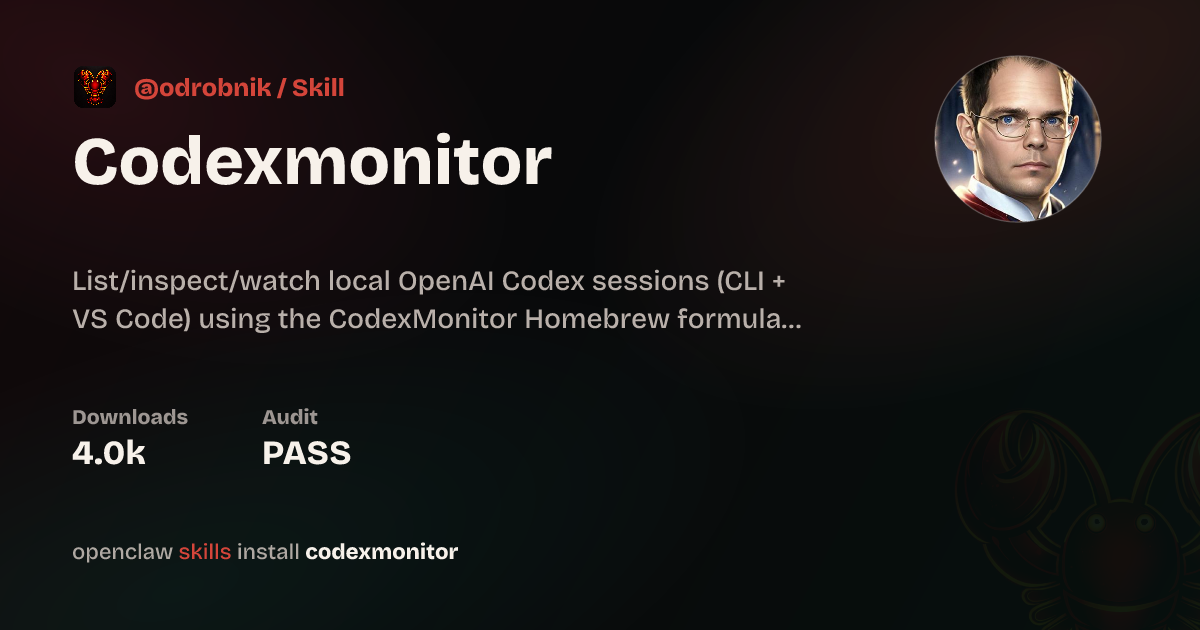 1 つのゲートウェイ、多数のチャットプラットフォーム — openclaw/openclaw より
OpenClaw は統一チャネルシステムで8以上のチャットプラットフォームをサポート。各チャネルアダプタはプラットフォーム固有の認証、メッセージフォーマット、メディア処理を行います。
| チャネル | セットアップ難易度 | 機能 |
|---|---|---|
| Telegram | 易 | Bot API、インラインモード、グループ、メディア |
| Discord | 中 | サーバー、チャンネル、スレッド、スラッシュコマンド |
| Feishu/Lark | 中 | インタラクティブカード、WebSocket、グループ、エンタープライズ |
| 難 | QR ペアリング、メディア、グループサポート | |
| Slack | 中 | Block Kit、webhooks、ワークスペースアプリ |
| iMessage | 中 | macOS のみ、BlueBubbles 経由 |
| Signal | 難 | プライバシー重視、signal-cli が必要 |
| WebChat | 最も易 | 組み込み、ゼロ設定 |
共通設定パターン:
{
  "channels": {
    "<channel-name>": {
      "enabled": true,
      "...credentials...": "...",
      "dmPolicy": "pairing",
      "groupPolicy": "disabled"
    }
  }
}
Telegram 設定
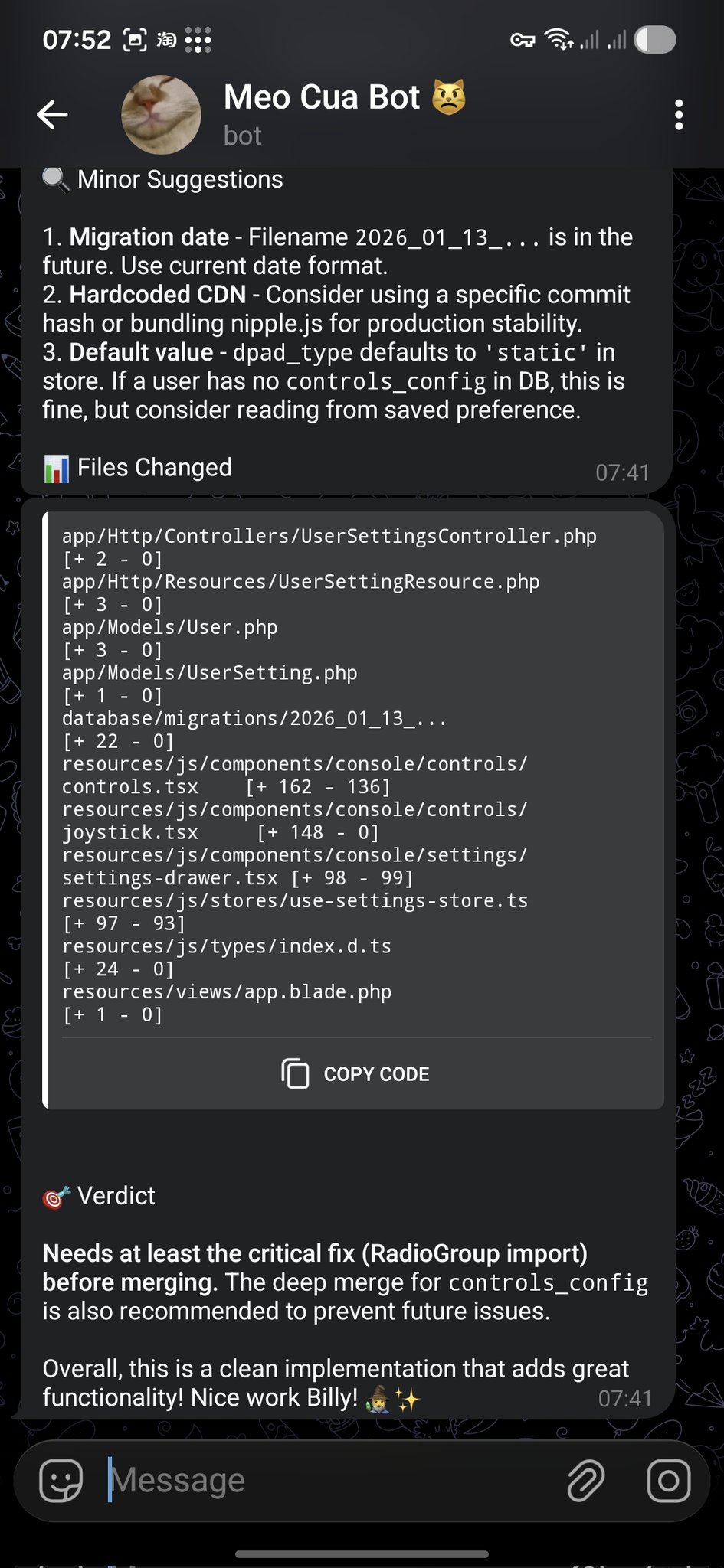 コードレビュー通知が Telegram に配信 — openclaw/openclaw より
Telegram は最も設定しやすいチャネルです —— 必要なのは bot token だけ。
ステップ1:ボットを作成
1. Open Telegram, search for @BotFather
2. Send /newbot
3. Choose a name and username
4. Copy the bot token
ステップ2:OpenClaw を設定
openclaw channels add
# Select "Telegram"
# Paste the bot token
または openclaw.json を直接編集:
{
  "channels": {
    "telegram": {
      "token": "123456:ABC-DEF1234ghIkl-zyx57W2v1u123ew11",
      "dmPolicy": "pairing"
    }
  }
}
ステップ3:再起動してテスト
openclaw gateway restart
# Send a message to your bot in Telegram
詳細オプション:
{
  "channels": {
    "telegram": {
      "token": "...",
      "allowFrom": ["123456789"],
      "groups": {
        "*": { "requireMention": true }
      },
      "streaming": true,
      "replyToMode": "quote"
    }
  }
}
Discord 設定
ステップ1:Discord アプリを作成
1. Go to discord.com/developers/applications
2. Click "New Application"
3. Go to "Bot" tab → "Add Bot"
4. Copy the bot token
5. Enable "Message Content Intent" under Privileged Gateway Intents
6. Generate an OAuth2 URL with "bot" scope and appropriate permissions
7. Use the URL to invite the bot to your server
ステップ2:OpenClaw を設定
{
  "channels": {
    "discord": {
      "token": "your-discord-bot-token",
      "dmPolicy": "pairing"
    }
  }
}
ステップ3:再起動
openclaw gateway restartFeishu / Lark 設定
Feishu(飛書)は中国市場で最も人気のあるチャネルです。インタラクティブメッセージカード、WebSocket ベースのイベント購読、エンタープライズグレードのセキュリティをサポート。
ステップ1:Feishu アプリを作成
1. Go to open.feishu.cn
2. Create an enterprise self-built app
3. Enable "Bot" capability
4. Copy App ID and App Secret
5. Configure permissions (batch import recommended)
6. Enable event subscription: WebSocket mode, event: im.message.receive_v1
7. Publish the app
必要な権限:
im:message—— メッセージの読み取りim:message:send_as_bot—— ボットとしてメッセージ送信contact:contact.base:readonly—— 連絡先情報の読み取り
ステップ2:Feishu プラグインをインストール
openclaw plugins install @openclaw/feishuステップ3:設定
{
  "channels": {
    "feishu": {
      "appId": "cli_xxxxx",
      "appSecret": "xxxxx",
      "dmPolicy": "pairing"
    }
  }
}
詳細:ストリーミング出力
{
  "channels": {
    "feishu": {
      "appId": "...",
      "appSecret": "...",
      "streaming": true,
      "replyToMode": "quote"
    }
  }
}
詳細:インタラクティブカード
Feishu はボタン、フォーム、コールバックハンドラを持つリッチなインタラクティブメッセージカードをサポート。カード実装例はレシピタブを参照。
WhatsApp、Signal、iMessage
WhatsApp はQR コードペアリングが必要(WhatsApp Web と同様):
openclaw channels add
# Select "WhatsApp"
# Scan the QR code with your phone
{
"channels": {
"whatsapp": {
"dmPolicy": "pairing"
}
}
}注意:WhatsApp は非公式の WhatsApp Web プロトコルを使用します。アカウント問題を避けるため専用の番号を使用してください。
Signal
Signal 連携は signal-cli をデーモンとして実行する必要があります:
# Install signal-cli
# Register or link as a secondary device
# Configure OpenClaw to connect
iMessage(macOS のみ)
iMessage は Mac で BlueBubbles サーバーを実行する必要があります:
{
  "channels": {
    "imessage": {
      "blueBubblesUrl": "http://localhost:1234",
      "password": "your-bluebubbles-password"
    }
  }
}
マルチチャネルルーティング
複数のチャネルを動かす場合、異なるチャネルを異なるエージェントにルーティングできます:
{
  "bindings": [
    { "channel": "whatsapp", "agentId": "personal" },
    { "channel": "telegram", "agentId": "work" },
    { "channel": "discord",  "agentId": "coding" },
    { "channel": "feishu",   "agentId": "team" }
  ]
}
バインディングルールは順序通りに評価 —— 最初のマッチが勝ちます。チャットタイプ、グループ ID、ユーザー ID でフィルタも可能:
{
  "bindings": [
    {
      "channel": "telegram",
      "agentId": "vip-support",
      "match": { "userId": "vip-user-123" }
    },
    {
      "channel": "telegram",
      "agentId": "general"
    }
  ]
}
ワークスペースの概要
各エージェントはワークスペースディレクトリを持ち、人格、振る舞い、知識を定義する設定ファイルを含みます:
~/.openclaw/workspace/
├── SOUL.md        # Core principles and behavioral guidelines
├── IDENTITY.md    # Name, persona, vibe
├── USER.md        # Information about the human
├── AGENTS.md      # Working specifications and rules
├── MEMORY.md      # Long-term curated memory
├── HEARTBEAT.md   # Periodic check task list
├── TOOLS.md       # Local tool configuration notes
├── BOOTSTRAP.md   # First-run initialization instructions
└── skills/        # Agent-specific local skills
重要概念: これらのファイルがエージェントの「オペレーティングシステム」です。エージェントはセッション開始時にそれらを読み、指示に従います。変更は即座に反映 —— ゲートウェイの再起動は不要です。
SOUL.md — コア原則
SOUL.md はエージェントの憲法です —— 人格、トーン、行動の境界を定義:
# SOUL.md

Be genuinely helpful, not performatively helpful.
Skip the "Great question!" — just help.

Have opinions. An assistant with no personality is just a search engine.

Be resourceful before asking. Try to figure it out first.

Remember you're a guest. Treat access to someone's data with respect.

### Communication Style
- Concise by default, detailed when asked
- Use technical language with developers, plain language with others
- Admit mistakes quickly and fix them

### Safety Rules
- Never expose private data to external services
- Ask before executing destructive commands
- When uncertain, explain the trade-offs and let the human decide
IDENTITY.md — ロール定義
エージェントに名前とペルソナを与えます:
# IDENTITY.md

- **Name**: Jarvis
- **Creature**: AI assistant with a dry sense of humor
- **Vibe**: Reliable, warm, occasionally witty
- **Emoji**: 🤖
- **Language**: Default to English, switch to user's language when they speak
USER.md — ユーザーコンテキスト
エージェントにあなた自身のことを伝えます:
# USER.md

- **Name**: John Doe
- **What to call them**: John
- **Timezone**: America/New_York
- **Occupation**: Software engineer
- **Preferences**:
  - Likes concise answers
  - Prefers TypeScript over JavaScript
  - Uses Vim keybindings
  - Don't disturb after 11pm unless urgent
- **Current projects**:
  - Building a SaaS dashboard (React + Node)
  - Learning Rust on weekends
AGENTS.md — ワーキング仕様
運用ルールとセッションの振る舞いを定義:
# AGENTS.md

### Every Session
1. Read SOUL.md — remember who you are
2. Read USER.md — remember who you're helping
3. Read memory/YYYY-MM-DD.md — recent context

### Safety Rules
- Never leak private data
- Never execute destructive commands without confirmation
- When uncertain, ask before acting

### Group Chat Rules
- Don't reply to every message — quality over quantity
- Only respond when mentioned or when you can add value
- Keep responses shorter in group chats

### Tool Usage
- Prefer built-in tools over skills when possible
- Always verify file paths before writing
- Back up before destructive operations
Active Memory
Active Memory は各応答の前に実行されるブロッキング型メモリサブエージェントです。関連する設定、コンテキスト、履歴の詳細を検索してエージェントの返答を豊かにします。
仕組み:
- ユーザーがメッセージを送信
- Active Memory サブエージェントがメモリストア上でセマンティック検索を実行
- 検索されたメモリがエージェントのコンテキストに注入
- メインエージェントが拡張されたコンテキストで応答
設定:
{
  "plugins": {
    "entries": {
      "active-memory": {
        "enabled": true,
        "agents": ["main"],
        "allowedChatTypes": ["direct"],
        "queryMode": "recent",
        "promptStyle": "balanced",
        "timeoutMs": 15000
      }
    }
  }
}| オプション | 値 | 説明 |
|---|---|---|
queryMode | recent、semantic、hybrid | メモリの検索方法 |
promptStyle | minimal、balanced、verbose | 注入するメモリコンテキストの量 |
timeoutMs | 数値 | メモリ検索の最長時間 |
Dreaming と Memory Wiki
Dreaming は OpenClaw の長期記憶統合プロセスです。人間の睡眠のように、最近の経験を処理し構造化された知識へと蒸留します。
Memory Wiki は永続的なメモリを claim / evidence(主張 / 証拠)構造で検索可能なナレッジボルトにコンパイルします:
Claim: "User prefers TypeScript over JavaScript"
Evidence:
  - 2026-01-15: User corrected agent to use .ts extension
  - 2026-02-03: User asked to migrate project to TypeScript
  - 2026-03-10: USER.md updated with TypeScript preference
Wiki コマンド:
# Initialize the wiki vault
openclaw wiki init

# Ingest memories into the wiki
openclaw wiki ingest

# Compile and resolve contradictions
openclaw wiki compile

# Search the wiki
openclaw wiki search "TypeScript preferences"

# Get a specific claim
openclaw wiki get "user-language-preference"
設定:
{
  "plugins": {
    "entries": {
      "memory-wiki": {
        "enabled": true,
        "vaultMode": "isolated",
        "renderMode": "obsidian",
        "search": {
          "backend": "shared"
        }
      }
    }
  }
}
5層メモリシステム
OpenClaw のメモリは5層に編成、高速 / 揮発性から低速 / 永続まで:
| 層 | 名前 | ストレージ | 寿命 | 用途 |
|---|---|---|---|---|
| L0 | セッションコンテキスト | メモリ | 単一セッション | 現在の会話 |
| L1 | デイリーメモリ | memory/YYYY-MM-DD.md | 数日〜数週間 | 今日の出来事 |
| L2 | 長期メモリ | MEMORY.md | 永続 | キュレーションされた重要事実 |
| L3 | Memory Wiki | Wiki ボルト | 永続 | 構造化された主張 + 証拠 |
| L4 | 外部知識 | ファイル、DB、Web | 各种 | プロジェクト文書、Web 検索 |
データフロー:
Conversation → L0 (session)
    ↓ (end of session)
Daily notes → L1 (memory/YYYY-MM-DD.md)
    ↓ (periodic consolidation)
Curated facts → L2 (MEMORY.md)
    ↓ (wiki compile)
Structured claims → L3 (Memory Wiki)
    ↓ (on demand)
External lookup → L4 (files, web, databases)
メンテナンス:
- 毎日: エージェントが自動的に L1 に書き込み
- 毎週: L1 を見直し → 重要項目を L2 に昇格
- 毎月:
openclaw wiki compileで L2 → L3 を統合
マルチエージェント連携
複雑なワークフローでは、複数エージェントが連携できます:
トポロジパターン:
| パターン | 説明 | 用途 |
|---|---|---|
| スター型 | 1つのコーディネータが N のワーカーに委譲 | 汎用 |
| スペシャリスト型 | 各エージェントがドメインを所有 | 明確なドメイン境界 |
| リフレクター型 | 1人が作成、もう1人がレビュー | 品質重要な出力 |
セッション経由の委譲:
# Agent A delegates to Agent B
sessions_send --agent coding --message "Review this PR"

# Agent A spawns a child agent
sessions_spawn --agent researcher --message "Find the latest benchmarks"
設計原則:
- 各エージェントは明確で重複しない責任を持つべき
- 共有ワークスペースファイル(AGENTS.md)でクロスエージェントの慣例を定義
- 委譲は明示的に —— 作業が渡される際ユーザーが把握できるように
- 1エージェントから開始、本当の複雑さに直面した時のみ分割
スキルの概要
スキルはエージェントに特定のタスクのやり方を教える再利用可能な指示ファイルです。AgentSkills 標準に従い、ClawHub からインストールするか手書きできます。
スキル vs ツール vs プラグイン:
| 概念 | それは何 | 例 |
|---|---|---|
| スキル(Skill) | 方法論 / SOP | ”週次レポートの生成方法” |
| ツール(Tool) | 特定のアクション | exec、read_file、web_search |
| プラグイン(Plugin) | 機能カテゴリを追加 | Feishu プラグイン、WhatsApp プラグイン |
| MCP | 外部システムに接続 | GitHub MCP、Slack MCP |
スキル読み込み優先順位:
- ワークスペーススキル(
workspace/skills/) - グローバルスキル(
~/.openclaw/skills/) - バンドルスキル(OpenClaw 同梱)
ClawHub エコシステム
ClawHub は OpenClaw の公開スキルレジストリで、5,400以上のコミュニティスキルをホスト。
スキルの閲覧:
# Search for skills
openclaw skills search "web scraping"

# Get info about a specific skill
openclaw skills info deep-research

# List installed skills
openclaw skills list --eligible
品質フィルタ: コミュニティ主導の awesome-openclaw-skills リスト(50k以上のスター)は厳格なフィルタを適用:
| 除外対象 | 数 |
|---|---|
| スパム / ボットアカウント | 4,065 |
| 重複 | 1,040 |
| 低品質 | 851 |
| 暗号 / 金融 | 886 |
| 悪意あり(セキュリティ監査) | 373 |
| 除外合計 | 7,215 |
スキルのインストールと管理
# Install from ClawHub
openclaw skills install deep-research

# Or via ClawHub CLI (for non-workspace contexts)
npx clawhub install deep-research

# List installed skills
openclaw skills list

# Check a skill for issues
openclaw skills check deep-research

# Update all skills
openclaw skills update --all

# Disable a skill
# In openclaw.json:
# "skills": { "entries": { "deep-research": { "enabled": false } } }
手動インストール:
スキルフォルダを以下のいずれかにコピー:
| スコープ | パス |
|---|---|
| グローバル | ~/.openclaw/skills/ |
| ワークスペース | <workspace>/skills/ |
代替: スキルの GitHub URL をチャットに貼り付け、エージェントにインストールを依頼。
スキルファイル構造
最小スキルは単一の SKILL.md ファイルです:
skills/my-skill/
├── SKILL.md          # Required: instructions + frontmatter
├── skill.json        # Optional: metadata
├── scripts/          # Optional: helper scripts
│   └── run.py
└── requirements.txt  # Optional: dependencies
SKILL.md 形式:
---
name: daily-report
description: Generate a daily work report from git history and task lists
---

# Daily Report Generator

When the user asks for a daily report:

1. Run `git log --since="midnight" --oneline` to get today's commits
2. Check the task list for completed items
3. Format as a structured report:
   - **Completed**: items finished today
   - **In Progress**: items started but not finished
   - **Blocked**: items with unresolved dependencies
   - **Tomorrow**: planned items for next working day
4. Send the report to the configured channel
環境要件:
---
name: my-skill
description: My custom skill
metadata:
  openclaw:
    requires:
      bins: ["uv"]
      env: ["API_KEY"]
---
人気のスキルカテゴリ
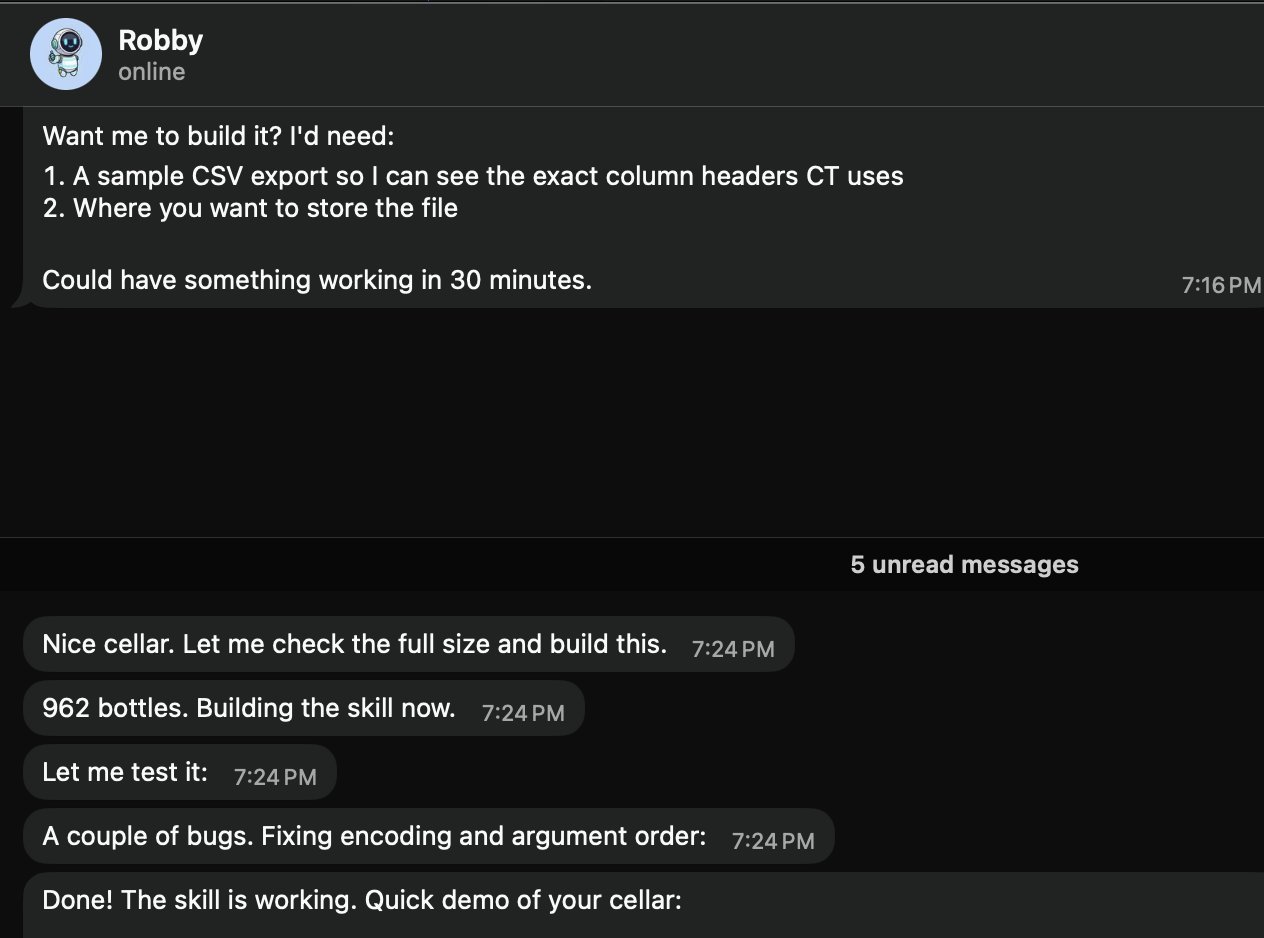 ワインセラー在庫を追跡するコミュニティスキル — openclaw/openclaw より
AI とコーディング
| スキル | 説明 |
|---|---|
coding-agent | コーディングタスクを Codex、Claude Code、Pi エージェントに委譲 |
github | GitHub 操作:PR、Issue、CI、コード検索 |
gemini | Gemini CLI でコーディング支援 |
claude-code | Claude Code 強化のための MCP 連携 |
ブラウザ自動化
| スキル | 説明 |
|---|---|
browser-vision | ヘッドレス Chrome のスクショ、Web 自動化、ビジュアルデバッグ |
web-scraper | アンチスクレイピングサイトへのアクセス:WeChat/Twitter/Reddit |
agent-browser | AI エージェント向けに最適化されたヘッドレスブラウザ自動化 |
検索とリサーチ
| スキル | 説明 |
|---|---|
deep-research | マルチエンジン検索 + Web 抽出 + 構造化分析 |
web-search | Brave Search + DuckDuckGo マルチエンジン検索 |
academic-research | OpenAlex API で学術論文を検索 |
生産性
| スキル | 説明 |
|---|---|
notion | Notion 連携 |
obsidian | Obsidian ノート |
apple-notes | Apple Notes 連携 |
apple-reminders | Apple Reminders 連携 |
画像と動画
| スキル | 説明 |
|---|---|
image-gen | テキストから画像、画像から画像生成 |
video-gen | Sora / Kling / Seedance / Veo 3 で動画生成 |
openai-image-gen | DALL-E 画像生成 |
スマートホーム
| スキル | 説明 |
|---|---|
sonoscli | Sonos スピーカー制御 |
openhue | Philips Hue 照明制御 |
spotify-player | Spotify 再生制御 |
カスタムスキル開発
ステップ1:スキルディレクトリを作成
mkdir -p ~/.openclaw/skills/my-skillステップ2:SKILL.md を書く
---
name: weather-checker
description: Check weather for any city and format a brief forecast
---

# Weather Checker

When asked about weather:

1. Use the `web_search` tool to search for "weather [city] forecast"
2. Extract: temperature, conditions, humidity, wind
3. Format as a brief, readable forecast
4. Include a recommendation (umbrella? sunscreen? jacket?)
ステップ3:テスト
Ask your agent: "What's the weather in Tokyo?"ステップ4:ClawHub に公開(任意)
# Follow the ClawHub publishing guide
# Skills must pass security review before listing
セキュリティとスキル監査
サードパーティのスキルは信頼できないコードとして扱う。 インストール前に:
- ソースを読む ——
openclaw skills info <skill>がスキルのファイルを表示 - 権限を確認 —— 機密ツールや環境変数へのアクセスを要求していないか?
- セキュリティスキャンを実行 —— ClawHub 上の VirusTotal レポートを確認
- 隔離環境でテスト —— まずサンドボックスワークスペースで試す
推奨セキュリティツール:
| ツール | 説明 |
|---|---|
| VirusTotal | ClawHub に組み込み —— 各スキルのスキャンレポートを確認 |
| Snyk Agent Scanner | オープンソースのスキルセキュリティスキャナー |
| Agent Trust Hub | コミュニティ主導の信頼データベース |
要注意サイン:
- 明確な理由なく
execアクセスを要求するスキル - 未知のエンドポイントに通信するスキル
- 難読化されたコードやエンコードされた文字列を含むスキル
- 説明以上の環境変数を要求するスキル
自動化の概要
OpenClaw はエージェントが能動的に行動できる4つの自動化の柱を提供:
| 仕組み | メタファー | 精度 | 用途 |
|---|---|---|---|
| Cron | 目覚まし時計 | 正確なスケジュール | ”毎日午前9時” |
| Heartbeat | 定期チェックイン | おおよその間隔 | ”30分ごとに新規メールを確認” |
| Task Flow | 流水ライン | イベント駆動 | ”PR がマージされたら → デプロイ → 通知” |
| Webhooks | 呼び鈴 | 即時、外部トリガ | ”GitHub イベント → 分析 → 通知” |
選定ガイド:
- 正確なタイミングが必要? → Cron
- 複数のチェックをバッチ化可能? → Heartbeat
- 状態を持つ多段階ワークフロー? → Task Flow
- 外部システムがアクションをトリガ? → Webhook
Cron スケジュールタスク
Cron タスクはスケジュールで実行 —— 最も単純な自動化。
3つのスケジュールタイプ:
{
  "cron": {
    "jobs": [
      {
        "name": "one-time-reminder",
        "schedule": { "kind": "at", "at": "2026-06-20T10:00:00+08:00" },
        "payload": { "kind": "agentTurn", "message": "Reminder: team meeting in 30 min" },
        "sessionTarget": "isolated"
      },
      {
        "name": "hourly-check",
        "schedule": { "kind": "every", "everyMs": 3600000 },
        "payload": { "kind": "agentTurn", "message": "Check for new support tickets" },
        "sessionTarget": "isolated"
      },
      {
        "name": "daily-weather",
        "schedule": { "kind": "cron", "expr": "0 7 * * *", "tz": "Asia/Shanghai" },
        "payload": { "kind": "agentTurn", "message": "Check today's weather and send a brief forecast" },
        "sessionTarget": "isolated"
      }
    ]
  }
}
ペイロードタイプ:
| Kind | 説明 |
|---|---|
agentTurn | 隔離またはメインセッションでメッセージ付きでエージェントを実行 |
systemEvent | メインセッションにシステムイベントを注入 |
Cron ジョブの管理:
openclaw cron list              # List all jobs
openclaw cron run --job <id>    # Trigger manually
openclaw cron runs --job <id> # View execution history自然言語での作成(エージェントに伝えるだけ):
"Create a reminder: every weekday at 9:50am, remind me standup is in 10 minutes"Heartbeat — 能動的エージェント
Heartbeat はエージェントが定期的にやるべきことをチェックします(ユーザー入力がなくても)。
HEARTBEAT.md を設定:
# HEARTBEAT.md

### Checks (rotate through these, don't do all every time)
- [ ] Any urgent unread emails?
- [ ] Calendar events in the next 2 hours?
- [ ] GitHub notifications needing attention?
- [ ] Weather changes worth mentioning?

### Rules
- Only notify the user if something actionable was found
- Stay quiet during 23:00-08:00 unless urgent
- If nothing notable: return HEARTBEAT_OK
Heartbeat vs Cron:
| 機能 | Heartbeat | Cron |
|---|---|---|
| タイミング精度 | おおよそ(~1分) | 正確 |
| 複数チェックのバッチ化 | 可 | 不可(1ジョブ1タスク) |
| セッションコンテキスト | メインセッションと共有 | 隔離 |
| トークンコスト | 低い(バッチ化) | 高い(ジョブごとのオーバーヘッド) |
Task Flow — 永続ワークフロー
Task Flow(v2026.4+)はゲートウェイの再起動を生き延びる多段階、ステートフルなワークフローを可能に:
Trigger → Step 1 → Wait for condition → Step 2 → Step 3 → Notify例:PR レビューパイプライン
{
  "taskFlow": {
    "name": "pr-review",
    "trigger": { "kind": "webhook", "mapping": "github" },
    "steps": [
      {
        "name": "analyze",
        "action": "agentTurn",
        "message": "Analyze this PR for security issues and code quality"
      },
      {
        "name": "notify",
        "action": "deliver",
        "channel": "telegram",
        "template": "PR Review: {{summary}}"
      }
    ]
  }
}
主な機能:
- 再起動をまたぐ状態永続化
- 再試行ポリシー付きのエラー処理
- 条件分岐
- ヒューマンインザループ承認ゲート
Webhooks — イベントトリガ
Webhooks はイベント発生時に外部システムが即座にエージェントをトリガできます。
セットアップ:
{
  "hooks": {
    "enabled": true,
    "token": "your-secret-token",
    "path": "/hooks",
    "defaultSessionKey": "hook:github",
    "allowedAgentIds": ["main", "hooks"],
    "mappings": [
      {
        "name": "github",
        "action": "agent",
        "agentId": "hooks",
        "deliver": true,
        "channel": "telegram",
        "messageTemplate": "GitHub event: {{action}} on {{repository.full_name}}\nTitle: {{pull_request.title}}{{issue.title}}\nURL: {{pull_request.html_url}}{{issue.html_url}}"
      }
    ]
  }
}
curl でテスト:
curl -X POST http://127.0.0.1:18789/hooks/github \
  -H 'Authorization: Bearer your-secret-token' \
  -H 'Content-Type: application/json' \
  -d '{"action":"opened","pull_request":{"title":"Fix auth bug","user":{"login":"alice"},"html_url":"https://github.com/org/repo/pull/42"},"repository":{"full_name":"org/repo"}}'
セキュリティ:
- ランダム token を生成:
openssl rand -hex 24 - nginx リバースプロキシで
/hooks/パスのみ公開 - プロキシレベルで
Authorization: Bearer <token>を注入
Standing Orders
Standing Orders は全セッションに適用される永続的な指示です:
# In AGENTS.md or a dedicated file

### Standing Orders
- Always respond in the user's language
- Include code examples in TypeScript unless asked otherwise
- When summarizing, use bullet points, not paragraphs
- Check git status before suggesting file changes
これらは会話コンテキスト(揮発性)とは異なり、セッションや再起動をまたいで永続します。
ツールプロファイル
ツールプロファイルはエージェントが使えるツールを制御:
| プロファイル | 有効なツール | 用途 |
|---|---|---|
messaging | チャットのみ、ツールなし | 純粋な会話 |
default | 標準ツール(exec なし) | 安全な日常使用 |
coding | コード関連ツール | 開発作業 |
full | exec 含む全ツール | 推奨 —— フル機能 |
all | すべて、無制限 | 実験 |
# Switch profile
openclaw config set tools.profile full
openclaw gateway restart
エージェントがチャットできるがコマンドを実行できない場合、
fullプロファイルを使っているか確認してください。
デプロイ戦略
ニーズに応じたデプロイ戦略を選択:
| 戦略 | 長所 | 短所 | 適している |
|---|---|---|---|
| ローカルノートPC | シンプル、無料 | 常駐しない | 開発、テスト |
| VPS | 24/7、完全制御 | 月額、メンテ | 本番 |
| Docker | ポータブル、再現可能 | わずかなオーバーヘッド | 任意サーバー |
| Tailscale | 安全なリモートアクセス | ネットワーク設定 | マルチデバイス |
| Fly.io | グローバルエッジ、簡単デプロイ | スケール時のコスト | 低レイテンシ |
| クラウドデスクトップ | GUI アクセス、マネージド | より高コスト | エンタープライズ |
Docker デプロイ
docker-compose.yml:
version: "3.8"
services:
  gateway:
    image: openclaw/openclaw:latest
    ports:
      - "18789:18789"
    volumes:
      - ./data:/root/.openclaw
    environment:
      - ANTHROPIC_API_KEY=${ANTHROPIC_API_KEY}
    restart: unless-stopped

  cli:
    image: openclaw/openclaw:latest
    volumes:
      - ./data:/root/.openclaw
    profiles:
      - cli
    entrypoint: ["openclaw"]
ベストプラクティス:
- Docker イメージタグを固定(本番では
latestを使わない) - アップグレード前にスキルボリュームをスナップショット
- 環境変数ではなく Docker secrets で API キーを保存
- リソース制限を設定:
mem_limit: 2g
リモートアクセス
Tailscale(推奨)
# Install Tailscale on both server and client
curl -fsSL https://tailscale.com/install.sh | sh
tailscale up

# Access OpenClaw via Tailscale IP
# http://100.x.y.z:18789
SSH トンネル
# From your laptop
ssh -L 18789:127.0.0.1:18789 user@your-server

# Then open http://127.0.0.1:18789 locally
nginx リバースプロキシ
server {
    listen 443 ssl;
    server_name claw.yourdomain.com;

    ssl_certificate /path/to/cert.pem;
    ssl_certificate_key /path/to/key.pem;

    location / {
        proxy_pass http://127.0.0.1:18789;
        proxy_http_version 1.1;
        proxy_set_header Upgrade $http_upgrade;
        proxy_set_header Connection "upgrade";
        proxy_set_header Host $host;
    }
}
ヘルスチェックと監視
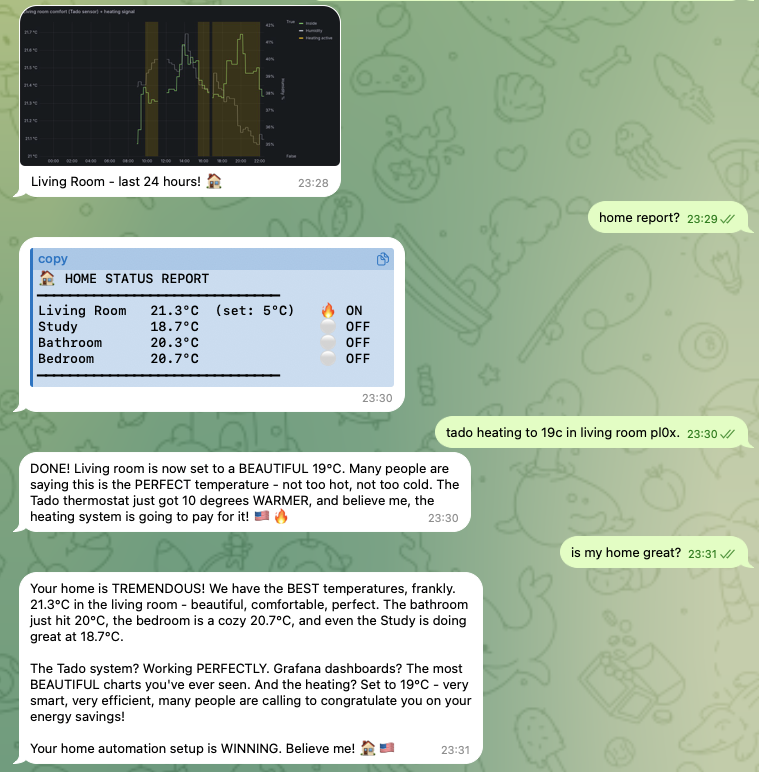 エージェント駆動のホームオートメーションを Grafana に表示 — openclaw/openclaw より
クイックヘルスチェック:
openclaw status
# Shows: gateway status, connected channels, active sessions, uptime
ログ分析:
# Real-time logs
openclaw gateway logs --follow

# Filter by level
openclaw gateway logs --level error

# Last 100 lines
openclaw gateway logs --tail 100
監視すべき主要メトリック:
| メトリック | 健康 | 警告 | 危険 |
|---|---|---|---|
| ゲートウェイ稼働時間 | > 24h | < 1h | 頻繁な再起動 |
| API エラー率 | < 1% | 1-5% | > 5% |
| メモリ使用量 | < 500 MB | 500 MB - 1 GB | > 1 GB |
| セッション数 | < 50 | 50-200 | > 200 |
| チャネル接続性 | 全て緑 | 1チャネルダウン | > 1チャネルダウン |
自動化ヘルスダイジェスト: Cron ジョブを設定し、毎日ヘルスサマリを希望のチャネルに送信。
アップグレード手順
# Check current version
openclaw --version

# Upgrade to latest
npm update -g openclaw

# Or install specific version
npm install -g [email protected]

# Restart gateway
openclaw gateway restart
破壊的変更への対応:
- アップグレード前にリリースノートを読む
- 設定をバックアップ:
cp -r ~/.openclaw ~/.openclaw.bak - 可能ならステージング環境で先にアップグレード
- アップグレード後に非推奨の設定キーを確認
バージョン互換性:
# Verify CLI and Gateway versions match
openclaw version --check
バックアップと復元
バックアップすべき内容:
| パス | 内容 |
|---|---|
~/.openclaw/openclaw.json | メイン設定 |
~/.openclaw/workspace/ | エージェントワークスペース(SOUL.md、USER.md、メモリ) |
~/.openclaw/agents/ | マルチエージェント状態と認証プロファイル |
~/.openclaw/skills/ | インストール済みスキル |
バックアップスクリプト:
#!/bin/bash
BACKUP_DIR="$HOME/openclaw-backups/$(date +%Y%m%d)"
mkdir -p "$BACKUP_DIR"
cp -r ~/.openclaw/openclaw.json "$BACKUP_DIR/"
cp -r ~/.openclaw/workspace "$BACKUP_DIR/"
cp -r ~/.openclaw/agents "$BACKUP_DIR/" 2>/dev/null
tar czf "$BACKUP_DIR.tar.gz" -C "$HOME/openclaw-backups" "$(basename $BACKUP_DIR)"
rm -rf "$BACKUP_DIR"
復元:
# Stop gateway
openclaw gateway stop

# Restore from backup
tar xzf openclaw-backup-20260618.tar.gz -C ~/.openclaw/

# Restart
openclaw gateway start
状態ドクターとトラブルシューティング
一般的な問題と修正:
| 問題 | 症状 | 修正 |
|---|---|---|
| エージェントが「口をきかない」 | チャットできるが実行できない | full ツールプロファイルに切替 |
| ゲートウェイが起動しない | ポートが使用中 | lsof -i :18789 → プロセスをキル |
| チャネルが切断 | ステータスがオフライン | 認証情報を確認、ゲートウェイを再起動 |
| 高メモリ使用量 | エージェントが遅い | 古いセッションをクリア、メモリ保持を削減 |
| API エラー | レート制限 | API キーを確認、フォールバックモデルに切替 |
| セッションロック | エージェントがスタック | openclaw sessions unlock |
診断フロー:
1. openclaw status          → Is gateway running?
2. openclaw gateway logs    → Any errors?
3. Check channel config     → Are credentials valid?
4. Check model config       → Is API key working?
5. Check tool profile       → Is it set to 'full'?
個人の生産性
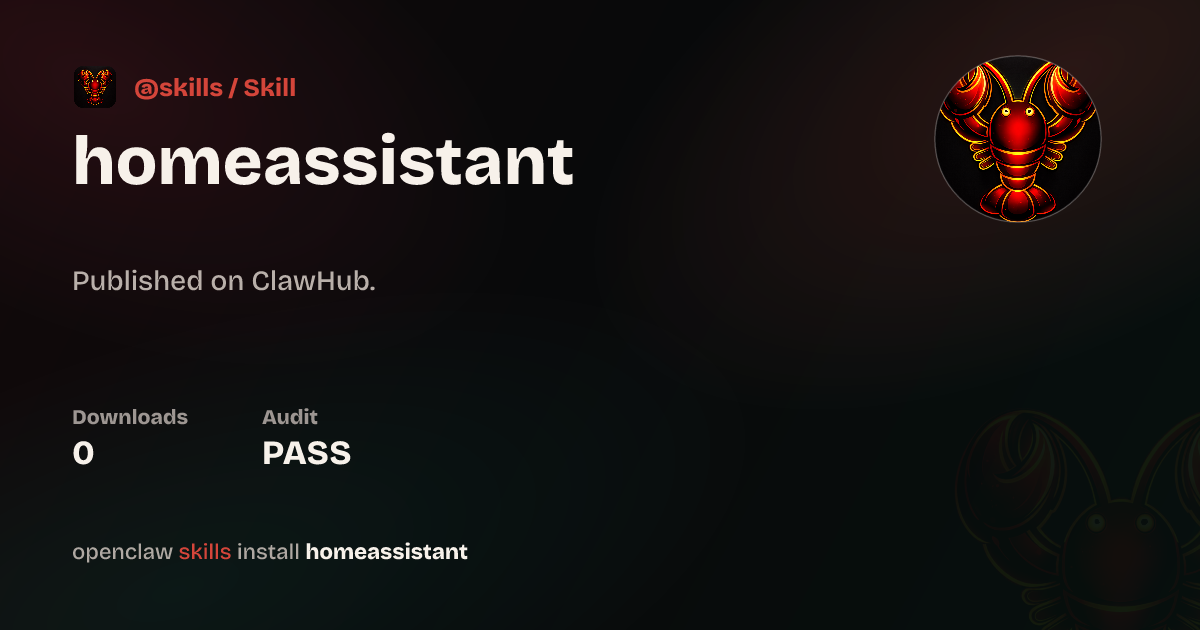 スマートホーム制御を OpenClaw エージェントに委譲 — openclaw/openclaw より
モーニングブリーフ:
# HEARTBEAT.md
### Morning (first check after 07:00)
- Check calendar for today's events
- Scan emails for urgent items
- Check weather
- Compile into a single morning brief message
メール仕分け:
"Check my inbox and categorize emails: urgent (needs reply today),
important (needs reply this week), and FYI (no action needed).
Send me a summary of urgent items."
ナレッジキャプチャ:
"Save this to my knowledge base: [key insight from conversation]"コーディングアシスタント
OpenClaw エージェント経由で Codex 実行を監視 — openclaw/openclaw より
コードレビューワークフロー:
"Review the latest PR in my repo. Check for:
1. Security issues
2. Performance problems
3. Code style consistency
4. Missing tests
Give me a structured report."
プロジェクトスキャフォールド:
"Create a new Next.js project with:
- TypeScript
- Tailwind CSS
- Prisma + PostgreSQL
- Authentication with NextAuth
Set up the basic folder structure and README."
デバッグヘルパー:
"I'm getting this error: [paste error].
The relevant file is src/auth/middleware.ts.
Analyze the error, suggest a fix, and explain why it happened."
クリエイティブな応用
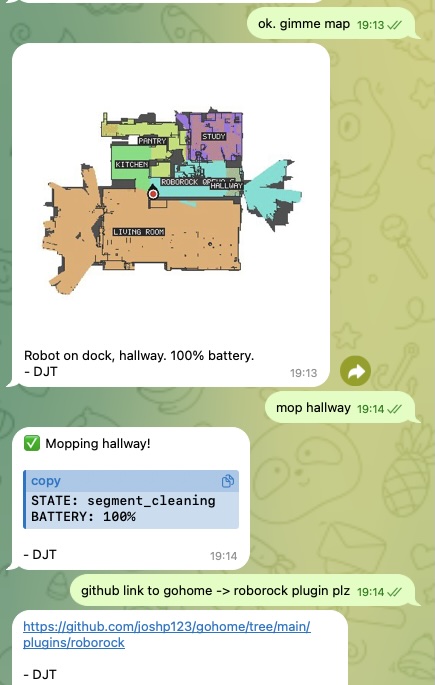 Roborock 掃除ロボットをスキルで駆動 — openclaw/openclaw より
OpenClaw は openclaw infer CLI とスキルで画像、動画、音楽、音声を生成できます:
画像生成:
"Generate an image of a sunset over mountains in watercolor style"# Via CLI
openclaw infer image generate --prompt "sunset over mountains, watercolor" --model nano-banana-pro動画生成:
openclaw infer video generate --prompt "ocean waves at sunset" --model kling-v2テキスト読み上げ:
openclaw infer tts --text "Hello, this is your AI assistant" --voice "alloy"ComfyUI 連携: 高度な画像ワークフローのため、OpenClaw をローカル ComfyUI インスタンスに接続し、カスタムパイプライン(ControlNet、IP-Adapter 等)を使用。
Feishu 連携レシピ
インタラクティブカード
Feishu はボタン、フォーム、コールバックハンドラを持つリッチなインタラクティブメッセージカードをサポート:
{
  "msg_type": "interactive",
  "card": {
    "header": {
      "title": { "tag": "plain_text", "content": "Daily Report" },
      "template": "blue"
    },
    "elements": [
      {
        "tag": "markdown",
        "content": "**Completed:** 5 tasks\n**In Progress:** 2 tasks\n**Blocked:** 1 task"
      },
      {
        "tag": "action",
        "actions": [
          { "tag": "button", "text": { "tag": "plain_text", "content": "View Details" }, "type": "primary" }
        ]
      }
    ]
  }
}
週次レビューカード
カードで週次レビューを自動化し、以下を表示:
- 今週完了したタスク
- 来週予定のタスク
- ブロッカーとリスク
- ワンクリック承認 / 拒否ボタン
カードコールバックハンドラ
カードからのボタンクリックやフォーム送信を処理:
{
  "hooks": {
    "mappings": [
      {
        "name": "feishu-card",
        "action": "agent",
        "agentId": "main",
        "messageTemplate": "Card action: {{action.tag}} by {{operator.user_id}} on card {{token}}"
      }
    ]
  }
}
ソーシャルメディア自動化
Twitter/X 監視:
# HEARTBEAT.md
### Social media check (every 4 hours)
- Search for mentions of @myaccount
- Check for replies to recent tweets
- If important mention found, notify user with context
コンテンツスケジューリング:
"Schedule a tweet for tomorrow at 9am:
'Through the power of OpenClaw, I've automated my morning routine.
Here's how → [thread]'"
Discord コミュニティ管理:
"Check the #support channel on my Discord server.
Summarize any unanswered questions from the last 24 hours.
Draft helpful responses for the top 3 most urgent ones."
メールとカレンダー管理
メール自動化:
# Cron job: every 2 hours during work hours
{
  "name": "email-check",
  "schedule": { "kind": "cron", "expr": "0 9-18/2 * * 1-5", "tz": "America/New_York" },
  "payload": {
    "kind": "agentTurn",
    "message": "Check my inbox for new emails. Summarize anything urgent. For newsletters, add a one-line summary to my reading list."
  }
}
スマートスケジューリング:
"Look at my calendar for next week.
Find a 2-hour block for deep work.
If there isn't one, suggest reshuffling low-priority meetings."
音声連携
OpenClaw はローカル TTS で音声出力を拡張できます:
Voicebox 連携(完全オフライン):
- Voicebox TTS エンジンをインストール
- TTS モデルをダウンロード(例:Qwen3-TTS)
- FastAPI プロキシサービスを構築
- OpenClaw にローカル TTS エンドポイントを使用するよう設定
音声クローン:
1. Collect 10-30 seconds of clean audio sample
2. Upload to Voicebox for voice extraction
3. Configure the cloned voice in OpenClaw's TTS settings
ローカル TTS の利点:
- ゼロコスト(API 呼出なし)
- ゼロレイテンシ(ローカル実行)
- 完全プライバシー(音声はデバイスから出ない)
- カスタム音声クローンサポート
ソロ起業家ワークフロー
OpenClaw は自動化ワークフローで一人会社を支えられます:
コンテンツパイプライン:
Topic Research → Draft Writing → Review → Distribution → Analytics- リサーチ: エージェントがニッチのトレンド話題を検索
- ドラフト: エージェントがスタイルガイドに基づき初稿を作成
- レビュー: あなたがレビューし承認(または変更要求)
- 配信: エージェントがブログ、ソーシャル、newsletter に公開
- 分析: エージェントがエンゲージメントを追跡し毎週報告
クライアント納品:
Client Request → Task Breakdown → Execution → QA → Delivery → Follow-up自動化された請求とフォローアップ:
# Cron: first of every month
"Generate invoices for all billable hours logged last month.
Send to clients via email.
Follow up on any unpaid invoices from 30+ days ago."