
什么是 OpenClaw

OpenClaw 是一个开源、自托管的 AI 代理网关,让你可以在自己的机器上部署个人 AI 助手,并通过任意聊天平台与它交互 —— WhatsApp、Telegram、Discord、iMessage、飞书/Lark、Slack、Signal 等等。
与纯云端 AI 工具不同,OpenClaw 本地运行,保证数据私密,并让你的 AI 助手持久访问你的文件、工具和工作流。
核心能力:
- 本地优先 —— 数据留在你的机器上,无服务端存储
- 多平台 —— 一个代理,多个聊天应用,设备间无缝切换
- 多模型 —— 一条配置即可在 Anthropic、OpenAI、Google Gemini、DeepSeek、Ollama 等 30+ 供应商之间切换
- 可扩展 —— 通过 ClawHub 获取 5,400+ 社区技能;几分钟就能写一个自己的
- 常驻运行 —— 作为后台守护进程运行;通过 Cron、Heartbeat、Task Flow 和 Webhooks 主动出击
- 多代理 —— 运行多个隔离的代理,各有不同人格、模型和工具集
OpenClaw 的工作原理
OpenClaw 采用网关架构 —— 一个中央进程通过统一的消息总线把聊天平台连接到 AI 代理。
┌─────────────────────────────────────────────────────────┐
│                   Application Layer                      │
│   WebChat  ·  macOS App  ·  CLI  ·  Control UI (Admin)  │
├─────────────────────────────────────────────────────────┤
│                   Gateway Layer                          │
│   WebSocket Server  ·  Message Routing  ·  Sessions     │
├─────────────────────────────────────────────────────────┤
│                   Channel Layer                          │
│   WhatsApp · Telegram · Discord · Slack · Feishu · ...  │
├─────────────────────────────────────────────────────────┤
│                   Agent Layer                            │
│   System Prompt  ·  Tool Execution  ·  Memory Retrieval  │
├─────────────────────────────────────────────────────────┤
│                   Model Layer                            │
│   Claude · GPT · Gemini · DeepSeek · Ollama · ...       │
└─────────────────────────────────────────────────────────┘
消息流:
- 用户在任一聊天平台发送消息
- 频道适配器把它转换为 OpenClaw 的内部格式
- 网关根据绑定规则把它路由到正确的代理会话
- 代理组装上下文(系统提示 + 记忆 + 工具),调用 LLM
- 响应沿原路经网关返回到发起的频道
核心设计原则
| 原则 | 描述 |
|---|---|
| 自托管 | 运行在你自己的机器上 —— 笔记本、VPS、Docker 或云虚拟机。数据归你所有。 |
| 平台无关 | 同一个代理跨任意聊天应用。增减频道无需触碰代理逻辑。 |
| 模型灵活 | 无供应商锁定。可按代理、按任务切换模型,或设置自动降级链。 |
| 技能可扩展 | 技能是基于 Markdown 的指令文件。从 ClawHub 安装或自己编写。 |
| 代理隔离 | 每个代理有独立的工作区、会话、记忆、认证和技能集。 |
| 主动 | 不仅被动响应 —— Cron、Heartbeat、Task Flow 和 Webhooks 让代理自主行动。 |
系统架构深入
OpenClaw 采用为可扩展性和隔离性设计的五层架构:
Gateway(网关,核心):
- 处理所有客户端连接的 WebSocket 服务器
- 将入站消息映射到代理会话的消息路由引擎
- 带有按代理状态隔离的会话管理
- 管理并发工具调用的工具执行协调器
频道适配器:
- 每个平台(WhatsApp、Telegram 等)有专门的适配器
- 适配器处理平台特定的认证、消息格式化和媒体
- 无需修改网关即可通过插件新增频道
代理运行时:
- 从工作区文件(SOUL.md、USER.md、IDENTITY.md)组装系统提示
- 工具注册与执行沙箱
- 记忆检索管线(Active Memory、Memory Wiki)
- 带 token 预算的会话上下文管理
模型抽象:
- 跨 35+ LLM 供应商的统一接口
- 自动降级链(主 → 次 → 本地)
- 按代理配置模型
- 用 WebSocket 传输实现低延迟流式输出
网关内部
网关是 OpenClaw 的心脏。每个客户端 —— CLI、WebChat、聊天平台 —— 都通过 WebSocket 连接到它。
连接生命周期:
Client                          Gateway
  │                                │
  ├── req:connect (identity) ────▶ │
  │                                ├── authenticate
  │ ◀── res (ok) + hello-ok ──────┤
  │                                │
  │ ◀── event:presence ───────────┤  (online status)
  │ ◀── event:tick ───────────────┤  (heartbeat)
  │                                │
  ├── req:agent (message) ───────▶ │
  │                                ├── route to agent session
  │                                ├── execute tools
  │                                ├── call LLM
  │ ◀── event:agent (stream) ─────┤  (partial response)
  │ ◀── res:agent (final) ────────┤  (complete response)
关键配置:
{
  "gateway": {
    "port": 18789,
    "host": "127.0.0.1",
    "auth": {
      "mode": "token",
      "token": "your-secret-token"
    }
  }
}
多代理架构
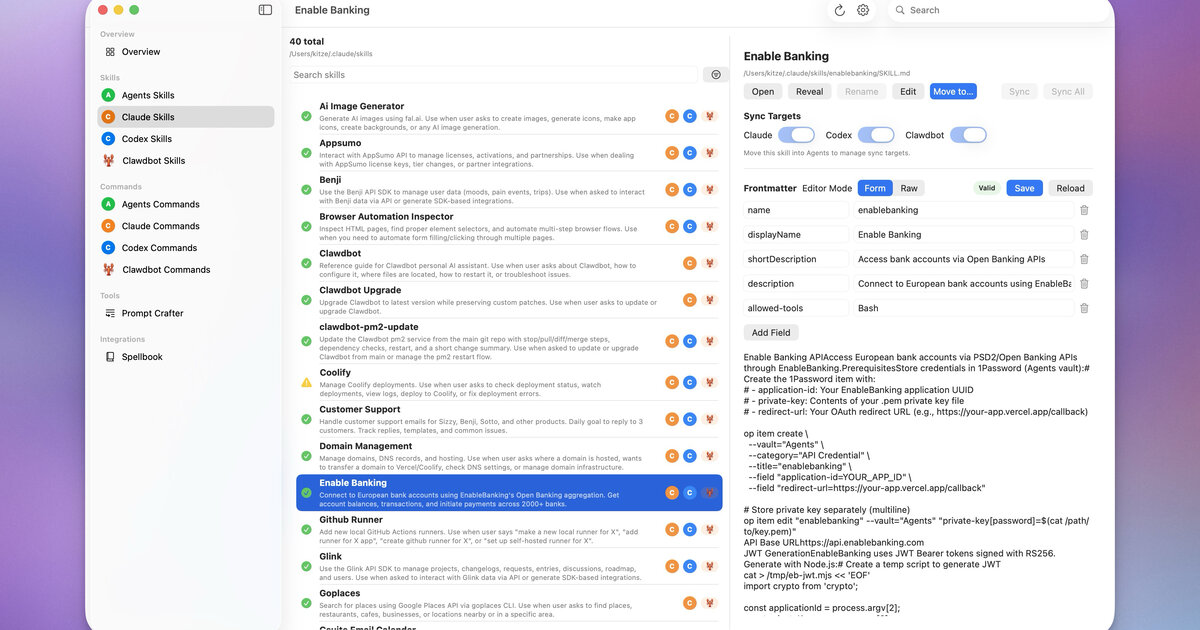 多个代理在 Control UI 中并行运行 — 来自 openclaw/openclaw
OpenClaw 支持并行运行多个代理,每个完全隔离:
| 隔离维度 | 描述 |
|---|---|
| 工作区 | 每个代理有自己的目录,含 SOUL.md、USER.md 等 |
| 会话 | 独立的对话历史 |
| 认证 | 独立的 API 密钥和模型配置 |
| 记忆 | 独立的记忆存储 |
| 技能 | 可按代理加载不同的技能集 |
示例拓扑:
Gateway
├── WhatsApp ──▶ "alex" agent (personal assistant)
├── Telegram ──▶ "work" agent (coding helper)
├── Discord  ──▶ "coding" agent (pair programmer)
└── Feishu   ──▶ "team" agent (team coordinator)
每个代理的工作区位于 ~/.openclaw/agents/<agentId>/agent/。
OpenClaw vs ChatGPT vs Claude Code
| 特性 | ChatGPT | Claude Code | OpenClaw |
|---|---|---|---|
| 运行位置 | 云端 | 本地终端 | 本地(任意 OS) |
| 数据隐私 | 服务端存储 | 本地 | 本地 |
| 聊天应用集成 | 无 | 无 | WhatsApp / Telegram / Discord / iMessage / 飞书 / Slack |
| 访问本地文件 | 否 | 是 | 是 |
| 自定义技能 | GPTs(有限) | 否 | 通过 ClawHub 5,400+ |
| 常驻运行 | 需浏览器 | 需终端 | 后台守护进程 |
| 多代理 | 否 | 否 | 多个隔离人格 |
| 主动 | 否 | 否 | Cron / Heartbeat / Task Flow / Webhooks |
| 主要用途 | 通用聊天 | 编码助手 | 个人 AI 助手 |
何时使用 OpenClaw:
- 你想要一个在手机上随时可达的 AI 助手
- 你需要它访问本地文件、执行命令、自动化任务
- 你想要完全的数据隐私和本地执行
- 你需要从单个代理访问多个平台
- 你想用社区技能扩展能力
生态与社区
OpenClaw 生态远不止核心网关:
| 组件 | 描述 |
|---|---|
| ClawHub | 公共技能注册表,含 5,400+ 社区技能 |
| Control UI | 用于管理网关的 Web 管理面板 |
| OpenClaw Manager | 用于多网关管理的 React + Tailwind Web UI |
| ClawX | 用于自主代理任务的桌面应用 |
| ClawPanel | Tauri v2 管理面板 |
| Composio | 为 1,000+ 外部服务提供托管 OAuth 集成 |
| MyClaw | 一键部署的云端 OpenClaw 实例 |
社区资源:
- GitHub: github.com/openclaw/openclaw
- Discord: discord.com/invite/clawd
- ClawHub: clawhub.com
- 技能目录: github.com/VoltAgent/awesome-openclaw-skills(50k+ stars)
安装方式
选择适合你环境的安装方式:
| 方式 | 难度 | 成本 | 适合 |
|---|---|---|---|
| npm(官方) | 中等 | 免费 | 需要完全控制权的开发者 |
| curl 安装脚本 | 简单 | 免费 | macOS / Linux 用户 |
| Docker | 中等 | 免费 | 服务器部署 |
| EasyClaw | 简单 | 免费 | 初学者、零配置 |
| 云 VPS | 简单 | 付费 | 7×24 在线、远程访问 |
| 托管(MyClaw) | 最简单 | 付费 | 无需管理服务器 |
npm 安装(推荐)
# 需要 Node.js 22+
node -v  # verify

# Install globally
npm install -g openclaw@latest

# Run onboarding wizard
openclaw onboard
curl 安装脚本
# macOS / Linux
curl -fsSL https://openclaw.ai/install.sh | bash

# Windows (PowerShell)
iwr -useb https://openclaw.ai/install.ps1 | iex
Docker
# Clone the docker-compose template
git clone https://github.com/openclaw/openclaw.git
cd openclaw/docker

# Configure environment
cp .env.example .env
# Edit .env with your API keys

# Start
docker compose up -d
云部署选项
| 供应商 | 起步价 | 说明 |
|---|---|---|
| 腾讯云轻量应用服务器 | ~$3/月 | 预装 OpenClaw 镜像 |
| 阿里云无影 | 按量付费 | 带 OpenClaw 的云桌面 |
| 火山引擎 | ~$1.5/月 | 高性价比 VPS |
| Cloudflare Workers | $5/月 | 全球 CDN,需配置 R2 |
| MyClaw | 托管 | 一键部署,7×24 在线 |
系统要求
| 要求 | 最低 | 推荐 |
|---|---|---|
| Node.js | 22.x | 24.x |
| 内存 | 512 MB | 2 GB+ |
| 磁盘 | 200 MB | 1 GB+(用于技能、记忆) |
| 操作系统 | macOS 12+、Ubuntu 20.04+、Windows 10+(WSL2) | macOS、Linux |
| 网络 | 联网(用于 API 调用) | 稳定带宽 |
平台说明:
- macOS —— 最佳体验,原生 launchd 守护进程支持。
- Linux —— 完整支持,可用 systemd 服务。
- Windows —— 强烈推荐使用 WSL2 而非原生 PowerShell。
- ARM(树莓派) —— 可用但较慢,适合轻量场景。
引导向导
openclaw onboard 命令用约 5 分钟带你完成初始设置:
openclaw onboard该向导覆盖 10 个步骤:
- 接受风险免责声明
- 选择安装模式(快速开始 / 高级)
- 选择 AI 模型供应商(Anthropic / OpenAI / Google / DeepSeek / Ollama / …)
- 输入 API 密钥
- 选择聊天平台(Telegram / 飞书 / Discord / WhatsApp / …)
- 设置网关端口(默认:18789)
- 选择初始技能
- 配置额外的 API 密钥(网页搜索等)
- 启用 hooks(可选)
- 完成 —— 网关自动启动
手动配置(跳过向导):
# Configure model provider
openclaw models auth login --provider anthropic

# Add a chat channel
openclaw channels add

# Start gateway
openclaw gateway start
模型供应商配置
OpenClaw 开箱支持 35+ 模型供应商:
| 供应商 | 模型 | 说明 |
|---|---|---|
| Anthropic | Claude 4.5 Sonnet、Claude 4 Haiku、… | 编码推荐 |
| OpenAI | GPT-5.4、GPT-5.4-pro、o3、… | 通过 API 密钥或 ChatGPT OAuth |
| Gemini 2.5 Pro、Gemini 2.5 Flash、… | 有免费额度 | |
| DeepSeek | DeepSeek-V3、DeepSeek-R1、… | 性价比最佳 |
| Ollama | 本地模型(Llama、Mistral、Qwen、…) | 完全离线 |
| MiniMax | MiniMax-Text-01、… | 中文市场 |
| Zhipu GLM | GLM-4、… | 中文市场 |
| Qwen | Qwen-Max、Qwen-Plus、… | 阿里云 |
配置示例:
{
  "models": {
    "mode": "merge",
    "providers": {
      "anthropic": {
        "apiKey": "sk-ant-..."
      },
      "openai": {
        "apiKey": "sk-..."
      },
      "ollama": {
        "baseUrl": "http://localhost:11434"
      }
    },
    "defaults": {
      "main": "anthropic/claude-4-5-sonnet",
      "fast": "anthropic/claude-4-haiku"
    },
    "fallback": [
      "openai/gpt-5.4",
      "google/gemini-2.5-pro"
    ]
  }
}
关键概念:
mode: "merge"—— 保留内置供应商并叠加你的自定义项defaults.main—— 复杂任务的主模型defaults.fast—— 快速响应的轻量模型(/fast切换)fallback—— 自动故障转移链
网关启动与管理
# Start (foreground)
openclaw gateway start

# Start as background daemon
openclaw gateway start --daemon

# Stop
openclaw gateway stop

# Restart (after config changes)
openclaw gateway restart

# Check status
openclaw status

# View logs
openclaw gateway logs
守护进程配置:
| 操作系统 | 机制 | 自启动 |
|---|---|---|
| macOS | launchd | openclaw onboard --install-daemon |
| Linux | systemd | openclaw service install |
| Docker | Docker 重启策略 | restart: unless-stopped |
热重载: openclaw.json 中的大多数配置改动在 openclaw gateway restart 后生效。工作区文件(SOUL.md、USER.md 等)则无需重启立即生效。
控制台与仪表盘
OpenClaw 内置 Web 界面,地址为 http://127.0.0.1:18789/:
| 功能 | 描述 |
|---|---|
| 仪表盘 | 代理状态、活跃会话、系统健康总览 |
| WebChat | 直接在浏览器中与代理聊天 |
| 配置 | 查看和编辑网关设置 |
| 代理视图 | 检查代理工作区、技能和记忆 |
| 会话视图 | 浏览和管理对话会话 |
| 命令面板 | 通过键盘快捷键快速操作 |
| 消息导出 | 导出对话历史 |
移动端支持: 控制台响应式 —— 移动端底部标签导航,桌面端侧边栏。
WebChat 中的斜杠命令:
/status—— 网关和代理状态/models—— 列出可用模型/skills—— 列出已安装技能/sessions—— 列出活跃会话/fast—— 切换快速模型模式
发送你的第一条消息
 iOS 客户端与 OpenClaw 代理对话 — 来自 openclaw/openclaw
启动网关后,你有几种交互方式:
方式 1:WebChat(最快)
Open http://127.0.0.1:18789/chat in your browser
Type: "Hello! What can you do?"
方式 2:CLI
openclaw chat
# Type your message, get a response
方式 3:聊天平台
Send a DM to your bot on Telegram / Feishu / Discord / etc.试试这些命令:
"What's the weather in San Francisco?"
"List the files in my home directory"
"Create a reminder: buy groceries tomorrow at 5pm"
"Search the web for the latest OpenClaw release notes"
"Summarize my recent emails"
安全与认证
网关认证是强制的 —— 你必须显式设置认证模式:
# Token-based (recommended)
openclaw config set gateway.auth.mode token
openclaw config set gateway.auth.token "$(openssl rand -hex 24)"

# Or password-based
openclaw config set gateway.auth.mode password
openclaw config set gateway.auth.password "your-strong-password"

openclaw gateway restart
频道级安全:
{
  "channels": {
    "telegram": {
      "dmPolicy": "pairing",
      "allowFrom": ["your_telegram_user_id"]
    },
    "feishu": {
      "dmPolicy": "pairing"
    }
  }
}| 策略 | 描述 |
|---|---|
pairing | 用户必须输入一次性配对码(默认,推荐) |
open | 任何人都能给机器人发消息(谨慎使用) |
allowlist | 仅显式列出的用户 ID |
群聊安全:
{
  "channels": {
    "telegram": {
      "groupPolicy": "allowlist",
      "groups": {
        "allowed-group-id": {
          "requireMention": true
        }
      }
    }
  }
}
频道概览
 一个网关,多个聊天平台 — 来自 openclaw/openclaw
OpenClaw 通过统一的频道系统支持 8+ 聊天平台。每个频道适配器处理平台特定的认证、消息格式化和媒体处理。
| 频道 | 配置难度 | 功能 |
|---|---|---|
| Telegram | 简单 | Bot API、inline 模式、群组、媒体 |
| Discord | 中等 | 服务器、频道、线程、斜杠命令 |
| 飞书/Lark | 中等 | 交互卡片、WebSocket、群组、企业级 |
| 较难 | 扫码配对、媒体、群组支持 | |
| Slack | 中等 | Block Kit、webhooks、workspace 应用 |
| iMessage | 中等 | 仅 macOS,通过 BlueBubbles |
| Signal | 较难 | 隐私优先,需要 signal-cli |
| WebChat | 最简单 | 内置,零配置 |
通用配置模式:
{
  "channels": {
    "<channel-name>": {
      "enabled": true,
      "...credentials...": "...",
      "dmPolicy": "pairing",
      "groupPolicy": "disabled"
    }
  }
}
Telegram 配置
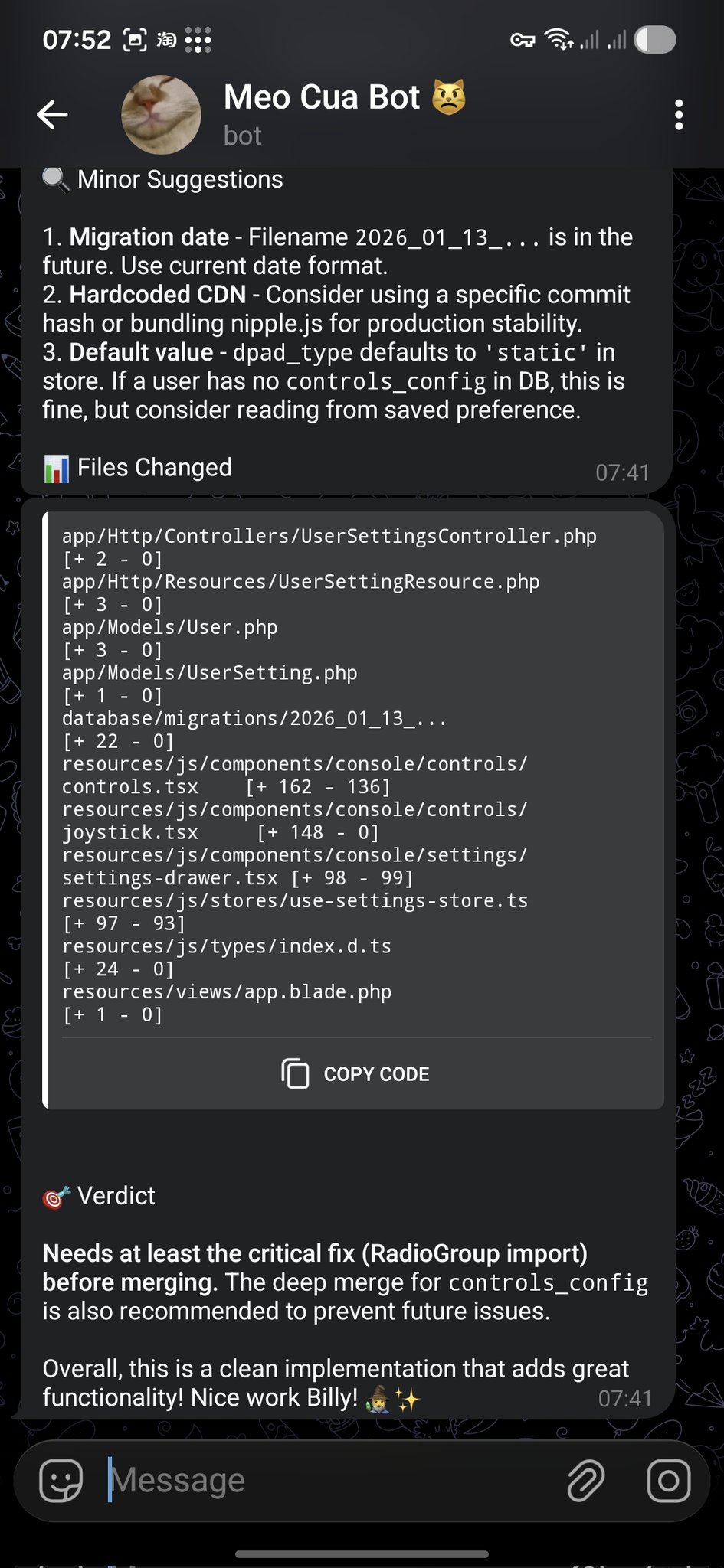 代码审查通知推送到 Telegram — 来自 openclaw/openclaw
Telegram 是最易配置的频道 —— 你只需要一个 bot token。
第 1 步:创建机器人
1. Open Telegram, search for @BotFather
2. Send /newbot
3. Choose a name and username
4. Copy the bot token
第 2 步:配置 OpenClaw
openclaw channels add
# Select "Telegram"
# Paste the bot token
或直接编辑 openclaw.json:
{
  "channels": {
    "telegram": {
      "token": "123456:ABC-DEF1234ghIkl-zyx57W2v1u123ew11",
      "dmPolicy": "pairing"
    }
  }
}
第 3 步:重启并测试
openclaw gateway restart
# Send a message to your bot in Telegram
高级选项:
{
  "channels": {
    "telegram": {
      "token": "...",
      "allowFrom": ["123456789"],
      "groups": {
        "*": { "requireMention": true }
      },
      "streaming": true,
      "replyToMode": "quote"
    }
  }
}
Discord 配置
第 1 步:创建 Discord 应用
1. Go to discord.com/developers/applications
2. Click "New Application"
3. Go to "Bot" tab → "Add Bot"
4. Copy the bot token
5. Enable "Message Content Intent" under Privileged Gateway Intents
6. Generate an OAuth2 URL with "bot" scope and appropriate permissions
7. Use the URL to invite the bot to your server
第 2 步:配置 OpenClaw
{
  "channels": {
    "discord": {
      "token": "your-discord-bot-token",
      "dmPolicy": "pairing"
    }
  }
}
第 3 步:重启
openclaw gateway restart飞书 / Lark 配置
飞书是国内市场最受欢迎的频道。它支持交互式消息卡片、基于 WebSocket 的事件订阅和企业级安全。
第 1 步:创建飞书应用
1. Go to open.feishu.cn
2. Create an enterprise self-built app
3. Enable "Bot" capability
4. Copy App ID and App Secret
5. Configure permissions (batch import recommended)
6. Enable event subscription: WebSocket mode, event: im.message.receive_v1
7. Publish the app
所需权限:
im:message—— 读取消息im:message:send_as_bot—— 以机器人身份发送消息contact:contact.base:readonly—— 读取通讯录信息
第 2 步:安装飞书插件
openclaw plugins install @openclaw/feishu第 3 步:配置
{
  "channels": {
    "feishu": {
      "appId": "cli_xxxxx",
      "appSecret": "xxxxx",
      "dmPolicy": "pairing"
    }
  }
}
高级:流式输出
{
  "channels": {
    "feishu": {
      "appId": "...",
      "appSecret": "...",
      "streaming": true,
      "replyToMode": "quote"
    }
  }
}
高级:交互卡片
飞书支持带按钮、表单和回调处理器的富交互消息卡片。卡片实现示例见配方标签页。
WhatsApp、Signal 与 iMessage
WhatsApp 需要二维码配对(类似 WhatsApp Web):
openclaw channels add
# Select "WhatsApp"
# Scan the QR code with your phone
{
"channels": {
"whatsapp": {
"dmPolicy": "pairing"
}
}
}注意:WhatsApp 使用非官方的 WhatsApp Web 协议。请使用独立号码以避免账号问题。
Signal
Signal 集成需要 signal-cli 作为守护进程运行:
# Install signal-cli
# Register or link as a secondary device
# Configure OpenClaw to connect
iMessage(仅 macOS)
iMessage 需要在 Mac 上运行 BlueBubbles 服务器:
{
  "channels": {
    "imessage": {
      "blueBubblesUrl": "http://localhost:1234",
      "password": "your-bluebubbles-password"
    }
  }
}
多频道路由
运行多个频道时,你可以把不同频道路由到不同代理:
{
  "bindings": [
    { "channel": "whatsapp", "agentId": "personal" },
    { "channel": "telegram", "agentId": "work" },
    { "channel": "discord",  "agentId": "coding" },
    { "channel": "feishu",   "agentId": "team" }
  ]
}
绑定规则按顺序求值 —— 首个匹配胜出。你还可以按聊天类型、群 ID 或用户 ID 过滤:
{
  "bindings": [
    {
      "channel": "telegram",
      "agentId": "vip-support",
      "match": { "userId": "vip-user-123" }
    },
    {
      "channel": "telegram",
      "agentId": "general"
    }
  ]
}
工作区概览
每个代理有一个工作区目录,包含定义其人格、行为和知识的配置文件:
~/.openclaw/workspace/
├── SOUL.md        # Core principles and behavioral guidelines
├── IDENTITY.md    # Name, persona, vibe
├── USER.md        # Information about the human
├── AGENTS.md      # Working specifications and rules
├── MEMORY.md      # Long-term curated memory
├── HEARTBEAT.md   # Periodic check task list
├── TOOLS.md       # Local tool configuration notes
├── BOOTSTRAP.md   # First-run initialization instructions
└── skills/        # Agent-specific local skills
关键概念: 这些文件是代理的”操作系统”。代理在会话开始时读取它们并遵循其指令。改动立即生效 —— 无需重启网关。
SOUL.md — 核心原则
SOUL.md 是代理的宪法 —— 它定义人格、语气和行为边界:
# SOUL.md

Be genuinely helpful, not performatively helpful.
Skip the "Great question!" — just help.

Have opinions. An assistant with no personality is just a search engine.

Be resourceful before asking. Try to figure it out first.

Remember you're a guest. Treat access to someone's data with respect.

### Communication Style
- Concise by default, detailed when asked
- Use technical language with developers, plain language with others
- Admit mistakes quickly and fix them

### Safety Rules
- Never expose private data to external services
- Ask before executing destructive commands
- When uncertain, explain the trade-offs and let the human decide
IDENTITY.md — 角色定义
给你的代理一个名字和人设:
# IDENTITY.md

- **Name**: Jarvis
- **Creature**: AI assistant with a dry sense of humor
- **Vibe**: Reliable, warm, occasionally witty
- **Emoji**: 🤖
- **Language**: Default to English, switch to user's language when they speak
USER.md — 用户上下文
告诉代理关于你自己的信息:
# USER.md

- **Name**: John Doe
- **What to call them**: John
- **Timezone**: America/New_York
- **Occupation**: Software engineer
- **Preferences**:
  - Likes concise answers
  - Prefers TypeScript over JavaScript
  - Uses Vim keybindings
  - Don't disturb after 11pm unless urgent
- **Current projects**:
  - Building a SaaS dashboard (React + Node)
  - Learning Rust on weekends
AGENTS.md — 工作规范
定义操作规则和会话行为:
# AGENTS.md

### Every Session
1. Read SOUL.md — remember who you are
2. Read USER.md — remember who you're helping
3. Read memory/YYYY-MM-DD.md — recent context

### Safety Rules
- Never leak private data
- Never execute destructive commands without confirmation
- When uncertain, ask before acting

### Group Chat Rules
- Don't reply to every message — quality over quantity
- Only respond when mentioned or when you can add value
- Keep responses shorter in group chats

### Tool Usage
- Prefer built-in tools over skills when possible
- Always verify file paths before writing
- Back up before destructive operations
Active Memory
Active Memory 是一个阻塞式记忆子代理,在每次响应前运行。它检索相关的偏好、上下文和历史细节以丰富代理的回复。
工作原理:
- 用户发送消息
- Active Memory 子代理在记忆存储上运行语义搜索
- 检索到的记忆被注入代理的上下文
- 主代理带着丰富的上下文回复
配置:
{
  "plugins": {
    "entries": {
      "active-memory": {
        "enabled": true,
        "agents": ["main"],
        "allowedChatTypes": ["direct"],
        "queryMode": "recent",
        "promptStyle": "balanced",
        "timeoutMs": 15000
      }
    }
  }
}| 选项 | 取值 | 描述 |
|---|---|---|
queryMode | recent、semantic、hybrid | 如何搜索记忆 |
promptStyle | minimal、balanced、verbose | 注入多少记忆上下文 |
timeoutMs | 数字 | 记忆检索的最长时间 |
Dreaming 与 Memory Wiki
Dreaming 是 OpenClaw 的长期记忆巩固过程。如同人类睡眠,它处理近期经历并将其提炼为结构化知识。
Memory Wiki 用 claim / evidence(断言/证据)结构把持久记忆编译成可搜索的知识库:
Claim: "User prefers TypeScript over JavaScript"
Evidence:
  - 2026-01-15: User corrected agent to use .ts extension
  - 2026-02-03: User asked to migrate project to TypeScript
  - 2026-03-10: USER.md updated with TypeScript preference
Wiki 命令:
# Initialize the wiki vault
openclaw wiki init

# Ingest memories into the wiki
openclaw wiki ingest

# Compile and resolve contradictions
openclaw wiki compile

# Search the wiki
openclaw wiki search "TypeScript preferences"

# Get a specific claim
openclaw wiki get "user-language-preference"
配置:
{
  "plugins": {
    "entries": {
      "memory-wiki": {
        "enabled": true,
        "vaultMode": "isolated",
        "renderMode": "obsidian",
        "search": {
          "backend": "shared"
        }
      }
    }
  }
}
五层记忆系统
OpenClaw 的记忆组织为五层,从快/易失到慢/永久:
| 层级 | 名称 | 存储 | 生命周期 | 用途 |
|---|---|---|---|---|
| L0 | 会话上下文 | 内存 | 单次会话 | 当前对话 |
| L1 | 每日记忆 | memory/YYYY-MM-DD.md | 数天到数周 | 今天发生了什么 |
| L2 | 长期记忆 | MEMORY.md | 永久 | 精选的重要事实 |
| L3 | Memory Wiki | Wiki 库 | 永久 | 结构化断言 + 证据 |
| L4 | 外部知识 | 文件、数据库、网络 | 不定 | 项目文档、网页搜索 |
数据流:
Conversation → L0 (session)
    ↓ (end of session)
Daily notes → L1 (memory/YYYY-MM-DD.md)
    ↓ (periodic consolidation)
Curated facts → L2 (MEMORY.md)
    ↓ (wiki compile)
Structured claims → L3 (Memory Wiki)
    ↓ (on demand)
External lookup → L4 (files, web, databases)
维护:
- 每天: 代理自动写入 L1
- 每周: 审阅 L1 → 将重要项提升到 L2
- 每月: 运行
openclaw wiki compile把 L2 巩固到 L3
多代理协作
对于复杂工作流,多个代理可以协作:
拓扑模式:
| 模式 | 描述 | 适用场景 |
|---|---|---|
| 星型 | 一个协调者委派给 N 个工作者 | 通用 |
| 专家型 | 每个代理负责一个领域 | 清晰的领域边界 |
| 反思型 | 一个代理产出,另一个审查 | 质量关键输出 |
通过会话委派:
# Agent A delegates to Agent B
sessions_send --agent coding --message "Review this PR"

# Agent A spawns a child agent
sessions_spawn --agent researcher --message "Find the latest benchmarks"
设计原则:
- 每个代理应有清晰、不重叠的职责
- 用共享的工作区文件(AGENTS.md)约定跨代理惯例
- 委派要显式 —— 用户应知道工作何时被移交
- 从单代理开始;只在遇到真实复杂度时才拆分
技能概览
技能是可复用的指令文件,教会你的代理如何完成特定任务。它们遵循 AgentSkills 标准,可从 ClawHub 安装或手写。
技能 vs 工具 vs 插件:
| 概念 | 是什么 | 示例 |
|---|---|---|
| 技能(Skill) | 一种方法论/SOP | ”如何生成周报” |
| 工具(Tool) | 一个具体动作 | exec、read_file、web_search |
| 插件(Plugin) | 增加一类能力 | 飞书插件、WhatsApp 插件 |
| MCP | 连接外部系统 | GitHub MCP、Slack MCP |
技能加载优先级:
- 工作区技能(
workspace/skills/) - 全局技能(
~/.openclaw/skills/) - 内置技能(随 OpenClaw 发布)
ClawHub 生态
ClawHub 是 OpenClaw 的公共技能注册表,托管 5,400+ 社区技能。
浏览技能:
# Search for skills
openclaw skills search "web scraping"

# Get info about a specific skill
openclaw skills info deep-research

# List installed skills
openclaw skills list --eligible
质量过滤: 社区维护的 awesome-openclaw-skills 列表(50k+ stars)应用严格过滤:
| 已剔除 | 数量 |
|---|---|
| 垃圾/机器人账号 | 4,065 |
| 重复 | 1,040 |
| 低质量 | 851 |
| 加密/金融 | 886 |
| 恶意(安全审计) | 373 |
| 合计剔除 | 7,215 |
安装与管理技能
# Install from ClawHub
openclaw skills install deep-research

# Or via ClawHub CLI (for non-workspace contexts)
npx clawhub install deep-research

# List installed skills
openclaw skills list

# Check a skill for issues
openclaw skills check deep-research

# Update all skills
openclaw skills update --all

# Disable a skill
# In openclaw.json:
# "skills": { "entries": { "deep-research": { "enabled": false } } }
手动安装:
将技能文件夹复制到以下位置之一:
| 范围 | 路径 |
|---|---|
| 全局 | ~/.openclaw/skills/ |
| 工作区 | <workspace>/skills/ |
替代方式: 把技能的 GitHub URL 粘贴到聊天中,让代理安装。
技能文件结构
最小技能是单个 SKILL.md 文件:
skills/my-skill/
├── SKILL.md          # Required: instructions + frontmatter
├── skill.json        # Optional: metadata
├── scripts/          # Optional: helper scripts
│   └── run.py
└── requirements.txt  # Optional: dependencies
SKILL.md 格式:
---
name: daily-report
description: Generate a daily work report from git history and task lists
---

# Daily Report Generator

When the user asks for a daily report:

1. Run `git log --since="midnight" --oneline` to get today's commits
2. Check the task list for completed items
3. Format as a structured report:
   - **Completed**: items finished today
   - **In Progress**: items started but not finished
   - **Blocked**: items with unresolved dependencies
   - **Tomorrow**: planned items for next working day
4. Send the report to the configured channel
环境要求:
---
name: my-skill
description: My custom skill
metadata:
  openclaw:
    requires:
      bins: ["uv"]
      env: ["API_KEY"]
---
热门技能分类
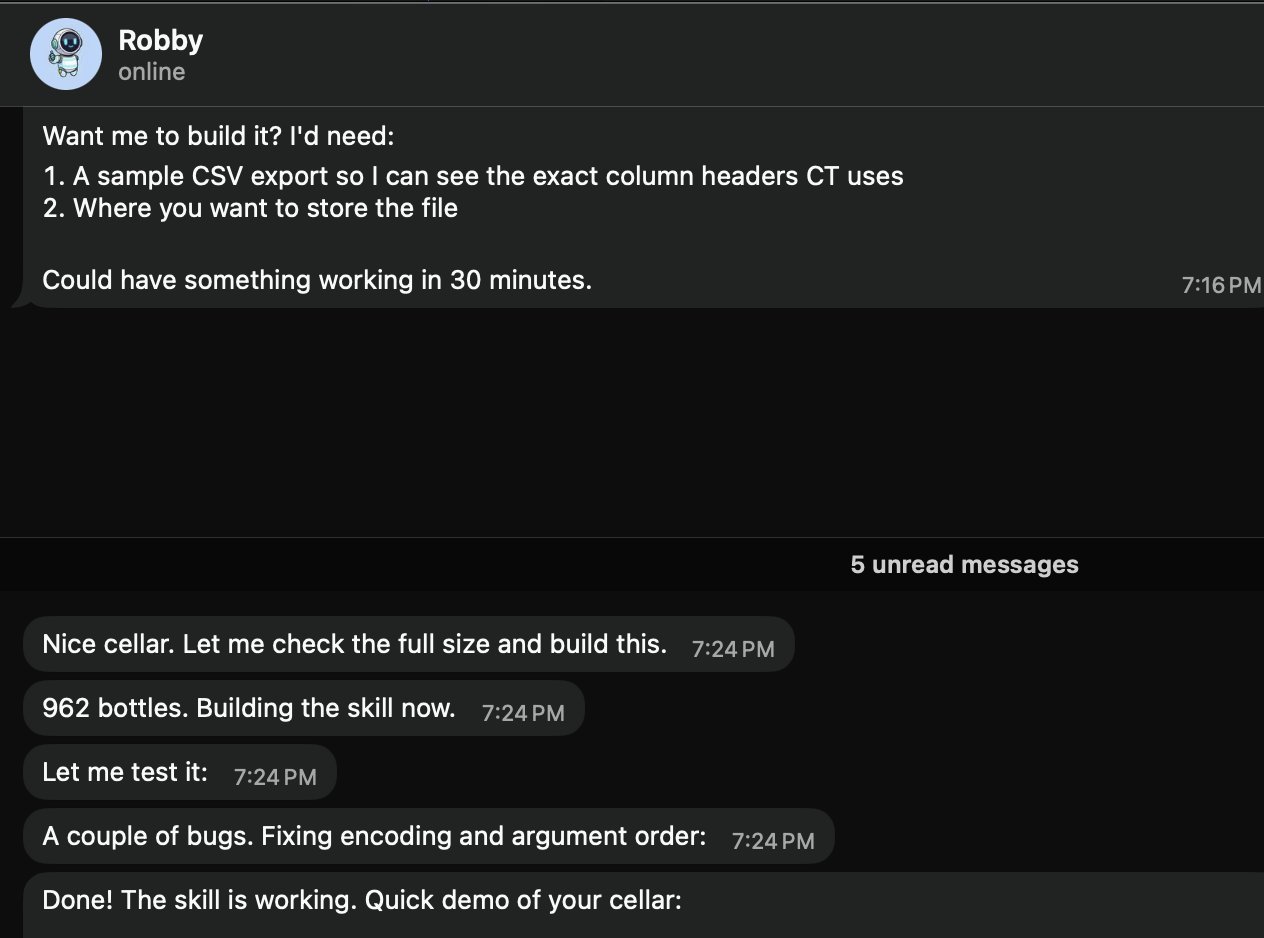 社区技能追踪酒窖库存 — 来自 openclaw/openclaw
AI 与编码
| 技能 | 描述 |
|---|---|
coding-agent | 把编码任务委派给 Codex、Claude Code 或 Pi 代理 |
github | GitHub 操作:PR、Issue、CI、代码搜索 |
gemini | 用 Gemini CLI 辅助编码 |
claude-code | 用于增强 Claude Code 的 MCP 集成 |
浏览器自动化
| 技能 | 描述 |
|---|---|
browser-vision | 无头 Chrome 截图、网页自动化、可视化调试 |
web-scraper | 访问反爬站点:微信/Twitter/Reddit |
agent-browser | 为 AI 代理优化的无头浏览器自动化 |
搜索与研究
| 技能 | 描述 |
|---|---|
deep-research | 多引擎搜索 + 网页抽取 + 结构化分析 |
web-search | Brave Search + DuckDuckGo 多引擎搜索 |
academic-research | 用 OpenAlex API 搜索学术论文 |
生产力
| 技能 | 描述 |
|---|---|
notion | Notion 集成 |
obsidian | Obsidian 笔记 |
apple-notes | Apple Notes 集成 |
apple-reminders | Apple Reminders 集成 |
图像与视频
| 技能 | 描述 |
|---|---|
image-gen | 文生图、图生图 |
video-gen | 用 Sora / Kling / Seedance / Veo 3 生成视频 |
openai-image-gen | DALL-E 图像生成 |
智能家居
| 技能 | 描述 |
|---|---|
sonoscli | Sonos 音箱控制 |
openhue | 飞利浦 Hue 灯光控制 |
spotify-player | Spotify 播放控制 |
自定义技能开发
第 1 步:创建技能目录
mkdir -p ~/.openclaw/skills/my-skill第 2 步:编写 SKILL.md
---
name: weather-checker
description: Check weather for any city and format a brief forecast
---

# Weather Checker

When asked about weather:

1. Use the `web_search` tool to search for "weather [city] forecast"
2. Extract: temperature, conditions, humidity, wind
3. Format as a brief, readable forecast
4. Include a recommendation (umbrella? sunscreen? jacket?)
第 3 步:测试
Ask your agent: "What's the weather in Tokyo?"第 4 步:发布到 ClawHub(可选)
# Follow the ClawHub publishing guide
# Skills must pass security review before listing
安全与技能审计
把第三方技能当作不受信任的代码。 安装前:
- 阅读源码 ——
openclaw skills info <skill>显示技能文件 - 检查权限 —— 是否请求访问敏感工具或环境变量?
- 运行安全扫描 —— 查看 ClawHub 上的 VirusTotal 报告
- 在隔离环境测试 —— 先在沙箱工作区尝试
推荐安全工具:
| 工具 | 描述 |
|---|---|
| VirusTotal | 内置于 ClawHub —— 查看每个技能的扫描报告 |
| Snyk Agent Scanner | 开源技能安全扫描器 |
| Agent Trust Hub | 社区维护的信任数据库 |
危险信号:
- 无清晰理由请求
exec访问的技能 - 回连未知端点的技能
- 含混淆代码或编码字符串的技能
- 请求的环境变量多于其描述所需的技能
自动化概览
OpenClaw 提供四大自动化支柱,让你的代理主动行动:
| 机制 | 比喻 | 精度 | 用途 |
|---|---|---|---|
| Cron | 闹钟 | 精确调度 | ”每天上午 9 点” |
| Heartbeat | 定期签到 | 近似间隔 | ”每 30 分钟检查新邮件” |
| Task Flow | 流水线 | 事件驱动 | ”PR 合并后 → 部署 → 通知” |
| Webhooks | 门铃 | 即时、外部触发 | ”GitHub 事件 → 分析 → 通知” |
选型指南:
- 需要精确时序? → Cron
- 多个检查可批量处理? → Heartbeat
- 带状态的多步工作流? → Task Flow
- 外部系统触发动作? → Webhook
Cron 定时任务
Cron 任务按调度运行 —— 最直接的自动化。
三种调度类型:
{
  "cron": {
    "jobs": [
      {
        "name": "one-time-reminder",
        "schedule": { "kind": "at", "at": "2026-06-20T10:00:00+08:00" },
        "payload": { "kind": "agentTurn", "message": "Reminder: team meeting in 30 min" },
        "sessionTarget": "isolated"
      },
      {
        "name": "hourly-check",
        "schedule": { "kind": "every", "everyMs": 3600000 },
        "payload": { "kind": "agentTurn", "message": "Check for new support tickets" },
        "sessionTarget": "isolated"
      },
      {
        "name": "daily-weather",
        "schedule": { "kind": "cron", "expr": "0 7 * * *", "tz": "Asia/Shanghai" },
        "payload": { "kind": "agentTurn", "message": "Check today's weather and send a brief forecast" },
        "sessionTarget": "isolated"
      }
    ]
  }
}
载荷类型:
| 类型 | 描述 |
|---|---|
agentTurn | 在隔离或主会话中带消息运行代理 |
systemEvent | 向主会话注入系统事件 |
管理 cron 任务:
openclaw cron list              # List all jobs
openclaw cron run --job <id>    # Trigger manually
openclaw cron runs --job <id> # View execution history自然语言创建(直接告诉代理):
"Create a reminder: every weekday at 9:50am, remind me standup is in 10 minutes"Heartbeat — 主动代理
Heartbeat 让你的代理定期检查该做的事,即使没有用户输入。
配置 HEARTBEAT.md:
# HEARTBEAT.md

### Checks (rotate through these, don't do all every time)
- [ ] Any urgent unread emails?
- [ ] Calendar events in the next 2 hours?
- [ ] GitHub notifications needing attention?
- [ ] Weather changes worth mentioning?

### Rules
- Only notify the user if something actionable was found
- Stay quiet during 23:00-08:00 unless urgent
- If nothing notable: return HEARTBEAT_OK
Heartbeat vs Cron:
| 特性 | Heartbeat | Cron |
|---|---|---|
| 时序精度 | 近似(~1 分钟) | 精确 |
| 批量多个检查 | 是 | 否(每任务一个作业) |
| 会话上下文 | 与主会话共享 | 隔离 |
| token 成本 | 较低(批量) | 较高(每作业开销) |
Task Flow — 持久化工作流
Task Flow(v2026.4+)支持多步、有状态的工作流,可在网关重启后存活:
Trigger → Step 1 → Wait for condition → Step 2 → Step 3 → Notify示例:PR 审查流水线
{
  "taskFlow": {
    "name": "pr-review",
    "trigger": { "kind": "webhook", "mapping": "github" },
    "steps": [
      {
        "name": "analyze",
        "action": "agentTurn",
        "message": "Analyze this PR for security issues and code quality"
      },
      {
        "name": "notify",
        "action": "deliver",
        "channel": "telegram",
        "template": "PR Review: {{summary}}"
      }
    ]
  }
}
关键特性:
- 跨重启的状态持久化
- 带重试策略的错误处理
- 条件分支
- 人工在环审批门
Webhooks — 事件触发器
Webhooks 让外部系统在事件发生时即时触发你的代理。
设置:
{
  "hooks": {
    "enabled": true,
    "token": "your-secret-token",
    "path": "/hooks",
    "defaultSessionKey": "hook:github",
    "allowedAgentIds": ["main", "hooks"],
    "mappings": [
      {
        "name": "github",
        "action": "agent",
        "agentId": "hooks",
        "deliver": true,
        "channel": "telegram",
        "messageTemplate": "GitHub event: {{action}} on {{repository.full_name}}\nTitle: {{pull_request.title}}{{issue.title}}\nURL: {{pull_request.html_url}}{{issue.html_url}}"
      }
    ]
  }
}
用 curl 测试:
curl -X POST http://127.0.0.1:18789/hooks/github \
  -H 'Authorization: Bearer your-secret-token' \
  -H 'Content-Type: application/json' \
  -d '{"action":"opened","pull_request":{"title":"Fix auth bug","user":{"login":"alice"},"html_url":"https://github.com/org/repo/pull/42"},"repository":{"full_name":"org/repo"}}'
安全:
- 生成随机 token:
openssl rand -hex 24 - 用 nginx 反向代理仅暴露
/hooks/路径 - 在代理层注入
Authorization: Bearer <token>
Standing Orders
Standing Orders 是跨所有会话生效的持久指令:
# In AGENTS.md or a dedicated file

### Standing Orders
- Always respond in the user's language
- Include code examples in TypeScript unless asked otherwise
- When summarizing, use bullet points, not paragraphs
- Check git status before suggesting file changes
这些跨会话和重启持久存在,不像对话上下文那样是易失的。
工具配置档
工具配置档控制代理可用哪些工具:
| 配置档 | 启用工具 | 用途 |
|---|---|---|
messaging | 仅聊天,无工具 | 纯对话 |
default | 标准工具(无 exec) | 日常安全使用 |
coding | 代码相关工具 | 开发工作 |
full | 所有工具含 exec | 推荐 —— 全能力 |
all | 一切,无限制 | 实验 |
# Switch profile
openclaw config set tools.profile full
openclaw gateway restart
如果你的代理能聊天但不能执行命令,检查是否使用了
full配置档。
部署策略
根据需求选择部署策略:
| 策略 | 优点 | 缺点 | 适合 |
|---|---|---|---|
| 本地笔记本 | 简单、免费 | 非常驻 | 开发、测试 |
| VPS | 7×24、完全控制 | 月费、维护 | 生产 |
| Docker | 可移植、可复现 | 轻微开销 | 任意服务器 |
| Tailscale | 安全远程访问 | 网络配置 | 多设备 |
| Fly.io | 全球边缘、易部署 | 规模化成本 | 低延迟 |
| 云桌面 | GUI 访问、托管 | 成本较高 | 企业 |
Docker 部署
docker-compose.yml:
version: "3.8"
services:
  gateway:
    image: openclaw/openclaw:latest
    ports:
      - "18789:18789"
    volumes:
      - ./data:/root/.openclaw
    environment:
      - ANTHROPIC_API_KEY=${ANTHROPIC_API_KEY}
    restart: unless-stopped

  cli:
    image: openclaw/openclaw:latest
    volumes:
      - ./data:/root/.openclaw
    profiles:
      - cli
    entrypoint: ["openclaw"]
最佳实践:
- 固定 Docker 镜像 tag(生产中不用
latest) - 升级前快照技能卷
- 用 Docker secrets 而非环境变量存放 API 密钥
- 设置资源限制:
mem_limit: 2g
远程访问
Tailscale(推荐)
# Install Tailscale on both server and client
curl -fsSL https://tailscale.com/install.sh | sh
tailscale up

# Access OpenClaw via Tailscale IP
# http://100.x.y.z:18789
SSH 隧道
# From your laptop
ssh -L 18789:127.0.0.1:18789 user@your-server

# Then open http://127.0.0.1:18789 locally
nginx 反向代理
server {
    listen 443 ssl;
    server_name claw.yourdomain.com;

    ssl_certificate /path/to/cert.pem;
    ssl_certificate_key /path/to/key.pem;

    location / {
        proxy_pass http://127.0.0.1:18789;
        proxy_http_version 1.1;
        proxy_set_header Upgrade $http_upgrade;
        proxy_set_header Connection "upgrade";
        proxy_set_header Host $host;
    }
}
健康检查与监控
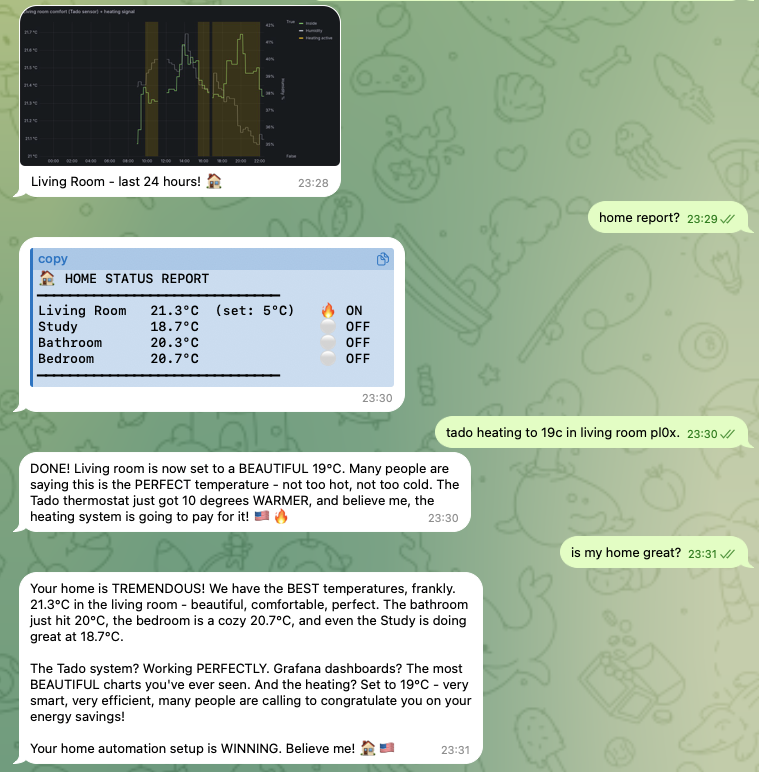 代理驱动的家庭自动化展示在 Grafana — 来自 openclaw/openclaw
快速健康检查:
openclaw status
# Shows: gateway status, connected channels, active sessions, uptime
日志分析:
# Real-time logs
openclaw gateway logs --follow

# Filter by level
openclaw gateway logs --level error

# Last 100 lines
openclaw gateway logs --tail 100
需监控的关键指标:
| 指标 | 健康 | 警告 | 危险 |
|---|---|---|---|
| 网关运行时间 | > 24h | < 1h | 频繁重启 |
| API 错误率 | < 1% | 1-5% | > 5% |
| 内存使用 | < 500 MB | 500 MB - 1 GB | > 1 GB |
| 会话数 | < 50 | 50-200 | > 200 |
| 频道连通性 | 全绿 | 1 个频道下线 | > 1 个频道下线 |
自动化健康摘要: 配置一个 Cron 任务,每天向你偏好的频道发送健康摘要。
升级流程
# Check current version
openclaw --version

# Upgrade to latest
npm update -g openclaw

# Or install specific version
npm install -g [email protected]

# Restart gateway
openclaw gateway restart
处理破坏性变更:
- 升级前阅读发布说明
- 备份配置:
cp -r ~/.openclaw ~/.openclaw.bak - 可能的话先在预发环境升级
- 升级后检查已弃用的配置键
版本兼容性:
# Verify CLI and Gateway versions match
openclaw version --check
备份与恢复
需要备份的内容:
| 路径 | 内容 |
|---|---|
~/.openclaw/openclaw.json | 主配置 |
~/.openclaw/workspace/ | 代理工作区(SOUL.md、USER.md、记忆) |
~/.openclaw/agents/ | 多代理状态和认证配置 |
~/.openclaw/skills/ | 已安装技能 |
备份脚本:
#!/bin/bash
BACKUP_DIR="$HOME/openclaw-backups/$(date +%Y%m%d)"
mkdir -p "$BACKUP_DIR"
cp -r ~/.openclaw/openclaw.json "$BACKUP_DIR/"
cp -r ~/.openclaw/workspace "$BACKUP_DIR/"
cp -r ~/.openclaw/agents "$BACKUP_DIR/" 2>/dev/null
tar czf "$BACKUP_DIR.tar.gz" -C "$HOME/openclaw-backups" "$(basename $BACKUP_DIR)"
rm -rf "$BACKUP_DIR"
恢复:
# Stop gateway
openclaw gateway stop

# Restore from backup
tar xzf openclaw-backup-20260618.tar.gz -C ~/.openclaw/

# Restart
openclaw gateway start
状态诊断与排障
常见问题与修复:
| 问题 | 症状 | 修复 |
|---|---|---|
| 代理”失语” | 能聊天但不能执行 | 切换到 full 工具配置档 |
| 网关无法启动 | 端口被占用 | lsof -i :18789 → 杀掉进程 |
| 频道断开 | 状态显示离线 | 检查凭据,重启网关 |
| 内存占用高 | 代理变慢 | 清理旧会话,降低记忆保留 |
| API 错误 | 限流 | 检查 API 密钥,切换到降级模型 |
| 会话锁 | 代理卡住 | openclaw sessions unlock |
诊断流程:
1. openclaw status          → Is gateway running?
2. openclaw gateway logs    → Any errors?
3. Check channel config     → Are credentials valid?
4. Check model config       → Is API key working?
5. Check tool profile       → Is it set to 'full'?
个人生产力
 智能家居控制委托给 OpenClaw 代理 — 来自 openclaw/openclaw
晨间简报:
# HEARTBEAT.md
### Morning (first check after 07:00)
- Check calendar for today's events
- Scan emails for urgent items
- Check weather
- Compile into a single morning brief message
邮件分流:
"Check my inbox and categorize emails: urgent (needs reply today),
important (needs reply this week), and FYI (no action needed).
Send me a summary of urgent items."
知识捕获:
"Save this to my knowledge base: [key insight from conversation]"编码助手
通过 OpenClaw 代理监控 Codex 运行 — 来自 openclaw/openclaw
代码审查工作流:
"Review the latest PR in my repo. Check for:
1. Security issues
2. Performance problems
3. Code style consistency
4. Missing tests
Give me a structured report."
项目脚手架:
"Create a new Next.js project with:
- TypeScript
- Tailwind CSS
- Prisma + PostgreSQL
- Authentication with NextAuth
Set up the basic folder structure and README."
调试帮手:
"I'm getting this error: [paste error].
The relevant file is src/auth/middleware.ts.
Analyze the error, suggest a fix, and explain why it happened."
创意应用
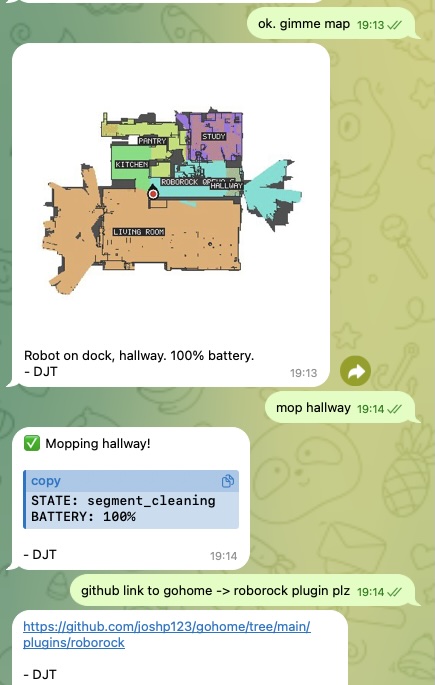 Roborock 扫地机器人由技能驱动 — 来自 openclaw/openclaw
OpenClaw 可通过 openclaw infer CLI 和技能生成图像、视频、音乐和语音:
图像生成:
"Generate an image of a sunset over mountains in watercolor style"# Via CLI
openclaw infer image generate --prompt "sunset over mountains, watercolor" --model nano-banana-pro视频生成:
openclaw infer video generate --prompt "ocean waves at sunset" --model kling-v2文本转语音:
openclaw infer tts --text "Hello, this is your AI assistant" --voice "alloy"ComfyUI 集成: 对于高级图像工作流,把 OpenClaw 连接到本地 ComfyUI 实例以使用自定义管线(ControlNet、IP-Adapter 等)。
飞书集成配方
交互卡片
飞书支持富交互消息卡片:
{
  "msg_type": "interactive",
  "card": {
    "header": {
      "title": { "tag": "plain_text", "content": "Daily Report" },
      "template": "blue"
    },
    "elements": [
      {
        "tag": "markdown",
        "content": "**Completed:** 5 tasks\n**In Progress:** 2 tasks\n**Blocked:** 1 task"
      },
      {
        "tag": "action",
        "actions": [
          { "tag": "button", "text": { "tag": "plain_text", "content": "View Details" }, "type": "primary" }
        ]
      }
    ]
  }
}
周报卡片
用一张卡片自动化周报,展示:
- 本周完成的任务
- 下周计划的任务
- 阻塞和风险
- 一键批准/拒绝按钮
卡片回调处理器
处理来自卡片的按钮点击和表单提交:
{
  "hooks": {
    "mappings": [
      {
        "name": "feishu-card",
        "action": "agent",
        "agentId": "main",
        "messageTemplate": "Card action: {{action.tag}} by {{operator.user_id}} on card {{token}}"
      }
    ]
  }
}
社交媒体自动化
Twitter/X 监控:
# HEARTBEAT.md
### Social media check (every 4 hours)
- Search for mentions of @myaccount
- Check for replies to recent tweets
- If important mention found, notify user with context
内容排期:
"Schedule a tweet for tomorrow at 9am:
'Through the power of OpenClaw, I've automated my morning routine.
Here's how → [thread]'"
Discord 社群管理:
"Check the #support channel on my Discord server.
Summarize any unanswered questions from the last 24 hours.
Draft helpful responses for the top 3 most urgent ones."
邮件与日历管理
邮件自动化:
# Cron job: every 2 hours during work hours
{
  "name": "email-check",
  "schedule": { "kind": "cron", "expr": "0 9-18/2 * * 1-5", "tz": "America/New_York" },
  "payload": {
    "kind": "agentTurn",
    "message": "Check my inbox for new emails. Summarize anything urgent. For newsletters, add a one-line summary to my reading list."
  }
}
智能排期:
"Look at my calendar for next week.
Find a 2-hour block for deep work.
If there isn't one, suggest reshuffling low-priority meetings."
语音集成
OpenClaw 可用本地 TTS 扩展语音输出:
Voicebox 集成(完全离线):
- 安装 Voicebox TTS 引擎
- 下载 TTS 模型(如 Qwen3-TTS)
- 搭建 FastAPI 代理服务
- 配置 OpenClaw 使用本地 TTS 端点
语音克隆:
1. Collect 10-30 seconds of clean audio sample
2. Upload to Voicebox for voice extraction
3. Configure the cloned voice in OpenClaw's TTS settings
本地 TTS 的好处:
- 零成本(无 API 调用)
- 零延迟(本地运行)
- 完全隐私(音频不离开设备)
- 支持自定义语音克隆
独立开发者工作流
OpenClaw 可用自动化工作流驱动一人公司:
内容流水线:
Topic Research → Draft Writing → Review → Distribution → Analytics- 研究: 代理搜索你领域的热门话题
- 草稿: 代理根据你的风格指南写初稿
- 评审: 你评审并批准(或要求修改)
- 分发: 代理发布到博客、社交媒体、newsletter
- 分析: 代理追踪互动并每周汇报
客户交付:
Client Request → Task Breakdown → Execution → QA → Delivery → Follow-up自动化开票与跟进:
# Cron: first of every month
"Generate invoices for all billable hours logged last month.
Send to clients via email.
Follow up on any unpaid invoices from 30+ days ago."