
Meet Hermes Agent

Hermes Agent is the self-improving AI agent built by Nous Research. Unlike a stateless chatbot, it ships with a closed learning loop baked in: it creates skills from experience, improves them during use, nudges itself to persist knowledge across sessions, searches its own past conversations, and builds a deepening model of who you are the longer you use it.
It runs on your own hardware — a $5 VPS, a GPU cluster, or serverless infrastructure that costs nearly nothing when idle — and it is not tied to your laptop. You can talk to it from Telegram while it works on a cloud VM. The core repo (NousResearch/hermes-agent, 200k+ stars, MIT) is one of the fastest-growing agent repos ever.
How it differs from its siblings:
- vs Claude Code / Codex — those are coding agents that live in your terminal session. Hermes is a general-purpose agent that lives on a server and reaches you through messaging platforms, cron jobs, and subagents. It keeps working after you close the laptop.
- vs OpenClaw — OpenClaw is the multi-platform messaging gateway Hermes directly succeeds. Hermes keeps OpenClaw’s “one agent, many chat apps” model and adds the thing OpenClaw never had: a built-in self-improvement loop and a Curator that maintains its own skill library. There is a one-command migration path from OpenClaw (covered in the final tab).
The orange-book guide frames the whole product in one line: “the first agent that ships with its ‘reins’ built in, and the reins grow themselves.” That is the spine of this guide.
Synthesized from: hermes-agent-orange-book (Part 1), hermes-agent (core README), awesome-hermes-agent (Official Resources).
One Brain, Many Faces
Hermes is model-agnostic. Pick any provider and switch with hermes model — no code changes, no lock-in:
- Nous Portal — Nous’s own gateway (300+ models + a Tool Gateway, one subscription)
- OpenRouter — 200+ models behind one API
- NovitaAI, NVIDIA NIM (Nemotron), Xiaomi MiMo, z.ai/GLM, Kimi/Moonshot, MiniMax, Hugging Face, OpenAI, or your own endpoint
The same brain shows you three surfaces (v0.16, “The Surface Release”):
- CLI / TUI — a real terminal interface with multiline editing, slash-command autocomplete, conversation history, interrupt-and-redirect, and streaming tool output.
- Native desktop app — the new v0.16 surface for people who don’t live in the terminal.
- Web dashboard — browser-based chat, terminal, memory, skills, and an inspector.
You can also reach it through any of 23 messaging platforms (covered in the Connecting Everything tab) — all from a single gateway process.
Synthesized from: hermes-agent-orange-book (Part 1), hermes-agent (core README).
Why Nous Built It
The orange book puts it bluntly: Hermes is the productization of Harness Engineering — the five components (instructions / constraints / feedback / memory / orchestration) that turn a raw LLM into a controllable, durable agent.
Most agents give you the harness and leave you to maintain it by hand. Hermes is different in one specific way: the reins grow themselves. Three engines drive that:
- Skills from experience — after a complex task, Hermes extracts a reusable skill and files it in its library. The skill then improves during use, not just at creation.
- Persistent, self-curated memory — periodic nudges make the agent persist what it learned, and it searches its own past conversations (FTS5) instead of forgetting them.
- Deepening user modeling — via Honcho, it builds a dialectic model of who you are across sessions, so its answers get calibrated to you over time.
The self-improvement engine is the headline differentiator and gets its own tab later (The Reins Grow Themselves), including the DSPy + GEPA research pipeline Nous open-sourced for evolving Hermes’s own prompts.
Synthesized from: hermes-agent-orange-book (Part 1, Part 2 framing).
Ecosystem & Version Map
Hermes is not a solo project — it sits at the center of a large, fast-moving ecosystem.
Core resources:
- Core repo — NousResearch/hermes-agent (200k+ stars, MIT). The agent itself.
- Official docs — hermes-agent.nousresearch.com/docs (quickstart, CLI, configuration, messaging, security, tools, skills, memory, MCP, cron, architecture).
- Skills Hub — the open standard for agent skills, compatible across Hermes, Claude Code, Cursor, Codex, and others.
- Discord — the Nous community (bug reports, feature requests, discussion).
- Sibling repos — hermes-agent-self-evolution (evolutionary self-improvement), autonovel (autonomous novel-writing pipeline), hermes-paperclip-adapter (run Hermes as a managed employee in a Paperclip company).
Release line (community-tracked): v0.7 → v0.12 (“The Curator release”) → v0.16 (“The Surface Release”). The awesome-list’s ecosystem review was last taken 2026-05-06 against v0.12; the orange book rebuilt on v0.16. Where v0.12 and v0.16 disagree (platforms 18 vs 23, backends 6 vs 7), this guide uses the v0.16 figure and flags the variance. For anything newer, check the official docs.
Synthesized from: awesome-hermes-agent (Official Resources, ecosystem status note), hermes-agent-orange-book (version notes).
Installation
This section grounds the practical “get running” path the awesome-list frames as its three-step “Where Do I Start?” — step 1: get running. The orange book is a concepts guide and explicitly defers install to the docs; the commands here come from the core README.
Linux, macOS, WSL2, Termux:
curl -fsSL https://hermes-agent.nousresearch.com/install.sh | bashWindows (native, PowerShell):
iex (irm https://hermes-agent.nousresearch.com/install.ps1)The installer handles everything: uv, Python 3.11, Node.js, ripgrep, ffmpeg, and a portable Git Bash (MinGit, unpacked to %LOCALAPPDATA%\hermes\git — no admin required, isolated from any system Git). If you already have Git, the installer detects and uses that instead.
After install:
source ~/.bashrc    # reload shell (or: source ~/.zshrc)
hermes              # start chatting!
Platform notes:
- Android / Termux — Hermes installs a curated
.[termux]extra, because the full.[all]extra pulls Android-incompatible voice dependencies. See the Termux guide in the docs. - Windows — native install lives under
%LOCALAPPDATA%\hermes; WSL2 installs under~/.hermesas on Linux. If Windows Defender flagsuv.exeas malware, that’s a false positive (it’s Astral’suv); whitelist the folder, not the hash — Hermes updatesuvand the hash changes.
Synthesized from: hermes-agent (core README, Quick Install), awesome-hermes-agent (Where Do I Start?).
Your First Conversation
The fastest path to a working agent skips collecting five separate API keys:
hermes setup --portalThat single command logs you in via OAuth, sets Nous as your provider, and turns on the Tool Gateway (web search via Firecrawl, image generation via FAL, TTS via OpenAI, and a cloud browser via Browser Use) — all under one subscription. Check what’s wired up any time with hermes portal info.
Prefer your own keys per-tool? You can bring them — the gateway is per-backend, not all-or-nothing. The full setup wizard is hermes setup (no --portal); it walks you through provider, model, tools, and messaging interactively.
Once set up, just type:
hermes # interactive CLI — start a conversationThe two entry points share many slash commands (/new, /model, /personality, /retry, /undo, /compress, /usage, /skills), so what you learn in the CLI carries over to messaging.
Synthesized from: hermes-agent (core README, Nous Portal + Getting Started).
Choosing a Model Provider
Hermes is model-agnostic. Pick a provider and model, then switch any time without touching code:
hermes model # choose your LLM provider and modelProvider options: Nous Portal (300+ models), OpenRouter (200+), NovitaAI, NVIDIA NIM (Nemotron), Xiaomi MiMo, z.ai/GLM, Kimi/Moonshot, MiniMax, Hugging Face, OpenAI, or your own endpoint.
Practical guidance: the awesome-list and docs recommend a model with ≥64K context for agentic work — tool calls and memory retrieval eat context fast. For getting started, Nous Portal’s single subscription is the lowest-friction choice; for production, OpenRouter lets you route per-task to whichever model is cheapest/strongest for that job.
Synthesized from: hermes-agent (core README), awesome-hermes-agent (Where Do I Start?).
CLI & TUI Basics
The CLI is a real terminal interface, not a line-by-line REPL. Highlights:
- Multiline editing and slash-command autocomplete
- Conversation history and streaming tool output
- Interrupt-and-redirect —
Ctrl+Cor just send a new message mid-task - Sessions — resume, branch, and search past conversations
Core commands:
hermes              # interactive CLI — start a conversation
hermes tools        # configure which tools are enabled
hermes config set   # set individual config values
hermes gateway      # start the messaging gateway
hermes doctor       # diagnose any issues
hermes update       # update to the latest version
Shared slash commands (CLI + messaging): /new or /reset, /model [provider:model], /personality [name], /retry, /undo, /compress, /usage, /insights [--days N], /skills, /<skill-name>.
When something feels off, hermes doctor diagnoses common issues; hermes update pulls the latest release. Because the product ships releases roughly every few weeks (v0.7 → v0.16 in ~two months), keeping current matters.
Synthesized from: hermes-agent (core README, Getting Started + CLI quick reference).
Configuration & Context
Configuration lives in a config file (providers, models, all options), editable via hermes config set or directly. Two files deserve special attention because they shape every conversation:
Personality & SOUL.md — SOUL.md defines the agent’s global default voice and behavioral guardrails (the “soul” it falls back to when nothing more specific applies). Set or switch personalities with /personality [name]. This is where you encode standing principles (“never delete without confirmation”, “prefer concise answers”) that persist across sessions and platforms.
Context Files — project-context files that shape every conversation in a workspace. Drop a context file in a project and Hermes folds it into every turn automatically — the equivalent of a per-project CLAUDE.md or AGENTS.md, but applied across CLI, desktop, and messaging.
Migration note: if you’re coming from OpenClaw, hermes setup auto-detects ~/.openclaw and offers to migrate your SOUL.md, memories, skills, allowlists, messaging settings, API keys, TTS assets, and workspace instructions before configuration begins (full migration is its own section in the final tab).
Synthesized from: hermes-agent (core README, Configuration/Context Files/SOUL.md docs), awesome-hermes-agent (Where Do I Start?).
Three Engines of Self-Improvement
This is the headline differentiator — the reason Hermes exists as a separate product rather than “OpenClaw with skills.” Three engines run continuously:
- Skills from experience. After a complex task, Hermes extracts a reusable skill and files it in its library. The skill doesn’t sit static — it improves during use, refining itself from execution traces.
- Self-curated persistent memory. Periodic nudges make the agent persist what it learned rather than dropping it at session end. It searches its own past conversations (FTS5 full-text search with LLM summarization) for cross-session recall.
- Deepening user modeling. Via Honcho, Hermes builds a dialectic model of who you are across sessions — not a keyword profile, but a model that gets refined through back-and-forth. Its answers calibrate to you over time.
The orange book calls this “the reins grow themselves” — the harness (instructions / constraints / feedback / memory / orchestration) is not maintained by hand but by the agent itself. The next two sections cover the Curator that governs the skill library, and the research pipeline (DSPy + GEPA) that evolves Hermes’s own prompts.
Synthesized from: hermes-agent-orange-book (Part 2), hermes-agent (core README, closed learning loop).
The Curator
Introduced in v0.12 (“The Curator release”), the Curator is the autonomous process that governs the skill library so it doesn’t rot.
On a 7-day cycle, the Curator:
- Grades skills — scores them on how well they actually perform
- Consolidates — merges overlapping skills that do the same thing
- Prunes — removes skills that are dead, superseded, or harmful
This matters because naive “the agent learns forever” systems accumulate cruft: duplicate skills, stale approaches, prompt drift. The Curator is the governance layer that keeps the library lean and trustworthy — the difference between “grows” and “grows weird.”
The awesome-list frames it precisely: “the only agent with a built-in learning loop — it creates skills from experience, improves them during use, and as of v0.12.0 maintains its own skill library through an autonomous Curator that grades, consolidates, and prunes on a 7-day cycle.”
Synthesized from: hermes-agent-orange-book (Part 2), awesome-hermes-agent (intro).
What Not to Learn
Self-improvement without guardrails is a liability — an agent that “learns” mid-conversation can break caching, drift from its purpose, or quietly get worse. Hermes enforces hard limits on what it will and won’t absorb:
- Mid-conversation stability — no skill/memory changes take effect mid-turn; caching compatibility is preserved so an in-flight conversation doesn’t see its own rules shift underneath it.
- Semantic preservation — an evolved variant must not drift from the original skill’s purpose. A “GitHub code review” skill can get better at code review; it can’t quietly become something else.
- Size limits — skills are capped (≤15KB), tool descriptions capped (≤500 chars), so the library can’t bloat unbounded.
- Human review gate — evolved variants go through human PR review, never a direct commit. The agent proposes; a person approves.
These same guardrails underpin the DSPy + GEPA evolution pipeline (next section), where every candidate mutation must pass a full test suite before it’s even considered.
Synthesized from: hermes-agent-orange-book (Part 2), hermes-agent-self-evolution (Guardrails).
Evolving Skills with DSPy + GEPA
For teams that want to actively evolve Hermes’s skills, prompts, and tool descriptions — not just let the Curator passively maintain them — Nous open-sourced hermes-agent-self-evolution (4.3k stars, MIT).
It uses DSPy + GEPA (Genetic-Pareto Prompt Evolution) — a reflective evolutionary search:
Read current skill/prompt/tool ──► Generate eval dataset
                                        │
                                        ▼
                                   GEPA Optimizer ◄── Execution traces
                                        │                    ▲
                                        ▼                    │
                                   Candidate variants ──► Evaluate
                                        │
                                   Constraint gates (tests, size limits, benchmarks)
                                        │
                                        ▼
                                   Best variant ──► PR against hermes-agent
The key insight: GEPA reads execution traces to understand why things fail, not just that they failed — then proposes targeted mutations rather than random search. It’s an ICLR 2026 Oral paper.
Why it’s practical: no GPU training required. Everything runs via API calls — mutating text, evaluating results, selecting the best variants — at roughly $2–10 per optimization run.
git clone https://github.com/NousResearch/hermes-agent-self-evolution.git
cd hermes-agent-self-evolution
pip install -e ".[dev]"
export HERMES_AGENT_REPO=~/.hermes/hermes-agent

# Evolve a skill using synthetic eval data
python -m evolution.skills.evolve_skill \
    --skill github-code-review \
    --iterations 10 \
    --eval-source synthetic

# Or use real session history from Claude Code, Copilot, and Hermes
python -m evolution.skills.evolve_skill \
    --skill github-code-review \
    --iterations 10 \
    --eval-source sessiondb
Synthesized from: hermes-agent-self-evolution (README).
The 5-Phase Plan & Guardrails
The self-evolution repo lays out a phased roadmap for what GEPA can optimize:
| Phase | Target | Engine | Status |
|---|---|---|---|
| Phase 1 | Skill files (SKILL.md) | DSPy + GEPA | ✅ Implemented |
| Phase 2 | Tool descriptions | DSPy + GEPA | 🔲 Planned |
| Phase 3 | System prompt sections | DSPy + GEPA | 🔲 Planned |
| Phase 4 | Tool implementation code | Darwinian Evolver | 🔲 Planned |
| Phase 5 | Continuous improvement loop | Automated pipeline | 🔲 Planned |
Two engines power it:
- DSPy + GEPA (MIT) — reflective prompt evolution that reads execution traces and proposes targeted mutations.
- Darwinian Evolver (AGPL v3, external CLI only) — code evolution with Git-based organisms, for Phase 4.
Every evolved variant must pass five guardrails before it lands:
- Full test suite —
pytest tests/ -qmust pass 100% - Size limits — skills ≤15KB, tool descriptions ≤500 chars
- Caching compatibility — no mid-conversation changes
- Semantic preservation — must not drift from original purpose
- PR review — all changes go through human review, never a direct commit
The operational playbook from the awesome-list is explicit about the failure mode: the trick is not “evolve faster” — it’s “evolve without quietly getting weird.” Pair the evolution pipeline with scheduled regression checks and a second evaluation pass that blocks bad prompt mutations.
Synthesized from: hermes-agent-self-evolution (README, Full Plan, Guardrails), awesome-hermes-agent (Level-Up Blueprints).
Three-Layer Memory
Hermes’s memory is layered, not flat — each layer has a different lifespan and purpose:
- Session memory — the current conversation. Short-lived, holds the active context window.
- Active memory — what’s retrieved and surfaced before a response (proactive memory retrieval, v2026.4+). The agent pulls relevant memories before answering, not just when asked.
- Long-term memory — durable knowledge that persists across sessions and platforms. This is what makes the agent “remember” you tomorrow.
The orange book frames this as a three-layer memory system (the “How It Remembers You” part) — and crucially, the layers compose. Session context can promote to active; active can promote to long-term; long-term feeds back into active retrieval on the next turn. The agent is not amnesiac between sessions the way a stateless chatbot is.
This layering is also what makes the Curator (previous tab) necessary — without governance, long-term memory would accumulate contradictions and stale claims.
Synthesized from: hermes-agent-orange-book (Part 3), hermes-agent (core README, closed learning loop).
Session Search & Summarization
Long-term memory is useless if you can’t find anything in it. Hermes ships FTS5 full-text session search with LLM summarization for cross-session recall.
Instead of dumping raw chunks back into context, the agent searches its past conversations, summarizes what’s relevant, and injects a compressed, relevant slice. This is the difference between “here are 10 chunks that mention your query” and an actual recalled answer.
The practical effect: you can reference something from a conversation three weeks ago — “remember when we decided on the pricing tier?” — and Hermes retrieves it without you re-explaining. Search works across CLI, desktop, and messaging because memory is shared, not per-surface.
The awesome-list’s operational playbook calls out a related gotcha: tune session timeout/expiry early. Use the configuration docs to adjust session retention for slower-moving threads so context is kept when needed — default expiry can drop context you wanted to keep.
Synthesized from: hermes-agent-orange-book (Part 3), hermes-agent (core README), awesome-hermes-agent (Operational Playbooks).
Honcho User Modeling
 Honcho — the dialectic user-modeling layer — via plastic-labs/honcho
The deepest memory layer is user modeling — Hermes doesn’t just remember what you said, it builds a model of who you are, via Honcho.
Honcho is dialectic — it refines the user model through back-and-forth, not a static keyword profile. The model deepens across sessions, so the agent’s answers get calibrated to your preferences, vocabulary, and working style over time. This is the “deepening model of who you are” the core README leads with.
Practical guidance from the awesome-list playbook:
- Curate
USER.mdandMEMORY.mdintentionally — treat profile memory as high-signal infrastructure. Keep entries concise, durable, and preference-focused instead of dumping raw notes. - Memory pressure handling — if you’re repeating context or losing long-term recall, review the Honcho Memory docs and evaluate hindsight or self-hosted memory backends.
For teams that want stronger cross-session modeling than the built-in default, the awesome-list’s Level-Up blueprint suggests layering honcho-self-hosted, then hindsight for retain/recall/reflect across large histories, then plur for portable shared memory in an open engram format.
Synthesized from: hermes-agent-orange-book (Part 3), hermes-agent (core README), awesome-hermes-agent (Operational Playbooks, Level-Up Blueprints).
Skills System
Skills are procedural memory — reusable capabilities Hermes creates from experience and improves during use. Unlike a static plugin, a skill refines itself from execution traces and is governed by the Curator (7-day grade/consolidate/prune cycle).
The open standard: Hermes skills are compatible with agentskills.io — the open skill standard that also works with Claude Code, Cursor, Codex, and other agents. A skill written for Hermes can move; a skill from the ecosystem can install into Hermes.
Installing & managing skills:
hermes tools        # configure which tools/skills are enabled
/skills             # browse installed skills (CLI + messaging)
/<skill-name>       # invoke a skill directly
Creating custom skills is covered in the Developer Guide path of the official docs (Architecture → Adding Tools → Creating Skills). The self-evolution repo (previous tab) is the active path for evolving existing skills rather than hand-writing new ones.
The next section catalogs the community skill ecosystem so you know what’s already out there before building your own.
Synthesized from: hermes-agent-orange-book (Part 3), hermes-agent (core README, Skills System docs).
Community Skills Catalog
The awesome-hermes-agent list tracks the skill ecosystem with maturity tags — production (stable, safe to build on), beta (works, still evolving), experimental (proof of concept, don’t depend on it). Selected entries:
Cross-platform / standard skills:
- [production] wondelai/skills — cross-platform agent skills for Claude Code and agentskills.io-compatible platforms.
- [production] youtube-skills — YouTube search, transcripts, playlist extraction. Fixes “my Hermes can’t watch YouTube on a $5 VPS” (built-in transcript fetch fails on cloud IPs; this routes through TranscriptAPI).
- [production] Anthropic-Cybersecurity-Skills — 753+ structured cybersecurity skills mapped to MITRE ATT&CK. 4k+ stars.
- [production] black-forest-labs/skills — official FLUX model skills for image generation, from the FLUX creators.
Hermes-native community skills:
- [beta] hermes-plugins — goal management, inter-agent bridge, model selection, cost control.
- [beta] hermes-skill-factory — meta-skill that auto-generates reusable skills from your workflows.
- [beta] oh-my-hermes — multi-agent orchestration skills (deep-research, deep-interview, ralplan, ralph, triage, autopilot). Covered in the multi-agent tab.
- [experimental] super-hermes — teaches Hermes to write its own analytical prompts (meta-reasoning layer).
- [experimental] hermes-life-os — personal OS agent that detects daily patterns and learns your routines.
Browse the full list at 0xNyk/awesome-hermes-agent (4.2k stars, CC BY 4.0).
Synthesized from: awesome-hermes-agent (Skills & Plugins).
64 Built-in Tools
Hermes ships a large built-in toolset — 64 tools per the v0.16 orange book (the core README’s docs page still lists “40+ tools” from an earlier version — the number grew across releases). Categories include:
- Web search and browsing (cloud browser via Browser Use)
- Vision (image extraction, understanding)
- Image generation (FAL)
- Text-to-speech (OpenAI)
- Voice memo transcription for cross-platform conversation continuity
Toolsets & profiles group tools so you can enable/disable them as a unit — e.g. a messaging profile, a coding profile, a full profile. Configure with hermes tools. This matters for security: the principle of least privilege says don’t enable coding tools on a messaging-only agent that strangers can reach.
The Tool Gateway (next-but-one section) is the Nous Portal-bundled subset — web search, image gen, TTS, cloud browser — under one subscription, so you don’t collect four separate API keys.
Synthesized from: hermes-agent-orange-book (Part 4), hermes-agent (core README, Tools & Toolsets docs).
MCP Integration
Hermes speaks MCP (Model Context Protocol) — connect any MCP server to extend the agent’s capabilities beyond the built-in tools.
- Connect any MCP server for extended tool capabilities
- Filter MCP tools so you only expose the ones you want (not the whole server’s surface)
- Extend safely — MCP tools flow through the same approval/authorization model as built-in tools
MCP is how Hermes reaches into external systems without baking every integration into core. The awesome-list tracks community MCP integrations (e.g. computer-use-linux — Linux desktop-control MCP server with AT-SPI accessibility trees, Wayland/X11 input, screenshots).
For a deeper MCP primer (the protocol itself, not Hermes-specific wiring), see the Agent Engineering channel’s MCP 协议 & 工具生态 section — this guide focuses on Hermes’s integration surface.
Synthesized from: hermes-agent-orange-book (Part 4), hermes-agent (core README, MCP Integration docs), awesome-hermes-agent (Official Resources).
Tool Gateway via Nous Portal
The Tool Gateway is the bundled-tool path for users on Nous Portal. One subscription covers four tools that would otherwise need four separate API keys and accounts:
| Tool | Backend | What it does |
|---|---|---|
| Web search | Firecrawl | Crawl and search the web |
| Image generation | FAL | Generate images |
| Text-to-speech | OpenAI | Voice synthesis |
| Cloud browser | Browser Use | Headless browsing from a cloud VM |
Enable it all in one command from a fresh install:
hermes setup --portalThat logs you in via OAuth, sets Nous as your provider, and turns on the Tool Gateway. Check status with hermes portal info.
The gateway is per-backend, not all-or-nothing — you can use Portal for the model but bring your own key for image gen, or mix any combination. This matters for cost control: route each tool to whichever backend is cheapest for your usage.
Synthesized from: hermes-agent (core README, Nous Portal).
23 Messaging Platforms
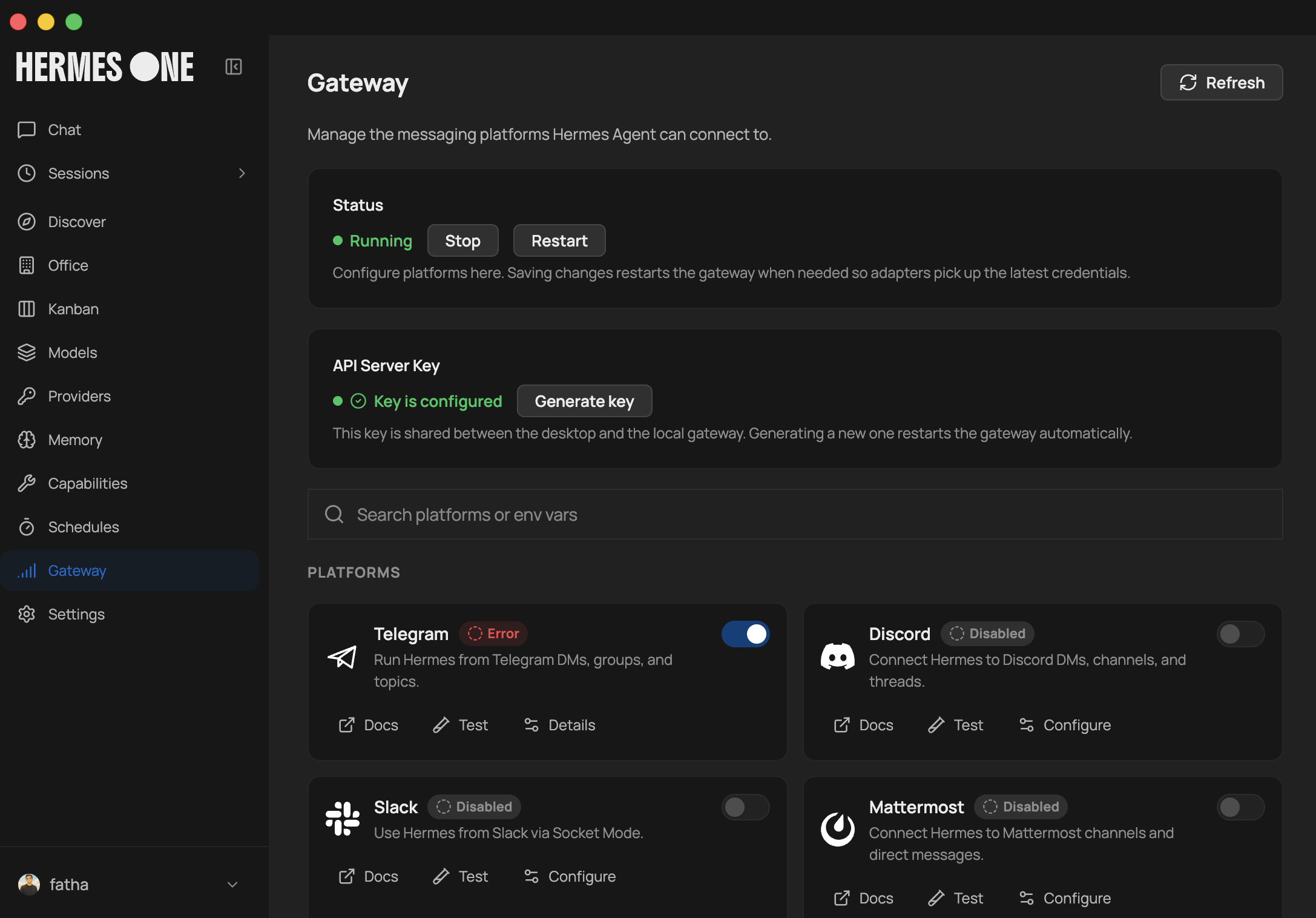 The messaging-gateway surface in the desktop app — via fathah/hermes-desktop
This is the OpenClaw inheritance, fully grown: Hermes talks to you through 23 messaging platforms from a single gateway process (v0.16; v0.12 had 18 — the number grew across releases).
Start the gateway:
hermes gateway setup     # configure platforms (Telegram, Discord, etc.)
hermes gateway start     # run the gateway process
Then send the bot a message on your platform of choice. Shared slash commands (/new, /model, /personality, /retry, /skills) work across all of them.
Supported platforms include: Telegram, Discord, Slack, WhatsApp, Signal, Email, Matrix, Mattermost, Microsoft Teams (via plugin), DingTalk, Feishu/Lark, WeCom, Weixin (WeChat, via the HermesClaw bridge), QQ Bot, Yuanbao, BlueBubbles (iMessage), Home Assistant, Google Chat, and more.
The China-platform cluster matters especially for the zh audience: WeCom, Weixin (via HermesClaw — run Hermes and OpenClaw on the same WeChat account), Feishu/Lark, DingTalk, QQ Bot, Yuanbao are all first-class.
DM pairing (covered in the security tab) governs which users a messaging agent will actually respond to — critical for any platform where strangers could message the bot.
Synthesized from: hermes-agent-orange-book (Part 4), hermes-agent (core README, Messaging Gateway docs).
Three Surfaces
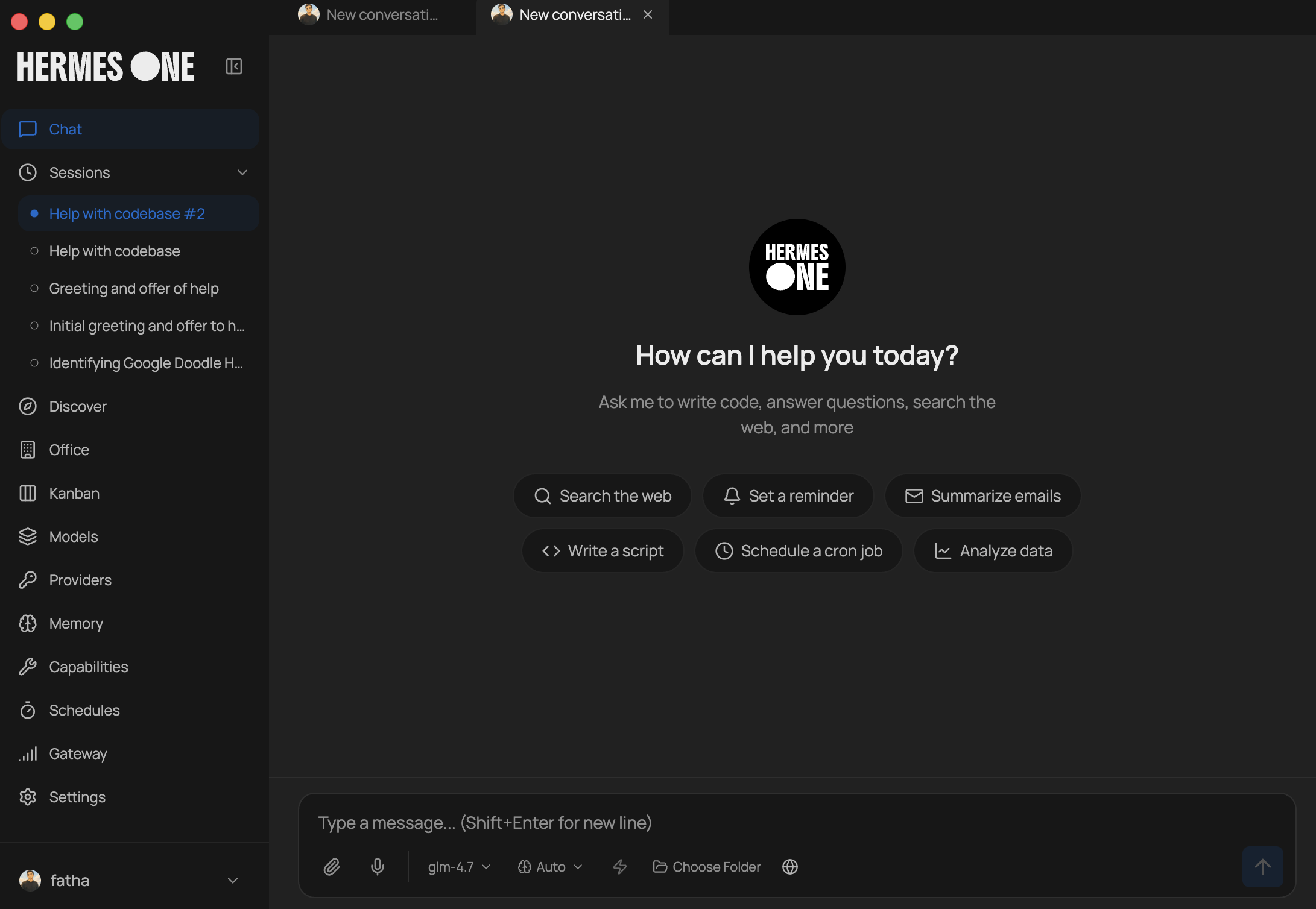 The chat surface of the desktop app — via fathah/hermes-desktop
The “Surface Release” (v0.16) is named for its three UI surfaces — Hermes now meets you where you actually work, not just in the terminal:
- CLI / TUI — the original surface. Full terminal interface: multiline editing, slash-command autocomplete, conversation history, streaming tool output, interrupt-and-redirect.
- Native desktop app — new in v0.16, for users who don’t live in the terminal. The orange book explicitly notes this broadened the audience: “AI power users who don’t live in the command line — Hermes now ships a desktop app, so this is for you too.”
- Web dashboard — browser-based chat, terminal, memory, skills, and an inspector.
Community WebUIs (from the awesome-list) extend the surface layer if the built-in options aren’t enough:
- hermes-webui (14.9k stars) — “the best way to use Hermes Agent from the web or your phone”
- hermes-workspace (5.8k) — native web workspace: chat, terminal, memory, skills, inspector
- EKKOLearnAI/hermes-studio (8.3k) — web dashboard with multi-platform chat, session management, scheduled jobs, usage analytics
- fathah/hermes-desktop (12.6k) — desktop companion
The awesome-list’s Level-Up blueprint suggests hermes-workspace for the richest daily UI, mission-control for multi-agent fleet visibility + cost tracking, and a lighter ops surface if you don’t need the full dashboard.
Synthesized from: hermes-agent-orange-book (Part 4), awesome-hermes-agent (Tools & Utilities, Level-Up Blueprints).
Voice & Community Bridges
Voice mode enables real-time voice interaction — in the CLI, over Telegram, and in Discord voice channels. Voice memo transcription gives cross-platform conversation continuity (send a voice memo from your phone, the agent reads it and replies).
Community bridges (from the awesome-list Integrations & Bridges) connect Hermes to platforms and services the core doesn’t ship:
- HermesClaw — WeChat bridge; run Hermes and OpenClaw on the same WeChat account.
- h0tnanny/hermes-vk-connector — VKontakte platform adapter.
- adnw-vinc/hermes-nextcloud — self-hosted Nextcloud bridge (files via WebDAV, notes, calendar/tasks, contacts). Fills the self-hosted-cloud gap.
- Alexeyisme/hermes-spotify-skill — Spotify playback control for headless Linux and Raspberry Pi 4/5. “The only Linux-native Spotify skill in the ecosystem.”
- DevvGwardo/hermes-claude-bridge — bidirectional chat bridge between Claude Code and Hermes (HTTP sync + JSONL mailbox).
These bridges are how the ecosystem extends Hermes into niches the core team doesn’t cover — and a signal of where the community finds gaps worth filling.
Synthesized from: hermes-agent (core README, Community), awesome-hermes-agent (Integrations & Bridges, Skills & Plugins).
delegate_task & Subagents
Hermes doesn’t do everything in one conversation thread. It delegates — spawns isolated subagents for parallel workstreams:
delegate_task— hand a sub-task to a fresh, isolated subagent that runs in its own context, returns a result, and collapses back. The parent thread never sees the subagent’s intermediate steps, only the answer.- Subagent parallelization — multiple subagents can run at once for independent workstreams.
- Python RPC — write Python scripts that call tools via RPC, collapsing multi-step pipelines into “zero-context-cost” turns (the work happens in a script, not in the conversation’s context window).
This is the core answer to context-window pressure: instead of stuffing a 50-step pipeline into one conversation (which fills the context and degrades quality), delegate each step to a subagent and keep the main thread clean.
The orange book’s Part 5 builds from delegate_task up to the full multi-agent Kanban platform (next section) — the trajectory is “one subagent” → “a fleet of coordinated agents.”
Synthesized from: hermes-agent-orange-book (Part 5), hermes-agent (core README, delegates and parallelizes).
The Multi-Agent Kanban Platform
New in v0.16: a persistent multi-agent Kanban platform — the orange book calls this out as material the first edition (v0.7) “barely touched.” It’s the orchestration layer above raw delegate_task.
Instead of ad-hoc delegation, the Kanban platform gives you a durable board where multiple agents pick up tasks, track state, and coordinate:
- Persistent state — tasks survive across sessions; an agent can pick up where another left off
- Coordination patterns — delegate/verify/iterate, consensus, triage, autopilot (see next section)
- Observability — you can see what each agent is working on, not just the final answer
This is the structural answer to “how do I run a fleet of agents without losing track.” The earlier surfaces (web dashboard, mission-control) exist precisely to make this fleet visible.
The orange book frames Part 5 as the arc from delegate_task (single subagent) → collaboration patterns (multiple agents coordinating) → the Kanban platform (durable multi-agent orchestration). It’s the difference between “I delegated once” and “I run an agent team.”
Synthesized from: hermes-agent-orange-book (Part 5, 2.0 changes note).
Collaboration Patterns
Once you have multiple agents, you need patterns for how they coordinate. The awesome-list and the oh-my-hermes skill suite encode the common ones:
- delegate → verify → iterate (
ralph) — verified execute → verify → iterate. The subagent does the work, a verifier checks it, and it iterates until the verification passes. - consensus (
ralplan) — Planner → Architect → Critic. Multiple roles propose/critique a plan before execution. Useful for high-stakes decisions where one agent’s judgment isn’t enough. - triage — route incoming work to the right agent/skill.
- autopilot — hands-off execution of a multi-step goal.
- deep-research / deep-interview — specialized flows for research and structured Q&A.
oh-my-hermes (beta) is the community’s opinionated orchestration skill suite — inspired by oh-my-claudecode, rebuilt on Hermes primitives. It composes end-to-end: research → interview → consensus plan → verified execution.
The principle: don’t hand-roll coordination logic for every task. These patterns are reusable building blocks — pick the one that matches your problem’s risk profile (consensus for high-stakes, autopilot for low-stakes).
Synthesized from: hermes-agent-orange-book (Part 5), awesome-hermes-agent (Skills & Plugins, Level-Up Blueprints).
Cron & Automation
Hermes has a built-in cron scheduler with delivery to any platform. The schedule itself is natural language — you don’t write crontab syntax, you describe the job:
- “Send me a daily report at 9am summarizing yesterday’s commits”
- “Back up the database nightly at 2am”
- “Run a weekly audit every Monday and post it to Slack”
These run unattended — the agent wakes, does the work, and delivers the result to whatever platform you specified. This is the “always-on” property that separates a server-resident agent from a terminal-session agent: it works while you sleep.
Cron + subagents + memory compose into real automations:
- A cron job triggers a subagent
- The subagent pulls relevant memory (what happened last time, user preferences)
- It does the work (report, backup, audit)
- It delivers to the platform and persists what it learned
The awesome-list’s Level-Up blueprint for “self-improvement without self-delusion” layers cron on the evolution pipeline: run hermes-agent-self-evolution on a schedule, then run a second verification cron to score quality and block optimization-loop gaming. Cron isn’t just for user-facing reports — it’s also the substrate for the agent’s own self-maintenance.
Synthesized from: hermes-agent (core README, scheduled automations), awesome-hermes-agent (Level-Up Blueprints).
Multi-Agent & Swarms Catalog
The awesome-list tracks the multi-agent/swarm ecosystem:
- [beta] oh-my-hermes — multi-agent orchestration skills (deep-research, deep-interview, ralplan, ralph, triage, autopilot). The flagship orchestration suite.
- [beta] hermes-plugins — includes an inter-agent bridge for running multiple Hermes instances.
- [beta] hermes-incident-commander — autonomous SRE agent for production incident detection and self-healing. Pairs naturally with Hermes’s cron scheduling.
- [beta] hermes-dojo — self-improvement system that monitors agent performance, identifies weak skills, and iterates on them.
- [experimental] hermes-skill-marketplace — agent that writes, tests, and publishes new skills autonomously.
The Level-Up blueprint for a “multi-agent execution layer” combines Hermes core delegation with hermes-agent-acp-skill (Codex/Claude Code routing), zouroboros-swarm-executors (local executor handoff), and opencode-hermes-multiagent or bigiron for specialized agent roles.
Browse the full catalog at 0xNyk/awesome-hermes-agent → Multi-Agent & Swarms.
Synthesized from: awesome-hermes-agent (Multi-Agent & Swarms, Level-Up Blueprints).
Deployment Strategies
Hermes runs on six terminal backends (v0.16 core README lists six; the awesome-list’s v0.12 review notes seven including Vercel Sandbox — flag the variance):
| Backend | Use case |
|---|---|
| local | run on your own machine |
| Docker | containerized, reproducible |
| SSH | run on a remote box you control |
| Singularity | HPC-style isolation |
| Modal | serverless persistence — hibernates when idle, wakes on demand, costs nearly nothing between sessions |
| Daytona | serverless persistence — same hibernate/wake model |
The serverless backends (Modal, Daytona) are the cost story: your agent’s environment hibernates when idle and wakes on demand, so a 24/7 agent costs nearly nothing between conversations. Run it on a $5 VPS for the always-on case, or serverless for the intermittent case.
Community deployment templates (from the awesome-list) give you repeatable deploys:
- render-examples/hermes-render — one-click Render deploy (single Docker web service, persistent disk, browser dashboard)
- floz/hermes-railway — minimal Railway template with Caddy reverse proxy + basic_auth
- leecoin06-commits/hermes-agent-android — Termux one-command installer (bilingual EN/AR)
- metantonio/hermes-wsl-ubuntu [production] — step-by-step WSL2 Ubuntu setup for Windows
- OUH-MESHLab/guix-hermes — Guix channel (Python deps + system/home services)
For repeatable, opinionated deploys the Level-Up blueprint also points at nix-hermes-agent, hermes-agent-docker, and evey-setup depending on how opinionated you want the stack.
Synthesized from: hermes-agent (core README, terminal backends), awesome-hermes-agent (Deployment, Level-Up Blueprints).
The OS Boundary
An agent that lives on your server and can run shell commands is also an agent that can run the wrong shell commands. Hermes’s security model is built around an honest OS boundary:
- Command approval — commands require approval before execution (the agent proposes, a person approves, by default)
- Authorization — scoped permissions per agent
- DM pairing — on messaging platforms, only paired users can drive the agent (critical: without this, anyone who can message the bot can run commands on your server)
- Container isolation — run the agent in a container (Docker/Singularity backend) so a compromised agent can’t reach the host
The orange book’s Part 6 frames this as the OS boundary — the line between “the agent can do things” and “the agent can do anything.” Crossing that line should be a deliberate, logged, approved choice, not a default.
Operational guidance:
- Don’t enable
coding/fulltool profiles on a messaging-reachable agent strangers can contact. - Run production agents in a container backend, not
local. - Treat DM pairing as mandatory for any public-facing bot.
Synthesized from: hermes-agent-orange-book (Part 6), hermes-agent (core README, Security docs).
Promptware Defense
Beyond the OS boundary, the orange book introduces Promptware defense — the security model for the prompt/skill layer itself, not just the shell.
The threat: an agent’s skills and prompts can be manipulated (prompt injection via retrieved content, malicious skills, adversarial inputs). Promptware defense treats the prompt/skill layer as attack surface that needs its own defenses:
- The honest security model — be explicit about what the agent can and cannot do, rather than pretending the prompt layer is inherently safe because it’s “just text”
- How far it can go — the orange book’s Part 6 closes with a frank assessment of the agent’s reach and the corresponding defenses
This pairs with the Curator’s governance (a malicious or drift skill gets pruned) and the self-evolution guardrails (evolved variants must pass the full test suite + human PR review). The three layers compose: OS boundary (shell), Promptware defense (prompt/skill), Curator/guardrails (self-improvement governance).
For an external security assessment of the framework, see 0xgrimRPR/hermes-agent-security-research (black-box assessment of Hermes Agent). For a forks-with-trust-boundaries angle, nativ3ai/hermes-agent-camel adds CaMeL trust verification to the agent loop for safety-critical deployments.
Synthesized from: hermes-agent-orange-book (Part 6), awesome-hermes-agent (Forks & Derivatives).
Migrating from OpenClaw
If you’re coming from OpenClaw, Hermes can automatically import your settings, memories, skills, and API keys. Hermes is OpenClaw’s successor — the messaging-gateway model carries over, and hermes claw migrate is the one-command bridge.
During first-time setup: the hermes setup wizard auto-detects ~/.openclaw and offers to migrate before configuration begins.
Anytime after install:
hermes claw migrate              # interactive migration (full preset)
hermes claw migrate --dry-run    # preview what would be migrated
hermes claw migrate --preset user-data   # migrate without secrets
hermes claw migrate --overwrite  # overwrite existing conflicts
What gets imported:
- SOUL.md — persona file
- Memories —
MEMORY.mdandUSER.mdentries - Skills — user-created skills →
~/.hermes/skills/openclaw-imports/ - Command allowlist — approval patterns
- Messaging settings — platform configs, allowed users, working directory
- API keys — allowlisted secrets (Telegram, OpenRouter, OpenAI, Anthropic, ElevenLabs)
- TTS assets — workspace audio files
- Workspace instructions —
AGENTS.md(with--workspace-target)
Use hermes claw migrate --help for all options, or the openclaw-migration skill for an interactive agent-guided migration with dry-run previews.
Side-by-side migration playbook (from the awesome-list): keep both systems running during migration using openclaw-to-hermes and the native migration path, then cut over once cron and routing behavior match.
Synthesized from: hermes-agent (core README, Migrating from OpenClaw), awesome-hermes-agent (Operational Playbooks).
Operational Playbooks & Level-Up
The awesome-list closes with two practical sections — Operational Playbooks (workflow patterns that repeatedly help in production) and Level-Up Blueprints (opinionated bundles for teams that want more out of Hermes fast).
Operational playbooks:
- Nightly self-evolution + guardrail evaluation — run hermes-agent-self-evolution on a schedule, then a second verification cron to score quality and block optimization-loop gaming.
- Memory pressure handling — if repeating context or losing recall, review Honcho docs; evaluate hindsight or self-hosted memory backends.
- Tune session timeout/expiry early — adjust retention so slower-moving threads keep context.
- OpenClaw side-by-side migration — keep both running, cut over once cron and routing match.
- Curate
USER.md/MEMORY.mdintentionally — treat profile memory as high-signal infrastructure, not a note dump.
Level-up blueprints (selected):
- Memory stack that compounds — built-in memory → honcho-self-hosted → hindsight → plur (portable shared memory, open engram format).
- Self-improvement without self-delusion — pair self-evolution with scheduled regression checks + lintlang for prompt/config linting + a second evaluation pass that blocks bad mutations.
- Operator cockpit for real work — hermes-workspace (richest daily UI) + mission-control (fleet visibility + cost tracking).
- Paperclip-managed autonomous ops — hermes-paperclip-adapter + Hermes cron + an operator dashboard = governed task workflows with approvals and operational continuity.
Real-world domain applications (from the awesome-list): autonovel (autonomous novel-writing pipeline, 100k+ word manuscripts end-to-end via the agent loop), hermes-incident-commander (autonomous SRE for incident detection/self-healing), hermes-life-os (personal OS that learns your daily routines), hermes-mars-rover (AI-powered Mars rover simulation).
The throughline: Hermes is not a demo — it’s a substrate for durable, self-improving, always-on agent systems. The ecosystem exists because people are running it in production for real work.
Synthesized from: awesome-hermes-agent (Operational Playbooks, Level-Up Blueprints, Domain Applications), hermes-agent (core README, autonovel).