
Installation & Authentication
macOS
brew install --cask claude-codeWindows
# First install Node.js LTS (nodejs.org)
npm install -g @anthropic-ai/claude-code
Linux(fnm recommended for Node)
curl -fsSL https://fnm.vercel.app/install | bash
fnm install --lts && fnm use --lts
npm install -g @anthropic-ai/claude-code
node --version  # Requires v18+
claude --version
Launch Options
# Start an interactive session in your project
cd your-project && claude

# Start with a question
claude "Explain the project architecture"

# Pipe input
cat error.log | claude "Analyze the error"
Three Auth Methods
| Method | Use Case | Steps |
|---|---|---|
| Claude.ai Account | Pro/Max subscribers | Run claude, then OAuth in browser |
| Team Invite | Team admin invite | Accept invite, key auto-generated |
| Manual API Key | Self-purchased API credits / third-party proxy | Paste key starting with sk-ant-... |
Environment Variables
For manual API keys or third-party proxies, fine-tune behavior via environment variables. Add to ~/.zshrc or ~/.bashrc:
# === Auth & Endpoints ===
export ANTHROPIC_AUTH_TOKEN="sk-your-api-key"        # API key
export ANTHROPIC_BASE_URL="https://your-proxy.example.com"  # Custom endpoint (third-party proxy)

# === Model Selection ===
export ANTHROPIC_MODEL="claude-sonnet-4-6"            # Default model
export ANTHROPIC_SMALL_FAST_MODEL="claude-haiku-4-5"  # Lightweight fast model for quick tasks
export ANTHROPIC_DEFAULT_SONNET_MODEL="claude-sonnet-4-6"
export ANTHROPIC_DEFAULT_OPUS_MODEL="claude-opus-4-7"

# === Performance & Behavior ===
export API_TIMEOUT_MS="3000000"                       # API timeout (ms)
export CLAUDE_CODE_DISABLE_NONESSENTIAL_TRAFFIC=1     # Disable non-essential network requests (telemetry etc.)
export CLAUDE_CODE_AUTO_COMPACT_WINDOW=1000000 # Auto-compaction trigger threshold (tokens) | Variable | Description | Typical |
|---|---|---|
ANTHROPIC_AUTH_TOKEN | API key | sk-ant-... |
ANTHROPIC_BASE_URL | Custom API endpoint | Third-party proxy URL |
ANTHROPIC_MODEL | Default model | claude-sonnet-4-6 |
ANTHROPIC_SMALL_FAST_MODEL | Lightweight fast model | claude-haiku-4-5 |
API_TIMEOUT_MS | API timeout | 3000000 |
CLAUDE_CODE_DISABLE_NONESSENTIAL_TRAFFIC | Disable telemetry & non-essential requests | 1 |
CLAUDE_CODE_AUTO_COMPACT_WINDOW | Auto-compaction threshold (tokens) | 1000000 |
💡 After installing, run
/doctorto check your environment: Node.js v18+, auth status, tool availability.
Quick Start Path
After installing, 5 steps from zero to productive:
1 Write CLAUDE.md
Create an instruction file at project root with rules and preferences. Keep it < 200 lines — compliance drops significantly beyond that.
2 Pick Permission Mode
Daily use default, trusted environments acceptEdits, CI/automation bypassPermissions.
3 Learn /compact
Proactively compact when context reaches 50% to maintain smart output quality.
4 Plan with /plan
For complex tasks, state the goal first, let the model plan steps, then confirm before executing.
Encapsulate repetitive workflows as Skills, automate lifecycle events with Hooks.
💡 Follow the “Bitter Lesson”: don’t optimize workflows for today’s model — build systems for the stronger models 6 months from now.
10 Power-ups
Interactive courses introduced in v2.1.90 that teach features most people overlook. Run /powerup to start.
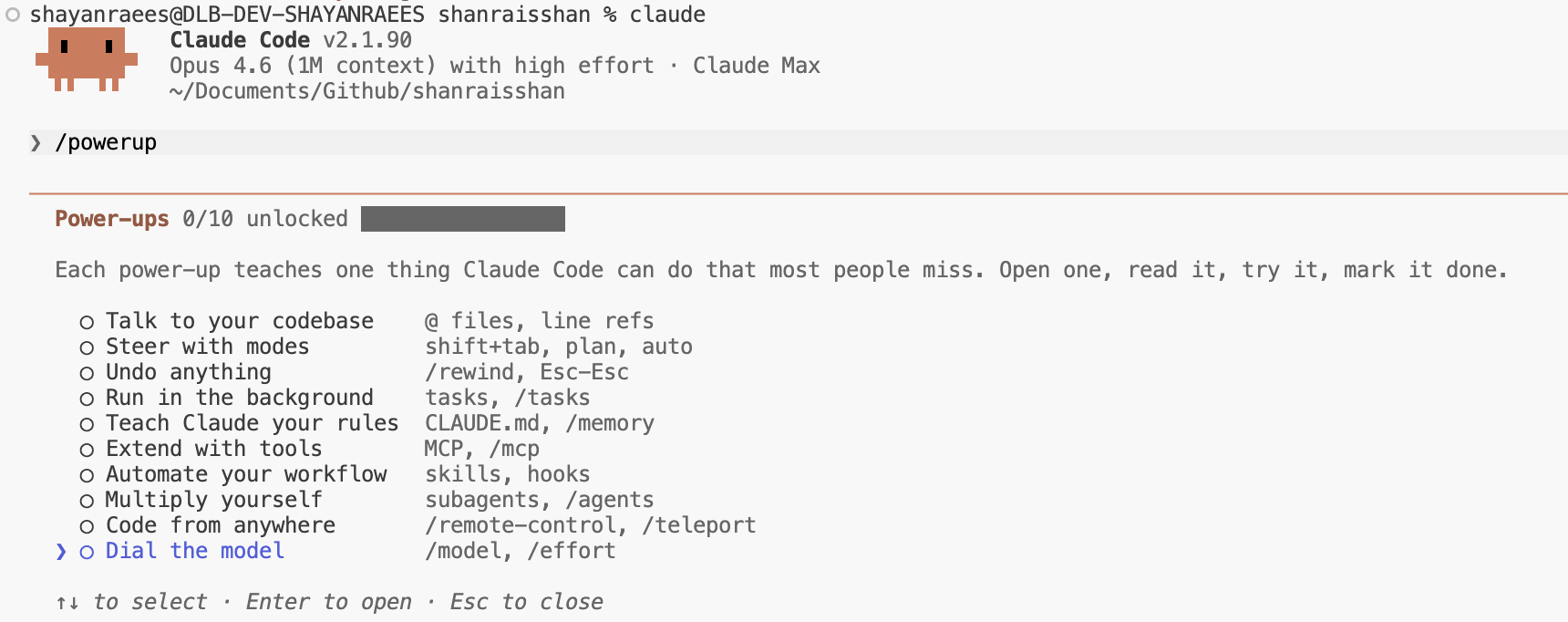 Power-ups selection menu
| # | Power-up | What You Learn |
|---|---|---|
| 1 | Talk to your codebase | @ file references, line-number refs |
| 2 | Steer with modes | Shift+Tab toggle plan / auto modes |
| 3 | Undo anything | /rewind undo, Esc-Esc interrupt |
| 4 | Run in the background | Background tasks, /tasks management |
| 5 | Teach Claude your rules | CLAUDE.md Project rules, /memory management |
| 6 | Extend with tools | MCP External tool extensions, /mcp |
| 7 | Automate your workflow | Skills Skills system + Hooks automation |
| 8 | Multiply yourself | Subagents Subagent parallelism, /agents |
| 9 | Code from anywhere | /remote-control remote control, /teleport |
| 10 | Dial the model | /model switch models, /effort adjust reasoning |
💡 Each Power-up includes animated demos. Start from #1 and work through them sequentially.
Three Levels to Master Claude Code
| Level | Analogy | Characteristics | Output Stability |
|---|---|---|---|
| Level 1 Prompting | Asking a stranger on the street | Answers vary each time, quality fluctuates | Low |
| Level 2 Agent | Hiring a domain expert | Fixed role + method, output is stable and controllable | Medium-High |
| Level 3 Skill | Giving the expert a training manual | Precise instructions + tool permissions, reusable | High |
Level 1 Prompting
Ask questions like a chat. After launching claude, just type your question — good for quick Q&A, brainstorming, doc editing. Downside: same question may get different answers each time.
Level 2 Agent
Assign Claude a role and method. Like hiring an expert — same task, same approach, stable and controllable output quality.
Level 3 Skill
Equip the Agent with specific capabilities — as precise as a training manual. One Agent can use multiple Skills, and one Skill can be reused by multiple Agents.
💡 Learning tip: Start with Level 1 to get familiar with interactions, then progressively use Agents and Skills to increase automation.
CLI Args Reference
| Param | Description | Example |
|---|---|---|
--model | Specify model | claude --model opus |
-p | Non-interactive mode | echo "hi" | claude -p |
--output-format | Output format text/json/stream-json | -p --output-format json |
--max-turns | Max conversation turns | --max-turns 5 |
--permission-mode | Permission mode | --permission-mode plan |
--resume | Resume previous session | claude --resume |
--continue | Continue previous session | claude --continue |
--effort | Reasoning effort | --effort high |
Community Workflows & Plugins
The open-source community has contributed many Claude Code workflows and plugin collections, sorted by GitHub Stars:
| Project | Stars | Description | A | C | S |
|---|---|---|---|---|---|
| Superpowers | 216k | Full-process methodology: brainstorming → TDD → code review → branch | 0 | 0 | 14 |
| Everything Claude Code | 204k | Largest community collection, 300+ skills covering plan/review/security/e2e | 63 | 121 | 300+ |
| Matt Pocock Skills | 115k | By TypeScript expert: TDD, diagnostics, architecture improvements, PRD | 0 | 0 | 28 |
| Spec Kit | 108k | GitHub official: spec → clarify → plan → tasks → implement | 0 | 9 | 0 |
| gstack | 106k | By YC president: CEO/Eng/Design multi-role review → ship | 0 | 0 | 61 |
| Get Shit Done | 64k | End-to-end delivery: spec → plan → execute → validate → ship | 33 | 67 | 0 |
| OpenSpec | 52k | Lightweight spec workflow: propose → apply → verify → archive | 0 | 9 | 0 |
| BMAD-METHOD | 49k | Product-driven development: brief → PRD → architecture → stories → QA | 6 | 0 | 42 |
| oh-my-claudecode | 36k | Team collaboration flow: team plan → PRD → exec → verify → fix | 19 | 0 | 39 |
| agent-skills | 27k | By Google engineer: spec → plan → build → test → ship | 3 | 7 | 21 |
| Compound Eng | 19k | Compound engineering: strategy → brainstorm → plan → compound | 47 | 4 | 39 |
| HumanLayer | 11k | Research→implement flow: research → plan → validate → implement | 6 | 27 | 0 |
ℹ️ A=Agents · C=Commands · S=Skills. Click project names to visit GitHub.
Skill Repositories
| Project | Stars | Skills | Description |
|---|---|---|---|
| anthropics/skills | 145k | 17 | Official Anthropic collection |
| mattpocock/skills | 113k | 25 | High-quality TypeScript skills |
| wshobson/agents | 36k | 155 | Multi-scenario skill collection |
| scientific-agent-skills | 27k | 143 | For academic research |
| agent-skills | 27k | 21 | by a Google engineer |
| awesome-agent-skills | 24k | 1,424+ | Curated collection |
| claude-skills | 15k | 246 | Full-stack coverage across 9 domains |
Agent Repositories
| Project | Stars | Agents | Description |
|---|---|---|---|
| agency-agents | 107k | 144 | Large agent definition library |
| awesome-subagents | 21k | 156 | Curated subagent collection |
Cross-Model Routing
Route Claude Code’s API to other model providers:
| Project | Stars | Bridge | Description |
|---|---|---|---|
| claude-code-router | 34k | OpenRouter, DeepSeek, Ollama, Gemini, etc. | Choose models per task |
| CLIProxyAPI | 32k | Gemini CLI, Codex, Claude Code | Wraps as compatible API |
| codex-plugin-cc | 18k | Codex / GPT-5 | Official OpenAI plugin: /codex:review |
| pal-mcp-server | 12k | 50+ models | Multi-model MCP server |
28 Popular Features
The most-watched features and tools in the Claude Code ecosystem:
| # | Feature | Description |
|---|---|---|
| 1 | Ultrareview | Deep code review with effort: high multi-dimensional analysis |
| 2 | Devcontainers | VS Code dev container integration for consistent environments |
| 3 | Channels | stable / latest update channel control |
| 4 | Ultraplan | Enhanced Plan Mode with finer task decomposition |
| 5 | Fast Mode | Fast Opus output without model downgrade |
| 6 | Computer Use | GUI interaction for browsers and desktop apps |
| 7 | Agent SDK | Python/TS SDK for building custom Agents |
| 8 | Voice Dictation | Voice input as typing alternative |
| 9 | Remote SSH | Remote dev via SSH connection |
| 10 | Background Agents | Long-running background tasks without blocking |
| 11 | Worktree Isolation | Isolated Git branch experiments |
| 12 | Custom Subagents | Define custom subagents in .claude/agents/ |
| 13 | Skills System | 9 types of reusable instruction packs |
| 14 | Hooks | 27 lifecycle event automation scripts |
| 15 | MCP Servers | Connect external services (databases, APIs, browsers) |
| 16 | CLAUDE.md | 4-level instruction files with project-wide context |
| 17 | Memory System | 3 scopes of cross-session persistent memory |
| 18 | Permission Modes | 6 permission modes from default to full CI automation |
| 19 | Plan Mode | Plan first, then implement — give goals not steps |
| 20 | Code Review | Built-in code review with multi-role analysis |
| 21 | Browser MCP | Playwright / Chrome DevTools modes |
| 22 | Cross-Model | Route to DeepSeek, Gemini, GPT, etc. |
| 23 | Agent Teams | Multi-Agent collaborative teams (Amp, Codex, etc.) |
| 24 | Scheduled Tasks | CronCreate/TaskCreate scheduled dispatch |
| 25 | RPI Workflow | Research → Plan → Implement loop |
| 26 | CRISPY Method | Structured task decomposition methodology |
| 27 | Sandbox Mode | Bash sandbox execution with network whitelist |
| 28 | Multi-Provider | Bedrock, Vertex, Foundry multi-cloud deployment |
Command → Agent → SkillUnderstand Claude Code’s three-layer orchestration architecture and core component relationships
Command → Agent → Skill Architecture
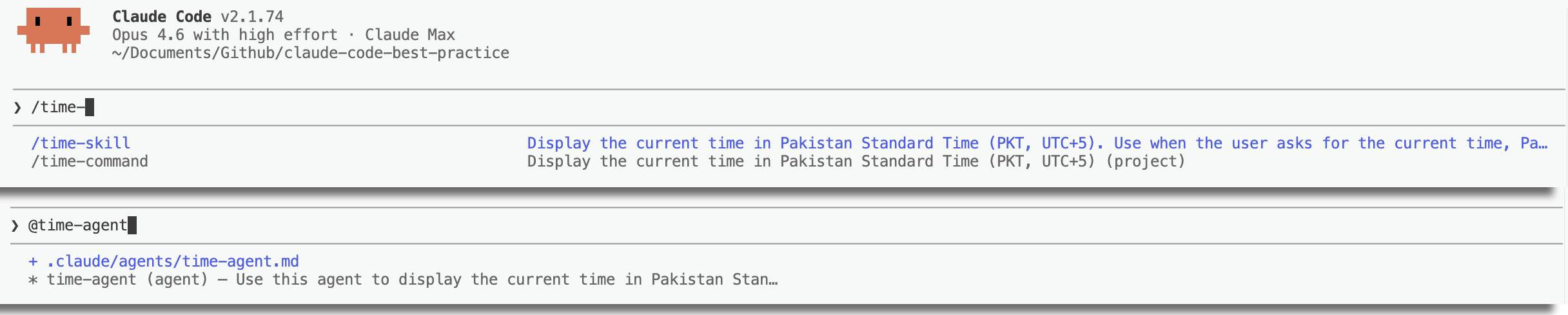 Command → Agent → Skill three-layer architecture
User input / command trigger
       │
       ▼
┌──────────────┐    Command (entry point)
│  /command    │    .claude/commands/*.md
└──────┬───────┘
       │ Agent tool
       ▼
┌──────────────┐    Agent (executor)
│  Agent       │    .claude/agents/*.md
└──────┬───────┘
       │ Preload/invoke Skill
       ▼
┌──────────────┐    Skill (knowledge)
│  Skill       │    .claude/skills/*/SKILL.md
└──────────────┘User entry point. Orchestrates Agent call order. 82 built-in custom
Independent context executor. Can run in parallel. 5 built-in custom
Reusable instruction pack. Loaded or invoked. 10 built-in custom
Comparison
| Dimension | Command | Agent | Skill |
|---|---|---|---|
| Role | Entry / Orchestrator | Executor | Knowledge Provider |
| Context | Shared main session | Independent window | Injected into caller |
| Trigger | User /cmd | Agent tool | Preloaded/Skill tool |
| Parallelism | Sequential | Parallel capable | N/A |
| Dynamic context injection | ✅ !command“ | ❌ | ✅ !command“ |
| Best for | Workflow orchestration | Focused tasks | Reusable instructions |
💡 Decision guide: Need to orchestrate multi-step flows chaining multiple Agents → Command. Need independent context, parallel execution, tool isolation → Agent. Need reusable instruction packs loaded across scenarios → Skill.
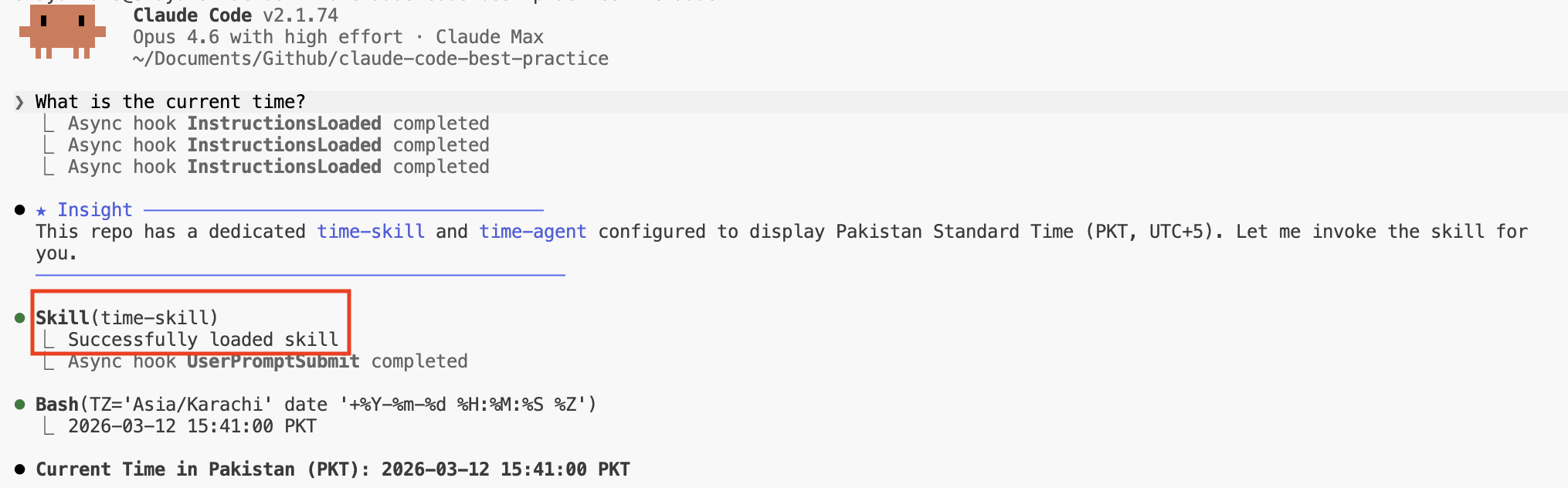 Relationships and use cases
Why Harness Matters
ℹ️ Output quality formula:
quality = f(effective_context, model_capability, iteration_loops)Harness directly impacts “effective context” and “iteration loops”.
Harness: 10 Core Capabilities
“Skills, Commands, Subagents all become prompts in the end, so strong prompts are enough?” — Technically true, practically false. Here’s what Harness does at layers prompts can’t reach:
| # | Capability | What It Does | Why Prompts Can’t Replace It |
|---|---|---|---|
| 1 | Context Isolation | Subagents run in independent context windows | One prompt fills one window; N parallel subagents = N× effective context |
| 2 | Tool Restriction Enforcement | allowed/disallowed-tools intercept before model calls | Prompt instructions are advisory; Deny rules are unbypassable |
| 3 | Lazy-loaded Rules & Memory | paths: frontmatter and sub-directory CLAUDE.md load on demand | Prompts are static; can’t dynamically load based on runtime file paths |
| 4 | Deterministic Hook Execution | Shell commands fire on lifecycle events, can intercept tool calls | Prompts can’t intercept their own tool calls; Hooks execute regardless of model intent |
| 5 | Model Routing | model: haiku/opus routes to different model endpoints | No token in a prompt can change which model responds |
| 6 | Parallel Scheduling | Multiple subagents execute concurrently | Prompts are sequential; Harness schedules parallel processes and collects results |
| 7 | Cross-session Persistence | Memory system and Settings layers persist across sessions | Prompts vanish when the session ends |
| 8 | Modular System Prompts | CLI conditionally loads 110+ system prompt fragments | Users can’t hand-write or replace internal CLI prompt fragments |
| 9 | Skill Preloading | skills: field injects full content into subagent initial context | Only the Harness loader can pre-fill another agent’s context |
| 10 | Permission Classifier | auto mode uses background classifier to pre-approve or block tool calls | A prompt can’t add a pre-execution safety layer to itself |
User Input vs What the Model Actually Sees
User input: "Write a recursive flatten function"     ← (a) ~6 tokens

What the model actually sees:                       ← (b) ~15,000 tokens
  ├── CLAUDE.md (Project specs)
  ├── Matched .claude/rules/*.md (paths trigger)
  ├── Modular system prompt fragments (110+)
  ├── Tool definitions
  ├── Environment context (cwd, git status, platform)
  ├── Previous conversation turns
  ├── Files read via Read/Grep
  └── User's 6-token request
Output quality depends on (b), not (a). Harness builds (b). “Strong prompts” can’t replicate (b) because most of it isn’t written by the user.
Subagents
5 Built-in Types
| Type | Model | Tool | Use Case |
|---|---|---|---|
general-purpose | inherit | All tools | Default agent, handles general tasks |
Explore | haiku | Read-only (Read/Grep/Glob, etc.) | Fast code search and navigation |
Plan | inherit | Read-only | Architecture research and solution design |
statusline-setup | sonnet | Read + Edit | Configure statusline settings |
claude-code-guide | haiku | Glob/Grep/Read/WebFetch/WebSearch | Answer Claude Code-related questions |
Custom Agent Frontmatter (16 Fields)
Expand all 16 fields
| Field | Description |
|---|---|
name | Agent identifier |
description | Trigger condition (“PROACTIVELY” = auto) |
tools | Allowed tools (comma-separated) |
disallowedTools | Disallowed tools |
model | haiku/sonnet/opus/inherit |
permissionMode | acceptEdits/plan/bypassPermissions |
maxTurns | Max turns |
skills | Preloaded skills list |
mcpServers | MCP servers |
hooks | Lifecycle hooks |
memory | user/project/local |
background | Run in background |
effort | Reasoning effort |
isolation | ”worktree” Git isolation |
color | CLI color |
Commands System (82 Built-in)
Claude Code has 82 built-in slash commands, organized into 11 categories. Custom commands go in .claude/commands/*.md.
| Category | Count | Key Commands |
|---|---|---|
| Auth | 5 | /login /logout /setup-bedrock /setup-vertex /upgrade |
| Config | 15 | /config /theme /permissions /sandbox /statusline /tui /voice /focus /color /keybindings /privacy-settings /radio /scroll-speed /stickers /terminal-setup |
| Context | 7 | /context /usage /cost /stats /insights /status /usage-credits |
| Debug | 7 | /doctor /feedback /heapdump /help /powerup /release-notes /tasks |
| Export | 2 | /copy /export |
| Extensions | 9 | /agents /chrome /hooks /ide /mcp /plugin /reload-plugins /reload-skills /skills |
| Memory | 1 | /memory |
| Model | 6 | /model /effort /fast /plan /ultraplan /passes |
| Project | 7 | /add-dir /diff /init /review /security-review /team-onboarding /ultrareview |
| Remote | 10 | /remote-control /teleport /desktop /mobile /schedule /autofix-pr /install-github-app /install-slack-app /remote-env /web-setup |
| Session | 13 | /clear /compact /resume /rewind /branch /goal /background /btw /rename /recap /stop /workflows /exit |
View all 82 commands with details
Auth (5)
| Command | Description |
|---|---|
/login | Log in to Anthropic account |
/logout | Log out |
/setup-bedrock | Configure Amazon Bedrock auth (requires CLAUDE_CODE_USE_BEDROCK=1) |
/setup-vertex | Configure Google Vertex AI auth (requires CLAUDE_CODE_USE_VERTEX=1) |
/upgrade | Upgrade to a higher plan |
Config (15)
| Command | Description |
|---|---|
/config | Open settings UI (alias /settings) |
/theme | Toggle color theme, supports custom and colorblind modes |
/permissions | Manage tool permission allow/ask/deny rules (alias /allowed-tools) |
/sandbox | Toggle sandbox mode |
/statusline | Configure status line |
/tui | Toggle terminal render mode (default or fullscreen) |
/voice | Voice dictation (hold/tap/off) |
/focus | Toggle focus view, showing only the last prompt and response |
/color | Set prompt bar color |
/keybindings | Open keybindings config file |
/privacy-settings | Privacy settings (Pro/Max) |
/radio | Open Claude FM lo-fi radio |
/scroll-speed | Adjust scroll speed |
/stickers | Order Claude Code stickers |
/terminal-setup | Configure terminal shortcuts (Shift+Enter, etc.) |
Context (7)
| Command | Description |
|---|---|
/context | Visualize current context usage |
/usage | Session cost and usage stats (aliases /cost, /stats) |
/insights | Generate session analytics report |
/status | Check version, model, connection status |
/usage-credits | Configure overage credits |
Debug (7)
| Command | Description |
|---|---|
/doctor | Diagnose installation and config issues |
/feedback | Submit feedback or report bugs (aliases /bug, /share) |
/heapdump | Generate heap memory snapshot |
/help | Show help |
/powerup | Interactive courses, 10 Power-ups |
/release-notes | Interactive version picker to view changelogs |
/tasks | Manage background tasks (alias /bashes) |
Export (2)
| Command | Description |
|---|---|
/copy | Copy last response to clipboard, code block selector when available |
/export | Export conversation as plain text |
Extensions (9)
| Command | Description |
|---|---|
/agents | Manage agent configs |
/chrome | Configure Claude in Chrome |
/hooks | View hooks config |
/ide | Manage IDE integrations |
/mcp | Manage MCP servers |
/plugin | Manage plugins |
/reload-plugins | Reload all plugins |
/reload-skills | Reload skills directory |
/skills | List available skills |
Memory (1)
| Command | Description |
|---|---|
/memory | Edit CLAUDE.md, toggle auto-memory |
Model (6)
| Command | Description |
|---|---|
/model | Switch model, use arrow keys to adjust effort |
/effort | Set reasoning effort (low/medium/high/xhigh/max/ultracode) |
/fast | Toggle fast mode |
/plan | Enter plan mode |
/ultraplan | Draft and review plans in browser |
/passes | Share free usage weeks |
Project (7)
| Command | Description |
|---|---|
/add-dir | Add working directory |
/diff | Interactive diff viewer with per-turn browsing |
/init | Initialize CLAUDE.md (CLAUDE_CODE_NEW_INIT=1 for interactive) |
/review | Local PR review |
/security-review | Security review of staged changes |
/team-onboarding | Generate team onboarding guide from usage history |
/ultrareview | Cloud deep multi-agent PR review |
Remote (10)
| Command | Description |
|---|---|
/remote-control | Allow remote control from claude.ai (alias /rc) |
/teleport | Pull web session to terminal (alias /tp) |
/desktop | Continue in desktop app (alias /app) |
/mobile | Download mobile app (aliases /ios, /android) |
/schedule | Create scheduled tasks (alias /routines) |
/autofix-pr | Monitor PRs and auto-fix CI failures |
/install-github-app | Install GitHub Actions app |
/install-slack-app | Install Slack app |
/remote-env | Configure default remote env for web sessions |
/web-setup | Connect GitHub to Claude Code on the web |
Session (13)
| Command | Description |
|---|---|
/clear | New conversation (aliases /reset, /new) |
/compact | Compact context (optional focus instruction) |
/resume | Resume historical session (alias /continue) |
/rewind | Roll back to previous state (aliases /undo, /checkpoint) |
/branch | Create session branch (alias /fork) |
/goal | Set persistent goal conditions |
/background | Switch to background (alias /bg) |
/btw | Ask a side question without adding to conversation |
/rename | Rename session |
/recap | Generate session recap |
/stop | Stop background session |
/workflows | View, pause, resume workflows |
/exit | Exit (alias /quit) |
💡 Custom commands: Place in
.claude/commands/*.md, supports 16 frontmatter fields (name, description, argument-hint, arguments, context, etc.). Use!command“ for dynamic context injection.
Orchestration Patterns
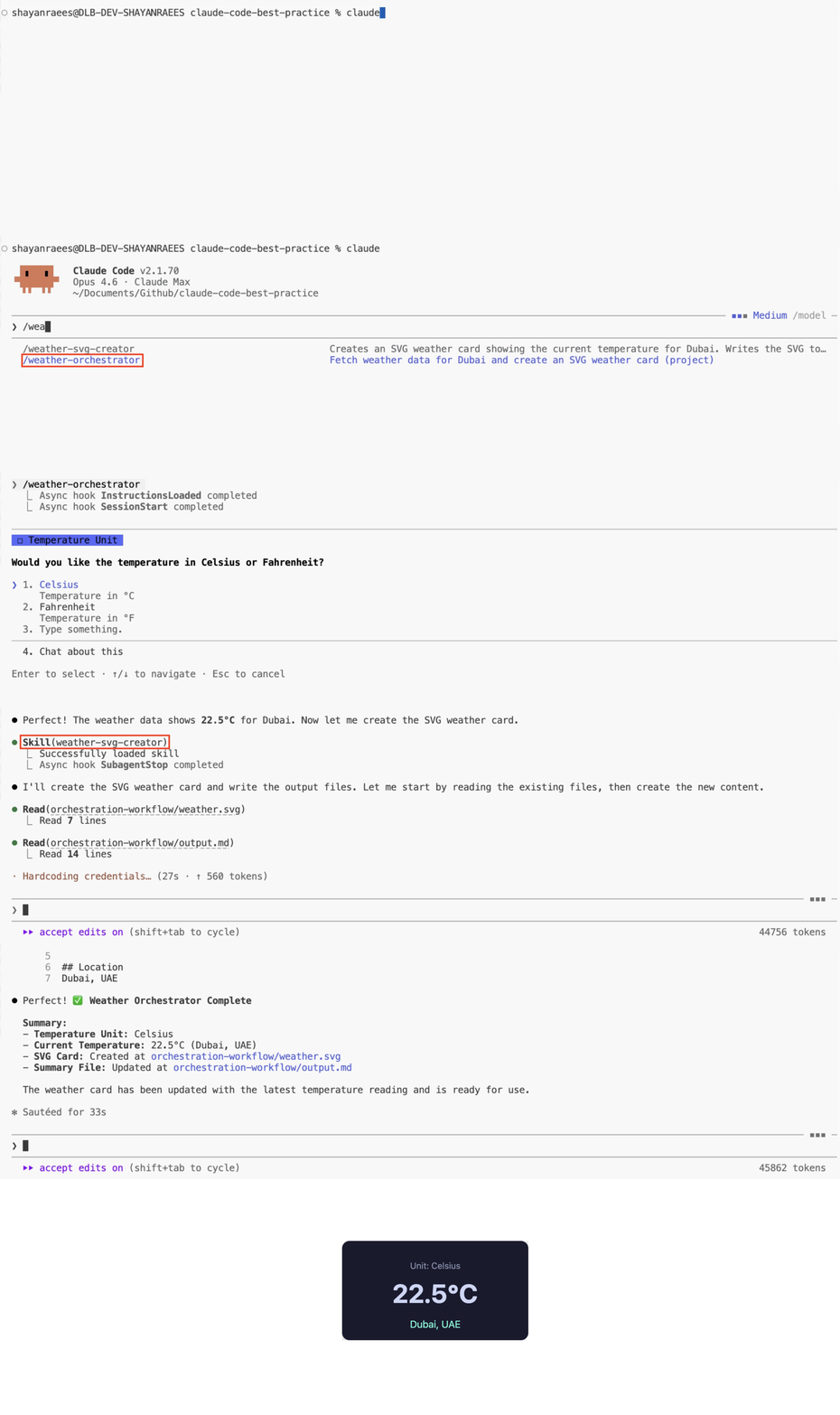 Weather Reporter full orchestration flow animation
User: /weather-orchestrator
       │
       ▼
┌──────────────────────────┐
│  weather-orchestrator    │  ← Command (entry point)
│  1. Ask temperature unit C/F   │
│  2. Call weather-agent   │
│  3. Call svg-creator     │
└──────┬───────────────────┘
       ▼
┌──────────────────────────┐
│  weather-agent           │  ← Agent
│  preload: weather-fetcher │  ← Skill (preloaded)
└──────┬───────────────────┘
       ▼
┌──────────────────────────┐
│  weather-svg-creator     │  ← Skill (invoked)
│  output: weather.svg         │
└──────────────────────────┘
Tasks System
Claude Code’s built-in task tracking system supports creation, querying, updates, and dependency management. Works with Subagents and Skills.
4 Core Tools
| Tool | Feature | Key Params |
|---|---|---|
TaskCreate | Create task | subject, description, addBlocks, addBlockedBy |
TaskList | List all tasks | (no params) |
TaskGet | Get task details | taskId |
TaskUpdate | Update task status | taskId, status, subject, description, addBlocks, addBlockedBy |
Task Lifecycle
pending → in_progress → completed
                 ↘ deleted
Dependencies
addBlocks— Marks “specified task cannot start until this task completes”addBlockedBy— Marks “this task must wait for specified task to complete before starting”- Forms a DAG (Directed Acyclic Graph), ensuring execution order
ℹ️ Environment Variable:
CLAUDE_CODE_TASK_LIST_IDidentifies current task list, file persisted in~/.claude/tasks/.
Skills & HooksReusable instruction packs + lifecycle event automation scripts
Skills System
ℹ️ Key insight: A Skill is a folder (not just a Markdown file). It can contain scripts, data, resources, config templates — anything an Agent can discover, read, and manipulate.
SKILL.mdis the entry point, but not the whole picture. See Orchestration for a real example.
Skills live in .claude/skills/*/SKILL.md with auto-discovery and triggering. At session start, Claude scans all available skill description fields to match the current task.
Progressive Info Loading
Tell Claude what files are in the folder via SKILL.md; it reads details only when needed. Avoids loading all info at once and wasting context.
Description Is for the Model
The description field isn’t a summary — it’s a trigger condition description. Write clearly “when should this skill be used,” and Claude auto-matches accordingly.
9 Config Patterns
| Type | Trigger | Use Case |
|---|---|---|
| Slash | User types /name | Common operations |
| Auto | Claude auto-matches | Auto-triggered by description |
| Path | When operating on matching files | paths: "*.tsx" |
| Fork | Isolate subagent | context: fork |
| Args | Call with arguments | arguments: filename |
| Disabled | No auto-trigger | disable-model-invocation: true |
| Hidden | Background knowledge only | user-invocable: false |
| Permitted | Active when enabled | allowed-tools |
| Model | Run with specified model | model: haiku |
2 Loading Modes
Preload Mode (Agent Skills)
Loaded via Agent’s skills: field. Auto-injected at Agent startup.
Invoke Mode (Invoked Skills)
Triggered via Skill tool or /skill-name. Claude can also auto-match and invoke.
9 Usage Categories
Distilled from hundreds of internal Anthropic skills (Thariq, 2026.03). A good skill belongs to one category; skills spanning multiple usually need splitting.
| # | Type | Description | Typical Example |
|---|---|---|---|
| 1 | Library & API Reference | Teach Claude to use specific libraries/CLIs/SDKs correctly, with code snippets and common pitfalls | billing-lib, frontend-design |
| 2 | Product Verification | Describe how to test/verify code correctness, often with Playwright, tmux | signup-flow-driver, checkout-verifier |
| 3 | Data Fetching & Analysis | Connect to data/monitoring stack with credentials, dashboard IDs, query templates | funnel-query, grafana |
| 4 | Business Process | Automate repetitive workflows into a single command; persistent logs help the model stay consistent | standup-post, weekly-recap |
| 5 | Code Scaffolding | Generate framework scaffolding, handling natural-language needs that pure code can’t cover | new-migration, create-app |
| 6 | Code Quality & Review | Enforce code standards and reviews; can auto-run via Hooks or GitHub Actions | adversarial-review, code-style |
| 7 | CI/CD & Deployment | Pull, push, deploy code; can reference other skills for data collection | babysit-pr, deploy-service |
| 8 | Runbooks | Receive symptoms → multi-tool investigation → structured report | service-debugging, oncall-runner |
| 9 | Infrastructure Ops | Ops actions (some destructive), needs guardrails | resource-orphans, cost-investigation |
9 Skill Design Tips (Thariq)
- Don’t state the obvious — Claude already knows a lot; focus on info that changes its default behavior
- Build a Gotchas section — highest-signal content, accumulated from common failure points
- Use the filesystem for progressive loading — tell Claude what’s in the folder; it reads on demand
- Avoid forcing a route — give goals and constraints, not steps
- Think through Setup — use
config.jsonfor config; when unset, let Claude ask via AskUserQuestion - Description Is for the Model — Write “when to trigger” not “what to do”
- Use Agent Skills for complex flows — preload into Agent, isolated context
- Skills can reference other Skills — but avoid circular dependencies
- Iterate continuously — extract Gotchas from failure cases, update skills
16 Frontmatter Fields
Expand full list
| Field | Type | Description |
|---|---|---|
name | string | Display name and /slash identifier |
description | string | Feature description (for auto-discovery) |
when_to_use | string | Trigger phrases and examples |
argument-hint | string | Autocomplete hint |
arguments | string/list | Positional arg $name replacement |
disable-model-invocation | bool | Block auto-invocation |
user-invocable | bool | false = hide from / menu |
allowed-tools | string | Auto-approved tools |
disallowed-tools | string/list | Removed tools |
model | string | haiku/sonnet/opus |
effort | string | low/medium/high/max |
context | string | fork = isolated execution |
agent | string | subagent type |
hooks | object | Lifecycle hooks |
paths | string/list | Glob activation scope |
shell | string | bash/powershell |
10 Built-in Skills
| # | Skill | Description |
|---|---|---|
| 1 | code-review | Review diffs for correctness bugs |
| 2 | batch | Cross-file batch operations |
| 3 | debug | Debug failed commands |
| 4 | loop | Scheduled loops (max 3 days) |
| 5 | claude-api | Build Claude API applications |
| 6 | fewer-permission-prompts | Reduce permission prompts |
| 7 | run | Launch driven apps (≥v2.1.145) |
| 8 | verify | Build verification changes (≥v2.1.145) |
| 9 | run-skill-generator | Teach /run how to start a project |
| 10 | simplify | Simplify code (4 parallel agents) |
Hooks System
Lifecycle event-driven automation scripts. Configured in .claude/settings.json or Agent frontmatter.
4 Hook Types
| Type | Description | Use Case |
|---|---|---|
command | Run shell commands (most common) | Notifications, code formatting, lint |
prompt | Inject prompt text into context | Dynamic rule loading, conditional reminders |
agent | Trigger subagent execution (multi-turn) | Complex automation needing model involvement |
http | Send HTTP requests (≥v2.1.63) | Notify external systems, Webhooks |
💡 Agent Frontmatter limitation: Only 6 Hook events are available in Agents:
PreToolUse,PostToolUse,PostToolUseFailure,PermissionRequest,Stop,SubagentStop. The other 21 events are only available in the main session.
27 Lifecycle Events
Grouped by function. All events support async and timeout options.
| Group | Event | Trigger |
|---|---|---|
| Tool Calls | PreToolUse | Before tool call (interceptable) |
PostToolUse | After successful tool call | |
PostToolUseFailure | After failed tool call | |
PermissionRequest | When requesting user permission | |
| Session | SessionStart | When session starts or resumes |
SessionEnd | When session ends | |
Setup | When running /setup to initialize project | |
| User Interaction | UserPromptSubmit | When user submits prompt |
Notification | Notification event | |
Stop | When Claude stops generating | |
| Subagents | SubagentStart | When subagent starts |
SubagentStop | When subagent completes | |
| Context | PreCompact | Before context compaction |
PostCompact | After context compaction | |
| Agent Teams | TeammateIdle | When teammate agent is idle (experimental) |
TaskCreated | When task is created (experimental) | |
TaskCompleted | When background task completes (experimental) | |
| Environment | ConfigChange | When config file changes |
WorktreeCreate | When Worktree is created | |
WorktreeRemove | When Worktree is removed | |
InstructionsLoaded | When CLAUDE.md / rules load | |
| MCP & Permissions | Elicitation | When MCP requests user input |
ElicitationResult | After user responds to MCP request | |
StopFailure | When turn ends due to API error | |
CwdChanged | When working directory changes | |
FileChanged | When monitored files change (requires matcher) | |
PermissionDenied | After auto mode denies tool call (retryable) |
Config Examples
Hooks are configured in Settings, or via Skill frontmatter per-need activation.
{
  "hooks": {
    "Stop": [{
      "type": "command",
      "command": "python3 .claude/hooks/scripts/hooks.py --event Stop"
    }],
    "PostToolUse": [{
      "type": "command",
      "command": "python3 .claude/hooks/scripts/hooks.py --event PostToolUse"
    }]
  }
}
Advanced Tool Usage
Prompt-to-Code (PTC) — Paradigm Shift
Instead of stuffing instructions into the system prompt, PTC compiles them into executable code rules that run in a sandbox. Result: shorter prompts, more precise reasoning, ~37% token savings.
| Comparison | Traditional Prompt | PTC Mode |
|---|---|---|
| Instruction format | Natural language prompt | Code rules + allowed_callers |
| Execution | Model interprets line by line | Sandbox code execution, returns result |
| Token cost | High (full prompt sent each time) | Low (code + return value) |
| Determinism | Low (interpretation may vary) | High (explicit code logic) |
PTC Configuration Example
{
  "type": "code_execution_20250825",
  "name": "data_processor",
  "allowed_callers": ["code_execution_20250825"],
  "input_schema": {
    "type": "object",
    "properties": {
      "task": { "type": "string" }
    }
  }
}
PTC Advanced Patterns
Batch Processing
Loop through multiple records in a single PTC call, reducing tool invocations. Ideal for batch translation, classification, etc.
Early Termination
Add conditional checks in code to return immediately when threshold is met. Avoids unnecessary computation.
Conditional Branching
Dynamically select different processing branches based on input type, instead of defining separate tools for each.
PTC Constraints
| Limitation | Description |
|---|---|
| Platform support | No Bedrock / Vertex support, API direct only |
| Tool type | No MCP tools, API native tools only |
| Container lifecycle | ~4.5 min timeout |
| Model requirement | Opus 4.5+ or Sonnet 4.5+ |
Dynamic Tool Filtering
Web Search / Web Fetch results are pre-processed by code before entering context, rather than injected raw. Requires beta header anthropic-beta: code-execution-web-tools-2026-02-09.
| Benchmark | Model | No Filter | With Filter | Improvement |
|---|---|---|---|---|
| BrowseComp | Sonnet | 33.3% | 46.6% | +13.3pp |
| Opus | 45.3% | 61.6% | +16.3pp | |
| DeepsearchQA | Sonnet | 52.6% | 59.4% | +6.8pp |
| Opus | 69.8% | 77.3% | +7.5pp |
Tool Search
Mark infrequently used tools with defer_loading: true; the model searches and loads them on demand, reducing tool definitions by ~85%.
// Tool definitionsExample
{
  "name": "specialized_analyzer",
  "defer_loading": true,
  "description": "..."
}

// Claude Code environment variable
ENABLE_TOOL_SEARCH=auto:5  // Keep 5 common tools, defer the rest
Tool Use Examples
Add an input_examples array (1-5 items) to tool definitions with real data samples. Model call accuracy jumps from 72% to 90%.
{
  "name": "query_database",
  "input_examples": [
    { "sql": "SELECT * FROM users WHERE active = true LIMIT 10" },
    { "sql": "SELECT COUNT(*) FROM orders WHERE date > '2026-01-01'" }
  ]
}
Availability in Claude Code
| Strategy | Claude Code CLI | API / SDK |
|---|---|---|
| Tool Search | ✅ Built-in (v2.1.7+) | ✅ Manual config |
| Tool Use Examples | ✅ Configure in CLAUDE.md | ✅ Configure in tool definitions |
| PTC | ❌ Not applicable in CLI | ✅ API-level feature |
| Dynamic Filtering | ❌ Not applicable in CLI | ✅ API-level feature |
💡 CLI User Priority: Configure Tool Use Examples and Tool Search in CLAUDE.md first (
ENABLE_TOOL_SEARCH=auto:5). These provide the most benefit for CLI users. PTC and Dynamic Filtering are primarily for SDK/API deep integration scenarios.
Configuration & Memory System5-Layer Config Priority · CLAUDE.md Spec · Auto Memory · MCP Extensions
Settings 5-Layer Priority
| Priority | Source | Scope | Sharing |
|---|---|---|---|
| 1 (Highest) | Managed Settings | Organization | IT deployed |
| 2 | CLI arguments | Single session | No |
| 3 | .claude/settings.local.json | Project personal | git-ignored |
| 4 | .claude/settings.json | Project team | Committed |
| 5 (Lowest) | ~/.claude/settings.json | Global | No |
Managed Settings Delivery Methods
| Method | Platform |
|---|---|
| Server-managed | Remote push |
| MDM Profile | macOS com.anthropic.claudecode |
| Registry Policy | Windows HKLM\SOFTWARE\Policies\ClaudeCode |
| managed-settings.json | macOS /Library/Application Support/ClaudeCode/ |
| Drop-in directory | managed-settings.d/*.json merged alphabetically |
Core Settings
80+ Settings Complete List (Click to expand)
| Category | Key | Default | Description |
|---|---|---|---|
| Model | model | default | Default model alias or full ID |
| Model | agent | - | Default agent name |
| Model | effortLevel | - | Reasoning effort: low/medium/high/xhigh |
| Model | modelOverrides | - | Model ID mapping (Bedrock/Vertex) |
| Model | availableModels | - | Restrict available model list |
| Language | language | english | Response language |
| Language | alwaysThinkingEnabled | false | Enable extended thinking by default |
| Maintenance | cleanupPeriodDays | 30 | Session cleanup period (days) |
| Updates | autoUpdatesChannel | latest | stable/latest |
| Plans | plansDirectory | ~/.claude/plans | Plan file storage directory |
| Memory | autoMemoryEnabled | true | Enable auto memory |
| Memory | autoMemoryDirectory | - | Custom memory directory |
| Memory | claudeMdExcludes | - | Glob pattern to exclude CLAUDE.md files |
| Display | statusLine | - | Custom status line |
| Display | outputStyle | default | Output style |
| Display | editorMode | normal | normal/vim |
| Display | viewMode | - | default/verbose/focus |
| Display | tui | default | fullscreen/default render mode |
| Display | prefersReducedMotion | false | Reduce animation |
| Worktree | worktree.symlinkDirectories | [] | Symlink directories |
| Worktree | worktree.sparsePaths | [] | Sparse checkout paths |
| Worktree | worktree.baseRef | fresh | fresh/head branch source |
| Attribution | attribution.commit | Co-authored-by | Git commit attribution |
| Attribution | attribution.pr | Generated | PR description attribution |
| Team | teammateMode | auto | auto/in-process/tmux |
| Sandbox | sandbox.enabled | false | Enable Bash sandbox |
| Sandbox | sandbox.autoAllowBashIfSandboxed | true | Auto-approve in sandbox |
| Sandbox | sandbox.network.allowedDomains | [] | Network domain allowlist |
| Sandbox | sandbox.customExecutable | - | Custom sandbox executable |
| Sandbox | sandbox.profileName | - | Sandbox profile name |
| Plugins | allowedPlugins | [] | Plugin allowlist |
| Plugins | deniedPlugins | [] | Plugin denylist |
| Plugins | pluginRegistry | - | Custom plugin registry URL |
| Plugins | pluginInstallDir | - | Plugin install directory |
| Plugins | pluginWorkingDir | - | Plugin working directory |
| Plugins | enableAllProjectMcpServers | false | Auto-enable project-level MCP |
| Display | statusLine.enabled | true | Enable status line |
| Display | statusLine.fontSize | - | Status line font size |
| Display | statusLine.theme | - | Status line theme override |
| Attribution | attribution.hideFromGitLog | false | Hide attribution from git log |
| Attribution | attribution.hideFromPrDescription | false | Hide attribution from PR description |
| Core | verbose | false | Verbose output mode |
| Core | maxTurns | - | Max conversation turns |
| Core | disallowedTools | [] | Globally disabled tools list |
| Core | allowedTools | [] | Pre-approved tools list |
| Core | hooks | {} | Lifecycle hooks config |
| Core | mcpServers | {} | MCP server config |
| Core | env | {} | Environment variable injection |
| Core | includeContext | [] | Extra context files |
| Core | permissions | {} | Permission override config |
| Core | forceLoadSkills | [] | Forced skill loading |
| Core | minimumVersion | - | Prevent auto-update downgrade below this version |
| Core | defaultShell | bash | Default shell (bash / powershell) |
| Core | includeGitInstructions | true | Include commit/PR workflow instructions in system prompt |
| Core | fastModePerSessionOptIn | false | Require manual fast mode enable per session |
| Core | apiKeyHelper | - | Shell script path that outputs auth token |
| Core | claudeMd | - | (managed only) Org-level CLAUDE.md instructions |
| Language | showThinkingSummaries | false | Show extended thinking summaries |
| Language | voice | - | Voice dictation config (enabled, mode, autoSubmit) |
| Skills | disableSkillShellExecution | false | Disable inline shell execution for skills |
| Skills | maxSkillDescriptionChars | 1536 | Per-skill description + when_to_use char limit |
| Skills | skillListingBudgetFraction | 0.01 | Fraction of model context window reserved for skill listing |
| Skills | skillOverrides | - | Per-skill name visibility override |
| Features | disableAllHooks | - | Disable all hooks (including custom status line) |
| Features | disableRemoteControl | false | Disable remote control |
| Features | disableAgentView | false | Disable background agents and agent view |
| Features | disableWorkflows | false | Disable dynamic workflows (/workflows) |
| Features | awaySummaryEnabled | true | Generate idle session summary on user return |
| Display | respectGitignore | true | File picker follows .gitignore |
| Display | autoScrollEnabled | true | Auto-scroll conversation in fullscreen |
| Display | showTurnDuration | true | Show turn duration after response |
| Display | syntaxHighlightingDisabled | false | Disable code syntax highlighting |
| Display | preferredNotifChannel | auto | Task completion / permission prompt notification method |
| Display | showClearContextOnPlanAccept | false | Show “clear context” option on plan accept |
| MCP | enabledMcpjsonServers | [] | MCP server allowlist (by name) |
| MCP | disabledMcpjsonServers | [] | MCP server denylist (by name) |
| Sandbox | sandbox.failIfUnavailable | false | Exit with error if sandbox enabled but unavailable |
| Sandbox | sandbox.excludedCommands | [] | Commands to run outside sandbox |
| Sandbox | sandbox.filesystem.allowWrite | [] | Extra writable paths inside sandbox |
| Sandbox | sandbox.filesystem.denyWrite | [] | Paths denied write inside sandbox |
| Sandbox | sandbox.filesystem.denyRead | [] | Paths denied read inside sandbox |
| Worktree | worktree.bgIsolation | worktree | Background session isolation mode (worktree/none) |
| IDE | autoConnectIde | false | Auto-connect to running IDE from external terminal |
| IDE | autoInstallIdeExtension | true | Auto-install extension from VS Code terminal |
| Features | workflowKeywordTriggerEnabled | true | Whether typing “ultracode” triggers dynamic workflow (v2.1.157) |
| Features | ultracode | - | (session-only) Auto-generate workflow for each task, maximize thoroughness (v2.1.154) |
| Features | feedbackSurveyRate | - | Session quality survey probability (0-1) |
| Core | disableDeepLinkRegistration | - | Prevent registering claude-cli:// protocol handler |
| Auth | forceLoginMethod | - | Restrict login method: claudeai or console |
| Auth | forceLoginOrgUUID | - | Restrict login to specified org UUID |
| Auth | apiKeyHelper | - | Shell script path that outputs auth token |
| Auth | gcpAuthRefresh | - | Custom script to refresh GCP ADC |
| Plugins | strictPluginOnlyCustomization | - | (managed) Lock skills/agents/hooks/MCP to plugins only |
| Plugins | strictKnownMarketplaces | - | (managed) Allowed marketplace allowlist |
| Plugins | blockedMarketplaces | - | (managed) Blocked marketplace denylist |
| Plugins | enabledPlugins | - | Enable/disable by plugin name |
| Display | spinnerTipsEnabled | true | Show tips while waiting |
| Display | spinnerVerbs | - | Custom spinner verbs (mode + verbs array) |
| Display | fileSuggestion | - | Custom file suggestion command |
| Display | terminalProgressBarEnabled | true | Enable terminal progress bar |
| Attribution | prUrlTemplate | - | PR link template (self-hosted GitLab/Bitbucket etc.) |
| Features | companyAnnouncements | - | Show custom announcements at startup (random rotation) |
⚠️ Deny rules always have highest priority — deny at any level overrides all allow rules. Array settings are merged and deduplicated across levels, not replaced.
Managed Layer Internal Priority
Within the managed layer, sources are used in this order (only one source, no cross-layer merging):
| Priority | Source |
|---|---|
| 1 | Server-managed remote push |
| 2 | MDM Profile / Registry Policy |
| 3 | managed-settings.d/*.json + managed-settings.json |
| 4 | HKCU Registry (Windows only) |
Managed-Layer Policy Keys (Click to expand)
| Key | Type | Description |
|---|---|---|
parentSettingsBehavior | string | Controls how SDK parent process managed settings interact with MDM layer. "first-wins"(default) discards parent; "merge" allows parent to tighten but not relax policy. Requires v2.1.133+ |
policyHelper | object | Executable that dynamically computes managed settings. Format {path: string}, only effective in MDM or system managed-settings.json. Executed on each startup and merged into managed layer. Requires v2.1.136+ |
forceRemoteSettingsRefresh | boolean | Block CLI startup until remote managed settings fetch completes. Exit on failure (fail-closed) |
wslInheritsWindowsSettings | boolean | Read Windows policy chain on WSL (requires Windows admin to set) |
allowManagedPermissionRulesOnly | boolean | Only managed permission rules take effect; user/project allow/ask/deny ignored |
allowManagedMcpServersOnly | boolean | Only allow MCP servers in managed allowlist |
allowManagedHooksOnly | boolean | Only allow hooks defined in managed layer |
ℹ️ v2.1.126 Change:
/confignow persists changes to~/.claude/settings.jsoninstead of keeping them in memory only. Edits via the interactive Config UI survive restarts.
Permission Modes
Configure via permissions key in Settings.
| Mode | Description | Scenario |
|---|---|---|
default | High-risk operations require confirmation | Day-to-day development |
plan | Read-only exploration, overrides explicit allow rules (v2.1.136) | Planning phase |
acceptEdits | Auto-accept file edits. Extra prompt for build tool config files (v2.1.160) | Trusted Claude |
dontAsk | Auto-deny unless pre-approved | Restricted environments |
auto | Auto-approve via background safety check. Falls back to prompt after 3 consecutive or 20 cumulative blocks | High-efficiency development (research preview) |
bypassPermissions | Skip all confirmations. .claude/commands|agents|skills|worktrees/ write exempt from prompt | CI/CD only |
Tool Permission Syntax
| Tool | Syntax | Example |
|---|---|---|
| Bash | Bash(command pattern) | Bash(npm run *), Bash(git *) |
| Read | Read(path pattern) | Read(.env), Read(./src/**) |
| Edit | Edit(path pattern) | Edit(*.ts) |
| Write | Write(path pattern) | Write(*.md) |
| WebFetch | WebFetch(domain:*) | WebFetch(domain:example.com) |
| Agent | Agent(name) | Agent(Explore) |
| Skill | Skill(name) | Skill(weather-fetcher) |
| MCP | mcp__server__tool | mcp__memory__* |
Path Prefixes
| Prefix | Meaning | Example |
|---|---|---|
// | Absolute path | Read(//Users/alice/file) |
~/ | Relative to Home | Read(~/.zshrc) |
/ | Relative to project root | Edit(/src/**) |
| No prefix | Current directory | Read(*.ts) |
Matching Rules
- Compound commands: Split by
&&,||,;,|, each sub-command matches independently.Bash(safe-cmd *)does not coversafe-cmd && other-cmd - Wildcard position:
*can appear as prefix, suffix, or infix.Bash(* install)matchesnpm install;Bash(git * main)matchesgit push main - Word boundary:
Bash(ls *)(with space) does not matchlsof;Bash(ls*)(no space) matches both - Symlinks: allow requires both symlink and target both in allowed dirs; deny triggers on either
- Process wrappers:
timeout,time,nice,nohupstripped before matching.watch,find -execalways prompt
Global vs Project Config
Global ~/.claude/
settings.json Global settings CLAUDE.md All project instructions Best for: personal preferences, general config, shell aliases
Project .claude/
settings.json Team shared (committed) settings.local.json Personal override (git-ignored)) CLAUDE.md Project instructions agents/ SubAgent definitions skills/ Skill definitions commands/ Custom commands
6 Configuration Dimensions
| Dimension | Global | Project |
|---|---|---|
| Settings | ~/.claude/settings.json | .claude/settings.json + settings.local.json |
| Memory | ~/.claude/CLAUDE.md | Per-directory CLAUDE.md + auto memory |
| MCP | ~/.claude/mcp.json | .mcp.json |
| Skills | ~/.claude/skills/ | .claude/skills/ |
| Agents | ~/.claude/agents/ | .claude/agents/ |
| Hooks | hooks field in settings.json | hooks field in settings.json |
Directory Structure
~/.claude/                          .claude/
├── settings.json      ← Global settings    ├── settings.json      ← Team shared
├── settings.local.json               ├── settings.local.json ← Personal override
├── CLAUDE.md          ← Global instructions    ├── CLAUDE.md          ← Project instructions
├── mcp.json           ← Global MCP    ├── agents/            ← Subagent definitions
├── agents/            ← Global agents    │   ├── reviewer.md
│   ├── explorer.md                   │   └── coder.md
│   └── researcher.md                 ├── skills/            ← Skill definitions
├── skills/            ← Global skills    │   ├── lint-check/
│   └── deploy-check/                 │   │   └── SKILL.md
├── commands/          ← Global commands    │   └── test-runner/
│   └── review.md                     │       └── SKILL.md
├── plans/             ← Plan files    ├── commands/          ← Custom commands
├── tasks/             ← Task persistence  │   └── commit.md
├── memory/            ← Auto memory    ├── rules/             ← Conditional rules
└── plugins/           ← Plugin installs    │   ├── tests.md
                                      │   └── security.md
                                      └── mcp.json           ← Project MCP
6 Design Principles
| Principle | Description |
|---|---|
| Least Surprise | Default behavior is intuitive, minimal unexpected config |
| Layered Override | Higher layers override lower; deny always highest |
| Progressive Disclosure | Zero config for simple cases; unfold for complex |
| Team Friendly | Project config committable; personal config git-ignored |
| Security First | Multi-layer permission protection, sandboxed execution |
| Extensible | MCP + Skills + Hooks — three extension dimensions |
Global-Only Features
allowedPlugins/deniedPlugins— Plugin allowlist/denylistmanagedSettings— IT-deployed org-level configautoUpdatesChannel— Update channel controlcleanupPeriodDays— Session auto-cleanuppluginRegistry— Custom plugin sourceplansDirectory— Global plan files directoryautoMemoryEnabled— Memory system toggle
CLAUDE.md Specification
CLAUDE.md is the single most impactful configuration in Claude Code. A well-structured CLAUDE.md improves output quality more than any Settings tuning.
4 Storage Locations
| File | Location | Load timing | Purpose |
|---|---|---|---|
CLAUDE.md | Project root | At startup (traverse upward) | Team shared instructions |
CLAUDE.local.md | Project root (git-ignored) | At startup (traverse upward) | Personal preferences, not committed |
~/.claude/CLAUDE.md | User home dir | Every session | Global personal instructions, all projects |
.claude/rules/*.md | Project rules/ | Depends on frontmatter | Conditionally loaded rules |
.claude/rules/ Conditional Loading
With paths: frontmatter
Lazy-loaded only when operating on matching paths. Ideal for framework-specific rules, e.g. paths: ["src/**/*.test.ts"] loads only when editing test files.
Without frontmatter
Loaded every session, equivalent to CLAUDE.md. Best for project-wide rules.
Writing Guidelines
- Keep under 200 lines — compliance drops beyond this
- Write WHY not WHAT — code already explains WHAT; document hidden constraints, subtle invariants, workarounds for specific bugs
- Negative instructions are more effective — “don’t use pattern X” is clearer than “use pattern Y”
- Don’t state the obvious that code already expresses — CLAUDE.md’s value is pushing Claude out of default thinking
- Don’t save code patterns, architecture snapshots, or git history — these are derivable from code
- Include project-specific constraints: build order dependencies, known incompatible library versions, special deployment processes
claudeMdExcludes
Use claudeMdExcludes setting to skip unwanted CLAUDE.md files:
{
  "claudeMdExcludes": [
    "**/vendor/**/CLAUDE.md",
    "**/node_modules/**/CLAUDE.md"
  ]
}
💡 Exclusion applies to user, project, and local memory only; managed policy files cannot be excluded.
Monorepo Loading Mechanism
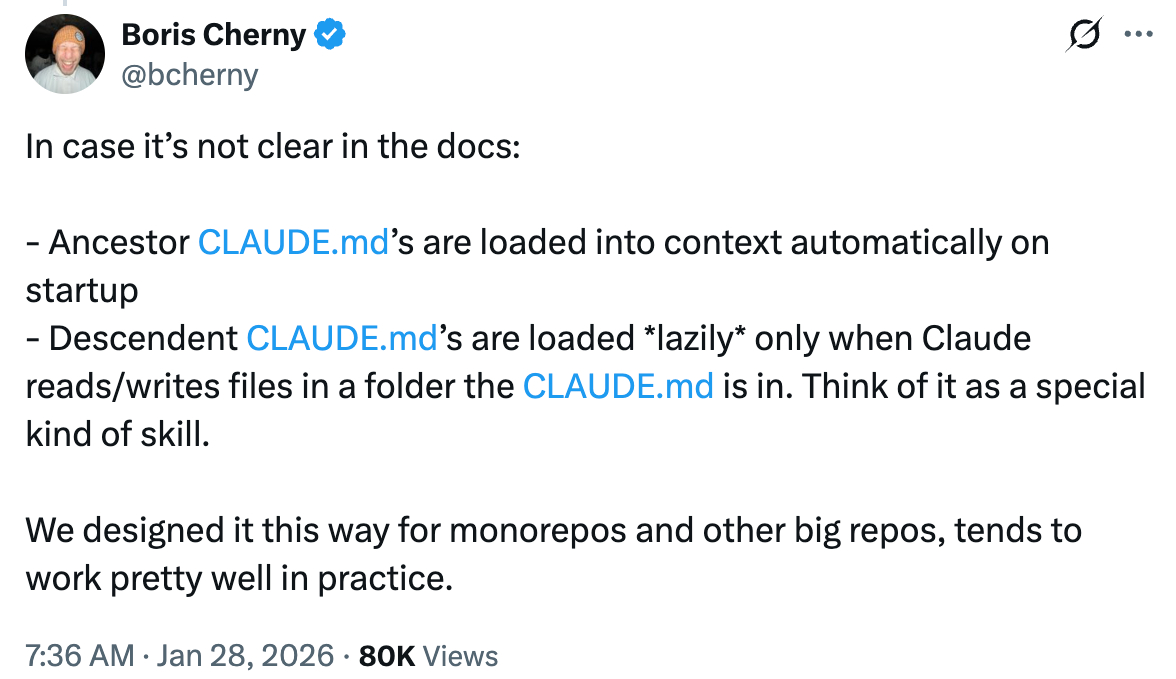 CLAUDE.md loading mechanism in monorepos (Boris Cherny original)
Ancestor Loading
At startup, traverses upward and immediately loads all CLAUDE.md files. Immediate
Descendant Loading
Subdirectory CLAUDE.md files load only when operating in that directory. Lazy
Scenario Comparison
Assume monorepo structure: frontend/CLAUDE.md, backend/CLAUDE.md, api/CLAUDE.md, root CLAUDE.md.
Scenario 1: Start from root cd /mymonorepo && claude
| File | Loaded? | Reason |
|---|---|---|
Root CLAUDE.md | ✓ Immediate | Current working directory |
frontend/CLAUDE.md | ✗ Lazy | Loads when operating in frontend/ |
backend/CLAUDE.md | ✗ Lazy | Loads when operating in backend/ |
api/CLAUDE.md | ✗ Lazy | Loads when operating in api/ |
Scenario 2: Start from component directory cd /mymonorepo/frontend && claude
| File | Loaded? | Reason |
|---|---|---|
Root CLAUDE.md | ✓ Immediate | Ancestor directory, upward traversal |
frontend/CLAUDE.md | ✓ Immediate | Current working directory |
backend/CLAUDE.md | ✗ Never | Sibling directory on different branch |
api/CLAUDE.md | ✗ Never | Sibling directory on different branch |
💡 Best practice: Shared conventions in root
CLAUDE.md, component-specific instructions in componentCLAUDE.md. Personal preferences inCLAUDE.local.md(git-ignored).
Auto Memory
Claude Code ‘s auto memory system persists information across sessions. Memory files are stored in the project .claude/ directory or global ~/.claude/, organized in YAML frontmatter + Markdown format.
4 Memory Types
| Type | Content | When to save | Typical file |
|---|---|---|---|
| user | Role, goals, knowledge background | When learning about user | user_role.md |
| feedback | Preferences and corrections | On user correction/confirmation | feedback_testing.md |
| project | Project progress, milestones | When learning project status | project_auth_rewrite.md |
| reference | External system pointers | When learning about external resources | ref_linear_ingest.md |
Memory File Structure
Each memory is an independent Markdown file using YAML frontmatter:
---
name: feedback-testing
description: Testing preferences and corrections
metadata:
  type: feedback
---

Integration tests must use a real database, not mocks.
**Why:** Last quarter a migration failed due to mock/production environment divergence.

[[testing-patterns]]  ← link to related memory
MEMORY.md Index
All memories are managed via the MEMORY.md index file, kept under 200 lines. Index format per line:
- [Title](filename.md) — one-line summaryWhat NOT to Save
- Code patterns, architecture, file paths — derivable from code
- Git history, recent changes —
git logis authoritative - Debug solutions — the fix is in code, context in commit message
- Content already covered in CLAUDE.md
- Ephemeral task details — use Task or Plan instead
Configuration
| Key | Default | Description |
|---|---|---|
autoMemoryEnabled | true | Enable auto memory, toggle via /memory |
autoMemoryDirectory | - | Custom memory directory (global/managed layer only) |
Agent Memory 3 Scopes
With Subagents, Memory can persist knowledge across agents.
| Scope | Storage | Notes |
|---|---|---|
user | ~/.claude/ | Global, shared across all projects |
project | .claude/ | Project-level, team shared |
local | .claude/ (git-ignored) | Local, personal |
Keep the MEMORY.md index file under 200 lines.
MCP Services
Common MCP Services
| MCP | Usage | Config |
|---|---|---|
| Context7 | Latest library docs | Auto |
| Playwright | Browser automation testing | npx @anthropic-ai/mcp-playwright |
| Chrome DevTools | Browser debugging | Chrome Extension |
| DeepWiki | GitHub repo docs | Auto |
| Excalidraw | Diagram drawing | Auto |
MCP Settings Keys
| Key | Scope | Description |
|---|---|---|
enableAllProjectMcpServers | Any | Auto-approve all .mcp.json servers |
enabledMcpjsonServers | Any | Allowlist by name |
disabledMcpjsonServers | Any | Denylist by name |
allowedMcpServers | Managed | Allowlist by name/command/URL matching |
deniedMcpServers | Managed | Denylist by matching pattern |
allowManagedMcpServersOnly | Managed | Only allow MCP servers in managed allowlist |
allowAllClaudeAiMcps | Managed | Allow claude.ai cloud MCP connectors |
channelsEnabled | Managed | Allow Channel message push (Team/Enterprise) |
Configuration Example
{
  "mcpServers": {
    "context7": {
      "command": "npx",
      "args": ["-y", "@anthropic-ai/mcp-context7"]
    },
    "always-on-server": {
      "type": "http",
      "url": "https://mcp.example.com",
      "alwaysLoad": true
    }
  }
}
Key Features
alwaysLoad (v2.1.121)
Set "alwaysLoad": true in server config to load all tools immediately instead of lazy discovery. Only for small tool sets needed every turn.
Hot Reload (v2.1.139)
/mcp Reconnect re-reads .mcp.json without restarting the session. Also injects CLAUDE_PROJECT_DIR into stdio server environment.
Environment Variable Expansion
Use ${ENV_VAR} syntax in .mcp.json to reference environment variables, avoiding hardcoded secrets:
{
  "mcpServers": {
    "my-api": {
      "url": "https://mcp.example.com/mcp?token=${MCP_API_TOKEN}"
    }
  }
}
⚠️
workspaceis a reserved MCP server name (v2.1.128). User-defined servers with this name will be skipped with a warning.
💡 OAuth-compatible servers complete authentication automatically (following RFC 9728), no manual
apiKeyHelperconfig needed.
Development WorkflowsRPI · CRISPY · Cross-Model · Agent Teams · Automation
RPI Workflow
Research → Plan → Implement, each phase has a validation gate. Orchestrates multiple agent roles via Subagents.
Step 1: RESEARCH   → RESEARCH.md (GO / NO-GO)
Step 2: PLAN       → PLAN.md + pm.md + ux.md + eng.md
Step 3: IMPLEMENT  → IMPLEMENT.md (phased, each phase has test gates)
8 Agent Roles
| Agent | Model | Responsibility |
|---|---|---|
| requirement-parser | sonnet | Parse unstructured requirements into standardized format (functional/non-functional, constraints, complexity estimation) |
| product-manager | opus | Transform high-level requirements into PRD (user stories, acceptance criteria, success metrics, scope definition) |
| senior-software-engineer | opus | TDD-first implementer: small commits, clear boundaries, reversible, observable |
| ux-designer | opus | Generate UX Brief: all-state design (loading/empty/error/success), accessibility annotations |
| code-reviewer | opus | Code review: correctness, security, dependencies, architectural boundaries, outputs NEEDS REVISION / APPROVED |
| technical-cto-advisor | opus | CTO-level strategic assessment: tech stack alignment, risk assessment, business risk integration |
| constitutional-validator | opus | Five-dimensional framework validation: mission alignment, architecture alignment, knowledge management, human-AI collaboration, complexity fit |
| documentation-analyst-writer | opus | Produce documentation per project standards (API, architecture, user guide), with self-check protocol |
3 Commands
| Command | Param | Agents Used | Output |
|---|---|---|---|
/rpi:research | “ | requirement-parser → product-manager → Explore → senior-engineer → cto-advisor → doc-writer | RESEARCH.md (GO/NO-GO/CONDITIONAL/DEFER) |
/rpi:plan | “ | product-manager → ux-designer → senior-engineer → doc-writer | pm.md + ux.md + eng.md + PLAN.md |
/rpi:implement | [--phase N] | Explore → senior-engineer → code-reviewer (per-phase loop) | IMPLEMENT.md (includes PR notes) |
Project Directory Structure
rpi/{feature-slug}/
├── REQUEST.md              # Feature description
├── research/RESEARCH.md    # GO/NO-GO analysis
├── plan/
│   ├── PLAN.md             # Implementation roadmap (3-5 phases)
│   ├── pm.md               # Product requirements document
│   ├── ux.md               # UX design draft
│   └── eng.md              # Technical specification
└── implement/IMPLEMENT.md  # Implementation log (per-phase verification)
CRISPY Method
C — Clarify      Define requirements
R — Research     Technical research
I — Ideate       Brainstorm solutions
S — Structure    Architecture design
P — Plan         Create plan
Y — Yield        Produce implementation
  + Iterate      Iterate & refine
ℹ️ CRISPY is an evolution of RPI, adding Ideate and Structure phases, emphasizing that solution design matters more than implementation.
Cross-Model Collaboration (Claude + Codex)
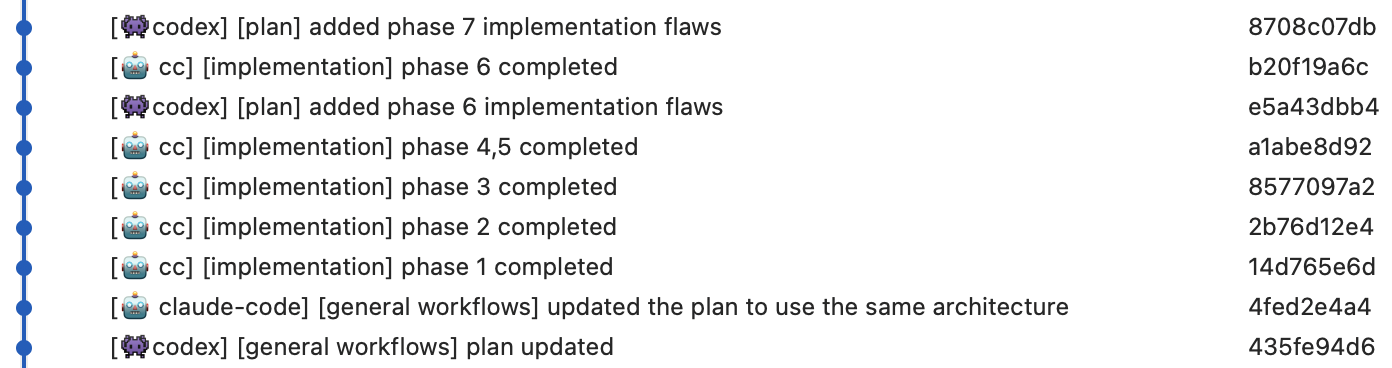 Claude Code (Opus) + Codex CLI (GPT) cross-model 4-step collaboration workflow
STEP 1: PLAN          Claude Code Opus · Plan Mode
STEP 2: QA REVIEW     Codex CLI GPT · Review plan, insert findings
STEP 3: IMPLEMENT     Claude Code Opus · Phase-by-phase implementation
STEP 4: VERIFY        Codex CLI GPT · Verify against plan
💡 **Core idea: **Different models review each other. Codex appends “Codex Finding” annotations without rewriting the original plan.
Agent Teams
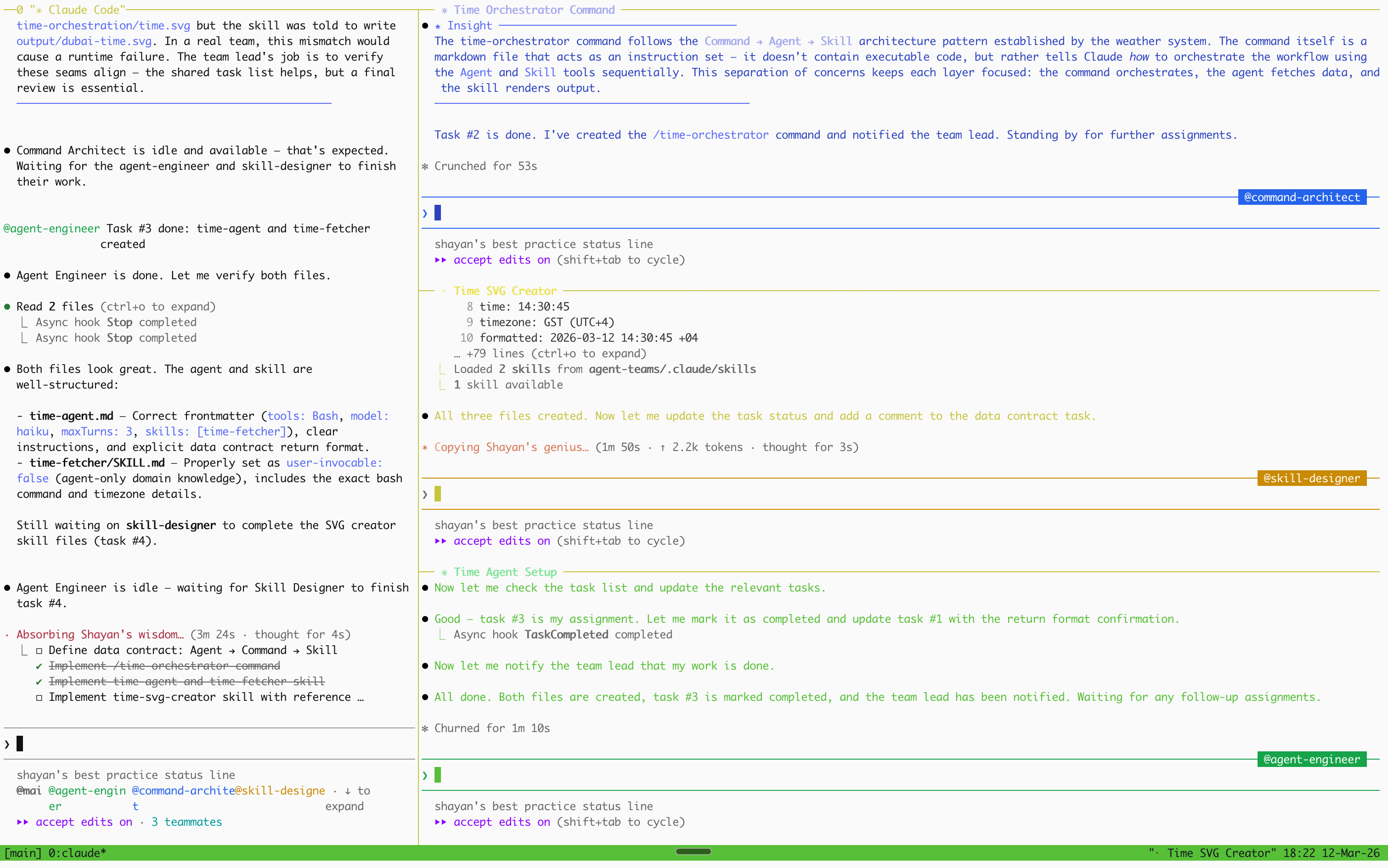 Agent Teams multi-agent collaboration workflow
Coordinate multiple agents via shared task list (TaskCreate/TaskUpdate). Ideal for large refactors decomposable into independent subtasks.
Team Coordination Pattern
Take Time Orchestration as an example — three roles build in parallel, sharing a data contract {time, timezone, formatted}:
| Role | Output | Description |
|---|---|---|
| Command Architect | time-orchestrator command | Design slash command, orchestrate Agent → Skill call order |
| Agent Engineer | time-agent + time-fetcher skill | Lightweight Agent (haiku, maxTurns:3), fetches Dubai time via preloaded Skill |
| Skill Designer | time-svg-creator skill | Receive data contract, generate SVG time card + output.md |
Agent Teams Component List
time-agent definition
---
name: time-agent
description: Get current Dubai time (Asia/Dubai, UTC+4)
tools: Bash
model: haiku
color: blue
maxTurns: 3
skills: time-fetcher
---
Use Bash to execute `TZ='Asia/Dubai' date`, return time/timezone/formatted fields.
time-orchestrator command
---
description: Get Dubai time and generate SVG time card
model: haiku
---
1. Agent(time-agent) → fetch {time, timezone, formatted}
2. Skill(time-svg-creator) → generate SVG card
Note: Must execute sequentially, cannot parallelize.
time-fetcher Skill
---
name: time-fetcher
description: Fetch current Dubai time via bash
user-invocable: false
---
Command: TZ='Asia/Dubai' date '+%Y-%m-%d %H:%M:%S %Z'
Return format: { time: "HH:MM:SS", timezone: "GST (UTC+4)", formatted: "full output" }
time-svg-creator Skill
---
name: time-svg-creator
description: Create Dubai time SVG card
allowed-tools: Write, Read
---
Receive time/timezone/formatted, generate self-contained SVG card.
Output: agent-teams/output/dubai-time.svg + output.md
Scheduled Tasks
# CronCreate Parameters
cron: "*/5 * * * *"     # Standard 5-field cron (local timezone)
prompt: "Check CI status"   # Prompt executed on trigger
recurring: true          # true=recurring, false=one-shot
durable: true            # true=persist to file
Goal-Driven
Automatically decompose and track progress with the task system.
- User sets a goal
- Claude decomposes into subtasks and creates a task list
- Implement step by step, updating status each step
- Request user input when blocked
Community Goal Tips
- Let the Agent propose Goals — describe the problem context first, then let the Agent suggest appropriate goals, usually more precise than hand-written ones
- Let the Agent draft /goal prompts — the Agent knows its own capability boundaries better, producing more feasible goal prompts
/goalConditional Goals — e.g./goal all tests pass and no lint errors, Agent keeps working until the condition is met- Goal + TaskCreate Integration — Decompose Goal into TaskCreate task list, mark each done on completion
Session Management
| Scenario | Recommended Action |
|---|---|
| Starting complex task | /plan |
| Context > 50% | /compact |
| Hallucination detected | /undo to revert |
| Multi-file changes | Agent parallel dispatch |
| Long-running task | Background agent |
⚠️ Context Rot starts appearing at ~300-400k. **Revert > Correct. **
Deep ReportsLLM Performance · Tool Comparison · Usage · Learning Path
LLM Performance Degradation Analysis
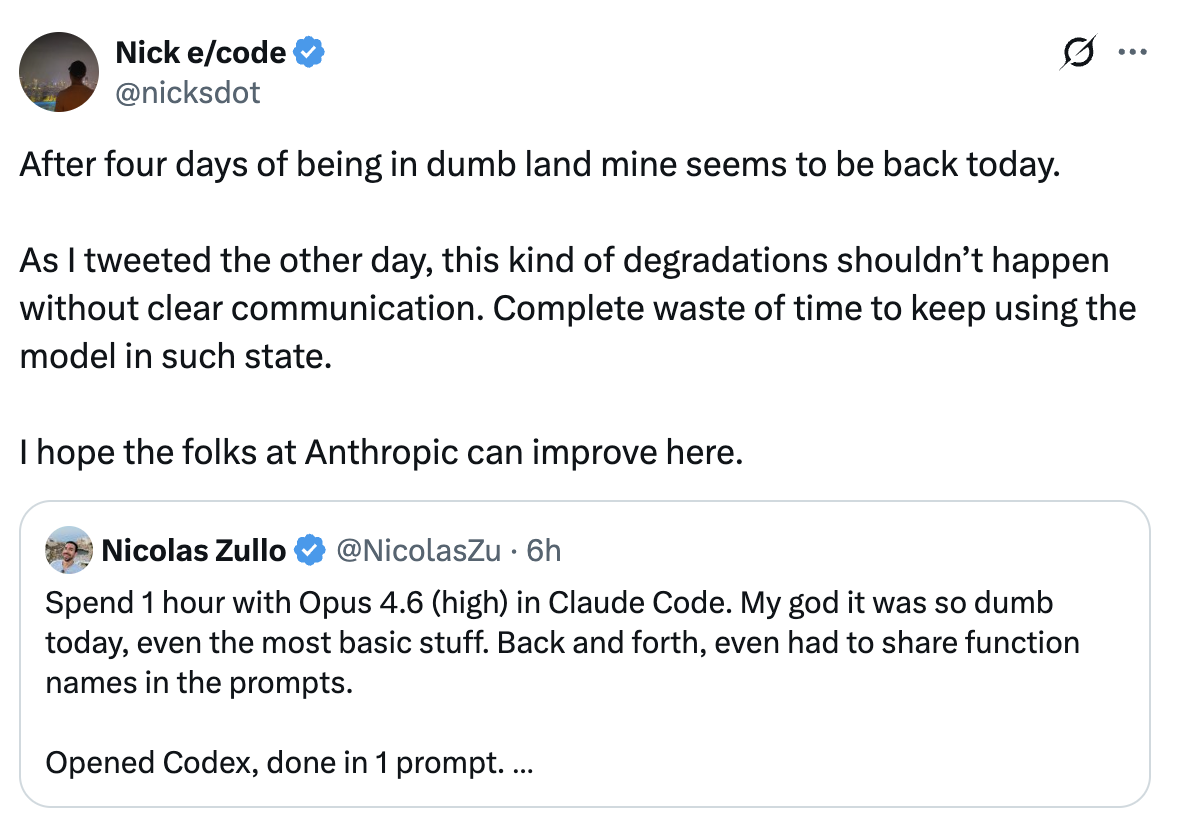 Daily fluctuations in LLM output quality
9-Layer Inference Stack (Frozen Weights ≠ Frozen Behavior)
┌──────────────────────────────────────────────┐
│  User session context              ← In-session degradation    │
│  System Prompt                    ← Periodically updated      │
│  Post-Training (RLHF/fine-tuning)  ← Can update silently    │
│  Sampling params (temperature/top-p) ← Server-adjustable    │
│  Speculative Decoding (draft model) ← Quality fluctuation      │
│  MoE routing / batch composition   ← ±8-14% variance   │
│  Hardware routing (TPU/GPU/Trainium)← Different failure modes  │
│  Quantization level (FP16/INT8/INT4)← May change under load │
│  Compiler & runtime (XLA:TPU/CUDA) ← Confirmed bugs  │
├──────────────────────────────────────────────┤
│  Model weights (frozen) ← This layer does not change                    │
└──────────────────────────────────────────────┘
Key Findings
| Question | Answer |
|---|---|
| Do model weights change? | No — confirmed by all providers |
| Can daily behavior differ? | Yes — ±8-14% variance confirmed |
| Is it intentional “dumbing down”? | No — no evidence of intentional degradation |
| Are infrastructure bugs real? | Yes — Anthropic confirmed 3 bugs, affecting up to 16% of requests |
| Are there psychological factors? | Yes — confirmation bias and honeymoon effect are real |
| Should you trust personal perception? | Partially — real causes exist, but perception amplifies them |
Anthropic 2025.9 Post-Mortem: 3 Infrastructure Bugs
Bug #1 — Context Window Routing Error
| Dimension | Details |
|---|---|
| Cause | Sonnet 4 requests incorrectly routed to 1M token context window servers |
| Timeline | Introduced Aug 5, worsened after Aug 29 load balancer change |
| Peak Impact | 16% of Sonnet 4 requests affected (Aug 31 worst period) |
| User Impact | ~30% of Claude Code users received at least one degraded response |
| Hidden Detail | Routing was “sticky” — once hitting a bad server, subsequent requests kept routing there |
| Fix | Sept 4-18 rolling deployment across platforms |
Bug #2 — TPU Output Corruption
| Dimension | Details |
|---|---|
| Cause | TPU server misconfiguration, assigning high probability to low-frequency tokens during generation |
| Symptoms | Sudden Thai/Chinese characters in English responses, obvious code syntax errors |
| Scope | Opus 4.1/Opus 4 (Aug 25-28), Sonnet 4 (Aug 25-Sept 2); Claude API only |
| Fix | Rolled back on Sept 2 |
Bug #3 — XLA:TPU Compiler Miscompilation (Most Tricky)
| Dimension | Details |
|---|---|
| Root Cause | A code change fixing precision issues accidentally exposed a latent compiler bug in XLA:TPU |
| Behavior | Approximate top-k operation “sometimes returned completely wrong results”, but only for specific batch sizes and model configs |
| Why Hard to Find | Behavior depended on preceding/succeeding operations and whether debugging tools were enabled |
| Hidden Duration | A Dec 2024 workaround had been masking this deeper bug all along |
| Impact | Haiku 3.5 confirmed; Sonnet 4/Opus 3 partially suspected |
| Resolution | Switched from approximate top-k to exact top-k, accepting slight efficiency loss |
⚠️ Claude runs on three different hardware platforms (AWS Trainium, NVIDIA GPU, Google TPU), each with different failure modes, compilers, and precision behavior. Your requests may hit different hardware on different days.
MoE Routing Variance (Scale AI Research)
In MoE (Mixture of Experts) architecture, the query composition of other users in the batch determines which experts your request is routed to — and this composition is non-deterministic.
| Provider | Daily Score Variance |
|---|---|
| OpenAI (GPT-4 series) | ±10-12% |
| Anthropic (Claude series) | ±8-11% |
| Google (Gemini series) | ±9-14% |
Specific example: the same model scored 77% on jailbreak resistance one day and 63% the next — a 14-point swing with zero bugs, zero changes.
System Prompt & Post-Training Updates
| Factor | Description |
|---|---|
| System Prompt Changes | Model weights unchanged, but system prompt can update anytime. Claude 3.7 had multiple hot-fix instructions, 4.0 removed them all (solved via RL) |
| Post-Training Updates | Can update RLHF/fine-tuning without changing base weights — technically “model unchanged” but behavior has shifted |
| Silent Model Switching | OpenAI has been documented silently swapping user-facing models multiple times (GPT-4o→GPT-5 forced switch, autoswitcher bug) |
Stanford Study (2023) — and Its Controversy
Chen/Zaharia/Zou’s landmark study found GPT-4 accuracy on “prime number judgment” dropped from 97.6% to 2.4% (Mar→Jun 2023), but had methodological issues:
- March version used temperature 0.0, June version used temperature 1.0 — a fundamental confounding variable
- Only 500 queries per task — sample size too small
- “Math problems” were actually yes/no questions, model guessing pattern changed rather than math ability declining
- Changes may be intentional post-training safety updates, not unintentional degradation
Psychological Factors
| Effect | Description |
|---|---|
| Confirmation Bias | Once someone tweets “Claude is dumb today”, you start noticing every error |
| Honeymoon Effect | Initial experience with new models is always impressive, expectations rise faster than capability |
| ”Weekend Claude” Myth | Strict analysis found no consistent day-of-week pattern |
| Randomness | Same prompt produces different output each time. A few bad responses in a row may just be bad luck |
Codex 5.3 Comparison Analysis
When Claude has short-term degradation, Codex 5.3 may appear significantly better, reasons:
- Product-Goal Fit — Codex is optimized for code generation, producing better coding results even at equal model strength
- Reasoning Strategy Differences — Each provider independently tunes latency/reasoning depth/decoding defaults
- Service Path Isolation — Different routing layers/compilers/release pipelines, one failing doesn’t affect the other
- Release Timing — One provider mid-release while another is stable can create large temporary quality divergence
Degradation Hypothesis Ranking
| Hypothesis | Likelihood | Reasoning |
|---|---|---|
| Provider incident + rollback | High | Best matches “days of decline followed by quick recovery” pattern |
| Service configuration change | High | Common source of sudden behavior changes, no retraining needed |
| Silent alias/snapshot move | Medium-High | Can change behavior without user action |
| Prompt drift + context pollution | Medium | Can degrade individual sessions, but hard to explain widespread multi-day reports |
| Permanent base model degradation | Low | Inconsistent with quick recovery to prior quality |
Practical Recommendations
- Lock model snapshots when available (instead of using floating aliases)
- Store request metadata (model ID, parameters, latency, error rates)
- Run fixed daily canary tests, alert on regression
- Reset or compact long sessions after multiple failures
- Maintain backup provider/model paths
- Separate “model quality” from “service reliability” in internal dashboards
💡 **The single most important action: **When quality feels degraded, use
/compactor start a fresh session. This is the most effective single action — most “Claude got dumber” is context pollution, not model degradation.
Harness Importance
Common misconception: skill/command/subagent/hook all end up as prompts, so writing good prompts is enough. **This is wrong. **At the engineering level, the Harness is a prompt construction system + deterministic execution system + context architecture system.
| Metric | Value |
|---|---|
| User input tokens | 6–60 |
| Model actual reasoning tokens | 5,000–50,000+ |
| CLI modular prompt fragments | 110+ |
Harness 10 Capabilities (cannot be replicated by prompts)
| # | Capability | Description |
|---|---|---|
| 1 | Context isolation | N parallel subagents ≈ N× effective context |
| 2 | Tool restriction enforcement | allowed/disallowedTools intercept before model calls |
| 3 | Lazy loading rules | paths: frontmatter loads on demand |
| 4 | Hooks determinism | Lifecycle events trigger shell commands, can block tool calls |
| 5 | Model routing | model: haiku / model: opus route to different endpoints |
| 6 | Parallel execution | Multiple subagents run concurrently |
| 7 | Cross-session persistence | Memory system and settings layers persist across conversations |
| 8 | Modular system prompt | 110+ fragments conditionally loaded by function |
| 9 | Skill preloading | Full skill content injected into subagent startup context |
| 10 | Permission classification | auto mode background classifier pre-approves/blocks |
💡 Output quality = f(effective context, model capability, iteration loops). Users control only a tiny fraction of effective context; the harness controls the rest and the entire iteration loop. Strong prompts are necessary but not sufficient.
Browser MCP Comparison
| Metric | Chrome DevTools | Claude in Chrome | Playwright |
|---|---|---|---|
| Tool Count | 26 tools | 16 tools | 21 tools |
| Token Cost | ~19.0k (9.5%) | ~15.4k (7.7%) | ~13.7k (6.8%) |
| Browser Support | Chrome only | Chrome only | Chromium/Firefox/WebKit |
| Headless Mode | Supported | Not supported | Supported |
| CI/CD Integration | Excellent | Poor (requires login) | Excellent |
| Security | Isolated profiles | Attack rate 23.6%→11.2% | Mature security model |
| Cost | Free | Requires paid plan | Free |
Recommended Workflow
| Step | Purpose | Tool |
|---|---|---|
| Development | Terminal coding | Claude Code |
| Testing | E2E/cross-browser | Playwright MCP |
| Debugging | Performance/network | Chrome DevTools MCP |
| Verification | Quick visual check | Claude in Chrome |
| CI/CD | Headless automation | Playwright MCP |
# Install command
npx playwright install
claude mcp add playwright -s user -- npx @playwright/mcp@latest
claude mcp add chrome-devtools -s user -- npx chrome-devtools-mcp@latest
💡 Playwright has the highest token efficiency (186.3k remaining), Chrome DevTools the lowest (181k remaining). Gap of ~5.3k tokens.
Monorepo Skill Discovery
Skills discovery/loading mechanism is different from CLAUDE.md: CLAUDE.md traverses upward (ancestor loading) , while Skills use nested directory auto-discovery (descendant discovery), and are only loaded on demand when editing files in the corresponding directory. See Monorepo Loading Mechanism.
Standard Skill Locations
| Scope | Path | Applies To |
|---|---|---|
| Enterprise | Managed settings | All users in organization |
| Personal | ~/.claude/skills/*/SKILL.md | All projects |
| Project | .claude/skills/*/SKILL.md | Current project only |
| Plugins | /skills/*/SKILL.md | Where plugin is enabled |
CLAUDE.md vs Skills Loading Comparison
| Behavior | CLAUDE.md | Skills |
|---|---|---|
| Upward traversal (ancestor) | Yes | No |
| Downward discovery (descendant) | Yes (lazy loading) | Yes (auto discovery) |
| Default content loading | All content | Description only (full on demand) |
ℹ️ Character budget defaults to 15,000 characters, adjustable via
SLASH_COMMAND_TOOL_CHAR_BUDGETenvironment variable. Use/contextto check if any skills were excluded due to budget limits.
- General workflows go in root
.claude/skills/ - Package-specific skills go in the corresponding package
.claude/skills/ - Dangerous operation skills should set
disable-model-invocation: true - Use package name prefixes to avoid confusion (e.g.
frontend-review,backend-deploy)
Usage & Limits
| Metric | Value |
|---|---|
| Context Window | 1M token |
| Recommended compaction point | ~50% |
| Degradation onset | ~300-400k |
| CLAUDE.md recommendation | <200 lines |
| Extra Usage daily limit | $2,000/day |
| Limit reset window | Every 5 hours |
Monitoring Commands
| Command | Feature | Applies To |
|---|---|---|
/usage | View plan and rate limits | Pro/Max 5x/Max 20x |
/extra-usage | Configure pay-per-use overflow | Pro/Max 5x/Max 20x |
/cost | Current session tokens and cost | API key users |
/insights | Usage pattern analysis report | All users |
Cost Optimization
- Use
model: haikufor simple tasks effort: lowreduces reasoning- Background agent avoids blocking
- API key users use
--max-budget-usdto control costs - Configure extra-usage monthly cap to avoid unexpected charges
⚠️ Fast Mode (
/fast) counts as extra usage from the first token, not consuming subscription plan included quota. Must enable and fund extra-usage to use.
Spinner Verbs
Claude Code’s loading animation uses 179 random verbs. Common ones:
| Verb | Implies |
|---|---|
| Thinking / Cogitating | Reasoning |
| Reading / Perusing | Reading files |
| Editing / Crafting | Edit file |
| Searching / Spelunking | Searching code |
| Orchestrating | Orchestrating agents |
| Synthesizing | Synthesizing information |
Learning Path
A complete learning journey building a Weather Reporter from scratch, through 5 major phases · 37 slides:
Phase Order (reordered by cognitive dependencies)
| Order | Phase | Slides | Core Idea |
|---|---|---|---|
| 1 | Agents | 7 | First understand “who” does the work |
| 2 | Skills | 8 | Skills are the agent’s “capabilities” |
| 3 | Context | 7 | Context Window & memory system |
| 4 | CLAUDE.md | 7 | Project instructions are “rules” |
| 5 | Commands | 8 | Commands are the “orchestration layer” |
LEVELS Mapping (6 levels)
const LEVELS = {
  context:     '🔴 Context Window',   // context-window.jpeg, context.jpg
  claude_md:   '🟠 CLAUDE.md',   // Project instruction system
  agents:      '🟡 Agent System',     // Built-in + custom agents
  skills:      '🟢 Skills System',     // Skills framework
  commands:    '🔵 Commands System',     // Commands orchestration
  workflow:    '🟣 Full Workflow'    // End-to-end integration
}
37 Slides Outline
Expand all slide content
Agents Phase (Slides 1-7)
- What is an Agent? — Agent = Model + Tools + Context
- 5 built-in agent types — general-purpose / Explore / Plan / statusline-setup / claude-code-guide
- Agent Frontmatter — 16 tools field details
- Model selection — inherit / haiku / sonnet / opus tradeoffs
- Tool control — tools vs disallowedTools
- Permission Mode — acceptEdits / plan / bypassPermissions
- Weather Agent Design — weather agent in practice
Skills Phase (Slides 8-15)
- What is a Skill? — Skill = prompt template + metadata
- SkillTrigger — auto (PROACTIVELY) vs manual (/skill-name)
- Frontmatter fields — name / description / tools / model
- weather-fetcher skill — fetch weather data from API
- weather-analyzer skill — analyze weather trends
- Skill composition — multiple skills working together
- Skill testing — verify skill output quality
- Skill best practices — writing reusable skills
Context Phase (Slides 16-22)
- Context Window — 200K token boundary
- Context Compression — automatic summarization
- Memory System — user / project / local three tiers
- MEMORY.md Index — persistent memory management
- CLAUDE.md Injection — context loading strategy
- Resource Reuse — context-window.jpeg / context.jpg
- Context Window visualization — understanding token allocation
CLAUDE.md Phase (Slides 23-29)
- What is CLAUDE.md? — Project instructions file
- Three-level loading — global / project / local
- Writing conventions — structured instruction format
- Environment config — development environment conventions
- Code style — project code conventions
- Security rules — sensitive operation constraints
- Weather Reporter’s CLAUDE.md — practical example
Commands Phase (Slides 30-37)
- What is a Command? — command = orchestration layer
- Command vs Skill vs Agent — three-layer architecture comparison
- weather-orchestrator — weather orchestration command
- Command flow — prompt → steps → output
- Dynamic context injection —
!command“ syntax - Error handling & retries — robustness design
- End-to-end integration — Agents + Skills + Commands
- Review & outlook — from zero to complete Weather Reporter
Resource Reuse
| Asset | Reused In | Description |
|---|---|---|
context-window.jpeg | Slide 16 | Context Window visualization |
context.jpg | Slide 22 | Context allocation diagram |
Redesign Accounting
- goToSlide() target: all 37 call sites need updated index numbers
- data-level attribute: each slide’s level marker needs mapping to LEVELS
- Navigation component: prev/next buttons need binding to new slide order
- Progress bar: 5-segment progress indicator maps to 5 phases
ℹ️ Start simple → compose gradually → full orchestration. Don’t build complex architecture from the start. Phase order is rearranged by cognitive dependencies: first understand “who” (Agents), then “what they can do” (Skills), then “environment” (Context), then “rules” (CLAUDE.md), finally “orchestration” (Commands).
SDK vs CLI System Prompts
Claude Code CLI and Agent SDK use different system prompt strategies:
Agent SDK
- Base prompt about ~269 tokens
- Minimal guidance, highly customizable
modulartype supports custom system prompts- 110+ system prompt strings available
- Suitable for building custom agent applications
CLI Mode
- System prompt includes complete tool definitions
- Pre-installed Bash/Read/Write/Edit tool descriptions
- CLAUDE.md auto-injection
- Includes safety rules and behavior constraints
- Ready to use, zero configuration
Core Differences
| Dimension | Agent SDK | Claude Code CLI |
|---|---|---|
| System prompt length | ~269 tokens (minimal) | ~3000+ tokens (complete) |
| Tool descriptions | Loaded on demand | All pre-installed |
| Customizability | Fully controllable | CLAUDE.md + Settings |
| Use case | Build AI applications | Development workflows |
| Model selection | Any Claude model | Opus/Sonnet/Haiku |
💡 SDK provides a modular prompt type, allowing tool descriptions to be added individually, saving many tokens over CLI’s full loading.
Billion Dollar Questions
13 unanswered deep questions from the community — if you have answers, these are billion-dollar insights.
Memory & Instructions (4 questions)
- What should CLAUDE.md contain? — What to include, what to exclude?
- If CLAUDE.md exists, do you still need
constitution.mdorrules.md? - How often should CLAUDE.md be updated? How to tell if it’s outdated?
- Why does Claude still ignore instructions in CLAUDE.md — even with
MUSTin all caps?
Agents, Skills & Workflows (6 questions)
- When to use Command vs Agent vs Skill — when is native Claude Code better?
- How often should agents/commands/workflows be updated as models upgrade?
- General-purpose vs role/function-specific subagents — does detailed persona actually improve quality?
- Use Claude Code’s built-in plan mode, or build custom planning commands/agents to enforce team workflows?
- How do personal skills and community skills coexist? Who takes priority on conflict?
- **The ultimate question: **Can you convert an existing codebase to spec, delete the code, and have AI regenerate from spec alone?
Specs & Documentation (3 questions)
- Should every feature in the repo have a spec file?
- How often should specs be updated to stay current?
- When implementing a new feature, how to handle cascading impacts on other features’ specs?
⚠️ The answers to these questions will determine the direction of Agentic Engineering best practices. If you have insights, this is the frontier.
Expert InsightsBoris Cherny · Thariq · Community Best Practices
Boris Cherny — 13 Rules
 Boris Cherny — Claude Code Core Engineer
- Write great CLAUDE.md — highest ROI optimization
- Under 200 lines — compliance drops beyond this
- Negative instructions — “don’t do X” is more effective
- Manual /compact — proactively compress at 50%
- Plan before implementing — use /plan for complex tasks
- Subagent parallelism — dispatch independent tasks simultaneously
- Specify model explicitly — haiku for simple, opus for complex
- Revert > Correct — /undo is more reliable than post-hoc fixes
- Trust code reading — no need to manually paste code
- Hooks automation — use hooks for repetitive operations
- CLAUDE.local.md — personal preferences without polluting team
- Rules for conditional loading — paths to scope
- /doctor for diagnostics — run /doctor first when issues arise
12 Customization Tips
- Custom Subagents —
.claude/agents/*.md, YAML frontmatter defines tools/model/memory - Custom Commands —
.claude/commands/*.md, parameterized with $ARGUMENTS - Custom Skills —
.claude/skills/*/SKILL.md, description drives auto-discovery - Hooks Automation — settings.json configures lifecycle hooks (PreToolUse/PostToolUse/Stop)
- Rules Conditional Loading —
.claude/rules/*.md+paths:to scope - Permission Templates — allowed-tools controls at tool+path granularity
- Model Selection — haiku for simple, opus for complex, sonnet for balance
- Effort Tuning — low for quick response, max for deep reasoning
- Memory scopes — user (global) / project (team) / local (personal)
- MCP Integration — Connect external tools (databases, browsers, APIs)
- Worktree Isolation —
--worktreeorisolation: "worktree"for independent experiments - Background Tasks — Long tasks run in background, notification on completion
10 Advanced Tips
- Plan Mode First — Use
/planfor complex tasks, state goals not steps - Agent parallel orchestration — dispatch independent tasks simultaneously, leveraging context isolation
- Skills progressive disclosure — description always loaded, full content on demand
- Context Budget 50% — Proactively
/compact, stay in the smart zone - code-reviewer for Consistency — Cross-validate cross-file logic
- Iterative Refinement — Better than one-shot perfection, progressively approach the goal
- Error Recovery: /undo First — Reverting is more reliable than patching
- Testing First — TDD red-green-refactor combined with AI
- Docs as Context — Good docs = good output, write WHY not WHAT in comments
- Monitor Context Usage —
/contextfor visual token distribution check
Code Review Tips
💡 Test Time Compute: Code Review makes the model “think again” in an independent context, increasing output by 200%. Multi-Agent parallel review (security + performance + architecture) yields higher quality than single review.
effort: highfor more thorough review,effort: lowfor fewer but more focused findings- Have AI play “adversary” role — raise objections rather than surface-level review
- Auto-trigger before PR submission (Hooks PreToolUse config)
- Use with
--commentto add PR comments - Review scope: correctness, security vulnerabilities, code quality, project specs
- Different Agents play different roles (security review vs performance review vs architecture review)
PR Statistics (Boris Cherny’s Real Data)
| Metric | Value |
|---|---|
| Daily contributions | 266/day |
| Total PRs | 141 (all squash merge) |
| Total lines changed | 45,032 lines |
| Median PR | p50 = 118 lines |
| P90 PR | 490 lines |
| P99 PR | 2,978 lines |
| Smallest PR | 2 lines |
| Largest PR | 10,459 lines |
ℹ️ Boris has approximately 100% new code written by AI, humans review and guide direction. Key is independent commits per file for clearer history.
2 Merge Tips
- Commit per file — Each file gets its own commit, clearer history, easier to review/revert
- Don’t amend — Create new commits to preserve history, avoid overwriting pre-commit hook checks
6 Opus 4.7 Efficiency Tips
6 core efficiency improvement methods summarized by Boris Cherny after Opus 4.7 release.
- **Auto Mode (Shift+Tab) ** — One-click full auto mode, Agent autonomously decides read/write/execute, no step-by-step confirmation
/fewer-permission-promptsSkill — Preset skill that auto-configures common tool permissions, drastically reducing popup interruptions- Recaps Summary — Agent auto-generates execution summary after each turn, keeping context clear
- **Focus Mode (
/focus) ** — Filters irrelevant output, showing only core decisions and results, ideal for long tasks - Effort Level —
lowquick response (simple queries),mediumdefault,highdeep reasoning (code review),xhigh/maxmaximum depth (architecture design) - Verification mode — backend: auto-start server to verify; frontend: Chrome Extension checks rendering; desktop: Computer Use automated UI testing
💡 Auto Mode Best Practice: Use with
effort: highand/focus, let Agent work autonomously at high reasoning depth, reporting only key decision points.
Thariq — Skill Design
- Single Responsibility — each Skill does one thing
- Precise descriptions — determines auto-discovery accuracy
- Use when_to_use wisely — reduce false triggers
- Parameterized templates — arguments dynamic replacement
- Path scoping — paths avoid irrelevant activation
- Progressive disclosure — gradual loading
Thariq — Practical Tips
17 Mar Tips
- /doctor for environment diagnostics
- CLAUDE.md for constraints
- haiku for cost savings
- background for long tasks
- disallowedTools to restrict dangerous operations
16 Apr Tips
- Session management > Skill design
- /compact at 50%
- /undo > manual fixes
- Split into independent subagents
- Each < 50% context
Session Management — Deep Guide
Thariq’s deep Session management framework: understanding context degradation, branching strategies, subagent garbage collection.
⚠️ Context Rot: At approximately 300k-400k tokens the model starts “forgetting” earlier conversation, output quality drops significantly. This is not a bug, but a mathematical property of attention.
5 Branching Strategies
| Strategy | Scenario | Description |
|---|---|---|
continue | Continue from last | Restore full context to continue conversation |
rewind | Return to a point | Undo to specified step and restart |
clear | Fresh start | Clear context, start from scratch |
compact | Compress & retain | Intelligently compress while retaining key info |
subagent | Isolated execution | Dispatch subagent, no main context pollution |
Key Decision Table
| Scenario | Recommended Action |
|---|---|
| Context > 50% | /compact or dispatch subagent |
| Wrong direction | rewind to divergence point, don’t correct in place |
| Poor quality after compact | Use /compact [brief] with summary instructions, or directly clear + CLAUDE.md |
| Need to preserve history | Subagent handles new tasks, main conversation stays lean |
| Subagent context bloat | Subagents have built-in GC — auto-collected after completion, no impact on main session |
💡 Compact vs Fresh: If conversation history is highly relevant (e.g. debugging chain), use compact + brief; if topic has completely shifted, clear and rebuild context from CLAUDE.md is more efficient. Typical cause of bad compact: vague compression instructions causing key constraints to be dropped.
83 Categorized Tips
From community practices and official recommendations, organized into 16 tool categories. Core references: CLAUDE.md conventions, Subagents parallelism, RPI Workflow.
Prompting Tips (3)
- State goals not steps — Tell Claude what result you want, not how to do each step
- Negative instructions are more effective — “Don’t do X” is more reliable than “please do Y”
- Example-driven — Provide input/output examples, more accurate than abstract descriptions
Planning (7)
- Use
/planfor complex tasks first, state goals not detailed steps - Split into independent subtasks, each < 50% context
- Use TaskCreate to track progress, set dependencies
- Plan Mode should clearly describe expectations, let model plan the path
- Multi-round iteration beats one-shot perfection — progressively approach the goal
- Priority ordering: core first then edge cases, blocking first then independent
- Estimate context consumption, avoid oversized single tasks
Context (5)
/compactproactively at 50% context- Use
/compact [focus instructions]to retain key information - Context budget management — regular cleanup in long conversations
--resume / --continueto restore previous session- Good docs = good output, write WHY not WHAT in comments
Session (6)
- Session management is more important than Skill design — longer sessions are smarter
- /compact at 50%, avoid quality degradation
- /undo > manual fixes — reverting is more reliable than post-hoc correction
- Split into independent subagents, Each < 50% context
--continueseamlessly continue previous sessionmaxTurnslimits subagent turns, preventing infinite loops
CLAUDE.md (8)
- Writing great CLAUDE.md is the highest ROI optimization
- Under 200 lines — compliance drops beyond this
- Negative instructions — “don’t do X” is more effective
CLAUDE.local.mdpersonal preferences without polluting team- Only write information the model cannot infer on its own
.claude/rules/*.md+paths:conditional loadingclaudeMdExcludesexclude unneeded CLAUDE.md files- 4 scopes: global / project / directory / personal
Agents (4)
- Custom subagents
.claude/agents/*.md, YAML frontmatter defines tools/model/memory - Subagent parallelism — dispatch independent tasks simultaneously
context: forkisolates subagent context, preventing main conversation pollution- Specify model explicitly — haiku for simple, opus for complex
Commands (3)
.claude/commands/*.mdCustom commands$ARGUMENTSparameterized — command template dynamic replacement/project:command-nameto call project commands
Skills (9)
- Single responsibility — each skill does one thing
- Precise descriptions — determines auto-discovery accuracy
- Use when_to_use wisely — reduce false triggers
- Progressive disclosure — gradual content loading
- Path scoping — avoid irrelevant activation
- Arguments parameterized template — dynamic replacement
- forceLoadSkills forced loading — preload critical skills
- disallowedTools restriction — skill-level tool control
- Pick the right type from 9 options — skill/agent/Explore/code-simplifier etc.
Hooks (5)
- PreToolUse intercepts and modifies before tool execution
- PostToolUse triggers automation after tool execution
- Stop executes cleanup when session ends
- Auto-trigger code review before PR submission
- Use hooks for repetitive operations — formatting, lint, notifications etc.
Workflows (5)
- RPI Loop: Research → Plan → Implement
- CRISPY: Clarify → Research → Ideate → Structure → Plan → Yield
- Cross-Model Collaboration: Claude plans + Codex/Gemini executes
- Agent Teams: Multi-Agent parallel (Amp, Codex, Claude)
- Scheduled Tasks: CronCreate timed scheduling for auto-execution
Advanced Workflows (9)
- Background agent avoids blocking main session
- Worktree isolated experiments — independent branch + context
- Goal-driven — set goals for model to achieve autonomously
- Session management > skill design — long session strategies first
- Browser MCP automated testing — Playwright or Chrome DevTools
- Multi-Provider multi-cloud deployment — Bedrock/Vertex/Foundry
- Sandbox isolation — network whitelist + filesystem restrictions
- Agent SDK for custom Agents — Python/TS SDK
- Computer Use GUI interaction — controlling desktop applications
Git / PR (5)
- Commit per file — each file gets its own commit
- Don’t amend — create new commits to preserve history
--commentauto-add PR comments- 141 PRs / 45K lines / all squash merge
- Code Review 200% output increase — Test Time Compute
Debugging (6)
/doctorfor environment diagnostics — run this first when issues arise/undoto revert operations and code changescontext: forkisolated experiments — safe trial and errormaxTurnslimits turns — preventing infinite loopseffort: lowquick diagnostics — improve efficiency/contextvisualize token distribution
Utilities (5)
disallowedToolsban specific tools — security boundary- MCP Server connects external services — databases/APIs/browsers
allowedToolspre-approve tools — reduce confirmationsincludeContextinject extra files — enrich contextenvenvironment variable injection — unified config
Daily (2)
- Keyboard Shortcuts — Escape to interrupt, Shift+Tab to switch modes
- Regular /compact — proactively compress at 50% context
Video Highlights
🎬 Boris Cherny × Ryan Peterman — Career story of Claude Code’s creator Beginner
🎬 Boris Cherny × Lenny’s Podcast — Birth of Claude Code and product philosophy Product
🎬 Karpathy × AI Engineer — From Vibe Coding to Agentic Engineering Advanced
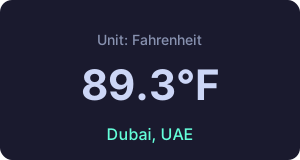
🎬 Matt Pocock Workshop — 2-hour Claude Code practical workshop Tutorial
Boris × Lenny’s Podcast — Claude Code’s Birth and the 100% AI Coding Era
- Claude Code was born from an internal hackathon, evolving from a simple CLI into an Anthropic core product
- “Latent Demand” is the core of product success — demand naturally explodes after lowering the barrier
- Approximately 100% of new code in Claude Code is written by AI, humans review and guide direction
- Plan Mode should state clear goals not detailed steps, let the model plan autonomously
- “Bitter Lesson”: Don’t optimize workflows for current models, build systems for stronger models 6 months from now
- CLAUDE.md should be minimal — only write information the model cannot infer on its own
- Security layer designed as multi-layer defense: permission system + confirmation prompt + sandboxed execution
Boris × Pragmatic Engineer — Engineering Journey from Meta to Anthropic
- Boris’s career path from startup to Meta E8 embodies the generalist engineer philosophy — solving problems across domains
- Claude Code architecture deliberately stays simple, using Bash tool instead of complex file operation tools
- Anthropic internally uses Agentic Search (glob/grep) to completely replace RAG
- Boris submits 20-30 PRs daily, using parallel Agents to handle multiple tasks simultaneously
- During code review, have AI play “adversary” role, raising objections
- Prototype culture is core — build fast, iterate fast, quickly discard approaches that don’t work
Boris × Ryan Peterman — From E4 to E8 Engineer Growth
- Meta promotion key is finding “latent demand” opportunities — Groups, Marketplace, Dating are all classic cases
- Side projects (Undux ORM, TypeScript practical handbook) are important paths for technical growth
- Generalist philosophy: don’t define as “frontend” or “backend”, be able to solve problems across domains
- Claude Code was born from competitive pressure with Codex, going from prototype to product in extremely short time
- In large organizations, the best influence is amplifying the entire team’s efficiency through tools and systems
- “Anti-Eating Own Dog Food” (using your own product at scale internally) is the best way to discover issues
Boris × Y Combinator — CLI’s Unexpected Rise and AI Agent Topology
- Claude Code choosing CLI over IDE plugin was accidental not planned — CLI’s simplicity became an advantage
- Agent topology is diverse: single Agent, parallel Agents, hierarchical Agents, different tasks suit different topologies
- Multiple agents’ context windows are uncorrelated — this is the theoretical basis for parallel execution
- CLAUDE.md should be minimal — only write project-specific information the model cannot infer
- Plan Mode is a temporary tool, as model capabilities improve dedicated planning mode will no longer be needed
- Plugin ecosystem is built by “swarm” development — many external contributors building different plugins simultaneously
Cat & Boris × Every — Dual-Use Tool Design & Compounding Engineering
- Dual-use tools: Claude Code serves both humans and AI, Slash commands are shared human-AI interface
- “Adversary Subagent” pattern: one Agent submits expenses, another plays auditor raising objections
- Compounding Engineering: every code change makes subsequent changes easier
- “Unshipping” strategy: removing rarely-used features improves focus more than adding new ones
- Subagent architecture breaks complex tasks into focused small tasks for parallel execution
Dex Horthy × MLOps — RPI to Crispy Methodology Evolution
- The most common mistake in RPI is skipping Research and going directly to Plan
- “Read code not plans” — must deeply understand existing codebase before planning
- Instruction budget should be kept under 150-200 lines, beyond which model compliance drops significantly
- Context Window has “smart zone” and “dumb zone” — first half understood well, second half often ignored
- Vertical slices planning beats horizontal layers — each delivery is end-to-end verifiable functionality
- “Crispy” methodology 7 steps, core is each step has clear completion criteria
- Design discussions should produce 200 lines of refined plan not 1000 lines of verbose document
- “No slop in 2026” — don’t tolerate AI-generated redundant code and generic statements
- Don’t outsource thinking — you must understand every line of AI output, otherwise you can’t verify
- CRISPY Methodology Evolution — from RPI (Research→Plan→Implement) evolved into a more precise 7-step process, each step with crispy (clear) completion criteria
Karpathy × AI Engineer — Software 3.0 & Verifiability Principle
- Software 1.0 (handwritten code), 2.0 (neural network weights), 3.0 (LLM prompts) three paradigms coexist
- “Jagged Intelligence”: LLMs surpass humans on some tasks yet make errors on simpler ones
- Verifiability is the core principle of AI coding — only let AI do tasks that can be automatically verified
- Vibe Coding suits rapid prototyping, Agentic Engineering suits production code
- “Animals vs Ghosts” framework: understand whether code is an observable “animal” or an elusive “ghost”
- Education philosophy: “Outsource thinking, but don’t outsource understanding”
Matt Pocock Workshop — Smart/Dumb Zones, Vertical Slices & TDD
- Smart/Dumb Zones: first half of context is the efficient processing zone, put key instructions here
- “Grill Me” skill: have AI confirm it truly understands requirements through Q&A before coding
- PRD goal document: transform requirements into clear “destination documents”, let AI know success criteria
- Vertical Slices (Tracer Bullets): each slice is a complete feature from UI to database
- AFK Agent Loop (“Ralph Loop”): Agent continues working in a loop while unattended
- TDD red-green-refactor with AI: write failing test first (red), AI implements (green), AI refactors
- Deep vs Shallow Modules: design deep modules with simple interfaces, reducing surface area AI needs to understand
- Sand Castle Parallelism: independent tasks assigned to multiple Agents, progressively stacked
Cheat SheetCommon Commands · CLI Flags · Environment Variables · Config Templates
Common Commands (82 built-in)
Session Management
| Command | Description |
|---|---|
/clear | Clear context and start new conversation (aliases /reset, /new) |
/compact [instructions] | Compress context, optionally with focus instructions |
/resume [session] | Resume session (alias /continue) |
/branch [name] | Fork current conversation (alias /fork) |
/rewind | Rewind conversation and code (aliases /checkpoint, /undo) |
/goal [condition] | Set persistent goal, clear to remove |
/stop | Stop background session |
/exit | Exit CLI (alias /quit) |
/background [prompt] | Detach session to background (alias /bg) |
/rename [name] | Rename session |
/recap | Generate one-line summary of current session |
/btw | Quick sidebar question, not added to conversation |
/workflows | View/manage workflow progress |
Model (Model)
| Command | Description |
|---|---|
/model [model] | Switch model, ← → to adjust effort |
/effort [level] | Set reasoning effort low~max/ultracode |
/fast [on|off] | Fast mode toggle |
/plan [description] | Enter plan mode |
/ultraplan | Draft plan in browser, execute remotely or locally |
/passes | Share one week Free Claude Code (eligible users only) |
Config (Configure)
| Command | Description |
|---|---|
/config | Settings interface (alias /settings) |
/permissions | Manage permission rules (alias /allowed-tools) |
/sandbox | Toggle sandbox mode |
/statusline | Configure status line |
/keybindings | Custom keybindings |
/theme | Switch theme (includes light/dark/colorblind-friendly/custom) |
/tui [default|fullscreen] | Render mode |
/voice [hold|tap|off] | Voice dictation |
/focus | Focus view (hide intermediate steps) |
/color [color|default] | Set prompt bar color (red/blue/green etc.) |
/radio | Open Claude FM lo-fi radio in browser |
/scroll-speed | Interactively adjust mouse scroll speed |
/stickers | Order Claude Code stickers |
/terminal-setup | Configure terminal shortcuts (Shift+Enter, etc.) |
/privacy-settings | View and update privacy settings (Pro/Max) |
Context & Cost
| Command | Description |
|---|---|
/context | Visualize context usage |
/usage | Session cost and usage (aliases /cost, /stats) |
/usage-credits | Configure usage credits |
/insights | Usage pattern analysis report |
/status | Version, model, account status |
Extensions
| Command | Description |
|---|---|
/agents | Manage agent configs |
/mcp | Manage MCP servers |
/plugin | Manage plugins |
/reload-plugins | Reload all active plugins (no restart needed) |
/reload-skills | Rescan skills/commands directories |
/skills | List available skills (sorted by t for token count) |
/hooks | View hooks config |
/ide | Manage IDE integrations |
/chrome | Chrome settings |
/memory | Edit CLAUDE.md and auto memory |
Project
| Command | Description |
|---|---|
/init | Initialize project CLAUDE.md |
/diff | Interactive diff viewer |
/review | Local PR review |
/ultrareview [PR] | Cloud-based deep multi-agent review |
/security-review | Security vulnerability analysis |
/add-dir | Add working directory |
/team-onboarding | Generate team onboarding guide |
Remote & Automation
| Command | Description |
|---|---|
/teleport | Pull web session to local (alias /tp) |
/remote-control | Remote control session (alias /rc) |
/schedule | Create/manage scheduled tasks (alias /routines) |
/desktop | Continue in Desktop app (alias /app) |
/mobile | Download mobile App (aliases /ios, /android) |
/autofix-pr | Auto-fix PR CI failures |
/remote-env | Configure default remote environment |
/web-setup | Connect GitHub to web via gh CLI |
/install-github-app | Set up GitHub Actions app |
/install-slack-app | Install Slack app |
Debug & Auth
| Command | Description |
|---|---|
/doctor | Environment diagnostics (press f for auto-fix) |
/login | Log in to Anthropic account |
/logout | Log out |
/setup-bedrock | Configure Bedrock auth (requires env var) |
/setup-vertex | Configure Vertex AI auth (requires env var) |
/upgrade | Upgrade to a higher plan |
/help | Help information |
/feedback | Submit feedback or report bug (aliases /bug, /share) |
/heapdump | Export JS heap snapshot to ~/Desktop |
/powerup | Interactive feature exploration course |
/release-notes | Interactive release notes viewer |
/tasks | Manage background tasks (alias /bashes) |
Export
| Command | Description |
|---|---|
/copy [N] | Copy recent response to clipboard (N=which one) |
/export [filename] | Export conversation as plain text |
Subcommands (run directly in terminal)
| Command | Description |
|---|---|
claude | Start interactive REPL |
claude "question" | Start with initial prompt |
claude agents | List configured agents |
claude auth | Manage authentication |
claude install | Install or switch native build |
claude remote-control | Manage remote control sessions |
claude doctor | CLI diagnostics |
claude mcp | Configure MCP (add/remove/list/get/enable) |
claude plugin | Manage plugins |
claude setup-token | Create long-lived token |
claude update | Update version |
CLI Flags (16 categories)
Complete CLI startup flags reference, organized by function.
Session Management
| Flag | Short | Description |
|---|---|---|
--continue | -c | Continue most recent conversation |
--resume | -r | Resume session by ID/name |
--from-pr | Resume session associated with PR | |
--fork-session | Create new session ID on resume | |
--session-id | Specify session UUID | |
--no-session-persistence | Disable session persistence (print mode only) | |
--remote | Create claude.ai web session | |
--teleport | Web session to local terminal |
Model & Configuration
| Flag | Description |
|---|---|
--model | Set model (sonnet/opus/haiku or full ID) |
--fallback-model | Fallback when primary model overloaded (print mode) |
--betas | Beta feature headers (API key users) |
Permissions & Security
| Flag | Description |
|---|---|
--dangerously-skip-permissions | Skip all permission prompts (use with extreme caution) |
--allow-dangerously-skip-permissions | Allow skipping permissions (doesn’t activate, just enables option) |
--permission-mode | Permission Mode: default/plan/acceptEdits/bypassPermissions |
--permission-prompt-tool | Use MCP tool for permission prompts in non-interactive mode |
--allowedTools | Pre-approved tool list |
--disallowedTools | Fully removed tools |
--tools | Restrict available tool set |
Output & Format
| Flag | Short | Description |
|---|---|---|
--print | -p | Non-interactive / headless mode |
--output-format | text / json / stream-json | |
--input-format | text / stream-json | |
--json-schema | Output matching JSON Schema (print mode) | |
--verbose | Verbose logging | |
--include-partial-messages | Include streaming partial events (requires —print + stream-json) |
System Prompt
| Flag | Description |
|---|---|
--system-prompt | Replace entire system prompt |
--system-prompt-file | Load system prompt from file |
--append-system-prompt | Append to default prompt |
--append-system-prompt-file | Append prompt from file |
Agent & Subagent
| Flag | Description |
|---|---|
--agent | Specify agent |
--agents | Dynamically define subagents |
--teammate-mode | Agent display: auto/in-process/tmux |
MCP & Plugins
| Flag | Description |
|---|---|
--mcp-config | Load MCP server configuration |
--strict-mcp-config | Only use specified MCP config |
--plugin-dir | Load plugin directory (repeatable) |
Directory & Workspace
| Flag | Description |
|---|---|
--add-dir | Add working directory |
--worktree / -w | Start in isolated worktree |
Budget & Limits
| Flag | Description |
|---|---|
--max-budget-usd | Maximum cost (print mode) |
--max-turns | Maximum turns (print mode) |
Integration
| Flag | Description |
|---|---|
--chrome / --no-chrome | Browser integration toggle |
--ide | Auto-connect IDE |
Initialization & Maintenance
| Flag | Description |
|---|---|
--init | Run init hooks and start interactive mode |
--init-only | Run init hooks then exit (no interactive) |
--maintenance | Run maintenance hooks then exit |
Debug & Settings Override
| Flag | Description |
|---|---|
--debug | Debug categories (e.g. “api,hooks”) |
--settings | Override settings |
--setting-sources | Specify load sources: user,project,local |
--disable-slash-commands | Disable all skills and slash commands |
Version & Help
| Flag | Short | Description |
|---|---|---|
--version | -v | Output version number |
--help | -h | Show help |
Environment Variables
Startup Environment Variables (shell config)
| Variable | Description |
|---|---|
CLAUDE_CODE_EXPERIMENTAL_AGENT_TEAMS=1 | Enable experimental Agent Teams |
CLAUDE_CODE_TMPDIR | Override temp file directory |
DISABLE_AUTOUPDATER=1 | Disable auto-update |
CLAUDE_CODE_EFFORT_LEVEL | Control reasoning depth |
USE_BUILTIN_RIPGREP=0 | Use system ripgrep (Alpine) |
CLAUDE_CODE_SIMPLE | Simple mode (Bash + Edit only) |
CLAUDE_BASH_NO_LOGIN=1 | Skip login shell |
CCR_FORCE_BUNDLE=1 | Force bundle upload (—remote) |
Auth & Model & Provider
| Variable | Description |
|---|---|
ANTHROPIC_API_KEY | API key (direct auth) |
ANTHROPIC_AUTH_TOKEN | OAuth token |
CLAUDE_CODE_USE_BEDROCK=1 | Use AWS Bedrock |
CLAUDE_CODE_USE_VERTEX=1 | Use Google Vertex |
CLAUDE_CODE_MODEL | Default model ID |
CLAUDE_CODE_SMALL_FAST_MODEL | Fast/small model ID |
MAX_THINKING_TOKENS | Max thinking tokens |
Sandbox & Security & Performance
| Variable | Description |
|---|---|
CLAUDE_CODE_SANDBOX_MODE | Sandbox mode (docker/macOS/docker-arm) |
CLAUDE_CODE_MAX_TURNS | Default max turns |
CLAUDE_CODE_ENABLE_TASKS=1 | Enable task system |
CLAUDE_CODE_DISABLE_BACKGROUND_TASKS=1 | Disable background tasks |
CLAUDE_CODE_USE_POWERSHELL_TOOL | Enable PowerShell tool |
CLAUDE_CODE_SHELL | Custom shell path |
Display & MCP & Plugins & Telemetry
| Variable | Description |
|---|---|
CLAUDE_CODE_DISABLE_NONESSENTIAL_TRAFFIC=1 | Disable non-essential network requests |
CLAUDE_CODE_DISABLE_EXPERIMENTAL_BETAS=1 | Disable experimental betas |
CLAUDE_MCP_TIMEOUT | MCP tool timeout (ms) |
CLAUDE_CODE_ADDITIONAL_DIRECTORIES_CLAUDE_MD=1 | Load additional directory CLAUDE.md |
CLAUDE_CODE_SKIP_DOCTOR_CHECK | Skip startup diagnostics |
CLAUDE_CODE_NO_ATTRIBUTION=1 | Skip commit attribution |
Config Templates
CLAUDE.md Template
# Project Name

## Tech Stack
- Frontend: React + TypeScript
- Backend: Node.js + Express

## Coding Conventions
- File naming: kebab-case
- Components: functional + hooks
- Testing: Vitest

## Constraints
- Do not use any type
- Do not skip tests
- API must have error handling
.claude/settings.json Template
{
  "permissions": {
    "allow": ["Bash(npm run *)","Bash(git status)","Read","Grep","Glob"],
    "deny": ["Bash(rm -rf *)","Bash(git push --force)"]
  }
}
Agent Definition Template
---
name: my-agent
description: Perform specific task
tools: "Bash,Read,Write,Edit,Grep"
model: sonnet
maxTurns: 20
memory: project
---

# My Agent
1. Read relevant files
2. Analyze code
3. Implement changes
4. Verify results
Skill Definition Template
---
name: my-skill
description: What to do
arguments: filename
allowed-tools: "Read,Write,Edit"
paths: "src/**/*.ts"
---

Process $filename:
1. Read → 2. Transform → 3. Write back
Workflow Cheatsheet
RPI Workflow
/rpi:research REQUEST.md- Check GO/NO-GO
/rpi:plan feature-name/rpi:implement feature-name
Cross-Model Collaboration
- Claude Code Plan Mode
- Codex CLI QA review
- Claude Code implement
- Codex CLI verify
Daily Development
/planto plan- Confirm approach
- Implement
/code-reviewto review/verifyto verify
Troubleshooting
/doctorto check/debugto debug/undoto revert/compactto clean