Preface: From LLM to Agent — A Complete Engineering Path
Large Language Models (LLMs) have transformed the way we build software. But simply calling an API and getting text back is only the first step. The real engineering challenge is: how do you evolve a model from “being able to chat” to “being able to get things done” — capable of calling external tools, autonomously planning tasks, collaborating in teams, remembering user preferences, and ultimately running reliably in production environments.
This path covers eight core domains:
- LLM Fundamentals: Understanding Tokenization, Transformer architecture, context windows, and prompt engineering
- RAG Principles and Practice: Mastering Retrieval-Augmented Generation to give models access to private knowledge
- Agent Tool Use: Function Calling, the ReAct loop, and the MCP protocol
- Agent Planning & Execution: Reflection mechanisms, Plan & Execute, workflow orchestration
- Multi-Agent Collaboration: Hierarchical collaboration, blackboard patterns, collaboration methodology
- Memory & Skill: Short-term/long-term memory management, Skill system design
- Agent Evaluation: End-to-end evaluation, white-box evaluation, evaluation-driven iteration
- Production Deployment: Model deployment, inference optimization, safety guardrails, Harness Engineering
This guide is aimed at developers who want to systematically master Agent engineering, providing a panoramic technical reference from foundational principles to production practices.
Tokenization Principles
Why Tokenization is Necessary
Computers cannot directly understand human text. The first step an LLM takes when processing text is to convert natural language into a numerical format that machines can compute. This process is called Tokenization.
A token is the basic unit obtained after a tokenizer encodes text; each token corresponds to an integer ID in the vocabulary. A key insight: a token is typically a sub-word fragment or character fragment — it is not necessarily a complete “word” and may not carry independent semantic meaning.
Input text: "ACP is a very"
          ↓ Tokenizer
Token sequence: [347, 1186, 374, 1134]
In English, words may be split into roots and suffixes; Chinese may be segmented by character or common phrase; spaces and punctuation may also be encoded into tokens. Tokenizers differ greatly between models — the GPT family uses BPE (Byte Pair Encoding), LLaMA uses SentencePiece BPE, and some Chinese models are specially optimized for Chinese corpora.
Token Vectorization and Positional Encoding
The integer ID value itself carries no semantic meaning. An ID of 500 does not mean it is “more important” than ID 50. Therefore, these discrete IDs need to be mapped to dense vectors through an Embedding matrix.
Token ID → Embedding Matrix Lookup → d-dimensional vector
  1186   →   [0.023, -0.451, 0.789, ..., -0.312]  (d=4096 or larger)
At the same time, word order is critical — “I help you” and “you help me” are entirely different. Since the Transformer’s Self-Attention mechanism inherently lacks sequence awareness, additional Positional Encoding is needed. Modern models typically use Rotary Position Embedding (RoPE), which introduces relative position information into the attention computation, enabling the model to naturally handle long sequences.
Decoding Strategies: From Probabilities to Output
After model inference, logits (score vectors) are obtained and converted via softmax into a probability distribution P(next_token | context). A decoding strategy is then used to select the output token:
| Strategy | Principle | Suitable Scenarios |
|---|---|---|
| Greedy Decoding | Select the token with the highest probability each time | Tasks requiring deterministic output (e.g., code generation, structured extraction) |
| Beam Search | Maintain multiple candidate paths and select the sequence with the highest overall probability | Translation, summarization, and other tasks requiring a global optimum |
| Top-k Sampling | Randomly sample from the k tokens with the highest probability | Creative writing, dialogue generation |
| Top-p (Nucleus) | Sample from the smallest token set whose cumulative probability exceeds p | General conversation, balancing diversity and quality |
Two core parameters control output randomness:
Temperature: Controls the “sharpness” of the softmax probability distribution.
# temperature effect comparison
# raw logits → softmax(logits / temperature)
# T=0.1: probability is highly concentrated, nearly deterministic output
# T=0.7: moderate, preserving reasonable diversity
# T=1.5: probability tends toward uniform, output highly random
Top_p (nucleus sampling threshold): Controls the range of candidate tokens that participate in sampling. For example, top_p=0.9 means sampling only from the smallest token set whose cumulative probability reaches 90%.
# typical configuration example
response = client.chat.completions.create(
    model="gpt-4",
    messages=[{"role": "user", "content": "Write a poem about artificial intelligence"}],
    temperature=0.8,   # moderate creativity
    top_p=0.9,         # nucleus sampling
    max_tokens=200
)
Autoregressive Generation and Stop Conditions
The model uses Autoregressive Generation: each time a new token is generated, it is appended to the end of the input, and then the next token is predicted based on the new sequence.
"ACP is a very" → predicts "informative"
"ACP is a very informative" → predicts "course"
"ACP is a very informative course" → ... → predicts <EOS> → stops
Stop conditions include:
- Generation of a special end-of-sequence token (EOS token)
- Reaching the preset
max_tokenslimit - Generating a user-specified stop word sequence
Different model families have different stop tokens:
| Model | Stop Token |
|---|---|
| GPT family | <|endoftext|> |
| LLaMA/Mistral | </s> |
| DeepSeek | <|end▁of▁sentence|> |
| Some Chinese LLMs | <|im_end|> |
Streaming output is essentially the server decoding and incrementally sending each token or small group of tokens as soon as they are generated, rather than waiting for all tokens to be generated before returning.
Transformer Architecture & Attention Mechanism
Architectural Overview
The core of modern large language models is the Transformer architecture. Although the complete Transformer contains both an encoder and a decoder, today’s mainstream autoregressive LLMs (GPT, LLaMA, etc.) use only the Decoder-only architecture.
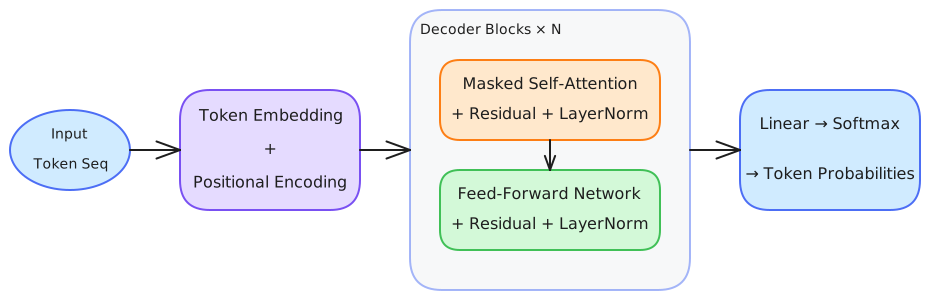
Causal Self-Attention
The core formula of the Attention mechanism:
Attention(Q, K, V) = softmax(QK^T / √d_k) · VHere Q (Query), K (Key), and V (Value) are all derived from the same input sequence through linear transformations. Key design elements:
(1) Scaling Factor √d_k: Prevents the dot product from becoming too large, which would cause the softmax gradient to vanish. When the vector dimension d_k is large, the variance of the dot product also increases; dividing by √d_k normalizes the variance.
(2) Causal Mask: In autoregressive models, each token can only “see” the tokens before it, and cannot “peek” at future content. This is achieved by filling the upper triangular positions with -∞:
Input: ["ACP", "is", "a", "very"]
Attention matrix (after causal masking):
        ACP   is    a   very
ACP   0.8    -∞   -∞    -∞
is    0.3   0.7   -∞    -∞
a     0.2   0.3  0.5    -∞
very  0.1   0.2  0.3   0.4
(3) Multi-Head Attention: Rather than performing a single attention computation, multiple sets of Q/K/V projections are executed in parallel, each set focusing on different semantic relationships (grammatical structure, coreference, semantic similarity, etc.), and the outputs of all heads are concatenated at the end.
# pseudo-code for multi-head attention
def multi_head_attention(x, num_heads=8, d_model=512):
    d_head = d_model // num_heads  # dimension per head
    outputs = []
    for h in range(num_heads):
        Q = linear_projection(x, d_head)
        K = linear_projection(x, d_head)
        V = linear_projection(x, d_head)
        attn_out = softmax(Q @ K.T / sqrt(d_head)) @ V
        outputs.append(attn_out)
    return concat(outputs)  # concatenate all heads
Feed-Forward Network (FFN)
Each Attention layer is immediately followed by an FFN:
FFN(x) = GELU(x·W₁ + b₁) · W₂ + b₂The FFN typically first expands the hidden dimension (e.g., 4x), then compresses it back to the original dimension. This “expand-compress” structure provides the model with nonlinear transformation capability, and is a key component for storing and applying knowledge.
Residual Connections & Layer Normalization
Each sub-layer (Attention and FFN) is combined with its input via a residual connection:
output = LayerNorm(x + Sublayer(x))Residual connections allow gradients to propagate directly to shallow layers, solving the training difficulties of deep networks. Modern architectures typically use a Pre-Norm layout for LayerNorm (normalization before the sub-layer), which is more stable than the original Post-Norm.
Context Window & Token Budget
The Essence of the Context Window
The place where a large model receives input is called the Context Window. Think of it as a computer’s memory (RAM) — capacity is limited, and directly impacts performance.
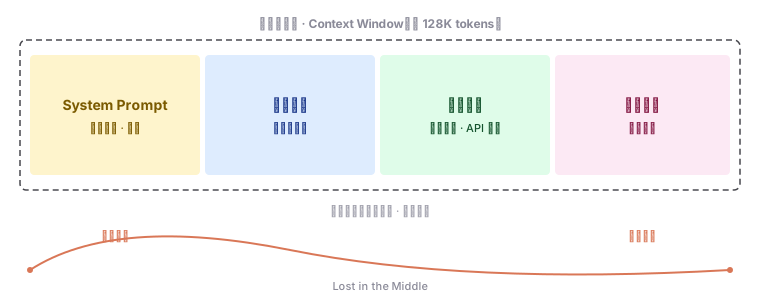
Modern models have greatly expanded context windows:
- GPT-4 Turbo: 128K tokens
- Claude 3: 200K tokens
- Gemini 1.5 Pro: 1M+ tokens
- Open-source models (LLaMA 3, some Chinese models, etc.): 32K–128K tokens
But a larger window does not mean you can abuse it. Research shows a “Lost in the Middle” effect: the model’s ability to process information in the middle portion of the context significantly degrades — it pays more attention to the beginning (primacy effect) and the end (recency effect).
Token Budget Management
In production, you need to manage context like you manage memory. Here are the core strategies:
(1) Accurately Calculate Token Consumption
import tiktoken

def count_tokens(text: str, model: str = "gpt-4") -> int:
    encoding = tiktoken.encoding_for_model(model)
    return len(encoding.encode(text))

# Example: count total tokens for messages
def count_message_tokens(messages):
    encoding = tiktoken.encoding_for_model("gpt-4")
    total = 0
    for msg in messages:
        # each message has a fixed overhead (~4 tokens)
        total += 4
        total += len(encoding.encode(msg["content"]))
    total += 2  # priming for the reply
    return total
(2) Context Window Allocation Strategy
┌──────────────────────────────────────────────┐
│ Token Budget Allocation (128K window example)  │
├──────────────────────────────────────────────┤
│ System Prompt:      2-5K  (role definition, rules) │
│ RAG Retrieval:      3-8K  (relevant knowledge chunks) │
│ Chat History:       10-20K (most recent N turns)     │
│ Current User Input: 1-3K                             │
│ Reserved Response:  4-8K                             │
│ Buffer Margin:      remaining (~80K)                 │
└──────────────────────────────────────────────┘
(3) Context Engineering
Context Engineering is the practice of systematically designing, building, and optimizing context. It goes beyond simply “stuffing information into a prompt” and encompasses four core techniques:
| Technique | Problem Solved | Core Method |
|---|---|---|
| RAG | Insufficient private-domain knowledge | Retrieve relevant information from external knowledge bases and inject into context |
| Prompt Engineering | Imprecise instructions | Guide model behavior through carefully designed instructions |
| Tool Use | Model cannot execute operations | Empower models with the ability to call external tools |
| Memory | Forgetting across sessions | Establish long- and short-term memory mechanisms |
Many failures of LLM applications are not due to the model lacking intelligence, but rather failures of “context.” Context Engineering is precisely the key to unlocking the potential of large models.
Prompt Engineering Methodology
System Prompt Design
The System Prompt is the model’s “constitution” — it defines the role’s behavioral boundaries, response style, and task constraints. A good System Prompt should include:
# System Prompt structure template
Role Definition: |
  You are a senior Python technical documentation reviewer,
  focused on code correctness and pedagogical effectiveness.

Behavioral Guidelines:
  - Do not modify variable names or API version numbers in the code
  - When you find issues, provide the specific location and fix suggestions
  - If there is insufficient information to judge, explicitly say "unsure"

Output Format:
  ## Review Report
  ### Key Issues
  - **[Line N]**: Issue description
    - Severity: Critical|General|Minor
    - Fix Suggestion: specific suggestion

Constraints:
  - No playful remarks or unnecessary scene-setting
  - Terminology must be explained on first occurrence
  - Code blocks must include necessary import statements
Few-Shot & Structured Output
Few-Shot Examples: Provide input-output exemplars for the model to imitate format and style.
examples = [
    {
        "input": "Explain what a Python decorator is",
        "output": "### Pain Point Introduction\nHave you ever wanted to add the same logging logic across multiple functions?..."
    },
    {
        "input": "Explain what a list comprehension is",
        "output": "### Pain Point Introduction\nHave you ever written code like this — 5 lines of a for loop just to filter out even numbers from a list?..."
    }
]

prompt = f"""
Please answer user questions in the style of the following examples:

{examples}

User question: {user_question}
"""
Structured Output: Constrain output format through JSON Schema or Pydantic models.
from pydantic import BaseModel
from typing import List, Optional

class CodeReview(BaseModel):
    file_name: str
    issues: List[dict]
    overall_score: int  # 1-5
    requires_rewrite: bool

# Attach the Schema in the prompt
prompt = f"""
Please output the review results according to the following JSON Schema:

{CodeReview.model_json_schema()}

Code to review:
{code}
"""
Chain-of-Thought (CoT)
For complex tasks requiring multi-step reasoning, guiding the model to “speak its thought process” can significantly improve accuracy.
# ❌ Direct request (lower accuracy)
prompt_simple = "Calculate: A class has 30 students. There are 4 more boys than girls. How many boys are there?"

# ✅ CoT prompt (higher accuracy)
prompt_cot = """
Calculate: A class has 30 students. There are 4 more boys than girls. How many boys are there?

Please reason step by step:
Step 1: Let the number of girls be x, then the number of boys is x + 4
Step 2: Total students = x + (x + 4) = 30
Step 3: Solve 2x + 4 = 30, so x = 13
Step 4: Number of boys = x + 4 = 17
Answer: 17 boys
"""
CoT variants also include:
- ToT (Tree of Thoughts): Explore multiple reasoning paths simultaneously and choose the best
- GoT (Graph of Thoughts): Represent reasoning as a directed graph, supporting more complex reasoning topologies
- Self-Consistency: Sample multiple CoT paths and take a majority vote
Meta Prompting: Let the Model Optimize Its Own Prompts
Writing a perfect prompt in one shot is nearly impossible. The core idea of Meta Prompting is: have a large model play the role of “prompt review expert,” helping you analyze and optimize the prompt itself.
meta_prompt = """
You are a prompt engineering expert. Please analyze the flaws in the following prompt and generate an optimized version.

Current prompt:
{current_prompt}

Output of this prompt:
{current_output}

Desired output:
{desired_output}

Please analyze the gap and output the optimized prompt.
"""

# This loop can be automated: Generate → Evaluate → Optimize → Regenerate
A complete Meta Prompting workflow can also introduce “reference answers” and quantitative scoring:
- Set Reference Answers: Define the ideal output
- Analyze the Gap: Have an “evaluator” model compare generated results against reference answers
- Optimize the Prompt: Rewrite the prompt based on the gap analysis report
- Quantitative Verification: Use a Grader to score multiple versions
Embedding & Vector Retrieval
How Embedding Models Work
Embedding models convert text into high-dimensional vectors so that semantically similar texts are close together in vector space.
"I like eating apples"   →  [0.12, -0.34, 0.56, ..., 0.78]  (1024 dimensions)
"I love eating apples"   →  [0.11, -0.33, 0.55, ..., 0.79]  ← very close
"Car repair guide"       →  [-0.78, 0.45, -0.23, ..., 0.01] ← very far
Embedding model training typically includes a Contrastive Learning phase: the input consists of many text pairs labeled as relevant/irrelevant, and the training objective is to maximize the vector similarity of relevant texts and minimize that of irrelevant ones.
# Calculate cosine similarity between two text vectors
import numpy as np

def cosine_similarity(a, b):
    return np.dot(a, b) / (np.linalg.norm(a) * np.linalg.norm(b))

# Example
query_vec = embedding_model.encode("How do I apply for annual leave?")
doc_vec = embedding_model.encode("Employee annual leave application procedure")

similarity = cosine_similarity(query_vec, doc_vec)
print(f"Similarity: {similarity:.4f}")  # 0.92 — highly relevant
Vector Database Selection
Vector databases are the core infrastructure of RAG systems. Choosing requires trade-offs:
| Solution | Representative Products | Advantages | Disadvantages | Suitable Scenarios |
|---|---|---|---|---|
| In-Memory Storage | LlamaIndex built-in | Zero-config, rapid prototyping | Data not persistent, memory-constrained | Development & testing |
| Local Vector DB | Milvus, Qdrant, Chroma | Full-featured, data under your control | Requires self-deployment and maintenance | Small-to-medium applications |
| Managed Services | Pinecone, Weaviate Cloud | No operations, auto-scaling | Higher cost, data offsite | Production, elastic demand |
| Existing DB Extensions | PostgreSQL + pgvector, Elasticsearch | Leverage existing infrastructure | Vector performance not as good as dedicated DBs | Teams already using that database |
# Example using Chroma (lightweight local vector DB)
import chromadb
from chromadb.utils import embedding_functions

client = chromadb.PersistentClient(path="./chroma_db")
collection = client.create_collection(
    name="company_docs",
    embedding_function=embedding_functions.OpenAIEmbeddingFunction(
        api_key="your-api-key",
        model_name="text-embedding-3-small"
    )
)

# Add documents
collection.add(
    documents=["Employee annual leave application procedure...", "Travel reimbursement standards..."],
    metadatas=[{"source": "hr_policy.pdf"}, {"source": "finance_policy.pdf"}],
    ids=["doc_1", "doc_2"]
)

# Retrieve
results = collection.query(
    query_texts=["How do I apply for annual leave?"],
    n_results=3
)
Document Chunking Strategies
The Fundamental Tension of Chunking
The retrieval effectiveness of a RAG system heavily depends on document chunking quality. The core tension is:
Chunks too large → too much noise introduced during retrieval, model attention is diluted
Chunks too small → key information may be truncated, context is lost
There is no single “universally optimal” chunking strategy. You need to choose based on document type, retrieval scenario, and model capability.
Five Mainstream Chunking Methods
Token Chunking
Splits by a fixed number of tokens. Suitable for scenarios requiring precise token consumption control.
from llama_index.core.node_parser import TokenTextSplitter

splitter = TokenTextSplitter(
    chunk_size=256,     # tokens per chunk
    chunk_overlap=30    # overlap tokens between adjacent chunks
)

nodes = splitter.get_nodes_from_documents(documents)Advantages: Precisely controls context size, suitable for models with smaller context windows. Disadvantages: May cut off mid-sentence, breaking semantic integrity.
Sentence Chunking
A splitting method that preserves sentence integrity; the default choice for most scenarios.
from llama_index.core.node_parser import SentenceSplitter

splitter = SentenceSplitter(
    chunk_size=512,
    chunk_overlap=50
)Advantages: Maintains the semantic unit integrity of natural language. Disadvantages: Unaware of document structure, may split related paragraphs into different chunks.
Sentence Window Chunking
Uses different granularities for indexing and retrieval: small granularity for indexing for precise matching, and when returning retrieval results, includes adjacent context windows.
from llama_index.core.node_parser import SentenceWindowNodeParser

parser = SentenceWindowNodeParser(
    window_size=3,          # expand by 3 adjacent sentences during retrieval
    window_metadata_key="window",
    original_text_metadata_key="original"
)
Core advantage: Balances retrieval precision and context completeness.
Semantic Chunking
Adaptively selects split points based on semantic relevance, preserving the semantic continuity of documents.
from llama_index.core.node_parser import SemanticSplitterNodeParser

splitter = SemanticSplitterNodeParser(
    buffer_size=1,
    breakpoint_percentile_threshold=95,  # split when similarity falls below this threshold
    embed_model=embed_model
)
Suitable scenarios: Long documents with good logical structure and specialized content.
Markdown Chunking
Specifically optimized for Markdown structured documents, splitting by heading hierarchy.
from llama_index.core.node_parser import MarkdownNodeParser

parser = MarkdownNodeParser()
# Automatically recognizes #, ##, ### heading levels, splits at each heading paragraph
Best practice: Convert documents from PDF/Word to Markdown before chunking, leveraging heading structure to improve retrieval accuracy.
Chunking Strategy Selection Guide
| Document Type | Recommended Strategy | Reason |
|---|---|---|
| Technical manuals (clear structure) | Markdown chunking | Leverages heading hierarchy to preserve structure |
| Legal contracts (tight logic) | Semantic chunking | Preserves the semantic integrity of clauses |
| Conversation transcripts | Sentence window chunking | Needs surrounding context for semantic understanding |
| Code documentation | Token chunking + Semantic chunking | Needs precise length control |
| News/Blog posts | Sentence chunking | Weak inter-paragraph connections |
Retrieval-Augmented Generation Pipeline
The Two-Phase RAG Architecture
RAG (Retrieval-Augmented Generation) is the core architecture for solving the “knowledge deficiency” problem of large models. It divides the process into two phases:
Phase One: Build Index

- Parse Documents: Parse formats like PDF, Word, Markdown into plain text
- Chunk Text: Split documents into paragraphs according to the chosen strategy
- Embed Vectors: Convert each chunk into a vector using an Embedding model
- Store Index: Store vectors in a vector database and build an index
Phase Two: Retrieve and Generate
┌──────────┐    ┌──────────┐    ┌──────────┐    ┌──────────┐
│  Query    │ → │  Retrieve │ → │  Augment  │ → │  Generate │
│  User Q   │    │  Vectors  │    │  Prompt   │    │  Model    │
└──────────┘ └──────────┘ └──────────┘ └──────────┘- Receive Query: Accept the user’s question
- Vector Retrieval: Vectorize the question and retrieve the most similar chunks from the vector database
- Prompt Assembly: Assemble retrieved knowledge chunks + original question + instructions into a complete prompt
- Model Generation: The LLM generates an answer based on the augmented context
Complete RAG Pipeline Example
from openai import OpenAI
import numpy as np

client = OpenAI()

class SimpleRAG:
    def __init__(self, embed_model="text-embedding-3-small"):
        self.embed_model = embed_model
        self.documents = []      # store document texts
        self.embeddings = []     # store document vectors

    def add_documents(self, docs: list[str]):
        """Build index: vectorize and store documents"""
        for doc in docs:
            vec = self._embed(doc)
            self.documents.append(doc)
            self.embeddings.append(vec)

    def _embed(self, text: str) -> np.ndarray:
        resp = client.embeddings.create(
            model=self.embed_model,
            input=text
        )
        return np.array(resp.data[0].embedding)

    def retrieve(self, query: str, top_k: int = 3) -> list[str]:
        """Retrieve the most relevant document chunks"""
        query_vec = self._embed(query)
        similarities = [
            np.dot(query_vec, doc_vec) /
            (np.linalg.norm(query_vec) * np.linalg.norm(doc_vec))
            for doc_vec in self.embeddings
        ]
        top_indices = np.argsort(similarities)[-top_k:][::-1]
        return [self.documents[i] for i in top_indices]

    def query(self, question: str) -> str:
        """Complete RAG query"""
        contexts = self.retrieve(question)
        prompt = f"""Please answer the question based on the following reference information:

Reference Information:
{' '.join(contexts)}

Question: {question}

If the reference information is insufficient to answer the question, please state so explicitly."""

        resp = client.chat.completions.create(
            model="gpt-4",
            messages=[{"role": "user", "content": prompt}]
        )
        return resp.choices[0].message.content
Query Rewriting in Multi-Turn RAG Conversations
Implementing multi-turn conversation in a RAG scenario presents unique challenges. If the user’s second turn says “Who is his manager?”, retrieving directly with this sentence would completely fail — the system doesn’t know who “he” refers to.
Solution: Query Rewriting
def rewrite_query(conversation_history: list, current_query: str) -> str:
    """Use an LLM to rewrite a context-dependent question into a standalone question"""
    rewrite_prompt = f"""
    Based on the conversation history, rewrite the current question into a standalone question that does not depend on context.

    Conversation History:
    {format_history(conversation_history)}

    Current Question: {current_query}

    Rewritten Question:"""

    resp = client.chat.completions.create(
        model="gpt-4",
        messages=[{"role": "user", "content": rewrite_prompt}],
        temperature=0.1
    )
    return resp.choices[0].message.content

# Example
# History: User asked "Where is Zhang San's desk?" Assistant replied "5th floor, Building A"
# Current: "Who is his manager?"
# Rewritten: "Who is Zhang San's manager?"
Advanced RAG Patterns

HyDE (Hypothetical Document Embeddings)
The core idea of HyDE: first have the model “fabricate” a hypothetical answer, then use that hypothetical answer for retrieval instead of the original question. The intuition is — the hypothetical answer is semantically closer to real documents than the question itself.
def hyde_retrieve(query: str, top_k: int = 3) -> list[str]:
    """Retrieve using the HyDE method"""
    # Step 1: Generate a hypothetical answer
    hyde_prompt = f"""
    Question: {query}
    Please write a passage that answers this question.
    Passage:"""

    hyde_resp = client.chat.completions.create(
        model="gpt-4",
        messages=[{"role": "user", "content": hyde_prompt}]
    )
    hypothetical_doc = hyde_resp.choices[0].message.content

    # Step 2: Use the hypothetical answer for retrieval instead of the original question
    query_vec = embed(hypothetical_doc)
    results = vector_db.search(query_vec, top_k=top_k)
    return results
HyDE is particularly suitable for scenarios where the original query is very short but semantically complex, because the hypothetical answer can provide more semantic clues.
Re-Ranking
Initial vector retrieval (coarse ranking) is fast but has limited precision. A re-ranking model (fine ranking) can be introduced to perform a second sort on candidate chunks:
from sentence_transformers import CrossEncoder

reranker = CrossEncoder('BAAI/bge-reranker-v2-m3')

def rerank(query: str, candidates: list[str], top_k: int = 3):
    """Re-rank candidate chunks"""
    pairs = [(query, doc) for doc in candidates]
    scores = reranker.predict(pairs)

    # Sort by relevance score
    ranked = sorted(
        zip(candidates, scores),
        key=lambda x: x[1],
        reverse=True
    )
    return [doc for doc, _ in ranked[:top_k]]
Retrieval Strategy Optimization Panorama
| Timing | Improvement Strategy | Description |
|---|---|---|
| Pre-Retrieval | Query Rewriting | Rewrite context-dependent questions into standalone questions |
| Pre-Retrieval | Query Expansion | Add more semantic information to improve recall |
| Pre-Retrieval | Tag Extraction | Filter by tags first, then use vector retrieval |
| Pre-Retrieval | Multi-Step Query Decomposition | Break complex questions into multiple sub-queries |
| Post-Retrieval | ReRank | Use a more precise model for a second sort |
| Post-Retrieval | Sliding Window | After retrieving a chunk, supplement with adjacent chunks |
RAG Document Preparation Strategy
The key to building a high-quality RAG system is document preparation. You need to understand the relationship between “intent space” and “knowledge space”:
Intent Space (what users may ask)    Knowledge Space (what the knowledge base covers)
     ┌─────────┐
     │ Overlap │ ← RAG can answer these
     └─────────┘
     ↑            ↑
  Uncovered        Unused
  intents →        knowledge →
  supplement       optimize
  knowledge        recall
Core principles:
- Before optimizing algorithms, first supplement missing knowledge
- Before improving recall, first improve document quality
- Continuously collect user intent, forming a closed loop of “data collection → knowledge updates → expert verification”
Function Calling Protocol
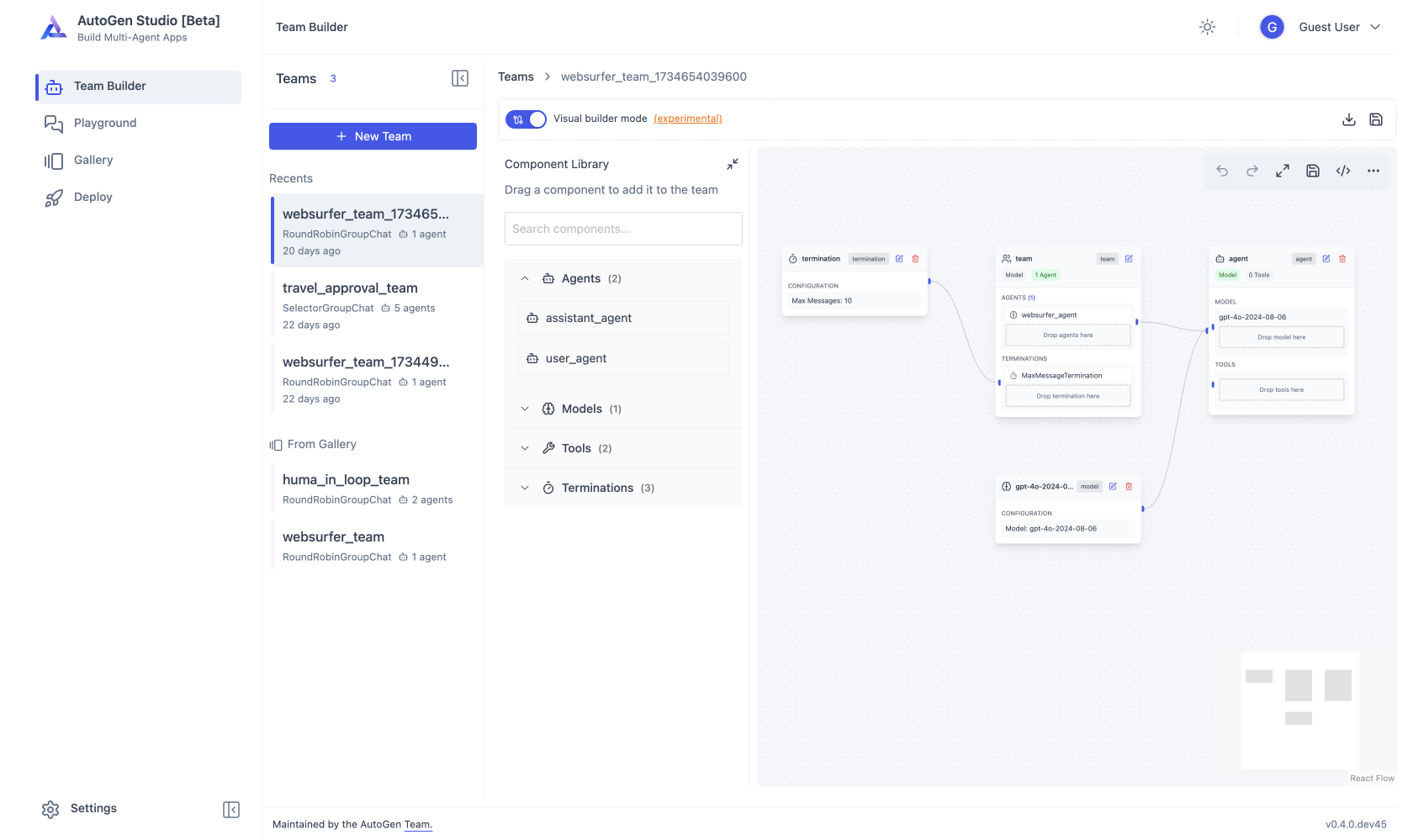 AutoGen Studio — Microsoft’s no-code multi-agent workflow builder — via microsoft/autogen
 DSPy — program (not prompt) LLMs declaratively; used by Hermes’s self-evolution pipeline — via stanfordnlp/dspy
What is Function Calling
Function Calling (also called Tool Calling) is a standard capability provided by LLM APIs. It allows the model to output structured tool invocation instructions when needed, rather than plain text replies.
The workflow is as follows:

JSON Schema Tool Definition
# Define tool list
tools = [
    {
        "type": "function",
        "function": {
            "name": "search_knowledge_base",
            "description": "Search the company internal knowledge base for policy documents and operation guides",
            "parameters": {
                "type": "object",
                "properties": {
                    "query": {
                        "type": "string",
                        "description": "Search keywords or question"
                    },
                    "category": {
                        "type": "string",
                        "enum": ["hr", "it", "finance", "general"],
                        "description": "Knowledge category"
                    }
                },
                "required": ["query"]
            }
        }
    },
    {
        "type": "function",
        "function": {
            "name": "send_email",
            "description": "Send an email",
            "parameters": {
                "type": "object",
                "properties": {
                    "to": {
                        "type": "string",
                        "description": "Recipient email address"
                    },
                    "subject": {
                        "type": "string",
                        "description": "Email subject"
                    },
                    "body": {
                        "type": "string",
                        "description": "Email body"
                    }
                },
                "required": ["to", "subject", "body"]
            }
        }
    }
]
Complete Function Calling Loop
from openai import OpenAI
import json

client = OpenAI()

def execute_function_call(tool_call):
    """Execute a tool call and return the result"""
    func_name = tool_call.function.name
    args = json.loads(tool_call.function.arguments)

    if func_name == "search_knowledge_base":
        # actual search logic
        result = knowledge_base.search(args["query"])
        return json.dumps(result)
    elif func_name == "send_email":
        # actual email sending logic
        result = email_service.send(
            to=args["to"],
            subject=args["subject"],
            body=args["body"]
        )
        return json.dumps({"status": "sent" if result else "failed"})
    else:
        return json.dumps({"error": f"Unknown function: {func_name}"})

def chat_with_tools(user_message: str, messages: list = None):
    """Conversation with Function Calling support"""
    if messages is None:
        messages = [
            {"role": "system", "content": "You are an enterprise assistant that can search the knowledge base and send emails."}
        ]

    messages.append({"role": "user", "content": user_message})

    # First call: model decides whether to use tools
    response = client.chat.completions.create(
        model="gpt-4",
        messages=messages,
        tools=tools
    )

    assistant_msg = response.choices[0].message

    # If the model wants to call tools
    if assistant_msg.tool_calls:
        messages.append(assistant_msg)

        for tool_call in assistant_msg.tool_calls:
            # Execute the tool
            result = execute_function_call(tool_call)
            # Return the result to the model
            messages.append({
                "role": "tool",
                "tool_call_id": tool_call.id,
                "content": result
            })

        # Second call: model generates final response based on tool results
        final_response = client.chat.completions.create(
            model="gpt-4",
            messages=messages
        )
        return final_response.choices[0].message.content

    # If the model responds directly
    return assistant_msg.content
Tool Definition Best Practices
- Descriptions must be precise: The model decides when to call a tool based on
description; vague descriptions lead to incorrect invocations - Parameters should have constraints: Use
enum,required, and type constraints to reduce parameter errors by the model - Functions should have a single responsibility: Don’t pack multiple operations into one function
- Return structured results: Tool returns should be easy for the model to understand; JSON is recommended
# ❌ Poor tool description
{"name": "do_stuff", "description": "Perform an operation", "parameters": {...}}

# ✅ Precise tool description
{
    "name": "cancel_meeting",
    "description": "Cancel a specified meeting; requires a meeting ID and cancellation reason",
    "parameters": {
        "properties": {
            "meeting_id": {"type": "string", "description": "Unique identifier of the meeting"},
            "reason": {"type": "string", "description": "Cancellation reason, will be notified to all participants"}
        },
        "required": ["meeting_id"]
    }
}
The ReAct Reasoning-Action Loop
The Core Idea of ReAct
ReAct (Reasoning + Acting) is a pattern that allows the model to alternate between Thought and Action. It does not generate a final answer in one shot; instead, it solves problems through a cycle of “Think → Act → Observe → Think…”

A typical ReAct execution process:
User: "Look up Zhang San's department, then send an email to his manager"

Thought 1: I need to first find Zhang San's department information
Action 1: search_knowledge_base(query="Zhang San department")
Observation 1: "Zhang San belongs to the Teaching & Research Department, manager is Li Si ([email protected])"

Thought 2: Got the information; now I need to write an email to Li Si
Action 2: send_email(to="[email protected]", subject="Regarding Zhang San",
                      body="...")
Observation 2: {"status": "sent"}

Thought 3: Task complete
Final Answer: "Zhang San is in the Teaching & Research Department. I have sent an email to his manager Li Si."
Manually Implementing a ReAct Agent
class ReActAgent:
    def __init__(self, tools: dict, max_iterations: int = 10):
        self.tools = tools
        self.max_iterations = max_iterations

    def run(self, task: str) -> str:
        messages = [
            {"role": "system", "content": self._build_system_prompt()},
            {"role": "user", "content": task}
        ]

        for i in range(self.max_iterations):
            response = client.chat.completions.create(
                model="gpt-4",
                messages=messages,
                tools=self._format_tools()
            )

            msg = response.choices[0].message

            if msg.content and not msg.tool_calls:
                # Model gave a final answer
                return msg.content

            if msg.tool_calls:
                # Add the assistant's tool calls to history
                messages.append(msg)

                for tc in msg.tool_calls:
                    tool_name = tc.function.name
                    args = json.loads(tc.function.arguments)

                    # Execute the tool
                    result = self.tools[tool_name](**args)

                    # Add the observation result to history
                    messages.append({
                        "role": "tool",
                        "tool_call_id": tc.id,
                        "content": json.dumps(result)
                    })
                    print(f"  [Tool: {tool_name}({args}) → {result}]")

        return "ReAct loop reached maximum iterations"

    def _build_system_prompt(self) -> str:
        return """You are an intelligent assistant capable of using tools.
Follow the ReAct pattern: think first, then act, observe the result, then decide the next step.
If the task is complete, directly give the final answer."""

    def _format_tools(self) -> list:
        return [
            {
                "type": "function",
                "function": {
                    "name": name,
                    "description": func.__doc__ or "",
                    "parameters": get_schema(func)
                }
            }
            for name, func in self.tools.items()
        ]
Advantages and Limitations of ReAct
Advantages:
- Observable: Every step of thought and action is traceable
- Self-correcting: Strategies can be adjusted after observing erroneous results
- Composable: Automatically combines multiple tools into a solution
Limitations:
- Unpredictable number of iterations (may loop infinitely)
- Multiple API calls increase latency and cost
- Dependent on the quality of observations returned by tools
MCP Protocol & Tool Ecosystem

Why MCP is Needed
Function Calling has a fundamental problem: tool definition and consumption are coupled. Every Agent developer needs to hard-code the tool’s JSON Schema in their own code. When a tool API is upgraded, all Agents that integrate that tool need manual updates.
Traditional Function Calling pattern:
  Agent A ──hard-coded Schema──→ web_search v1
  Agent B ──hard-coded Schema──→ web_search v1  ← duplicated definition
  Agent C ──hard-coded Schema──→ web_search v1  ← duplicated definition

MCP pattern:
  Agent A ──┐
  Agent B ──┼── MCP Client ──→ MCP Server (web_search)
  Agent C ──┘                    ↑
                          Tool provider defines Schema
The core idea of MCP (Model Context Protocol) is “whoever provides the tool defines the tool.” It shifts the responsibility for tool definition from the Agent (consumer) to the tool service (provider).
MCP Architectural Roles
| Role | Responsibility | Analogy |
|---|---|---|
| MCP Server | Declares tools (name, description, parameters), executes tool logic | USB device |
| MCP Client | Connects to MCP Server, fetches tool definitions, sends invocation requests | USB host controller |
| Agent | Uses MCP Client to get the tool list, decides which to invoke | Application |
Building MCP Server & Client
MCP Server Example:
from mcp.server import Server, stdio_server
from mcp.types import Tool, TextContent

app = Server("web-search")

@app.list_tools()
async def list_tools() -> list[Tool]:
    return [
        Tool(
            name="web_search",
            description="Search the internet to get the latest information",
            inputSchema={
                "type": "object",
                "properties": {
                    "query": {"type": "string", "description": "Search keywords"},
                    "num_results": {"type": "integer", "default": 5}
                },
                "required": ["query"]
            }
        )
    ]

@app.call_tool()
async def call_tool(name: str, arguments: dict) -> list[TextContent]:
    if name == "web_search":
        results = search_engine.search(
            arguments["query"],
            num=arguments.get("num_results", 5)
        )
        return [TextContent(type="text", text=json.dumps(results))]
    raise ValueError(f"Unknown tool: {name}")

# Start Server via stdio
async def main():
    async with stdio_server() as streams:
        await app.run(streams[0], streams[1], app.create_initialization_options())

if __name__ == "__main__":
    import asyncio
    asyncio.run(main())
MCP Client Integration Example:
from mcp import ClientSession, StdioServerParameters
from mcp.client.stdio import stdio_client

async def run_with_mcp_tools(user_query: str):
    server_params = StdioServerParameters(
        command="python",
        args=["web_search_server.py"]
    )

    async with stdio_client(server_params) as (read, write):
        async with ClientSession(read, write) as session:
            await session.initialize()

            # Fetch tool definitions from MCP Server
            tools_result = await session.list_tools()
            tools = tools_result.tools

            # Convert to OpenAI-format tools parameter
            openai_tools = [
                {
                    "type": "function",
                    "function": {
                        "name": tool.name,
                        "description": tool.description,
                        "parameters": tool.inputSchema
                    }
                }
                for tool in tools
            ]

            # Standard Function Calling flow
            response = client.chat.completions.create(
                model="gpt-4",
                messages=[{"role": "user", "content": user_query}],
                tools=openai_tools
            )

            # If the model wants to call tools, execute via MCP Client
            if response.choices[0].message.tool_calls:
                for tc in response.choices[0].message.tool_calls:
                    result = await session.call_tool(
                        tc.function.name,
                        json.loads(tc.function.arguments)
                    )
                    # ... return result to the model
Engineering Value of MCP
- Decoupling: Tool definition and service implementation are separated, allowing independent iteration
- Dynamic Discovery: Agent automatically pulls the latest tool list at startup, zero maintenance cost
- Ecosystem Effect: Third parties can provide standardized MCP Servers; Agent developers only need to integrate an MCP Client
- Multiple Transport Protocols: Supports stdio (local process communication) and HTTP/SSE (remote communication)
Reflection & Self-Correction
Why Reflection is Needed
LLM-generated content is not always usable. It may:
- Silently “correct” variable names in code causing runtime errors
- Continue reasoning based on incorrect “facts,” producing cascading errors
- Forget earlier constraints somewhere in a very long output
The core idea of Reflection is: give the model an opportunity to review and evaluate the complete content it has already generated, so it can discover and correct errors.
Two Patterns of Self-Feedback
Pattern 1: Single-Step Instruction Reflection
In a single call, instruct the model via prompt to generate an answer and reflect at the same time:
prompt_with_reflection = """
## Task
1. Polish the language expression of the following course content, output the full polished content.
2. Reflect on the polished content:
   - Does it comply with writing standards
   - Apart from language expression, was any other content accidentally modified
   Output the reflection results and modification suggestions.
3. Revise the course content based on the suggestions, output the revised full content.

## Course Draft
{original_content}
"""Advantages: Simple implementation, completes in one call. Disadvantages: The model is prone to self-verification with the same thinking bias, falling into “self-justification.”
Pattern 2: Two-Step “Generate-Review”
Separate generation and review into two independent calls:
def generate_and_review(content: str) -> str:
    # Step 1: Generate
    draft_resp = client.chat.completions.create(
        model="gpt-4",
        messages=[{
            "role": "system",
            "content": "You are a course writer. Polish the following content to make it more engaging."
        }, {
            "role": "user",
            "content": content
        }]
    )
    draft = draft_resp.choices[0].message.content

    # Step 2: Review (use a different system prompt!)
    review_resp = client.chat.completions.create(
        model="gpt-4",
        messages=[{
            "role": "system",
            "content": """You are a strict technical reviewer.
Please compare the [Original Content] and [Polished Content]:
- If only wording was modified and technical content (like code) is fully identical → reply "Pass"
- If technical content was modified → reply "Fail", indicate the specific location"""
        }, {
            "role": "user",
            "content": f"Original Content:\n{content}\n\nPolished Content:\n{draft}"
        }]
    )

    # Step 3: If not passed, feed the review result back to the writing Agent for correction
    review = review_resp.choices[0].message.content
    if "Fail" in review:
        # ... feed the review back to the writing Agent for correction
        pass

    return draft
Core advantage: The reviewer Agent’s perspective differs from the writer Agent’s, avoiding role bias. You can even set up multiple specialized reviewer Agents — fact review, logic review, style review, safety review.
External Feedback
Self-feedback has inherent limitations: the model cannot verify the correctness of content in a real environment. The idea of external feedback is to execute the generated results in a real environment and use objective facts to validate.
def generate_code_and_validate(spec: str) -> str:
    # Step 1: Generate code
    code_resp = client.chat.completions.create(
        model="gpt-4",
        messages=[{"role": "user", "content": f"Write Python code based on the following requirements:\n{spec}"}]
    )
    code = extract_code(code_resp.choices[0].message.content)

    # Step 2: External execution validation
    import subprocess, tempfile
    with tempfile.NamedTemporaryFile(suffix=".py", mode="w") as f:
        f.write(code)
        f.flush()
        result = subprocess.run(
            ["python", f.name],
            capture_output=True,
            text=True,
            timeout=30
        )

    # Step 3: Feed errors back to the model for correction
    if result.returncode != 0:
        fix_prompt = f"""The following code produced an error when executed:

Code:
{code}

Error:
{result.stderr}

Please fix the code and output the complete corrected version."""
        fix_resp = client.chat.completions.create(
            model="gpt-4",
            messages=[{"role": "user", "content": fix_prompt}]
        )
        return fix_resp.choices[0].message.content

    return code
Application scenarios for external feedback:
- Code execution validation: Run code with a code interpreter, catch runtime errors
- JSON Schema validation: Use libraries like Pydantic to validate structured output
- Numerical computation verification: Use calculator tools to verify mathematical results
- Visualization rendering verification: After generating a chart, let the model “see” the rendered result for visual inspection
Plan & Execute Pattern
Why Explicit Planning is Needed
When having an Agent directly execute complex tasks, common problems are:
- Forgetting: “Forgetting” earlier constraints when processing later steps
- Cascading errors: Early errors become the foundation for subsequent reasoning, with error amplification
- Structural oversight: The model tends toward linear processing and fails to identify parallel/dependency relationships in tasks
The core idea of the Plan & Execute pattern: Plan first, then execute — first formulate a complete action plan, confirm it through review, then execute step by step.
Plan Mode Implementation
from typing import List
from pydantic import BaseModel

class PlanStep(BaseModel):
    step_id: int
    description: str
    dependencies: List[int] = []  # IDs of dependent steps
    tool: str = ""               # tool to use
    expected_output: str = ""    # expected output

class ExecutionPlan(BaseModel):
    goal: str
    steps: List[PlanStep]

def plan_and_execute(task: str) -> str:
    # Phase 1: Formulate the plan
    plan_prompt = f"""
    You are a project planning expert. Please create a detailed execution plan for the following task.

    Requirements:
    1. Decompose the task into concrete steps
    2. Mark dependencies between steps
    3. State the expected output for each step

    Task: {task}

    Please output the plan in JSON format."""

    plan_resp = client.chat.completions.create(
        model="gpt-4",
        messages=[{"role": "user", "content": plan_prompt}],
        response_format={"type": "json_object"}
    )
    plan = ExecutionPlan.model_validate_json(
        plan_resp.choices[0].message.content
    )

    # Phase 2: Execute based on dependencies
    results = {}
    executed = set()

    while len(executed) < len(plan.steps):
        for step in plan.steps:
            if step.step_id in executed:
                continue
            # Check if all dependencies have been executed
            if all(dep in executed for dep in step.dependencies):
                # Execute the step
                result = execute_step(step, results)
                results[step.step_id] = result
                executed.add(step.step_id)

    # Phase 3: Summarize results
    return summarize_results(plan, results)
Fixed Workflows: Pipeline Pattern
When a task’s steps are deterministic and repeatable, they should be solidified into a pipeline:
Input → Step 1 → Step 2 → Step 3 → ... → Outputclass Pipeline:
"""Fixed pipeline: each step's output is the next step's input"""
def __init__(self):
self.steps = []
def add_step(self, name: str, func):
self.steps.append({"name": name, "func": func})
def run(self, input_data):
result = input_data
for step in self.steps:
print(f" [Execute] {step['name']}")
result = step["func"](result)
return result
# Example: Document processing pipeline
pipeline = Pipeline()
pipeline.add_step("Parse PDF", parse_pdf_to_text)
pipeline.add_step("Clean Text", clean_text)
pipeline.add_step("Split Sections", split_sections)
pipeline.add_step("Vectorize", vectorize_chunks)
pipeline.add_step("Store Index", store_to_vectordb)
pipeline.run("document.pdf")Workflow Orchestration Patterns
Five Core Workflow Patterns
Complex tasks require organizing Agent nodes according to specific topologies. Here are five core patterns:
Branching (Router)
Judge the task type at the entry node and route to different processing paths.

def router_agent(user_input: str):
    """Route to different processing pipelines based on intent"""
    classify_prompt = f"""
    Analyze the type of the following user request and reply with a single word:
    - code_review: check/validate code
    - style_review: polish/optimize language
    - fact_check: verify factual/conceptual accuracy

    Request: {user_input}
    Type:"""

    intent = client.chat.completions.create(
        model="gpt-4o-mini",  # use a lightweight model to save cost
        messages=[{"role": "user", "content": classify_prompt}],
        temperature=0
    ).choices[0].message.content.strip()

    pipelines = {
        "code_review": code_review_pipeline,
        "style_review": style_review_pipeline,
        "fact_check": fact_check_pipeline
    }
    return pipelines.get(intent, default_pipeline)(user_input)
Parallel Execution
Simultaneously dispatch mutually independent subtasks, then aggregate at the end.
              ┌→ Code Check ──┐
User Input → Split ─┼→ Fact Check ──┼→ Merge → Summary Report
              └→ Style Check ─┘
import asyncio
async def parallel_review(notebook_content: str):
"""Run three reviews on course content in parallel"""
tasks = [
asyncio.create_task(check_code(notebook_content)),
asyncio.create_task(check_facts(notebook_content)),
asyncio.create_task(check_style(notebook_content))
]
code_result, fact_result, style_result = await asyncio.gather(*tasks)
# Summarize
return generate_summary_report(code_result, fact_result, style_result)Mixture-of-Agents (MoA)
Multiple different models process the same task, and an aggregator synthesizes the best result.
             ┌→ Model A (good at reasoning) ──┐
User Question → Split ─┼→ Model B (good at creativity) ──┼→ Aggregator → Best Answer
             └→ Model C (good at accuracy) ──┘
The core finding of MoA is model “Collaborativeness”: when a model can reference other models’ outputs, it often generates higher-quality responses.
def mixture_of_agents(task: str):
    """MoA implementation: multiple models + aggregation"""
    # Layer 1: Proposers generate in parallel
    proposers = ["gpt-4", "claude-3-opus", "gemini-pro"]
    proposals = []

    for model in proposers:
        resp = client.chat.completions.create(
            model=model,
            messages=[{"role": "user", "content": task}]
        )
        proposals.append(resp.choices[0].message.content)

    # Layer 2: Aggregator synthesizes
    aggregator_prompt = f"""
    Below are {len(proposals)} responses to the same question. Please synthesize their strengths
    and produce a single optimal answer.

    {format_proposals(proposals)}

    Synthesized answer:"""

    final = client.chat.completions.create(
        model="gpt-4",  # use the strongest model for aggregation
        messages=[{"role": "user", "content": aggregator_prompt}]
    )
    return final.choices[0].message.content
Human-in-the-Loop (HITL)
Introduce human review at key nodes, forming an “AI executes → human approves → AI continues” loop.
def hitl_workflow(task: str):
    """Human-in-the-loop workflow"""
    plan = generate_plan(task)
    print(f"Execution Plan:\n{format_plan(plan)}")

    approval = input("Approve this plan? (y/n): ")
    if approval.lower() != 'y':
        return "Task cancelled"

    for step in plan.steps:
        result = execute_step(step)
        print(f"Step {step.step_id} complete: {result['summary']}")

        if step.get("requires_review"):
            review = input(f"Please review the step result (approve/modify/reject): ")
            if review == "reject":
                print("Step rejected, re-executing...")
                result = execute_step(step, feedback=review)

    return generate_final_output()
Pattern Selection Methodology
| Pattern | Suitable Scenarios | Unsuitable Scenarios |
|---|---|---|
| Pipeline | Fixed processes, linear steps | Tasks requiring dynamic decisions |
| Branching | Multiple input types needing different processing | Tasks requiring simultaneous handling of multiple aspects |
| Parallel | Mutually independent subtasks, pursuing efficiency | Tasks with dependency chains |
| MoA | High-quality requirements, creative tasks | Cost-sensitive routine tasks |
| HITL | High-risk decisions, compliance requirements | Real-time systems with low-latency requirements |
| Plan & Execute | Variable processes, new tasks requiring exploration | Highly repetitive, deterministic tasks |
Best practice is the “explore-solidify” hybrid approach: first use Plan & Execute to discover the optimal solution, then solidify it into a Pipeline for mass production.
Hierarchical Collaboration Pattern
Leader-Worker Architecture
Hierarchical collaboration (Hierarchical/Team Leader Pattern) is the most intuitive multi-Agent collaboration pattern. It mimics the organizational structure of “project manager + team members”:

The Leader Agent is responsible for:
- Receiving and understanding the top-level task
- Decomposing it into subtasks and assigning them to appropriate Workers
- Tracking overall progress
- Aggregating Worker outputs
Worker Agents each have domain-specific expertise and focus on executing their assigned subtasks.
Implementing Hierarchical Collaboration via Handoff
class LeaderWorkerSystem:
    """Hierarchical collaboration system implementation"""

    def __init__(self):
        self.workers = {
            "instructional_designer": self._create_worker(
                "You are an instructional designer, skilled at designing course outlines and learning paths."
            ),
            "data_scientist": self._create_worker(
                "You are a data scientist, skilled at writing Python data analysis code and case studies."
            ),
            "content_writer": self._create_worker(
                "You are a content writer, skilled at transforming technical content into engaging course scripts."
            )
        }
        self.leader = self._create_leader()

    def _create_leader(self):
        return {
            "system_prompt": """You are a course project manager. Your responsibilities are:
1. Analyze requirements and decompose them into subtasks
2. Assign tasks to the appropriate experts
3. Integrate each expert's output into a complete course
Available expert team: instructional_designer, data_scientist, content_writer""",
            "tools": [
                {
                    "type": "function",
                    "function": {
                        "name": "delegate_to_worker",
                        "description": "Delegate a subtask to a specified expert",
                        "parameters": {
                            "type": "object",
                            "properties": {
                                "worker": {
                                    "type": "string",
                                    "enum": list(self.workers.keys()),
                                    "description": "The expert receiving the task"
                                },
                                "task": {
                                    "type": "string",
                                    "description": "Specific subtask description"
                                }
                            },
                            "required": ["worker", "task"]
                        }
                    }
                }
            ]
        }

    def run(self, project_brief: str) -> str:
        """Execute a complete course development project"""
        messages = [
            {"role": "system", "content": self.leader["system_prompt"]},
            {"role": "user", "content": project_brief}
        ]

        # Leader loop
        while True:
            response = client.chat.completions.create(
                model="gpt-4",
                messages=messages,
                tools=self.leader["tools"]
            )
            msg = response.choices[0].message

            if msg.content and not msg.tool_calls:
                return msg.content  # Final aggregated output

            if msg.tool_calls:
                messages.append(msg)
                for tc in msg.tool_calls:
                    if tc.function.name == "delegate_to_worker":
                        args = json.loads(tc.function.arguments)
                        # Call Worker to execute the subtask
                        worker_result = self._run_worker(
                            args["worker"], args["task"]
                        )
                        messages.append({
                            "role": "tool",
                            "tool_call_id": tc.id,
                            "content": worker_result
                        })

    def _run_worker(self, worker_name: str, task: str) -> str:
        worker = self.workers[worker_name]
        resp = client.chat.completions.create(
            model="gpt-4",
            messages=[
                {"role": "system", "content": worker},
                {"role": "user", "content": task}
            ]
        )
        return resp.choices[0].message.content
Pros and Cons of Hierarchical Collaboration
Advantages:
- Clear structure, each Agent has well-defined responsibilities
- The Leader controls the big picture, preventing deviation from the goal
- Each Worker has an independent context window, enabling more focus
- Supports parallel task delegation
Disadvantages:
- Workers do not communicate directly with each other; information transfer has delay/distortion
- The Leader becomes a single point of bottleneck
- The final assembled output may lack a sense of overall coherence
Blackboard Collaboration Pattern
Decentralized Co-Creation
The Blackboard pattern (Blackboard/Co-creation Pattern) mimics the working style of “experts gathered around a whiteboard brainstorming.” It has no centralized coordinator; all Agents equally read from and write to a shared space:

Blackboard Pattern Implementation
class BlackboardSystem:
    """Blackboard collaboration system"""

    def __init__(self, agents: dict, max_rounds: int = 3):
        self.agents = agents
        self.max_rounds = max_rounds
        self.blackboard = []  # shared space

    def run(self, problem: str) -> str:
        # Write the problem to the blackboard
        self.blackboard.append({"source": "user", "content": problem})

        for round_num in range(self.max_rounds):
            print(f"\n=== Round {round_num + 1} ===")
            new_contributions = []

            # All Agents read the blackboard in parallel and contribute
            for name, agent_config in self.agents.items():
                contribution = self._agent_contribute(
                    name, agent_config, self.blackboard
                )
                if contribution:
                    new_contributions.append({
                        "source": name,
                        "content": contribution
                    })

            # Write new contributions to the blackboard
            self.blackboard.extend(new_contributions)

            # Check if consensus has been reached
            if self._check_consensus():
                break

        return self._synthesize_final_answer()

    def _agent_contribute(self, name, config, blackboard):
        """Each Agent reads the blackboard and contributes their thoughts"""
        board_text = self._format_blackboard(blackboard)

        prompt = f"""You are a {config['role']}.

Current content on the shared blackboard:
{board_text}

Based on the existing discussion, offer your insights, additions, challenges, or new ideas.
If an existing proposal is already well-developed, you may agree and explain why."""

        resp = client.chat.completions.create(
            model="gpt-4",
            messages=[
                {"role": "system", "content": config["system_prompt"]},
                {"role": "user", "content": prompt}
            ]
        )
        return resp.choices[0].message.content

    def _format_blackboard(self, blackboard):
        return "\n\n".join([
            f"[{entry['source']}]: {entry['content']}"
            for entry in blackboard
        ])

    def _check_consensus(self):
        """Check whether the latest blackboard contributions have formed a consensus"""
        # Implement consensus detection logic
        pass

    def _synthesize_final_answer(self):
        """Synthesize the final solution from blackboard content"""
        pass
Blackboard Pattern vs. Hierarchical Pattern
| Dimension | Hierarchical Pattern | Blackboard Pattern |
|---|---|---|
| Control Mode | Centralized (Leader controls) | Decentralized (equal participation) |
| Communication | Star (Leader↔Worker) | Fully connected (All Agents↔Blackboard) |
| Decision Mechanism | Leader decides | Emergent consensus |
| Suitable Tasks | Clear goals, decomposable | Open exploration, need collective intelligence |
| Efficiency | High (parallel + controllable) | Lower (multiple rounds of discussion) |
| Creativity | Limited (constrained by Leader’s perspective) | High (collision of ideas produces new ones) |
| Cost | Medium | High (all Agents participate every round) |
Collaboration Pattern Selection Methodology
Learning from the Real World
Excellent multi-Agent system design comes from observing and distilling real-world team collaboration. Rather than memorizing abstract pattern names, go into the business and observe how human expert teams accomplish similar tasks.
Three dimensions of observation:

Hybrid Pattern Design
Real projects rarely use a single pattern. Hybrid designs are common:
                    ┌─────────────┐
                    │   Leader    │  ← Hierarchical pattern
                    └──────┬──────┘
           ┌───────────────┼───────────────┐
           ▼               ▼               ▼
    ┌──────────┐    ┌──────────┐    ┌──────────┐
    │Instructional│  │ Content   │    │ Review    │
    │ Designer   │  │ Writer    │    │ Leader    │
    │  Worker    │  │  Worker   │    └─────┬────┘
    └──────────┘    └──────────┘           │
                                  ┌────────┼────────┐
                                  ▼        ▼        ▼
                             ┌──────┐ ┌──────┐ ┌──────┐
                             │ Code │ │ Fact │ │Style │  ← Parallel pattern
                             │Check │ │Check │ │Check │
                             └──────┘ └──────┘ └──────┘
                                 │        │        │
                                 └────────┼────────┘
                                          ▼
                                    ┌──────────┐
                                    │ Summary  │
                                    │ Report   │
                                    └──────────┘
Cost Awareness
The token consumption of multi-Agent systems is typically 3-5x that of a single Agent. Trade-offs need to be considered during design:
def estimate_cost(num_agents: int, avg_tokens_per_agent: int,
                  rounds: int = 1, price_per_1k: float = 0.01):
    """Estimate token cost for a multi-Agent system"""
    total_tokens = num_agents * avg_tokens_per_agent * rounds
    return total_tokens * price_per_1k / 1000

# Example: 5 Agents, 2000 tokens each, 3 rounds of blackboard discussion
cost = estimate_cost(5, 2000, 3)
print(f"Estimated cost: ${cost:.2f}")
# Actual numbers may be higher because blackboard content is also retransmitted
Short-Term Memory Management
Statelessness: The Root of the Problem
Large language models are fundamentally stateless. Each API call is independent — it won’t remember the content of the previous conversation, your preferences, or previously reached consensus.
# These two calls are completely independent of each other
response1 = client.chat.completions.create(
    model="gpt-4",
    messages=[{"role": "user", "content": "My name is John"}]
)
# Response: "Hello John! How can I help you?"

response2 = client.chat.completions.create(
    model="gpt-4",
    messages=[{"role": "user", "content": "What's my name?"}]
)
# Response: "Sorry, I don't know your name because we haven't spoken before."
The solution: maintain a conversation history list and send the complete history each time.
class ConversationBuffer:
    """Simplest short-term memory: save the full conversation history"""

    def __init__(self, system_prompt: str = ""):
        self.messages = []
        if system_prompt:
            self.messages.append({"role": "system", "content": system_prompt})

    def chat(self, user_input: str) -> str:
        self.messages.append({"role": "user", "content": user_input})
        response = client.chat.completions.create(
            model="gpt-4",
            messages=self.messages
        )
        reply = response.choices[0].message.content
        self.messages.append({"role": "assistant", "content": reply})
        return reply
Context Window Pressure
As conversation turns increase, the full-history approach faces three fatal problems:
- Exceeding the context window: History length exceeds model limits → program error
- Cost spiral: Re-sending the entire history every call → linear growth in token consumption
- Attention dilution: In long contexts, the model’s ability to process information in the middle portion significantly degrades
Three Memory Management Strategies
Strategy 1: Fixed Window Truncation (Context Truncation)
Keep only the most recent N conversation turns or N tokens.
class TruncationMemory:
    def __init__(self, max_tokens: int = 4000):
        self.max_tokens = max_tokens
        self.messages = []

    def add_and_truncate(self, role: str, content: str):
        self.messages.append({"role": role, "content": content})

        # Delete the oldest messages until total tokens are within the limit
        while self._total_tokens() > self.max_tokens:
            self.messages.pop(0)  # delete the oldest non-system message

    def _total_tokens(self):
return sum(count_tokens(m["content"]) for m in self.messages)Advantages: Extremely simple implementation, low computational overhead. Disadvantages: If key information was in early conversations, the Agent will “forget” it after truncation.
Strategy 2: Rolling Summary
Before forgetting, first extract the key points.
Conversation History: [msg1, msg2, msg3, msg4, msg5, msg6, msg7, msg8]
                          ↓ compress the first half
         [Summary(m1-m4), msg5, msg6, msg7, msg8]
                          ↓ continue compressing
         [Summary(m1-m6), msg7, msg8]
class RollingSummaryMemory:
def __init__(self, summary_trigger_tokens: int = 3000):
self.summary_trigger = summary_trigger_tokens
self.messages = []
self.summary = ""
def add_message(self, role: str, content: str):
self.messages.append({"role": role, "content": content})
if self._total_tokens() > self.summary_trigger:
self._compress()
def _compress(self):
"""Compress the first half of the conversation into a summary"""
split_point = len(self.messages) // 2
to_compress = self.messages[:split_point]
remaining = self.messages[split_point:]
compress_prompt = f"""
Please summarize the following conversation history into a concise paragraph,
preserving key information:
Conversation:
{format_messages(to_compress)}
Summary:"""
resp = client.chat.completions.create(
model="gpt-4o-mini", # use a lightweight model for summarization
messages=[{"role": "user", "content": compress_prompt}]
)
self.summary = resp.choices[0].message.content
# Replace compressed messages with the summary
self.messages = [
{"role": "system", "content": f"Conversation History Summary:\n{self.summary}"}
] + remaining
def _total_tokens(self):
return sum(count_tokens(m["content"]) for m in self.messages)Advantages: Compresses length while preserving core information, maintaining long-term coherence. Disadvantages: Extra API call cost; summary quality directly affects subsequent conversations.
Strategy 3: Vector-Based Retrieval
The most intelligent approach: store conversation history in a vector database and retrieve the most relevant memories on demand.
class VectorBasedMemory:
    def __init__(self):
        self.conversations = []  # full conversation records
        self.embeddings = []     # vector for each conversation turn
        self.embed_model = "text-embedding-3-small"

    def store_conversation(self, user_msg: str, assistant_msg: str):
        """Store a conversation turn and vectorize it"""
        conversation_text = f"User: {user_msg}\nAssistant: {assistant_msg}"
        self.conversations.append(conversation_text)

        vec = client.embeddings.create(
            model=self.embed_model,
            input=conversation_text
        )
        self.embeddings.append(vec.data[0].embedding)

    def retrieve_relevant(self, current_query: str, top_k: int = 5):
        """Retrieve the history conversations most relevant to the current query"""
        query_vec = client.embeddings.create(
            model=self.embed_model,
            input=current_query
        ).data[0].embedding

        # Calculate similarity
        similarities = [
            np.dot(query_vec, mem_vec) /
            (np.linalg.norm(query_vec) * np.linalg.norm(mem_vec))
            for mem_vec in self.embeddings
        ]

        top_indices = np.argsort(similarities)[-top_k:][::-1]
return [self.conversations[i] for i in top_indices]Advantages: Fundamentally breaks free from context window length limits, semantically precise matching. Disadvantages: Highest system complexity, introduces Embedding models and vector databases.
Strategy Selection Guide
| Scenario | Recommended Strategy |
|---|---|
| Chatbots | Fixed window truncation (simple and effective) |
| Customer service Q&A (information value decays quickly over time) | Fixed window truncation |
| Long-form content creation / project planning | Rolling summary |
| Personalized assistant / long-term interaction | Vector-based retrieval |
| Best practice | Hybrid: summary + vector retrieval |
Long-Term Memory & Vector Storage
From Passive Context to Active Memory Management
A truly intelligent Agent should not merely passively receive pre-processed context; it should be able to actively manage its own memory — deciding for itself when to remember something and when to recall something.
This requires providing the Agent with two core tools:
# Memory management tools available to the Agent
memory_tools = [
    {
        "type": "function",
        "function": {
            "name": "record_to_memory",
            "description": "Store important information in long-term memory. Use when the user explicitly states a preference, provides key information, or completes an important decision.",
            "parameters": {
                "type": "object",
                "properties": {
                    "content": {
                        "type": "string",
                        "description": "The content to remember"
                    },
                    "category": {
                        "type": "string",
                        "enum": ["preference", "fact", "decision", "context"],
                        "description": "Memory category"
                    }
                },
                "required": ["content"]
            }
        }
    },
    {
        "type": "function",
        "function": {
            "name": "retrieve_from_memory",
            "description": "Retrieve relevant information from long-term memory. Use when needing to recall user preferences, historical decisions, or previously discussed content.",
            "parameters": {
                "type": "object",
                "properties": {
                    "query": {
                        "type": "string",
                        "description": "Retrieval query"
                    },
                    "category": {
                        "type": "string",
                        "description": "Optional, limit retrieval to a specific memory category"
                    }
                },
                "required": ["query"]
            }
        }
    }
]
Short-Term Memory vs. Long-Term Memory
┌─────────────────────────────────────────────────────┐
│               Memory System Architecture              │
├─────────────────────────────────────────────────────┤
│                                                     │
│  Short-term Memory                                   │
│  ┌───────────────────────────────────────────────┐  │
│  │ Storage: Conversation buffer (messages list)  │  │
│  │ Management: Truncation / Summarization        │  │
│  │ Lifecycle: Current session                    │  │
│  │ Responsibility: Maintain conversational        │  │
│  │ coherence, remember "what we were just          │  │
│  │ talking about"                                 │  │
│  └───────────────────────────────────────────────┘  │
│                                                     │
│  Long-term Memory                                    │
│  ┌───────────────────────────────────────────────┐  │
│  │ Storage: Vector DB + metadata store           │  │
│  │ Management: Vector retrieval + tool-based     │  │
│  │ invocation                                    │  │
│  │ Lifecycle: Cross-session                      │  │
│  │ Responsibility: Persist key information,       │  │
│  │ support intelligent cross-session retrieval    │  │
│  └───────────────────────────────────────────────┘  │
│                                                     │
└─────────────────────────────────────────────────────┘
Memory Management Best Practices
-
Be selective about what to remember: More memory is not always better. Low-value information interferes with subsequent retrieval. Establish a write admission mechanism — only write when the user explicitly requests it or the information’s importance exceeds a threshold.
-
Continuous governance: Memory is a dynamic data asset. Regularly clean up outdated information, merge duplicate entries, and verify factual accuracy. Provide users with an interface to manage their memory (view, modify, delete).
-
Contextualized application: Different scenarios have different memory needs. In a course documentation workflow, personalized preferences should not be recorded; for product fact information (API parameters, feature limitations, etc.), it should be recorded and periodically reviewed for validity.
Skill System Design
Evolution from Prompt to Skill
A carefully crafted Prompt has high value, but it only works within the current session. When the session ends, the knowledge is scattered. Skill elevates Prompts into reusable, version-managed, team-shareable professional knowledge modules.
Evolution path:
Ad-hoc Prompt ("Help me review this course")
    ↓ Problem: have to rewrite every time, inconsistent standards
Fixed Prompt (stored in chat history)
    ↓ Problem: scattered, hard to find, impossible to collaborate
Standalone File (course-review.md)
    ↓ Problem: file bloat, hard to maintain
Knowledge Base Directory (course-review/)
    ↓ Problem: still need to manually tell the Agent what to do
Skill (SKILL.md + resource files + scripts)
Skill Structure
A standard Skill consists of YAML frontmatter + Markdown body:
---
name: course-review
description: |
  Review course content for technical accuracy, code correctness, and pedagogical quality.
  Use this skill when the user requests reviewing, auditing, or evaluating existing courses or training materials.
---

# Course Review Skill

## Review Process
1. Extract the Notebook directory structure to understand the overall chapter layout
2. Review each section chapter by chapter, checking against the following directions:
   - Code executability (see [code-quality.md](code-quality.md))
   - Content accuracy (see [content-accuracy.md](content-accuracy.md))
   - Teaching style (see [style-guide.md](style-guide.md))
   - Outdated APIs (see [outdated-api.md](outdated-api.md))
3. Aggregate review results and generate a report in the output format

## Anti-Pattern Checklist
- ❌ Do not modify variable names or API version numbers in code
- ❌ Do not skip any check item
- ❌ Do not introduce new technical concepts during the review

## Output Format
For each check, provide: Pass/Fail/Needs Human Review + location + modification suggestion
Directory structure:
course-review/
├── SKILL.md              # Main instruction entry point
├── code-quality.md       # Code executability check items
├── content-accuracy.md   # Factual accuracy check items
├── style-guide.md        # Teaching style positive and negative examples
├── outdated-api.md       # Outdated API reference table
└── scripts/
    ├── extract_toc.py    # Extract Notebook table of contents
    └── validate_code.py  # Automatically execute code validation
Skill vs RAG
Many people confuse Skill and RAG. Their core distinction is:
| RAG | Skill | |
|---|---|---|
| Problem Solved | ”The model doesn’t know a certain fact" | "The model doesn’t know how to do something” |
| Information Type | Factual knowledge (document content, product parameters) | Procedural knowledge (processes, standards, judgment rules) |
| Trigger Method | Retrieved and injected into context | Selected and expanded (Agent decides whether to activate) |
| Loading Method | One-shot injection of retrieval results | Progressive disclosure (load sub-files on demand step by step) |
| Lifecycle | Each query is independently retrieved | Cross-session persistent, version-manageable |
Five-Step Method for Writing High-Quality Skills
Step 1: Determine if it's worth doing
  ├─ Does this task involve "expert intuition"? (Experts do it well but beginners easily miss edge cases)
  ├─ Is this task sufficiently complex? (If it can be done in 3 clicks in a GUI, skip it)
  └─ Will this task be executed repeatedly? (If only once, skip it)

Step 2: Extract what to write
  ├─ Extract the expert's decision tree, not just steps
  ├─ Inject anti-pattern checks ("what pitfalls must absolutely be avoided")
  ├─ Template pattern: provide standardized output templates
  └─ Examples pattern: use examples instead of text descriptions

Step 3: Write good instructions
  ├─ Concise: every sentence should be worth its token cost
  ├─ Freedom matching: constraint level matches task risk
  │   ├─ Low freedom (database migration): precise scripts
  │   ├─ Medium freedom (report generation): pseudo-code / parameterized
  │   └─ High freedom (code review): text instructions
  └─ Progressive disclosure: keep the main file lean, load details on demand

Step 4: Equip with proper tools
  ├─ Workflow: traceable Checklists
  ├─ Feedback loop: Run → Check → Fix → Repeat
  ├─ High-risk operations: verify the plan before executing
  └─ AI-friendly scripts: structured state + fix hints + graceful degradation + idempotent safety

Step 5: Verify and iterate
  ├─ Phase 1: Establish an evaluation baseline (have evaluation before writing the Skill)
  ├─ Phase 2: Extract the Skill (use AI to summarize repeatedly provided information)
  └─ Phase 3: Dual-Agent testing iteration (designer vs. user)
Skill as Code
Treat Skills as code and enjoy the methodology of code engineering:
- Version management: Skill directories are checked into Git; every modification has a history
- Code review: New/modified Skills require PR review
- CI/CD: Skill changes trigger evaluation pipelines to ensure no regression
- Community sharing: Share and reuse Skills like open-source libraries
Progressive Disclosure & Skill as Code
The Design Philosophy of Progressive Disclosure
The core contradiction faced by traditional Prompt engineering: too much information → context crowding, attention dilution; too little information → Agent lacks sufficient knowledge to support decisions.
Progressive Disclosure is a design pattern that resolves this contradiction:
Layer 1: Skill list (visible when Agent starts)
  ↓ Agent chooses to activate a Skill
Layer 2: SKILL.md (loaded after Skill activation)
  ↓ Agent executes a certain step
Layer 3: Sub-files (load corresponding resources on demand)
  ↓ Need to verify a specific technical detail
Layer 4: Script execution (provides deterministic results)
Design principles:
- Maintain a flat structure, avoid deep nested references
- SKILL.md directly links all resource files, ensuring “one step” reachability
- Don’t stuff everything into SKILL.md — it’s just the entry point
AI-Friendly Script Design
The quality of tool script output directly impacts Agent performance. Four key principles:
1. Structured status feedback — Output JSON instead of free text:
# ❌ Poor output
print("Error: exit code 1")
print("Could not find module 'openpyxl'")

# ✅ AI-friendly output
print(json.dumps({
    "status": "failed",
    "error_code": "MODULE_NOT_FOUND",
    "missing_module": "openpyxl",
    "fix_hint": "Run pip install openpyxl to install the missing dependency",
    "fallback_available": True,
    "affected_cells": [42, 43, 44]
}))
2. Errors include fix hints — Tell the Agent “how to fix” rather than just “what went wrong.”
3. Graceful degradation over crashing — Provide defaults and continue where possible.
4. Idempotent and safe — Support repeated execution without side effects:
| Scenario | Non-idempotent (Dangerous) | Idempotent (Safe) |
|---|---|---|
| File write | Append content each time | Clear first, then write |
| Database operation | INSERT each time | Use UPSERT |
| API call | Create a new resource each time | Use idempotency keys |
Evaluation Framework Design

Why “Feels Good Enough” is Unreliable
Optimizing an Agent based purely on subjective feeling leads to:
- Hard to quantify: “Feels better” cannot serve as an engineering decision basis
- Lack of standards: Evaluation criteria may drift between different testers or different time points
- Cannot reproduce: Cannot systematically regression test to ensure new changes haven’t broken old functionality
Evaluation-Driven Development elevates evaluation from the end of the development cycle to the core:
         ┌──────────────────┐
         │  Evaluation =     │
         │  Quality Ruler    │
         └────────┬─────────┘
                  │
    ┌─────────────┼─────────────┐
    ▼             ▼             ▼
What can be    The faster and  Determines the
measured can   more accurate    upper bound of
be improved    the feedback,    product capability
               the more efficient
               the improvement
End-to-End Evaluation
End-to-end evaluation focuses on the final output, answering “Is this Agent good for users?”
Evaluation metrics fall into two categories:
| Type | Description | Example |
|---|---|---|
| Objective metrics | Can be directly judged by code rules | Can the code run, does the format match Schema, is the word count within range |
| Subjective metrics | Involve semantic and quality judgments | Content accuracy, pedagogical effectiveness, whether language style complies with rules |
White-box Evaluation
When Agent processes become complex, end-to-end evaluation cannot pinpoint specific issues. White-box evaluation advocates going deep inside the system, designing separate evaluation systems for key components.
End-to-End Evaluation (only looks at final output):
  Agent overall → Score 4.2/5 → but doesn't know where the problem is

White-box Evaluation (examines intermediate stages):
  ┌────────────┐    ┌────────────┐    ┌────────────┐
  │ Concept     │    │ Code Gen   │    │ Style       │
  │ Explanation │    │            │    │ Adjustment  │
  │ Score 3.1/5 │    │ Score 4.8/5│    │ Score 4.5/5 │
  └────────────┘    └────────────┘    └────────────┘
       ↑ Bottleneck is here!
Core advantages of white-box evaluation:
- Clear signal: Uninterfered improvement signal, focus on the real bottleneck
- Fast iteration: Only need to test a single component, no need to run the entire process
- Precise optimization: Each change’s effect can be precisely measured
LLM-as-Judge
Using LLMs as Evaluators
Have another LLM play the role of “evaluation expert,” automatically scoring based on defined metrics and scoring rubrics.
def llm_judge_evaluate(generated_output: str, criteria: dict):
    """Use an LLM as an evaluator"""
    judge_prompt = f"""
    You are a professional course quality evaluator. Please score according to the following criteria:

    Evaluation Criteria:
    {json.dumps(criteria, indent=2, ensure_ascii=False)}

    Content to Evaluate:
    {generated_output}

    Please output the scoring result in JSON format:
    {{
        "scores": {{
            "accuracy": <1-5>,
            "clarity": <1-5>,
            "engagement": <1-5>
        }},
        "overall": <1-5>,
        "comments": "Overall evaluation"
    }}"""

    resp = client.chat.completions.create(
        model="gpt-4",
        messages=[{"role": "user", "content": judge_prompt}],
        response_format={"type": "json_object"}
    )
    return json.loads(resp.choices[0].message.content)
Biases of LLM Evaluators
When using LLMs as evaluators, you must be alert to their inherent biases:
| Bias Type | Manifestation | Mitigation |
|---|---|---|
| Style Bias | Prefers a certain code/writing style | Explicit scoring criteria, don’t rely on “taste” |
| Length Bias | Thinks longer responses are “more complete” | Include “conciseness” as a scoring dimension |
| ”Yes-Man” Bias | Tends to give positive evaluations | Use comparative evaluation (A vs B, which is better) |
| Position Bias | Tends to select content at specific positions in a list | Randomly shuffle the order of evaluated content |
Best practice: In the early stages, use human experts to establish a “golden test set” and use it to calibrate the LLM evaluator. Periodically verify the consistency of automated evaluation with manual spot checks.
Evaluation Metric Decomposition
Decompose vague evaluation goals into specific, individually checkable rubrics:
# Content quality evaluation decomposition example
Evaluation Dimension: "Content Quality"
Rubrics:
  - id: "pain_point"
    description: "Does it open with a specific pain point?"
    type: "boolean"
  - id: "theory_depth"
    description: "Does it clearly point out the limitations of the initial solution and introduce the core theory?"
    type: "boolean"
  - id: "code_relevance"
    description: "Are the code examples closely related to the theory being explained and sufficiently simplified?"
    type: "boolean"
  - id: "anti_pattern_check"
    description: "Does it avoid playful remarks like 'congratulations on unlocking a new skill'?"
    type: "boolean"
Evaluation-Driven Iteration
The Evaluation Closed Loop
Evaluation is not a one-time event, but an engine that continuously drives improvement:
    ┌──────────────────────────────────┐
    │                                  │
    ▼                                  │
┌─────────┐   ┌──────────┐   ┌─────────┐
│ Build   │ → │ Discover │ → │ Extract │
│ MVP     │   │ Issues   │   │ Metrics │
└─────────┘   └──────────┘   └─────────┘
                                  │
                                  ▼
┌─────────┐   ┌──────────┐   ┌─────────┐
│ Deploy  │ ← │ Regression│ ← │ Optimize│
│ to Prod │   │ Test     │   │ & Improve│
└─────────┘   └──────────┘   └─────────┘
                                  │
                                  └────→ (loop)
Business Experts Lead Evaluation Standards
Evaluation metrics (especially subjective ones) must be led by the most senior business experts:
-
Mobilize participation with business goals: Don’t say “help us define evaluation metrics”; say “this Agent will help you shorten the course production cycle from 2 weeks to 3 days while maintaining 90%+ user satisfaction.”
-
Provide structured tools to lower the barrier: Scoring rubric templates, case annotation tools, guiding questions like “If you could only look at three metrics to judge whether a course is good, which three would you choose?”
-
Establish a continuous collaboration mechanism: Weekly review meetings where experts look at data and the tech team adjusts the system, making decisions together.
The Efficiency Leverage of Evaluation
Not all evaluation needs to be fully automated and comprehensive. Start with the simplest method:
Level 1: Manual spot check → "Copy the code and run it"
Level 2: Automated scripts → "Write a script for batch execution"
Level 3: Integrated evaluation pipeline → CI/CD integration, automatically triggered on every PR
Level 4: Continuous monitoring → Real-time monitoring of key metrics in production
Each level has a different ROI. In the early stages, Level 1 has the highest ROI — fastest problem discovery, lowest implementation cost. As the system matures, gradually evolve toward higher levels.
Model Deployment Strategy
Business Requirements Analysis Framework
The first step in deploying an LLM application to production is not technology selection, but requirements analysis:
┌────────────────────────────────────────────┐
│        Business Requirements Matrix         │
├────────────────────────────────────────────┤
│                                            │
│  Functional Requirements (What to do):       │
│  ├─ Natural Language Processing → General LLM│
│  ├─ Code Generation → Code-optimized LLM    │
│  ├─ Mathematical Reasoning → Math-fine-tuned LLM│
│  ├─ Visual Understanding → Multimodal Model │
│  └─ Speech Processing → Speech Model        │
│                                            │
│  Non-Functional Requirements (How to do it):│
│  ├─ Performance: TTFT < 500ms, TPOT < 50ms │
│  ├─ Cost: per call < $0.01                 │
│  ├─ Stability: 99.9% availability          │
│  ├─ Security: Content filtering, privacy    │
│  │   protection                            │
│  └─ Compliance: Industry regulatory         │
│      requirements                          │
│                                            │
└────────────────────────────────────────────┘
Model Selection Strategy
Not every scenario requires the largest model. Model selection follows the “minimum viable” principle:
Task Complexity
    ↑
    │  ┌──────────────────────────┐
    │  │ Large Models (GPT-4, Claude)│
    │  │ - Complex reasoning       │
    │  │ - Multi-step planning     │
    │  │ - Creative generation     │
    │  └──────────────────────────┘
    │  ┌──────────────────────────┐
    │  │ Medium Models (GPT-4o-mini)│
    │  │ - Intent recognition      │
    │  │ - Structured extraction   │
    │  │ - Summary generation      │
    │  └──────────────────────────┘
    │  ┌──────────────────────────┐
    │  │ Small Models / Distilled  │
    │  │ - Text classification     │
    │  │ - Keyword matching        │
    │  │ - Format validation       │
    │  └──────────────────────────┘
    └─────────────────────────────────→ Call Frequency
Distillation: Giving Small Models Professional Capabilities
The core idea of distillation: “copy” the judgment capability of a large model to a small model.
Teacher Model (GPT-4)          Student Model (0.6B params)
      │                         │
      │  Generate labeled data    │
      ├─────────────────────────→│
      │  "Understand request      │  Learn the teacher's
      │   intent"                │  behavior patterns
      │  [Input → Output pairs]  │
      │                         │
      │  Result: Small model     │
      │  approaches teacher      │
      │  performance on          │
      │  specific tasks          │
Distillation vs. Fine-tuning:
| Fine-tuning | Distillation | |
|---|---|---|
| Data source | Human annotation | Teacher model generation |
| Data cost | High | Low (API call cost) |
| Data scale | Limited | Can be generated at scale |
| Quality ceiling | Depends on annotators | Depends on teacher model |
Three distillation paths:
| Path | Resources Needed | Suitable Scenarios |
|---|---|---|
| Data Synthesis Distillation (Black-box) | Only API access needed | Structured tasks, commercial API teachers |
| Knowledge Distillation KD (White-box) | Teacher model weights | Open-source teachers, needs higher precision |
| Inference Compression | Teacher inference trajectories | Multi-step reasoning tasks (e.g., DeepSeek-R1) |
Inference Optimization
Performance Optimization Framework
LLM inference optimization can be divided into four directions:
Process Requests Faster
- Model miniaturization: Choose model variants with fewer parameters
- Quantization: INT4/INT8/FP16 quantization reduces computational resource demands
- Pruning: Remove redundant weights, reducing model complexity
- Knowledge distillation: Train small models using large model data
Quantization Precision Comparison:
  FP32 (full precision) → Baseline performance, highest computational overhead
  FP16 (half precision) → ~2x speedup, almost no precision loss
  INT8                  → ~4x speedup, minor precision loss
  INT4                  → ~8x speedup, precision impact needs careful evaluation
Reduce the Number of Requests to Process
- Context Cache: Cache the common prefix of multi-turn conversations to reduce redundant computation
- Batching: Combine multiple requests into one batch to improve hardware utilization
- Result caching: Directly return cached results for high-frequency identical queries
# Typical application of context caching
# In multi-turn conversations, System Prompt + historical knowledge documents are the common prefix
# First turn: full computation (full price)
# Subsequent turns: cache-hit portion billed at 20% of the price
Reduce Token Input/Output
- Input side: Streamline input, remove redundant information, generate summaries for long documents first
- Output side: Guide concise answers through prompts, set reasonable
max_tokens
The design philosophy of max_tokens: it is a safety valve rather than a content control mechanism. Semantically complete, concise replies should be guided by prompts; max_tokens is more suitable as the last line of defense for cost control.
Parallel Processing
LLM inference is fundamentally large-scale matrix computation. Understand the difference between CPU and GPU:
| CPU | GPU | |
|---|---|---|
| Core count | Few powerful cores (8-64) | Massive simple cores (thousands) |
| Suitable tasks | Complex logic, serial | Large-scale parallel matrix computation |
GPU parallelization strategies:
- Data parallelism: Distribute data shards across multiple GPUs
- Model parallelism: Distribute different model layers across different devices
- Pipeline parallelism: Divide the computation process into stages executed sequentially
Don’t Default to Large Models
In many scenarios, simpler approaches are actually more efficient:
| Scenario | Alternative |
|---|---|
| Standard confirmation messages | Hard-coded templates + random variant selection |
| Responses with limited options | Pre-compute all possible results, match by input |
| Data display | Use charts, tables, and other traditional UI instead of LLM-generated descriptive text |
| Keyword matching | Filter by keywords first in the intent recognition stage, call LLM only when necessary |
Safety Guardrails
Security Threats Facing LLMs
LLM applications face multi-layered security threats requiring systematic defense strategies:

Defense Strategy Matrix
| Attack Type | Attack Method | Defense Measure |
|---|---|---|
| Prompt Injection | Inducing the model to override system instructions | Built-in safety guard detection + strict isolation of user input from system instructions |
| Command Injection | Embedding malicious code in requests | Pre-execution audit + least privilege |
| Prompt Leaking | Inducing the model to output its own System Prompt | Safety guard identification of probing patterns |
| Knowledge Base Poisoning | Uploading documents with incorrect information | Knowledge entry approval process + content pre-scanning |
| Model Theft | Collecting training data through massive API calls | API rate limiting + bot traffic identification |
| Malicious Tool Use | Inducing the Agent to perform dangerous operations | Pre-tool-call audit + circuit breaker mechanism |
Engineering Implementation of Safety Guardrails
class SafetyGuard:
    """Multi-layer safety guardrail implementation"""

    def __init__(self):
        self.blocked_keywords = set()    # custom sensitive words
        self.rate_limits = {}            # rate limit records
        self.max_tool_calls = 10         # max Agent tool calls
        self.dangerous_commands = {      # dangerous command blacklist
            "rm -rf", "DROP TABLE", "DELETE FROM",
            "os.system", "subprocess.call", "eval("
        }

    def check_input(self, user_input: str) -> tuple[bool, str]:
        """Input security check"""
        # 1. Sensitive word detection
        for keyword in self.blocked_keywords:
            if keyword in user_input.lower():
                return False, f"Input contains sensitive word: {keyword}"

        # 2. Command injection detection
        for dangerous in self.dangerous_commands:
            if dangerous.lower() in user_input.lower():
                return False, f"Potential dangerous command detected: {dangerous}"

        return True, "Passed"

    def check_tool_call(self, tool_name: str, args: dict) -> tuple[bool, str]:
        """Pre-tool-call audit"""
        # 1. Check call frequency
        if self.rate_limits.get(tool_name, 0) >= self.max_tool_calls:
            return False, f"Tool {tool_name} call limit exceeded"

        # 2. Check parameter safety
        args_str = json.dumps(args).lower()
        for dangerous in self.dangerous_commands:
            if dangerous.lower() in args_str:
                return False, f"Tool parameter contains dangerous command: {dangerous}"

        self.rate_limits[tool_name] = self.rate_limits.get(tool_name, 0) + 1
        return True, "Passed"

    def check_output(self, output: str) -> tuple[bool, str]:
        """Output content review"""
        # Detect whether sensitive information patterns appear in output
        sensitive_patterns = [
            r'\b\d{17}[\dXx]\b',           # ID card number
            r'\b1[3-9]\d{9}\b',            # mobile phone number
            r'[Pp]assword\s*[:=]\s*\S+',  # password pattern
        ]

        for pattern in sensitive_patterns:
            if re.search(pattern, output):
                return False, f"Output may contain sensitive information: {pattern}"

        return True, "Passed"
Circuit Breaker Mechanism
Set clear resource limits for each Agent task:
class CircuitBreaker:
    """Agent circuit breaker: prevent runaway loops from causing massive losses"""

    def __init__(self,
                 max_api_calls: int = 10,      # max API calls
                 max_wall_time: int = 300,      # max execution time (seconds)
                 max_cost: float = 0.50):       # max cost (USD)
        self.max_api_calls = max_api_calls
        self.max_wall_time = max_wall_time
        self.max_cost = max_cost
        self.reset()

    def reset(self):
        self.api_calls = 0
        self.start_time = time.time()
        self.total_cost = 0.0

    def check(self) -> tuple[bool, str]:
        """Check whether the circuit should break"""
        self.api_calls += 1
        elapsed = time.time() - self.start_time

        if self.api_calls > self.max_api_calls:
            return False, f"API call limit exceeded ({self.api_calls}/{self.max_api_calls})"
        if elapsed > self.max_wall_time:
            return False, f"Execution time limit exceeded ({elapsed:.0f}s/{self.max_wall_time}s)"
        if self.total_cost > self.max_cost:
            return False, f"Cost limit exceeded (${self.total_cost:.2f}/${self.max_cost:.2f})"

        return True, "Normal"
Harness Engineering
The Overall Blueprint for Production
Harness Engineering is the complete set of engineering practices that ensure an Agent system runs stably from development to production. It includes:

Observability
Use the OpenTelemetry standard to establish three types of data collection:
- Metrics: Token consumption, latency distribution, error rate
- Traces: Every stage a single request goes through and its duration
- Logs: Input/output at each stage, error stacks, audit information
# Instrument Agent calls with OpenTelemetry
from opentelemetry import trace
from opentelemetry.instrumentation.openai import OpenAIInstrumentor

# Automatically instrument OpenAI API calls
OpenAIInstrumentor().instrument()

tracer = trace.get_tracer(__name__)

@tracer.start_as_current_span("agent_task")
def run_agent_task(task: str):
    # span automatically records duration and context
    with tracer.start_as_current_span("llm_call") as span:
        span.set_attribute("task", task)
        result = agent.run(task)
        span.set_attribute("tokens_used", result.usage.total_tokens)
        return result
Pre-Deployment Checklist
Before pushing an Agent to production, complete the following checks:
☐ SLO Definition
  ├─ TTFT (Time to First Token) target: _____ ms
  ├─ TPOT (Time per Output Token) target: _____ ms
  └─ Availability target: _____%

☐ Cost Control
  ├─ Per-call budget cap: $_____
  ├─ Daily token consumption cap: _____ tokens
  └─ Alert thresholds configured

☐ Security Protection
  ├─ Input security check enabled
  ├─ Output content review enabled
  ├─ Agent behavior circuit breaker configured
  └─ Security monitoring alerts configured

☐ Disaster Recovery Plan
  ├─ Model degradation path defined
  ├─ Critical path fallback logic verified
  └─ Failure recovery drill completed

☐ Evaluation Baseline
  ├─ End-to-end evaluation score: _____
  ├─ Component-level evaluation score: _____
  └─ Regression test pipeline integrated

☐ Observability
  ├─ OpenTelemetry integrated
  ├─ Key metrics Dashboard established
  └─ Alert rules configured and verified
Progressive Rollout Strategy
Don’t go all-in at once. Adopt a progressive strategy:
Phase 1: Internal Testing (1-2 weeks)
  └─ Team members use it, collect initial feedback

Phase 2: Small-Scale Canary (5% of users)
  └─ Compare evaluation metrics between old and new systems

Phase 3: Expanded Rollout (25% → 50% → 100%)
  └─ Stay at each stage for 3-5 days to observe metrics

Phase 4: Full Rollout
  └─ Maintain monitoring, establish a continuous optimization loop
Production Operations Best Practices
Evaluation Baseline Management:
- Set the current production version as the baseline; any new version must surpass the baseline
- Periodically (weekly) retest both baseline and candidate versions with the latest data
- Integrate baseline checks into the deployment pipeline; versions that don’t meet the standard are automatically blocked
Layered Degradation Strategy:
- Primary model unavailable → Switch to backup model
- Backup model also unavailable → Use cached common responses
- Cache miss → Return preset degradation response templates
Cost Governance:
- Analyze token consumption by model, by user, by task type dimensions
- Identify abnormal cost spikes and set alerts
- Regular review: are there unnecessary long contexts, redundant System Prompts
Model Distillation: Teaching Small Models Domain Expertise
Why Distillation Matters
Large models (GPT-4, Claude, Qwen-72B) deliver excellent quality but come with high inference costs and latency. For production systems handling thousands of requests per minute, the token cost can become prohibitive. Model distillation offers a practical solution: use a large model’s outputs as training data to teach a smaller model (7B-14B) to replicate the same behavior at a fraction of the cost.
Teacher Model (GPT-4, 175B params)
  │
  ├── Generate high-quality responses for domain tasks
  │
  ▼
Training Data (input → teacher_output pairs)
  │
  ├── Fine-tune student model
  │
  ▼
Student Model (7B-14B params)
  │
  ├── Same quality, 10-50x lower cost
  └── 5-10x lower latency
Distillation Pipeline
Step 1: Define the Task Scope
Distillation works best when the task is well-defined and repetitive. Identify the specific domains where you need the small model to perform:
# Example: Customer support intent classification
task_definitions = [
    {
        "name": "intent_classification",
        "input_schema": {"user_message": "string", "context": "string"},
        "output_schema": {"intent": "string", "confidence": "float", "reasoning": "string"},
    },
    {
        "name": "response_generation",
        "input_schema": {"intent": "string", "knowledge": "string", "tone": "string"},
        "output_schema": {"response": "string", "sources": ["string"]},
    },
]
Step 2: Generate Training Data with Teacher Model
Use the large model to generate high-quality examples for your domain:
from openai import OpenAI

teacher = OpenAI(api_key="...")  # GPT-4 or similar
student = OpenAI(base_url="http://localhost:8000/v1")  # Your small model

def generate_training_examples(task_def: dict, n_examples: int = 1000) -> list:
    examples = []
    for i in range(n_examples):
        # Generate diverse inputs
        input_prompt = f"Generate a realistic input for task '{task_def['name']}'. Vary the complexity and edge cases."
        input_resp = teacher.chat.completions.create(
            model="gpt-4",
            messages=[{"role": "user", "content": input_prompt}],
        )
        user_input = input_resp.choices[0].message.content

        # Generate teacher output
        teacher_resp = teacher.chat.completions.create(
            model="gpt-4",
            messages=[
                {"role": "system", "content": f"You are an expert at {task_def['name']}. Follow this output schema: {task_def['output_schema']}"},
                {"role": "user", "content": user_input},
            ],
        )
        teacher_output = teacher_resp.choices[0].message.content

        examples.append({"input": user_input, "output": teacher_output})

    return examples

training_data = generate_training_examples(task_definitions[0], n_examples=2000)
Step 3: Fine-tune the Student Model
Use LoRA or full fine-tuning to train the small model on the teacher’s outputs:
# Using Hugging Face Transformers + PEFT for LoRA fine-tuning
from transformers import AutoModelForCausalLM, AutoTokenizer
from peft import LoraConfig, get_peft_model

model_name = "meta-llama/Llama-2-7b-hf"
model = AutoModelForCausalLM.from_pretrained(model_name)
tokenizer = AutoTokenizer.from_pretrained(model_name)

# Configure LoRA for efficient fine-tuning
lora_config = LoraConfig(
    r=16,  # LoRA rank
    lora_alpha=32,
    target_modules=["q_proj", "v_proj"],
    lora_dropout=0.05,
    bias="none",
    task_type="CAUSAL_LM",
)

model = get_peft_model(model, lora_config)
model.print_trainable_parameters()
# Output: trainable params: 4,194,304 || all params: 6,742,609,920 || trainable%: 0.0622

# Train on the distillation data
# ... (standard training loop)
Step 4: Evaluate and Iterate
Compare the student model’s outputs against the teacher’s on a held-out test set:
def evaluate_student_vs_teacher(test_set: list, teacher_client, student_client) -> dict:
    results = {"exact_match": 0, "semantic_similarity": 0, "total": len(test_set)}

    for example in test_set:
        student_resp = student_client.chat.completions.create(
            model="student-7b",
            messages=[{"role": "user", "content": example["input"]}],
        )
        student_output = student_resp.choices[0].message.content
        teacher_output = example["output"]

        # Exact match check
        if student_output.strip() == teacher_output.strip():
            results["exact_match"] += 1

        # Semantic similarity (using embeddings)
        # ... (compute cosine similarity between outputs)

    results["exact_match_rate"] = results["exact_match"] / results["total"]
    return results

# Target: >85% semantic similarity with teacher
When to Distill
| Scenario | Recommendation |
|---|---|
| High-volume, repetitive tasks (classification, extraction) | Distill — cost savings are massive |
| Creative, open-ended generation | Keep teacher — quality matters more than cost |
| Latency-sensitive applications (real-time chat) | Distill — smaller models are 5-10x faster |
| Rare, complex reasoning tasks | Keep teacher — small models struggle with novel reasoning |
| Hybrid: simple tasks + complex edge cases | Route — small model handles 80%, escalate to teacher for 20% |
Production Best Practices: Monitoring, Canary Releases, A/B Testing
Observability Stack
Production Agent systems need comprehensive observability. Set up the following monitoring layers:
1. Application-Level Metrics
import time
from prometheus_client import Counter, Histogram, Gauge

# Request metrics
request_counter = Counter('agent_requests_total', 'Total requests', ['model', 'intent', 'status'])
request_latency = Histogram('agent_request_duration_seconds', 'Request latency', ['model', 'intent'])
active_sessions = Gauge('agent_active_sessions', 'Active conversation sessions')

# Token usage metrics
token_usage = Counter('agent_tokens_total', 'Token usage', ['model', 'type'])  # type: input/output

# Quality metrics
hallucination_rate = Gauge('agent_hallucination_rate', 'Estimated hallucination rate')
user_satisfaction = Histogram('agent_user_satisfaction', 'User satisfaction score', buckets=[1, 2, 3, 4, 5])

def track_request(model: str, intent: str, status: str, latency: float, tokens_in: int, tokens_out: int):
    request_counter.labels(model=model, intent=intent, status=status).inc()
    request_latency.labels(model=model, intent=intent).observe(latency)
    token_usage.labels(model=model, type='input').inc(tokens_in)
    token_usage.labels(model=model, type='output').inc(tokens_out)
2. Distributed Tracing
Use OpenTelemetry to trace requests across your Agent pipeline:
from opentelemetry import trace
from opentelemetry.sdk.trace import TracerProvider
from opentelemetry.exporter.otlp.proto.grpc.trace_exporter import OTLPSpanExporter

trace.set_tracer_provider(TracerProvider())
tracer = trace.get_tracer(__name__)

def process_user_request(user_input: str):
    with tracer.start_as_current_span("process_request") as span:
        span.set_attribute("user.input_length", len(user_input))

        with tracer.start_as_current_span("retrieve_context") as retrieve_span:
            context = retrieve_relevant_docs(user_input)
            retrieve_span.set_attribute("docs.retrieved", len(context))

        with tracer.start_as_current_span("llm_generate") as llm_span:
            llm_span.set_attribute("model", "gpt-4")
            response = call_llm(user_input, context)
            llm_span.set_attribute("tokens.used", response.usage.total_tokens)

        return response
3. Logging Strategy
import structlog

logger = structlog.get_logger()

def log_agent_event(event_type: str, **kwargs):
    logger.info(
        event_type,
        session_id=kwargs.get("session_id"),
        user_id=kwargs.get("user_id"),
        model=kwargs.get("model"),
        intent=kwargs.get("intent"),
        latency_ms=kwargs.get("latency_ms"),
        tokens_in=kwargs.get("tokens_in"),
        tokens_out=kwargs.get("tokens_out"),
        error=kwargs.get("error"),
    )

# Example usage
log_agent_event(
    "request_completed",
    session_id="abc123",
    user_id="user_456",
    model="gpt-4",
    intent="faq_answer",
    latency_ms=1234,
    tokens_in=500,
    tokens_out=200,
)
Canary Release Strategy
Roll out changes gradually to minimize risk:
Phase 1: Canary (5% of traffic)
  └─ Run new model/config on small subset
  └─ Monitor error rates, latency, satisfaction
  └─ Duration: 1-3 days

Phase 2: Expanded (25% → 50%)
  └─ Increase traffic gradually
  └─ Compare metrics against baseline
  └─ Duration: 3-5 days per stage

Phase 3: Full Rollout (100%)
  └─ All traffic on new version
  └─ Continue monitoring
  └─ Keep old version available for quick rollback
# Simple canary routing based on user ID hash
import hashlib
def route_to_version(user_id: str, canary_percent: int = 5) -> str:
hash_val = int(hashlib.md5(user_id.encode()).hexdigest(), 16)
bucket = hash_val % 100
return "canary" if bucket < canary_percent else "stable"
# In your request handler
def handle_request(user_id: str, user_input: str):
version = route_to_version(user_id, canary_percent=5)
if version == "canary":
response = call_new_model(user_input)
else:
response = call_stable_model(user_input)
# Track metrics per version
track_request(model=version, ...)
return responseA/B Testing Framework
Compare two versions head-to-head to measure impact:
from dataclasses import dataclass
from enum import Enum

class Variant(Enum):
    CONTROL = "control"
    TREATMENT = "treatment"

@dataclass
class ABTestResult:
    variant: Variant
    total_requests: int
    avg_latency_ms: float
    success_rate: float
    user_satisfaction: float  # 1-5 scale

def run_ab_test(user_id: str, user_input: str) -> tuple[str, str]:
    """Returns (variant, response)"""
    # Consistent assignment based on user ID
    hash_val = int(hashlib.md5(user_id.encode()).hexdigest(), 16)
    variant = Variant.CONTROL if hash_val % 2 == 0 else Variant.TREATMENT

    if variant == Variant.CONTROL:
        response = call_control_model(user_input)
    else:
        response = call_treatment_model(user_input)

    return variant.value, response

def analyze_ab_results(results_a: list, results_b: list) -> dict:
    """Compare metrics between control and treatment"""
    import statistics

    def compute_metrics(results):
        return {
            "count": len(results),
            "avg_latency": statistics.mean([r["latency_ms"] for r in results]),
            "success_rate": sum(1 for r in results if r["success"]) / len(results),
        }

    metrics_a = compute_metrics(results_a)
    metrics_b = compute_metrics(results_b)

    return {
        "control": metrics_a,
        "treatment": metrics_b,
        "latency_improvement": (metrics_a["avg_latency"] - metrics_b["avg_latency"]) / metrics_a["avg_latency"] * 100,
        "success_rate_delta": (metrics_b["success_rate"] - metrics_a["success_rate"]) * 100,
    }
Alerting Rules
Set up alerts for critical conditions:
# Prometheus alerting rules
groups:
  - name: agent_alerts
    rules:
      - alert: HighErrorRate
        expr: rate(agent_requests_total{status="error"}[5m]) / rate(agent_requests_total[5m]) > 0.05
        for: 5m
        labels:
          severity: critical
        annotations:
          summary: "Agent error rate above 5%"

      - alert: HighLatency
        expr: histogram_quantile(0.95, rate(agent_request_duration_seconds_bucket[5m])) > 10
        for: 5m
        labels:
          severity: warning
        annotations:
          summary: "P95 latency above 10 seconds"

      - alert: TokenCostSpike
        expr: rate(agent_tokens_total[1h]) > 100000
        for: 30m
        labels:
          severity: warning
        annotations:
          summary: "Token usage spike detected"
RIDE Methodology: A Framework for AI-Driven Business Impact
The Challenge
Organizations rushing to adopt AI often fall into one of two traps:
- Solution looking for a problem: Building impressive AI demos that don’t address real business needs
- Analysis paralysis: Endless evaluation of AI tools without shipping anything
The RIDE methodology provides a structured approach to selecting, implementing, and measuring AI initiatives that deliver real business value.
RIDE: Research → Implement → Deliver → Enhance
┌─────────────────────────────────────────────────────────────┐
│                      RIDE Cycle                              │
│                                                              │
│   ┌──────────┐    ┌──────────┐    ┌──────────┐    ┌──────┐ │
│   │ Research │───▶│Implement │───▶│ Deliver  │───▶│Enhance│ │
│   │          │    │          │    │          │    │      │ │
│   └──────────┘    └──────────┘    └──────────┘    └──────┘ │
│        ▲                                              │     │
│        └──────────────────────────────────────────────┘     │
│                        (iterate)                             │
└─────────────────────────────────────────────────────────────┘
Phase 1: Research — Select the Right Problem
Goal: Identify high-impact, feasible AI use cases aligned with business priorities.
Key Activities:
- Map business pain points: Interview stakeholders, analyze support tickets, review process bottlenecks
- Score opportunities using the Impact-Feasibility matrix:
@dataclass
class UseCase:
    name: str
    description: str
    business_impact: int      # 1-10: revenue impact, cost savings, customer satisfaction
    technical_feasibility: int # 1-10: data availability, model capability, integration complexity
    time_to_value: int         # weeks to MVP
    stakeholders: list[str]

def score_use_case(uc: UseCase) -> float:
    """Higher score = better candidate for AI initiative"""
    return (uc.business_impact * 0.4 + uc.technical_feasibility * 0.3 +
            (10 - uc.time_to_value / 4) * 0.3)  # Normalize time to 1-10 scale

# Example scoring
use_cases = [
    UseCase("FAQ Bot", "Automate customer FAQ responses", 7, 9, 4, ["Support", "Engineering"]),
    UseCase("Code Review", "AI-assisted code review", 6, 7, 8, ["Engineering"]),
    UseCase("Demand Forecast", "Predict product demand", 9, 5, 12, ["Product", "Supply Chain"]),
]

for uc in sorted(use_cases, key=score_use_case, reverse=True):
    print(f"{uc.name}: score={score_use_case(uc):.1f}, impact={uc.business_impact}, feasibility={uc.technical_feasibility}")
# Output:
# FAQ Bot: score=8.2, impact=7, feasibility=9
# Code Review: score=6.7, impact=6, feasibility=7
# Demand Forecast: score=6.1, impact=9, feasibility=5- Validate with stakeholders: Present top candidates, get buy-in, define success criteria
Deliverable: Prioritized list of 2-3 use cases with clear success metrics.
Phase 2: Implement — Build the MVP
Goal: Ship a working prototype quickly, focusing on core functionality.
Key Principles:
- Start with the simplest approach: Rule-based → RAG → Fine-tuned model (only escalate if needed)
- Use existing tools: Don’t build infrastructure unless necessary
- Measure from day one: Instrument the MVP with the observability stack from the previous section
Implementation Checklist:
Week 1-2: Foundation
  □ Set up development environment
  □ Define data sources and access
  □ Build basic prompt templates
  □ Create evaluation dataset (50-100 examples)

Week 3-4: Core Functionality
  □ Implement retrieval pipeline (if RAG)
  □ Build Agent loop (if tool use)
  □ Integrate with existing systems (API, database)
  □ Add basic error handling and fallbacks

Week 5-6: Quality & Testing
  □ Run evaluation suite, iterate on prompts
  □ Add safety guardrails (content filtering, PII detection)
  □ Conduct user testing with 5-10 internal users
  □ Fix critical issues

Week 7-8: Deployment Prep
  □ Set up monitoring and alerting
  □ Document runbooks for common issues
  □ Prepare rollback plan
  □ Deploy to staging, run load tests
Phase 3: Deliver — Measure Business Impact
Goal: Quantify the real-world impact against the success criteria defined in Research.
Key Metrics by Use Case Type:
| Use Case Type | Primary Metrics | Secondary Metrics |
|---|---|---|
| Customer Support Bot | Ticket deflection rate, resolution time | Customer satisfaction (CSAT), cost per ticket |
| Code Review Assistant | Review turnaround time, defect escape rate | Developer satisfaction, code quality scores |
| Content Generation | Content production time, engagement metrics | Brand consistency scores, editorial review pass rate |
| Data Analysis Agent | Analysis turnaround time, insight quality | Stakeholder satisfaction, decision velocity |
Impact Calculation Example:
# Before/after comparison for FAQ Bot
before = {
    "monthly_tickets": 5000,
    "avg_resolution_time_hours": 24,
    "cost_per_ticket": 15,  # human agent cost
    "csat_score": 3.2,
}

after = {
    "monthly_tickets": 5000,
    "bot_deflection_rate": 0.65,  # 65% handled by bot
    "avg_resolution_time_hours": 0.5,  # for bot-handled
    "cost_per_ticket_bot": 0.50,  # API cost
    "cost_per_ticket_human": 15,  # for escalated
    "csat_score": 4.1,
}

# Calculate impact
bot_handled = after["monthly_tickets"] * after["bot_deflection_rate"]
human_handled = after["monthly_tickets"] - bot_handled

monthly_cost_before = before["monthly_tickets"] * before["cost_per_ticket"]
monthly_cost_after = (bot_handled * after["cost_per_ticket_bot"] +
                      human_handled * after["cost_per_ticket_human"])

monthly_savings = monthly_cost_before - monthly_cost_after
annual_savings = monthly_savings * 12

print(f"Monthly cost before: ${monthly_cost_before:,.0f}")
print(f"Monthly cost after: ${monthly_cost_after:,.0f}")
print(f"Annual savings: ${annual_savings:,.0f}")
print(f"CSAT improvement: {after['csat_score'] - before['csat_score']:.1f} points")
# Output:
# Monthly cost before: $75,000
# Monthly cost after: $29,875
# Annual savings: $541,500
# CSAT improvement: 0.9 points
Phase 4: Enhance — Iterate and Expand
Goal: Continuously improve the system based on data and feedback.
Enhancement Strategies:
- Prompt Optimization: Use evaluation data to refine prompts (see Evaluation chapter)
- RAG Improvements: Add more documents, improve chunking, add reranking
- Model Upgrades: Distill to smaller models for cost savings (see Distillation section)
- Feature Expansion: Add new capabilities based on user feedback
- Process Integration: Deepen integration with existing workflows
Iteration Cadence:
Weekly:
  - Review error logs and user feedback
  - Update evaluation dataset with new examples
  - Fix critical bugs

Monthly:
  - Run full evaluation suite
  - Analyze trends in metrics
  - Plan next iteration

Quarterly:
  - Review business impact against goals
  - Assess model/provider landscape for upgrades
  - Plan strategic enhancements
RIDE in Practice: Common Pitfalls
| Pitfall | How to Avoid |
|---|---|
| Skipping Research, jumping straight to implementation | Always start with stakeholder interviews and use case scoring |
| Building for months before delivering | Set 8-week MVP deadline; ship something measurable |
| Measuring only technical metrics (latency, accuracy) | Define business metrics upfront; track cost savings, time saved |
| Treating AI as a one-time project | Plan for continuous iteration; AI systems need ongoing maintenance |
| Ignoring safety and compliance | Build guardrails from day one; don’t bolt them on later |
Appendix: Key Concepts Quick Reference
| Concept | One-Line Explanation |
|---|---|
| Tokenization | Converting text into a sequence of numeric IDs the model can process |
| Embedding | Mapping discrete IDs to dense vectors containing semantic information |
| Attention | Allowing the model to attend to all relevant positions in the sequence when processing each token |
| RAG | First retrieve relevant knowledge, then let the model generate an answer based on that knowledge |
| ReAct | Having the model alternate between Reasoning and Action in a loop |
| Function Calling | The model outputs structured tool invocation instructions instead of plain text replies |
| MCP | Anthropic’s proposed tool standardization protocol, decoupling tool definition from usage |
| Plan & Execute | First formulate a complete action plan, review and approve it, then execute step by step |
| HyDE | First generate a hypothetical answer, then use that hypothetical answer for retrieval instead of the original question |
| Lost in the Middle | The model’s ability to process information in the middle portion of a long context significantly degrades |
| Mixture-of-Agents | Multiple different models process the same task, and an aggregator synthesizes the best result |
| LoRA | Efficient fine-tuning by training low-rank matrix adapters |
| Distillation | Using a large model’s outputs as training data to teach a small model |
| Skill | Encapsulating domain expertise into reusable, modular functional units |
| LLM-as-Judge | Using a large model as an evaluator to automatically score outputs |
| SLO | Service Level Objective, such as TTFT, TPOT, availability, etc. |
This guide is based on best practices in Agent engineering, covering the complete path from LLM fundamentals to production deployment. Technology evolves rapidly; it is recommended to stay tuned to community developments and combine the methodologies in this guide with the latest tools.
Capstone Project: Building an Intelligent Q&A Agent
Project Narrative: Throughout Parts 1-5, you learned the building blocks of Agent engineering in isolation. Now it’s time to put them all together. You will build a New Employee Q&A Agent — a system that starts as a simple API call and evolves into a production-grade Agent with RAG, tool use, memory, skills, evaluation, and deployment. Each stage mirrors a real engineering milestone.
6.1 Environment Setup & Basic Conversation
The Starting Point
Your company has a problem: new employees keep asking the same questions about onboarding, benefits, tools, and processes. HR spends hours repeating answers. Your goal: build an AI agent that can answer these questions accurately.
Stage 1 Goal: Get a basic LLM conversation working.
Project Setup
# Create project directory
mkdir qa-agent && cd qa-agent

# Set up Python environment
python -m venv .venv
source .venv/bin/activate

# Install dependencies
pip install openai python-dotenv
# .env
OPENAI_API_KEY=sk-your-key-hereFirst Conversation
# chat.py
import os
from openai import OpenAI
from dotenv import load_dotenv

load_dotenv()
client = OpenAI(api_key=os.getenv("OPENAI_API_KEY"))

def chat(user_message: str) -> str:
    response = client.chat.completions.create(
        model="gpt-4",
        messages=[
            {"role": "system", "content": "You are a helpful onboarding assistant for new employees."},
            {"role": "user", "content": user_message},
        ],
    )
    return response.choices[0].message.content

# Test it
print(chat("What's the dress code?"))
# Output: "Our dress code is business casual..."
Multi-Turn Conversation
A single-turn chat isn’t enough. Employees ask follow-up questions. Let’s add conversation history:
# multi_turn_chat.py
conversation_history = [
    {"role": "system", "content": "You are a helpful onboarding assistant for new employees at Acme Corp."}
]

def chat_with_history(user_message: str) -> str:
    conversation_history.append({"role": "user", "content": user_message})

    response = client.chat.completions.create(
        model="gpt-4",
        messages=conversation_history,
    )
    assistant_reply = response.choices[0].message.content
    conversation_history.append({"role": "assistant", "content": assistant_reply})

    return assistant_reply

# Test multi-turn
print(chat_with_history("What's the dress code?"))
print(chat_with_history("What about on Fridays?"))  # Follow-up question
print(chat_with_history("And for client meetings?"))  # Another follow-up
Token Budget Awareness
# token_tracker.py
import tiktoken

def count_tokens(messages: list, model: str = "gpt-4") -> int:
    encoding = tiktoken.encoding_for_model(model)
    total = 0
    for msg in messages:
        total += len(encoding.encode(msg["content"])) + 4  # overhead per message
    return total

def chat_within_budget(user_message: str, max_tokens: int = 4000) -> str:
    conversation_history.append({"role": "user", "content": user_message})

    # Trim history if over budget
    while count_tokens(conversation_history) > max_tokens:
        # Remove oldest non-system message pair
        non_system = [m for m in conversation_history if m["role"] != "system"]
        if len(non_system) >= 2:
            conversation_history.remove(non_system[0])
            conversation_history.remove(non_system[1])
        else:
            break

    response = client.chat.completions.create(
        model="gpt-4",
        messages=conversation_history,
    )
    reply = response.choices[0].message.content
    conversation_history.append({"role": "assistant", "content": reply})
    return reply
Stage 1 Complete: You have a basic multi-turn chatbot. But it only knows what the LLM was trained on — it doesn’t know your company’s specific policies.
6.2 RAG: Connecting Enterprise Knowledge
The Problem
print(chat_with_history("What's the parental leave policy?"))
# Output: "I don't have specific information about Acme Corp's parental leave policy..."
The LLM doesn’t know your company’s internal documents. You need Retrieval-Augmented Generation (RAG).
Step 1: Prepare Your Knowledge Base
# knowledge_base.py
import os
from pathlib import Path

# Sample company documents (in practice, load from your document store)
documents = [
    {
        "id": "doc_001",
        "title": "Employee Handbook - Leave Policies",
        "content": """Acme Corp provides the following leave benefits:
- Annual Leave: 20 days per year, prorated for partial years
- Sick Leave: 10 days per year
- Parental Leave: 16 weeks paid leave for primary caregivers, 8 weeks for secondary caregivers
- Bereavement Leave: 5 days for immediate family members
All leave requests must be submitted through the HR portal at least 2 weeks in advance, except for sick leave which can be reported same-day."""
    },
    {
        "id": "doc_002",
        "title": "Employee Handbook - Dress Code",
        "content": """Acme Corp Dress Code:
- Regular days: Business casual (collared shirts, slacks, closed-toe shoes)
- Casual Fridays: Jeans and casual wear allowed, but no flip-flops or gym clothes
- Client meetings: Business formal (suit and tie for men, business suit or dress for women)
- Remote work days: No dress code, but camera-on for meetings
When in doubt, err on the side of being more formal."""
    },
    # ... more documents
]
Step 2: Build the Retrieval Pipeline
# rag_pipeline.py
from openai import OpenAI
import numpy as np

client = OpenAI()

def get_embedding(text: str) -> list[float]:
    response = client.embeddings.create(
        model="text-embedding-3-small",
        input=text,
    )
    return response.data[0].embedding

def build_vector_store(docs: list) -> dict:
    """Embed all documents and store as a simple vector index"""
    vector_store = {}
    for doc in docs:
        embedding = get_embedding(doc["content"])
        vector_store[doc["id"]] = {
            "embedding": embedding,
            "content": doc["content"],
            "title": doc["title"],
        }
    return vector_store

def search(query: str, vector_store: dict, top_k: int = 3) -> list[dict]:
    """Retrieve top-k most relevant documents"""
    query_embedding = get_embedding(query)

    results = []
    for doc_id, doc_data in vector_store.items():
        similarity = cosine_similarity(query_embedding, doc_data["embedding"])
        results.append({
            "doc_id": doc_id,
            "title": doc_data["title"],
            "content": doc_data["content"],
            "score": similarity,
        })

    results.sort(key=lambda x: x["score"], reverse=True)
    return results[:top_k]

def cosine_similarity(a: list, b: list) -> float:
    a_arr = np.array(a)
    b_arr = np.array(b)
    return np.dot(a_arr, b_arr) / (np.linalg.norm(a_arr) * np.linalg.norm(b_arr))
Step 3: Augment Generation with Retrieved Context
# rag_chat.py
def rag_chat(user_message: str, vector_store: dict) -> str:
    # Step 1: Retrieve relevant documents
    relevant_docs = search(user_message, vector_store, top_k=3)

    # Step 2: Build context from retrieved documents
    context = "\n\n".join([
        f"[Source: {doc['title']}]\n{doc['content']}"
        for doc in relevant_docs
    ])

    # Step 3: Generate answer with context
    system_prompt = f"""You are a helpful onboarding assistant for Acme Corp.
Use the following company documents to answer questions. If the answer is not in the documents, say so honestly.
Always cite which document you're referencing.

--- Company Documents ---
{context}
--- End Documents ---"""

    response = client.chat.completions.create(
        model="gpt-4",
        messages=[
            {"role": "system", "content": system_prompt},
            {"role": "user", "content": user_message},
        ],
    )
    return response.choices[0].message.content

# Test it
vector_store = build_vector_store(documents)
print(rag_chat("What's the parental leave policy?", vector_store))
# Output: "According to the Employee Handbook - Leave Policies, Acme Corp provides:
# - 16 weeks paid leave for primary caregivers
# - 8 weeks for secondary caregivers
# All requests must be submitted through the HR portal at least 2 weeks in advance."
Stage 2 Complete: Your bot now answers from company documents. But it can only talk — it can’t do things like submit a leave request or check calendar availability.
6.3 Agent Tool Calling & Planning
The Problem
An employee asks: “Can you submit a leave request for me next Monday to Wednesday?”
Your bot can explain the policy, but it can’t actually submit the request. You need tool calling.
Step 1: Define Tools
# tools.py
import json

tools = [
    {
        "type": "function",
        "function": {
            "name": "submit_leave_request",
            "description": "Submit a leave request to the HR system",
            "parameters": {
                "type": "object",
                "properties": {
                    "leave_type": {
                        "type": "string",
                        "enum": ["annual", "sick", "parental", "bereavement"],
                        "description": "Type of leave"
                    },
                    "start_date": {"type": "string", "description": "Start date (YYYY-MM-DD)"},
                    "end_date": {"type": "string", "description": "End date (YYYY-MM-DD)"},
                    "reason": {"type": "string", "description": "Reason for leave"},
                },
                "required": ["leave_type", "start_date", "end_date"],
            },
        },
    },
    {
        "type": "function",
        "function": {
            "name": "check_leave_balance",
            "description": "Check remaining leave balance for an employee",
            "parameters": {
                "type": "object",
                "properties": {
                    "employee_id": {"type": "string", "description": "Employee ID"},
                    "leave_type": {"type": "string", "description": "Type of leave to check"},
                },
                "required": ["employee_id"],
            },
        },
    },
    {
        "type": "function",
        "function": {
            "name": "search_knowledge_base",
            "description": "Search the company knowledge base for policies and procedures",
            "parameters": {
                "type": "object",
                "properties": {
                    "query": {"type": "string", "description": "Search query"},
                },
                "required": ["query"],
            },
        },
    },
]

# Mock implementations
def submit_leave_request(leave_type: str, start_date: str, end_date: str, reason: str = "") -> dict:
    # In production, this calls your HR API
    return {"status": "submitted", "request_id": "LR-2024-001", "leave_type": leave_type, "dates": f"{start_date} to {end_date}"}

def check_leave_balance(employee_id: str, leave_type: str = None) -> dict:
    # Mock data
    balances = {"annual": 15, "sick": 8, "parental": 0, "bereavement": 5}
    if leave_type:
        return {"employee_id": employee_id, "leave_type": leave_type, "remaining_days": balances.get(leave_type, 0)}
    return {"employee_id": employee_id, "balances": balances}

def search_knowledge_base(query: str) -> str:
    # Reuse RAG search from previous section
    results = search(query, vector_store, top_k=2)
    return "\n\n".join([f"[{r['title']}]: {r['content'][:200]}..." for r in results])

TOOL_IMPLEMENTATIONS = {
    "submit_leave_request": submit_leave_request,
    "check_leave_balance": check_leave_balance,
    "search_knowledge_base": search_knowledge_base,
}
Step 2: Implement the ReAct Loop
# agent.py
def agent_chat(user_message: str, max_iterations: int = 5) -> str:
    messages = [
        {"role": "system", "content": """You are an onboarding assistant for Acme Corp.
You can use tools to help answer questions and perform actions.
Always think step by step. If you need information, use search_knowledge_base.
If the user wants to perform an action, use the appropriate tool.
After getting tool results, provide a clear summary to the user."""},
        {"role": "user", "content": user_message},
    ]

    for i in range(max_iterations):
        response = client.chat.completions.create(
            model="gpt-4",
            messages=messages,
            tools=tools,
            tool_choice="auto",
        )

        message = response.choices[0].message

        # If no tool calls, return the final answer
        if not message.tool_calls:
            return message.content

        # Process tool calls
        messages.append(message)  # Add assistant message with tool calls

        for tool_call in message.tool_calls:
            func_name = tool_call.function.name
            func_args = json.loads(tool_call.function.arguments)

            print(f"  [Tool Call] {func_name}({func_args})")

            # Execute the tool
            result = TOOL_IMPLEMENTATIONS[func_name](**func_args)

            # Add tool result to messages
            messages.append({
                "role": "tool",
                "tool_call_id": tool_call.id,
                "content": json.dumps(result),
            })

    return "I wasn't able to complete the task within the allowed steps."

# Test it
print(agent_chat("How many annual leave days do I have left? My employee ID is EMP-042."))
# Output:
#   [Tool Call] check_leave_balance({'employee_id': 'EMP-042', 'leave_type': 'annual'})
# "You have 15 annual leave days remaining."

print(agent_chat("Can you submit annual leave for me from Dec 23 to Dec 27?"))
# Output:
#   [Tool Call] submit_leave_request({'leave_type': 'annual', 'start_date': '2024-12-23', 'end_date': '2024-12-27'})
# "Your leave request has been submitted! Request ID: LR-2024-001, covering Dec 23-27, 2024."
Step 3: Add Planning for Complex Tasks
For multi-step tasks, the Agent needs to plan before executing:
# planner.py
def plan_and_execute(user_request: str) -> str:
    # Step 1: Generate a plan
    plan_response = client.chat.completions.create(
        model="gpt-4",
        messages=[
            {"role": "system", "content": """You are a task planner. Break down the user's request into concrete steps.
For each step, specify which tool to use and what arguments to pass.
Output a JSON array of steps."""},
            {"role": "user", "content": user_request},
        ],
    )

    plan_text = plan_response.choices[0].message.content
    print(f"Plan: {plan_text}")

    # Step 2: Execute each step using the agent
    # (In production, you'd parse the plan and execute step by step with validation)
    return agent_chat(user_request)
Stage 3 Complete: Your bot can now call tools and perform actions. But every conversation starts from scratch — it doesn’t remember previous interactions.
6.4 Memory & Skill: Making the Agent Smarter Over Time
The Problem
An employee has three separate conversations:
- “I’m starting next Monday, what should I bring?”
- “Thanks! By the way, my employee ID is EMP-042.”
- “Can you check my leave balance?”
The Agent has no idea what their employee ID is. Each conversation is isolated.
Step 1: Short-Term Memory (Conversation Buffer)
# memory.py
from dataclasses import dataclass, field

@dataclass
class ConversationBuffer:
    max_tokens: int = 4000
    messages: list = field(default_factory=list)
    summary: str = ""

    def add_message(self, role: str, content: str):
        self.messages.append({"role": role, "content": content})
        self._trim_if_needed()

    def _trim_if_needed(self):
        token_count = count_tokens(self.messages)
        if token_count > self.max_tokens:
            # Summarize old messages and keep recent ones
            old_messages = self.messages[:len(self.messages)//2]
            self.summary = self._summarize(old_messages)
            self.messages = self.messages[len(self.messages)//2:]

    def _summarize(self, messages: list) -> str:
        response = client.chat.completions.create(
            model="gpt-4",
            messages=[
                {"role": "system", "content": "Summarize this conversation in 2-3 sentences, focusing on key facts and decisions."},
                *messages,
            ],
        )
        return response.choices[0].message.content

    def get_context(self) -> list:
        context = []
        if self.summary:
            context.append({"role": "system", "content": f"Previous conversation summary: {self.summary}"})
        context.extend(self.messages)
        return context
Step 2: Long-Term Memory (User Profile Store)
# long_term_memory.py
import json
from pathlib import Path

USER_PROFILES_DIR = Path("user_profiles")
USER_PROFILES_DIR.mkdir(exist_ok=True)

def save_user_fact(user_id: str, fact: str):
    """Save a fact about a user to their long-term profile"""
    profile_path = USER_PROFILES_DIR / f"{user_id}.json"
    profile = {}
    if profile_path.exists():
        profile = json.loads(profile_path.read_text())

    if "facts" not in profile:
        profile["facts"] = []
    profile["facts"].append(fact)
    profile_path.write_text(json.dumps(profile, indent=2))

def get_user_facts(user_id: str) -> list[str]:
    """Retrieve all known facts about a user"""
    profile_path = USER_PROFILES_DIR / f"{user_id}.json"
    if not profile_path.exists():
        return []
    profile = json.loads(profile_path.read_text())
    return profile.get("facts", [])

def extract_and_save_facts(user_id: str, messages: list):
    """Use LLM to extract important facts from conversation and save them"""
    response = client.chat.completions.create(
        model="gpt-4",
        messages=[
            {"role": "system", "content": """Extract important facts about the user from this conversation.
Focus on: name, employee ID, department, preferences, upcoming events, action items.
Output a JSON array of fact strings. If no important facts, output []."""},
            *messages,
        ],
    )
    facts = json.loads(response.choices[0].message.content)
    for fact in facts:
        save_user_fact(user_id, fact)
Step 3: Skills — Reusable Workflows
# skills/onboarding_guide.md
"""
---
name: onboarding_guide
description: Guide new employees through their first week
triggers: new employee, first day, onboarding, getting started
---

# Onboarding Guide Skill

## Day 1 Checklist
1. Verify IT setup (laptop, accounts, VPN)
2. Introduce to team via Slack
3. Share key documents: handbook, org chart, tools guide
4. Schedule 1:1 with manager for week overview

## Week 1 Priorities
- Complete mandatory training modules (compliance, security)
- Set up development environment (if engineer)
- Attend team standup meetings
- Read team's project documentation

## Common First-Week Questions
- "How do I submit expenses?" → Use Concur, submit within 30 days
- "What's the wifi password?" → Provided on IT setup sheet
- "Who do I talk about benefits?" → HR portal or email [email protected]
"""

# skill_loader.py
from pathlib import Path

def load_skill(skill_name: str) -> str:
    skill_path = Path(f"skills/{skill_name}.md")
    if not skill_path.exists():
        return ""
    return skill_path.read_text()

def find_relevant_skill(query: str, available_skills: list[str]) -> str | None:
    """Determine which skill to activate based on the query"""
    skills_info = []
    for skill_name in available_skills:
        content = load_skill(skill_name)
        # Extract description from frontmatter
        skills_info.append(f"- {skill_name}: {content[:200]}")

    response = client.chat.completions.create(
        model="gpt-4",
        messages=[
            {"role": "system", "content": "Given the user query, which skill should be activated? Output just the skill name, or 'none' if no skill is relevant."},
            {"role": "user", "content": f"Query: {query}\n\nAvailable skills:\n" + "\n".join(skills_info)},
        ],
    )
    result = response.choices[0].message.content.strip()
    return result if result != "none" else None
Putting It Together: Memory-Aware Agent
# memory_agent.py
def memory_aware_agent_chat(user_id: str, user_message: str) -> str:
    # Load user's long-term facts
    user_facts = get_user_facts(user_id)
    facts_context = "\n".join(user_facts) if user_facts else "No previous facts known."

    # Check if a skill should be activated
    skill_name = find_relevant_skill(user_message, ["onboarding_guide"])
    skill_context = load_skill(skill_name) if skill_name else ""

    system_prompt = f"""You are an onboarding assistant for Acme Corp.

Known facts about this user:
{facts_context}

{f'Active skill: {skill_context}' if skill_context else ''}

Use the user's known facts to personalize responses.
If the user shares new important information, note it for future reference."""

    messages = [{"role": "system", "content": system_prompt}]
    messages.extend(conversation_buffer.get_context())
    messages.append({"role": "user", "content": user_message})

    response = client.chat.completions.create(
        model="gpt-4",
        messages=messages,
        tools=tools,
        tool_choice="auto",
    )

    reply = response.choices[0].message.content

    # Update memory
    conversation_buffer.add_message("user", user_message)
    conversation_buffer.add_message("assistant", reply)
    extract_and_save_facts(user_id, messages)

    return reply
Stage 4 Complete: Your Agent now remembers users, activates skills, and provides personalized responses. But how do you know it’s actually giving good answers?
6.5 Evaluation & Iterative Optimization
The Problem
You’ve built a lot, but you have no idea how well it works. Is it giving correct answers? Is it hallucinating? Is it missing important context?
Step 1: Build an Evaluation Dataset
# eval_dataset.py
eval_cases = [
    {
        "id": "eval_001",
        "input": "What's the parental leave policy?",
        "expected_output": "16 weeks for primary caregivers, 8 weeks for secondary caregivers",
        "required_sources": ["Employee Handbook - Leave Policies"],
        "category": "factual_recall",
    },
    {
        "id": "eval_002",
        "input": "How do I submit a leave request?",
        "expected_output": "Through the HR portal, at least 2 weeks in advance",
        "required_sources": ["Employee Handbook - Leave Policies"],
        "category": "procedural",
    },
    {
        "id": "eval_003",
        "input": "What should I wear to a client meeting?",
        "expected_output": "Business formal: suit and tie for men, business suit or dress for women",
        "required_sources": ["Employee Handbook - Dress Code"],
        "category": "factual_recall",
    },
    {
        "id": "eval_004",
        "input": "Can you submit a sick leave request for me today?",
        "expected_behavior": "Should call submit_leave_request tool with leave_type='sick'",
        "category": "tool_use",
    },
    {
        "id": "eval_005",
        "input": "What's the meaning of life?",
        "expected_behavior": "Should politely decline or redirect to onboarding topics",
        "category": "boundary",
    },
]
Step 2: Automated Evaluation
# evaluator.py
def evaluate_factual_recall(agent_fn, case: dict) -> dict:
    """Evaluate if the agent correctly recalls facts from documents"""
    response = agent_fn(case["input"])

    # Check 1: Does the response contain the expected information?
    expected_keywords = case["expected_output"].lower().split()
    response_lower = response.lower()
    keyword_hits = sum(1 for kw in expected_keywords if kw in response_lower)
    recall_score = keyword_hits / len(expected_keywords)

    # Check 2: Did it cite the right source?
    source_cited = any(src.lower() in response.lower() for src in case["required_sources"])

    return {
        "case_id": case["id"],
        "category": case["category"],
        "recall_score": recall_score,
        "source_cited": source_cited,
        "passed": recall_score > 0.7 and source_cited,
        "response": response[:200],
    }

def evaluate_tool_use(agent_fn, case: dict) -> dict:
    """Evaluate if the agent correctly uses tools"""
    # Capture tool calls during execution
    tool_calls_made = []
    original_implementations = {}

    # Wrap tools to capture calls
    for name, impl in TOOL_IMPLEMENTATIONS.items():
        original_implementations[name] = impl
        def make_wrapper(n):
            def wrapper(*args, **kwargs):
                tool_calls_made.append({"name": n, "args": kwargs})
                return original_implementations[n](*args, **kwargs)
            return wrapper
        TOOL_IMPLEMENTATIONS[name] = make_wrapper(name)

    try:
        response = agent_fn(case["input"])
        expected_tool = case["expected_behavior"].split("'")[1] if "'" in case["expected_behavior"] else ""
        correct_tool_called = any(tc["name"] == expected_tool for tc in tool_calls_made)

        return {
            "case_id": case["id"],
            "category": case["category"],
            "correct_tool_called": correct_tool_called,
            "tools_called": [tc["name"] for tc in tool_calls_made],
            "passed": correct_tool_called,
        }
    finally:
        # Restore original implementations
        for name, impl in original_implementations.items():
            TOOL_IMPLEMENTATIONS[name] = impl

def run_evaluation(agent_fn) -> dict:
    results = []
    for case in eval_cases:
        if case["category"] in ("factual_recall", "procedural"):
            results.append(evaluate_factual_recall(agent_fn, case))
        elif case["category"] == "tool_use":
            results.append(evaluate_tool_use(agent_fn, case))

    total = len(results)
    passed = sum(1 for r in results if r["passed"])

    return {
        "total_cases": total,
        "passed": passed,
        "pass_rate": passed / total if total > 0 else 0,
        "results": results,
    }
Step 3: LLM-as-Judge
# llm_judge.py
def llm_judge_evaluation(case: dict, agent_response: str) -> dict:
    """Use GPT-4 as a judge to evaluate response quality"""
    judge_prompt = f"""You are an expert evaluator for an onboarding assistant.

User Question: {case['input']}
Expected Answer: {case['expected_output']}
Agent Response: {agent_response}

Rate the response on these dimensions (1-5 scale):
1. Accuracy: Is the information correct?
2. Completeness: Does it cover all key points?
3. Helpfulness: Would a new employee find this useful?
4. Tone: Is it professional and friendly?

Output a JSON object with scores and a brief explanation."""

    response = client.chat.completions.create(
        model="gpt-4",
        messages=[
            {"role": "system", "content": judge_prompt},
            {"role": "user", "content": "Evaluate the response."},
        ],
    )

    return json.loads(response.choices[0].message.content)
Step 4: Iterate Based on Results
# iteration.py
def run_eval_improve_loop(max_iterations: int = 3):
    for iteration in range(max_iterations):
        print(f"\n=== Iteration {iteration + 1} ===")

        # Run evaluation
        results = run_evaluation(memory_aware_agent_chat)
        print(f"Pass rate: {results['pass_rate']:.0%}")

        # Analyze failures
        failures = [r for r in results["results"] if not r["passed"]]
        for f in failures:
            print(f"  FAIL [{f['case_id']}]: {f.get('response', '')[:100]}")

        if results["pass_rate"] >= 0.9:
            print("Target reached!")
            break

        # Iterate: improve prompts, add documents, fix tools
        print("  → Improving system prompt and adding more documents...")
        # (In practice, you'd modify your prompts, add documents, etc.)
Stage 5 Complete: You now have a measurable, iteratively improving Agent system. One last step: making it production-ready.
6.6 Distillation & Deployment
The Problem
Your Agent works great with GPT-4, but at scale the costs are unsustainable:
- 500 employees × 10 queries/day × 30 days = 150,000 queries/month
- At ~2000 tokens per query (input + output), that’s 300M tokens/month
- GPT-4 cost: ~$3,000/month
You need a cheaper model that performs just as well for your specific domain.
Step 1: Distill to a Smaller Model
# distillation.py
# Generate training data using GPT-4 as teacher
def generate_training_data(n_examples: int = 1000) -> list[dict]:
    training_data = []

    for case in eval_cases * (n_examples // len(eval_cases)):
        # Add variations to create more diverse data
        variations = [
            case["input"],
            f"Hey, {case['input'].lower()}",
            f"Quick question: {case['input']}",
        ]

        for variant in variations:
            response = client.chat.completions.create(
                model="gpt-4",
                messages=[
                    {"role": "system", "content": "You are an onboarding assistant for Acme Corp..."},
                    {"role": "user", "content": variant},
                ],
            )
            training_data.append({
                "input": variant,
                "output": response.choices[0].message.content,
            })

    return training_data

# Fine-tune a small model (e.g., Llama 2 7B) using the training data
# (See Production chapter for detailed fine-tuning code)
Step 2: Set Up Monitoring
# monitoring.py
from prometheus_client import Counter, Histogram, start_http_server

request_counter = Counter('qa_agent_requests_total', 'Total requests', ['intent', 'status'])
request_latency = Histogram('qa_agent_latency_seconds', 'Request latency')
token_counter = Counter('qa_agent_tokens_total', 'Token usage', ['type'])

# Start Prometheus metrics server
start_http_server(8000)

def tracked_agent_chat(user_id: str, user_message: str) -> str:
    import time
    start = time.time()

    try:
        response = memory_aware_agent_chat(user_id, user_message)
        request_counter.labels(intent="general", status="success").inc()
        return response
    except Exception as e:
        request_counter.labels(intent="general", status="error").inc()
        raise
    finally:
        request_latency.observe(time.time() - start)
Step 3: Deploy with Canary Release
# deployment.py
def route_request(user_id: str, user_message: str) -> str:
    """Route 5% of traffic to the new distilled model"""
    import hashlib
    bucket = int(hashlib.md5(user_id.encode()).hexdigest(), 16) % 100

    if bucket < 5:
        # Canary: use distilled model
        return distilled_model_chat(user_id, user_message)
    else:
        # Stable: use GPT-4
        return memory_aware_agent_chat(user_id, user_message)
Final Architecture
┌─────────────────────────────────────────────────────────┐
│                    Q&A Agent System                       │
│                                                          │
│  User ──▶ Router ──▶ Agent Core ──▶ LLM (GPT-4/7B)     │
│              │            │                               │
│              │            ├── RAG Pipeline (Vector DB)    │
│              │            ├── Tool Registry (HR API)      │
│              │            ├── Memory Store (User Profile) │
│              │            └── Skill Loader (Onboarding)   │
│              │                                            │
│              └── Monitoring (Prometheus + Grafana)        │
│                                                          │
│  Canary: 5% → Distilled Model (7B, fine-tuned)          │
│  Stable: 95% → GPT-4                                    │
└─────────────────────────────────────────────────────────┘
What You’ve Built
Starting from a single API call, you’ve progressively built:
| Stage | Capability | Knowledge Applied |
|---|---|---|
| 6.1 | Basic conversation | LLM Fundamentals (Tokens, Context Window) |
| 6.2 | Document-grounded answers | RAG (Embedding, Chunking, Retrieval) |
| 6.3 | Tool use & planning | Agent Core (Function Calling, ReAct, MCP) |
| 6.4 | Memory & personalized responses | Memory & Skill Systems |
| 6.5 | Measurable quality | Evaluation Framework |
| 6.6 | Cost-effective production system | Distillation, Monitoring, Canary Release |
This is the complete Agent engineering path — from “Hello World” to production.